Friday, January 16th 2026

Interesting AMD FCH-on-a-Stick Addon Card Gives the Appearance of Intel CPU on AMD Chipset
AMD creates the top X670E and X870E chipsets by joining two AMD "Promontory 21" FCH chips at the hip. Each of these takes in a PCI-Express 4.0 x4 connection, and puts out 8 PCIe 4.0 lanes and four SATA 6 Gbps ports that can be re-configured as four additional Gen 3 lanes. The X870E/X670E chipset hence has a total of 12 PCIe 4.0 lanes and up to eight SATA 6 Gbps ports on the platform. A company decided to put one of these chips on an add-on card, so you could upgrade your single-FCH platform, such as B650, B850, or X870, with more PCIe lanes wired out as additional M.2 slots, and some SATA ports.
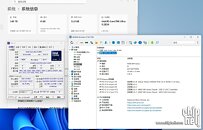
PC enthusiasts in China decided to install this card on an Intel motherboard to hilarious results—utilities such as AIDA64 are confused, thinking these Promontory 21 chips are the platform's main chipset. This gives the appearance of an Intel processor on an AMD chipset motherboard. The card has four M.2 slots, two on each side, and four SATA 6 Gbps ports. At least two of these are Gen 4 x4, while the others could be Gen 3 x4 and M.2-SATA, used when none of the SATA 6 Gbps ports is connected. There's no word on how to get one of these cards.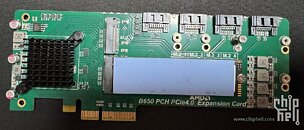
Sources:
ChipHell Forums, HXL (Twitter)
PC enthusiasts in China decided to install this card on an Intel motherboard to hilarious results—utilities such as AIDA64 are confused, thinking these Promontory 21 chips are the platform's main chipset. This gives the appearance of an Intel processor on an AMD chipset motherboard. The card has four M.2 slots, two on each side, and four SATA 6 Gbps ports. At least two of these are Gen 4 x4, while the others could be Gen 3 x4 and M.2-SATA, used when none of the SATA 6 Gbps ports is connected. There's no word on how to get one of these cards.


44 Comments on Interesting AMD FCH-on-a-Stick Addon Card Gives the Appearance of Intel CPU on AMD Chipset
I see the issue more in the possible need for firmware. I do not own datasheets. And I am already serching without results datasheets for my motherboard, various chips.
This post maybe shows how overpriced motherboards are. You could put the io on expansion cards. Less chips wasted for stuff which may never get utilised.
There's a reason we abandoned that idea with BabyAT back in the 90s.
Screw your vendor lockout, I'll build my own expansion fanout; with blackjack, and hookers!
Even though I'm good friends with one of the VP's at ASMedia, I doubt he'd give me access to the datasheet for the AMD chipsets, even less so access to the firmware.
You get more PCIe lanes, but they're not getting any more bandwidth to the CPU unless you plug them into one of the two 4-lane M.2 slots that hang off the CPU. Connecting a second chipset to a PCIe slot already hanging off the chipset just makes the horrible contention for lanes to the CPU even worse.
The idea is, that you never need all devices at full bandwidth. #
Some stuff will always be the bottleneck, x670 chipset, cpu bus, cpu itself, dram, storage, network...
I see several useful things about this device now that I have pondered it more. See, I really want USB 4 on my AM4 rig. This might be a pathway. More brain processing required.
Hats off to creative minds.
In reality, this is pretty niche, but there are some niche usecase that make sense.
You have limited upstreams bandwidth, but since you rarely use all your connected devices at the same time, plus with the help of DMA, not everything has to go via the CPU.
It's unlikely to cause a ton of contention to the CPU thanks to DMA, as anything that doesn't have to go to the CPU, won't go that far up the chain.No, it's actually quite different, as prior to USB4, USB didn't have DMA for the part after the host controller, so a USB hub doesn't have DMA.
With PCIe, you have DMA, so if you have two NVMe devices that you copy data between, that never goes via the CPU, but if you were to connect those two NVMe devices using an NVMe to USB 3.2 Gen 2x2 bridge, you'd have to go via the CPU, as I'm not aware of any USB 3.x host controllers that do any meaning full CPU offloading.
The only DMA interaction with USB would be if you have two devices on different USB host controllers that need to communicate with each other, but it's still not going to be as good as over PCIe.
If you look at all the add-in cards, they come with an internal USB 2.0 cable (as Thunderbolt doesn't support USB 2.0 natively) and a second, proprietary cable that differs between manufacturers. It might be possible to get Thunderbolt/USB4 working without that cable, but things like sleep and hot-swapping won't work and you could end up crashing your system if you try to hot-swap.
USB4 is based on Intel's "gifted" Thunderbolt 3, but Intel kindly left out a lot of things from the specs it "gave" to the USB-IF. Having talked with people in the industry about it and initially it was very hard for them to work out the spec and to get their products certified. Guess why USB4 was delayed for as long as it was?
Edit: Gigabyte seem to claim that it's GC-Titan Ridge add-in card works with some AM4 boards, assuming they have the extra pin-header.
www.gigabyte.com/PC-Accessory/GC-TITAN-RIDGE-rev-20
For example if I have 2x PCIe4 nvme SSDs connected to x870e chipset, they can copy files to each other @ max speed without any data going upstream to CPU? What if the data is encrypted with something like bitblocker?
Nevermind, just figured out that data still has to go upstream to memory controller, but it doesn't require any CPU cycles. So I'm guessing the main PCIe4x4 uplink to CPU is still a bottleneck if transferring more than 8GB/s like moving files from SSD to SSD while copying data from pcie5 SSD to sata
DMA is obviously not a new thing, but it has become more and more important, as modern computers are using increasingly higher amounts of bandwidth.
I don't really see the issue in your scenario, but I guess it depends on how the board maker has wired things up, since the CPU supports a pair of SATA ports, but potentially, there could be an issue if the SATA ports goes via the chipset. I haven't tested this kind of a scenario myself, but most people aren't going to run into these types of hypothetical issues.
Admittedly Intel moved its DMI bus (the one between the CPU and chipset) to eight lanes worth of PCIe 4.0 equivalent bandwidth, on higher-end chipsets, but I haven't seen anyone do any tests where they compare the performance between AMD and Intel when it comes to copying data between internal storage devices.
Now you need electrically x16 slot or at least x8 slot, of which there are no spares in mainstream motherboard, for multi-slot adapter.
(well, there are x1 slot adapters...)
For home user four PCIe lane connection upstream wouldn't be much of issue, because most usages wouldn't hammer multiple drives simultaneous.
And even if all four drives were hammered with sequential transfers, available bandwidth per drive would be still higher than on SATA drives.There's also power consumption cost for adding circuitry to offer more I/O lanes and bandwidth.
Which is accepted in server hardware really needing that bandwidth.
Though in power efficiency Intel's Z-serie boards are significantly ahead of AMD.
Current "double chipset" approach of X670/870 just isn't power efficient with traffic between chips propably going through SERDESes (and then going through another SERDES to get to PCIe lanes offered by chip) unless also internal communication of Promontory chip uses PCIe.
If you have a B650/B850 with eight dedicated lanes for two M.2 drives hanging off the CPU, you can move data between those two drives at their full speed, and you still have four chipset lanes for a third drive that is sharing its lanes with audio, USB, network etc but for most workloads that's barely going to impact the third drive. It's a reasonably common video-editing workflow where you have high bandwidth needs on three drives at once (raw source drive, final output destination, scratch disk for proxies+cache). That three-drive limitation is the limit of the AM5 processor, not the motherboard. Adding a more PCIe lanes to that system using three drives achieves nothing because all four chipset lanes are saturated by the third drive.
For single-tasking consumer workloads, that 28-lane limit s a sensible stopping point; Scenarios that need more lanes really do imply professional multitasking. If your system is running as a host for multiple VMs, those could suffer but you wouldn't really be seriously complaining if your production VM host was running on a consumer platform.
The additional FCH chip does give you more USB, more SATA, more actual raw connectivity. If you are one of those people who needs an additional 4-6 SATA ports, or a bazillion USB drives, then yeah, the extra physical ports that allows might be useful and that's why this FCH on a stick is interesting - but it's for edge-case weirdo scenarios, potentially in the sort of system that isn't even using a GPU so there are an extra 16 lanes to the CPU going spare anyway. The FCH-on-a-stick makes far more sense to me than the existence of x670/x870 since the kind of high-end gaming or workstation build that is likely to buy x670/x870 won't be an edge-case consumer scenario like a VM host, hosting a huge soft-RAID array of several SATA drives, or acting as some kind of USB-device farm.