Friday, January 16th 2026

Interesting AMD FCH-on-a-Stick Addon Card Gives the Appearance of Intel CPU on AMD Chipset
AMD creates the top X670E and X870E chipsets by joining two AMD "Promontory 21" FCH chips at the hip. Each of these takes in a PCI-Express 4.0 x4 connection, and puts out 8 PCIe 4.0 lanes and four SATA 6 Gbps ports that can be re-configured as four additional Gen 3 lanes. The X870E/X670E chipset hence has a total of 12 PCIe 4.0 lanes and up to eight SATA 6 Gbps ports on the platform. A company decided to put one of these chips on an add-on card, so you could upgrade your single-FCH platform, such as B650, B850, or X870, with more PCIe lanes wired out as additional M.2 slots, and some SATA ports.
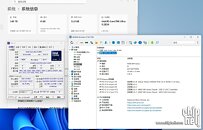
PC enthusiasts in China decided to install this card on an Intel motherboard to hilarious results—utilities such as AIDA64 are confused, thinking these Promontory 21 chips are the platform's main chipset. This gives the appearance of an Intel processor on an AMD chipset motherboard. The card has four M.2 slots, two on each side, and four SATA 6 Gbps ports. At least two of these are Gen 4 x4, while the others could be Gen 3 x4 and M.2-SATA, used when none of the SATA 6 Gbps ports is connected. There's no word on how to get one of these cards.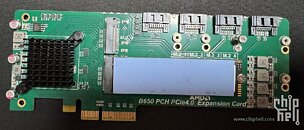
Sources:
ChipHell Forums, HXL (Twitter)
PC enthusiasts in China decided to install this card on an Intel motherboard to hilarious results—utilities such as AIDA64 are confused, thinking these Promontory 21 chips are the platform's main chipset. This gives the appearance of an Intel processor on an AMD chipset motherboard. The card has four M.2 slots, two on each side, and four SATA 6 Gbps ports. At least two of these are Gen 4 x4, while the others could be Gen 3 x4 and M.2-SATA, used when none of the SATA 6 Gbps ports is connected. There's no word on how to get one of these cards.


44 Comments on Interesting AMD FCH-on-a-Stick Addon Card Gives the Appearance of Intel CPU on AMD Chipset
You can literally connect whatever is available on the market and supported, such as this AIC.
www.tech2geek.net/thunderbolt-header-and-ports-complete-guide/
Another issue is firmware and BIOS support. That's a can of worms on its own..., as explained by Wendell in several Level1Tech videos. This forum has a lot of information on early, and painful, attempts to integrate TB on AMD boards.
forum.level1techs.com/t/x570-aorus-xtreme-master-was-it-originally-intended-to-have-thunderbolt-support/144835/123
AIC
Asus USB4 AIC supports 14-1 pin header
www.asus.com/motherboards-components/motherboards/accessories/usb4-pcie-gen4-card/helpdesk_download?model2Name=USB4-PCIe-Gen4-Card
They also have Thunderbolt 4 AIC with 14-1 pin header
www.asus.com/support/faq/1053841/
AM4 motherboard
A few B550 boards feature 14-1 header, such as Asus TUF GAMING B550-PLUS WIFI II
www.asus.com/motherboards-components/motherboards/tuf-gaming/tuf-gaming-b550-plus-wifi-ii/
The only thing is that secondary PCIe slots on B550 chipset support Gen3, but this should be a big deal
Native TB4/almost-USB4 on AM4
However, it's much easier to simply buy AM4 motherboard with native Thunderbolt 4 ports, such as X570 and B550 ProArt Creator. PCIe speed will be limited to Gen3 x4 plus overhead (~2.8 GB/s), up to 1 GB/s less than native USB4, but hey, it's not too bad for an older system. I had B550 edition and it worked flawlessly. It was the first B550 board certified for Thunderbolt 4.
It seems like they changed from GPIO to I2C as well and it appears that they've added a lot of additional features to that connector.
The X570 and B550 chipsets supports PCIe 4.0, so why would you be limited to PCIe 3.0? The ASM4242 USB4 host controller is only PCIe 4.0 x4.
Actually there are some boards already with all lanes exposed, like this one from ASROCKRack. Has the X600 pseudo-chipset from AMD which actually means no-chipset. This is the connection diagram, you can see all PCIe lanes used for peripherals, exposed as PCIe slots or MCIO. I would like this approach taken also on more boards without the BMC targeted for AM5 workstation class motherboards.
It was a mess and it was not user friendly at all, thanks, but no thanks.
AM5 has 28 PCIe gen 5 lanes which is plenty for a consumer / prosumer platform. Motherboard manufacturers could use those lanes to do USB4, SATA, multiplex them, etc, etc. Now on AMD we have the shitty x870 chipset, only using gen 4 as interconnect with the CPU, and the pathetic daisy chain situation with the dual promontory setup. I say this shit has to stop, just unleash the motherboard manufacturers to do their thing.
Good thing is it actually exists today with the X600 Knoll pseudo-chipset and is getting more popular, so maybe we end up in this situation anyway.
e.g. asus prime x670-p has taht firmware module, has the header. And I could buy that usb 4 plugin modules for around 100€ for a long time. The benefit 80 Watts power delivery and not the weak 30 WAtts useless usb 4 powerdelivery which most crap x870 motherboards have.
Note: That plugin module is generic, MSI has it, Asrock has it, Gigabyte has it. i mentioned it because I have that moterhbard lying around, also the datasheets for the motherboard and the plugin card lying around.The bad stuff, you need a plugin card which is related to the motherboard brand. root cause is the firmware and the properitary garbage uefi. In a perfect world we would have libreboot and access to teh firmware modules and we could patch it yourself, flash it yourself. Most cards have flash chips anyway these days, the manufacturers, especially asus does not want to cooperate and provide the data, datasheets, schematics and firmware. I limit myself now to the ASUS prime 670-p motherboard, which is 99% identical to teh wifi version.
I was interested in that topic. Most motherboards form asus have TB3 or TB4 or usb 4 plugin card. There is a pdf file which lists the compatible motherboards. it is on teh asus homepage for the usb 4 plugin card for example.Of course, Direct memory access or other specifics.
I wanted to give a generic explanation with a maybe real life example.
I would like to participate in the discussion, AMD, novution, ASMEDA, MSI and ASUS seems to refuse to provide publicly most informations for my motherboards over the years. Those small pieces do not really paint a good picutre. It is not my reading skills or tech knowledge. I bothered a lot with ucontrollers. It is the lack of informations from every part on my existing or previous am4 and am5 motherboards.
The Kiddy block schematic which i see on every motherboard review, is for kids. It lacks details. There is not more information available. I restrict my statement to the MSI x670e gaming plus wifi. the stuff i see since 1996 in the linux kernel configuration section also show the lack of documetnation. Regardless on which hardware I want to look up what a new kernel module does. It is a generic problem from ASUS and MSI and AMD. Seeing just the information flow from one black box to another does not really say much.
1. Z790 Biostar Valkyrie - 10-pin header 🤡
linustechtips.com/topic/1494391-thunderbolt-header-biostar-valkyrie-motherboards/
2. Z790 MSI Gaming Plus WiFi - 18-pin header 🤡
download-2.msi.com/archive/mnu_exe/mb/Z790GAMINGPLUSWIFI.pdf
3. Z790 Gigabyte Aorus Elite AX - 5+3-pin headers 🤡
www.manualslib.com/download/2919861/Gigabyte-Z790-Aorus-Elite-Ax.html
In principle, I have nothing against motherboard vendors rolling out chipset-less AM5 boards, but who would be a target market for this? I don't see any.
What would that look like with 28 Gen5 lanes to play with? Let's see:
- x16 for GPU (with bifurcation x8/x8 and/or x8/x4/x4 for AICs)
- x4 for primary NVMe
- x2, x2 for extra two NVMe drives running at half speed
- x1, x1, x1, x1 - for LAN, WiFi and two SATA
- 4 USB10 ports are supported by the CPU
- 1 USB 2.0 port is supported by the CPU
Not much there. This would need to sit below B840 chipset that brings 10 extra PCIe lanes, four USB5+10 and six USB 2.0. In addition, as almost all USB 2.0 are on the chipset, extra chips are needed for all USB 2.0 stuff, such as BT, audio, front ports, ect. Any more SATA would require another extra chip and traces, etc. Instead of one chipset, this is becoming more crowded on the motherboard. It does not sound either elegant or cost-saving. I would not like to be a motherboard designer to think about all those extras. Promo chipsets are cheap, they pack enough of expansion to make it much easier and flexible to design peripheral IO. So, no. You will not see chipset-less client boards any time soon. B840 is entry enough.
www.phison.com/phocadownload/ocp-2023/pdf/PS7101_2-lane%20Redriver%20IC.pdf
Target Market(s)?
Musicians, Media Producers, Audio Analysts, eSports Gamers, Twitch Gamers, etc.
Really, anyone that is advantaged by a lower-latency PC/Workstation.
Too bad DDR5 prices would keep that away from being an attractive platform.www.sonnettech.com/product/mcfiver-pcie-card/overview.html
That's basically what PROM21 provides, sans the 10G BASE-T NIC. (Which, could be supplied by RTL8127 Gen4x1/Gen3x2 on a hypothetical PROM21-based card)
PROM21 offers a *ton* of capability for what appears to be a cost-optimized design. Ex. Gen4 PCIe switches are not cheap or common to consumer kit but, PROM21 is plentiful.
TBQH, it seems almost perfect for these kinds of expansion cards.
Interesting from a technical standpoint still.