Thursday, March 19th 2026

Arctic Launches Senza AI 370 Fanless PC With Ryzen AI 9 HX 370 and 32 GB of RAM
Arctic has announced the updated version of its fanless Senza PC with updated internals, connectivity, and a more flexible design. The Senza AI 370 uses a familiar fanless design, with the heatsink integrated into the case of what would otherwise effectively be a mini PC, but now features the AMD Ryzen AI 9 HX 370 APU and its corresponding AMD Radeon 890M iGPU. That somewhat powerful iGPU in a silent form factor is the biggest differentiator compared to other desktops, but the Senza AI 370 is also designed to fit under a desk, virtually eliminating the need for the PC to be small in the first place. According to the Arctic online store, the Senza AI 370 retails for €1,199.99, and there are no optional barebones kits available.
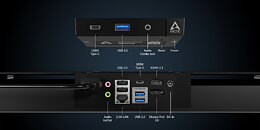
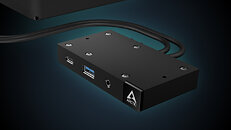
Arctic markets the Senza as a silent gaming and productivity machine and claims that it can operate at temperatures as low as 50° in gaming workloads—although there were no specifics on the ambient temperature or the exact games and settings tested, so take that with a pinch of salt. To its credit, the Senza AI 370 does have 32 GB of DDR5X-8000 memory and a 1 TB PCIe Gen 4 ×4 M.2 SSD. The I/O situation is also interesting, with Arctic opting for a break-away front I/O panel module that features 1 3.5 mm audio combo jack, a USB 3.2 Gen 1 Type-A port, and a USB4 Type-C port—this module is connected to the PC via a cable, so that the ports can be mounted near the front of the desk. The actual PC itself also features the following ports: 2× USB 2.0, 2× USB 3.2 Gen 2 Type-A, 1× USB4 Type-C, 1× HDMI 2.1, 1× DisplayPort 2.1, 1× 2.5 GbE, 1× DC in, and separate 3.5 mm audio jacks for mic in and audio out. Because the PC is designed to be mounted under a desk, what would traditionally be the rear I/O is also front-facing, which should make it easier to reach.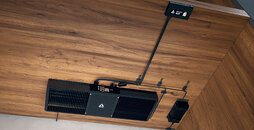

Source:
Arctic
Arctic markets the Senza as a silent gaming and productivity machine and claims that it can operate at temperatures as low as 50° in gaming workloads—although there were no specifics on the ambient temperature or the exact games and settings tested, so take that with a pinch of salt. To its credit, the Senza AI 370 does have 32 GB of DDR5X-8000 memory and a 1 TB PCIe Gen 4 ×4 M.2 SSD. The I/O situation is also interesting, with Arctic opting for a break-away front I/O panel module that features 1 3.5 mm audio combo jack, a USB 3.2 Gen 1 Type-A port, and a USB4 Type-C port—this module is connected to the PC via a cable, so that the ports can be mounted near the front of the desk. The actual PC itself also features the following ports: 2× USB 2.0, 2× USB 3.2 Gen 2 Type-A, 1× USB4 Type-C, 1× HDMI 2.1, 1× DisplayPort 2.1, 1× 2.5 GbE, 1× DC in, and separate 3.5 mm audio jacks for mic in and audio out. Because the PC is designed to be mounted under a desk, what would traditionally be the rear I/O is also front-facing, which should make it easier to reach.


14 Comments on Arctic Launches Senza AI 370 Fanless PC With Ryzen AI 9 HX 370 and 32 GB of RAM
A very nice product.
that should have several screw through mount holes and build in power supply unit. the external reusable cable tie is not a solution to mount a heavy power supply unit below the table.
i expect the thermals are specified at least with 40°C room temperature. bigger companies have climate devices to set temperature and humidity for a device under test.
External PSU is 120W, so I'm assuming its full TDP 54W.
Two USB4 ports is always a good thing. Looks like Arctic designed this device around HX 370 properly. They could've added 1 more USB-A 3.2 Gen 2 and 2.0 port, but I think that is being used up by ethernet.
RAM is embedded, but thats expected if you want to reach 8000MHz to benefit the 890M. They should offer a 64GB or 48GB model.
That was always a bad design. in response to post #12
when you consider the marketing pictures where it is mounted in the same plane as a table and not vertically for those mouting design it is a double fail on arctic. that is really a disappointment to have such logical failure on arctic side. with a very common design. my bosch recently purchased battery charger or the bosch hoover charging parking spot both have such slide in mounting design, but they are meant to be mounted vertically on the wall.
post #12 shows how non smart arctic really is. i never saw in real life any cables in perfect 90 degrees angle with a cable radius of maybe 3 mm. typical CAD - ai slop nonsense.
there are so many designs with deep holes where you unscrew screws to disassemble radios etc. that design exists for ages, there were also designs where you had such designs with a hole at the end to mount devices with a put through screw to something else. just by checking the picutre again and a few moments i realised it could be so easy to improve that design with common knowledge designs from 1970. maybe those engineers at arctic lack the knowledge in disassembling existing devices for years. maybe not motivated, not logical skills or no practical skills to design and produce such stuff. even with a 3d printed pre manufacturing design it would have been obvious the flaw.
At 65W or even 80W though, it still has diminishing returns as there are only four Zen 5 cores that are doing 5.089 GHz and the eight Zen5c cores are at 3.301 GHz, which is roughly around 8% to 10% more performance from 54W. Not really worth it to push the TDP higher on this APU as the performance gain isn't worth it, most likely hampered because of the inter-core latency between the Zen5 and 5c cores (65ns to 75ns observed with the latest chipset driver).