Wednesday, May 27th 2026

MSI Announces the PRO MAX Series of Displays, Designed for Mac Users
A Mac user's workspace is defined by precision, but the desktop experience has often felt like a compromise. Not anymore. The PRO MAX 271UPXW is designed to be the definitive counterpart to your MacBook, bringing the DarkArmor ink-black contrast of QD-OLED and the exclusive MSI M-Mate App. It doesn't just sit on your desk; it integrates into your ecosystem, matching your color standards and streamlining your connectivity so you can focus on what matters most: the work.
Refined Context: The Anchor of Your Modern Workspace
The MSI PRO MAX Series monitor is more than an addition to your desk—it is the missing piece of your Mac ecosystem. Its minimalist, pure white chassis and clean lines are designed to complement the iconic Apple aesthetic, turning a cluttered workstation into a curated studio. We've eliminated the friction between devices with the MSI M-Mate app featuring M-Sync and M-Color mode. M-Color keeps your color profiles consistent across every screen, while the M-Sync function lets you fine-tune settings with a few clicks, so you never have to break your creative flow to reach for monitor buttons. MSI M-Mate ensures that Mac users can maintain their creative flow within a familiar, intuitive environment.

 4th-Gen QD-OLED Vibrant Colors, Designed for Your Mac
At its heart, the QD-OLED panel of the PRO MAX 271UPXW12G with DarkArmor film delivers a 40% deeper black and vibrant contrast that Mac users have come to expect, ensuring your creative vision remains uncompromised when moving from laptop to desktop. With a pixel density of 166 PPI, every line of code and every curve in your design remains as sharp and crisp as the Liquid Retina display on your MacBook.
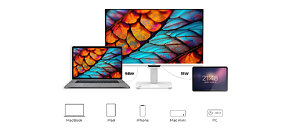
98 W / 15 W Dual Type-C Power Delivery
Convenience is built into the design. The Dual USB Type-C architecture offers a true single-cable solution, handling data transfer and 4K video while keeping your workspace pristine and cable-free. Whether you are deep in a design sprint or enjoying a moment of clarity at your desk, the PRO MAX 271UPXW12G adapts to your rhythm, providing a high-performance experience that feels as intentional as the work you create.
Professional Grade Color Performance: PANTONE Validated
For multimedia workers, accuracy is indispensable. PRO MAX Series QD-OLED monitor is PANTONE Validated and PANTONE SkinTon Validated with a Delta-E ≤ 2 rating, ensuring your work looks exactly as intended from screen to final output. To maintain this fidelity across the entire panel, Uniform Luminance technology prevents brightness fluctuations, providing a consistent visual canvas that is crucial for color grading and long-form editing. Whether you're switching between sRGB and DCI-P3 in Dual Gamut Mode or utilizing the Wide Color Gamut, you have the professional-grade fidelity needed for high-end design.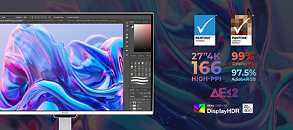 3-Device KVM: One Command Center for All Your Gear
The 27-inch 4K panel is designed for those who do more. Control a MacBook, a Mac Studio, and an iPad simultaneously with the integrated 3-Device KVM, or use PIP/PBP to manage multiple streams at once. To keep you going through long sessions, the AI Care Sensor automatically adjusts to your environment, keeping your eyes fresh while you focus on the big picture.
PRO MAX 271QPHW E14: The Evolution of Vision and Efficiency
The PRO MAX 271QPHW E14 debuts the EyesErgo+ ecosystem, featuring a groundbreaking Circular Polarized panel that mimics natural light to reduce eye strain, alongside hardware-level blue-light reduction and a fully adjustable ergonomic stand. Designed as a high-efficiency hub, it offers a 65 W USB Type-C single-cable solution, a built-in KVM switch for multi-system control, and specialized M-Mate software for seamless MacBook integration. Combining Delta E ≤ 2 color precision with a 144 Hz refresh rate, this monitor ensures that professional-grade performance never compromises visual wellness.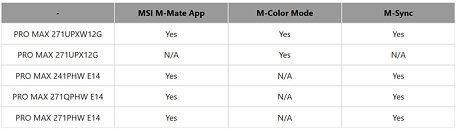
Sources:
MSI PRO MAX 271UPXW12G, MSI PRO MAX 271UPX12G, MSI PRO MAX 241PHW E14, MSI PRO MAX 271QPHW E14, MSI PRO MAX 271PHW E14
Refined Context: The Anchor of Your Modern Workspace
The MSI PRO MAX Series monitor is more than an addition to your desk—it is the missing piece of your Mac ecosystem. Its minimalist, pure white chassis and clean lines are designed to complement the iconic Apple aesthetic, turning a cluttered workstation into a curated studio. We've eliminated the friction between devices with the MSI M-Mate app featuring M-Sync and M-Color mode. M-Color keeps your color profiles consistent across every screen, while the M-Sync function lets you fine-tune settings with a few clicks, so you never have to break your creative flow to reach for monitor buttons. MSI M-Mate ensures that Mac users can maintain their creative flow within a familiar, intuitive environment.


At its heart, the QD-OLED panel of the PRO MAX 271UPXW12G with DarkArmor film delivers a 40% deeper black and vibrant contrast that Mac users have come to expect, ensuring your creative vision remains uncompromised when moving from laptop to desktop. With a pixel density of 166 PPI, every line of code and every curve in your design remains as sharp and crisp as the Liquid Retina display on your MacBook.
98 W / 15 W Dual Type-C Power Delivery
Convenience is built into the design. The Dual USB Type-C architecture offers a true single-cable solution, handling data transfer and 4K video while keeping your workspace pristine and cable-free. Whether you are deep in a design sprint or enjoying a moment of clarity at your desk, the PRO MAX 271UPXW12G adapts to your rhythm, providing a high-performance experience that feels as intentional as the work you create.
Professional Grade Color Performance: PANTONE Validated
For multimedia workers, accuracy is indispensable. PRO MAX Series QD-OLED monitor is PANTONE Validated and PANTONE SkinTon Validated with a Delta-E ≤ 2 rating, ensuring your work looks exactly as intended from screen to final output. To maintain this fidelity across the entire panel, Uniform Luminance technology prevents brightness fluctuations, providing a consistent visual canvas that is crucial for color grading and long-form editing. Whether you're switching between sRGB and DCI-P3 in Dual Gamut Mode or utilizing the Wide Color Gamut, you have the professional-grade fidelity needed for high-end design.

The 27-inch 4K panel is designed for those who do more. Control a MacBook, a Mac Studio, and an iPad simultaneously with the integrated 3-Device KVM, or use PIP/PBP to manage multiple streams at once. To keep you going through long sessions, the AI Care Sensor automatically adjusts to your environment, keeping your eyes fresh while you focus on the big picture.
PRO MAX 271QPHW E14: The Evolution of Vision and Efficiency
The PRO MAX 271QPHW E14 debuts the EyesErgo+ ecosystem, featuring a groundbreaking Circular Polarized panel that mimics natural light to reduce eye strain, alongside hardware-level blue-light reduction and a fully adjustable ergonomic stand. Designed as a high-efficiency hub, it offers a 65 W USB Type-C single-cable solution, a built-in KVM switch for multi-system control, and specialized M-Mate software for seamless MacBook integration. Combining Delta E ≤ 2 color precision with a 144 Hz refresh rate, this monitor ensures that professional-grade performance never compromises visual wellness.

8 Comments on MSI Announces the PRO MAX Series of Displays, Designed for Mac Users
My employer OTOH, might be ok with that, since they have slightly deeper pockets than I do, hahahaha :D
I just wanted to point out that there are NO prices included in the PR, that's all........
bjango.com/articles/macexternaldisplays2/
Ironically, the Windows program meant to improve font rendering is called MacType...