Monday, September 14th 2026

Valve's Steam Frame Starts at $1,059, Pre-Orders Now Open
Valve finally revealed pricing for the much-anticipated Steam Frame today. The standalone VR headset starts at $1,059 for the 256 GB model, while the 1 TB version costs $1,299. Pre-orders are open now through a randomized reservation lottery, similar to how Valve handled the Steam Machine launch. Sign-ups close on September 17, and Valve says it expects to send the first batch of purchase invites out on September 18. Valve also confirmed pricing for launch accessories, including a $29 power supply unit that surprisingly does not come included. Other add-ons include a $59 Ergonomic Accessories Kit, and a $49 Accessory Replacement Kit for the face gasket and cushions.
The pricing follows the same pattern Valve set with the Steam Machine, which launched in June at a steep $1,049, much higher than expected. The company blamed DRAM and storage shortages for pushing costs well past initial targets, and the same seems to have happened to the Steam Frame now. Industry reports say Valve had originally aimed to price the Frame below the $999 Index, but that goal looks to have gotten buried under the same memory crisis. It seems like the entire VR and handheld gaming space is now paying the DRAM tax, and I doubt the Frame will be the last device to see its price creep upward before launch.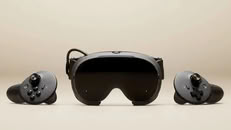
Source:
Valve
The pricing follows the same pattern Valve set with the Steam Machine, which launched in June at a steep $1,049, much higher than expected. The company blamed DRAM and storage shortages for pushing costs well past initial targets, and the same seems to have happened to the Steam Frame now. Industry reports say Valve had originally aimed to price the Frame below the $999 Index, but that goal looks to have gotten buried under the same memory crisis. It seems like the entire VR and handheld gaming space is now paying the DRAM tax, and I doubt the Frame will be the last device to see its price creep upward before launch.

47 Comments on Valve's Steam Frame Starts at $1,059, Pre-Orders Now Open
So not really something midrange GPUs can run, unless the game is minimalistic like Beat Sabre etc...
"~171 million people VR users worldwide in 2025" - the most commonly cited figure across recent industry reports and projected to reach about 216 million by the end of 2026 (88 million in the USA).
The tech (on a consumer level), became mature enough to be both useful and enjoyable about 7 or 8 years ago (IMO)- and the growth curves pretty much echo that. We began developing for VR about that time as well. It's good!
- Into the Radius 2 (April 2026 full release)
- Forefront (April 2026)
- Fixer Undercover
- Compass (late May 2026)
- Teenage Mutant Ninja Turtles: Empire City (April 2026)
- Iron Rebellion
- JetSuit
- Myst & Riven remakes (May 2026, PSVR2)
- Gunman Contracts: Stand Alone (September 2026)
- The Lightkeepers (September 2026)
by my ranking or online commentary... And a few I haven't played or reviewed yet:Atmospheric survival shooter in an anomaly zone. Probably the strongest pure PCVR/Quest experience of the year.
Large-scale multiplayer shooter (up to 32 players) with vehicles and destructible environments. Big multiplayer push!.
Clever spy/puzzle game with great writing and tools. Ranked as one of the best pure Quest titles of the year.
Beautiful open-world flying/exploration adventure. Many players’ personal favorite of 2026.
Physics-based co-op beat’em-up. Sweet cartoon energy and fairly satisfying combat.
Tactical mech combat from the cockpit. Good depth and immersion.
Highly replayable arcade flyer. Excellent value and buttloads of fun.
Classic adventure games given full VR makeovers. PSVR2 folks seem to love it.
Standalone version of the popular Half-Life: Alyx mod. Lots of buzz - strong reception on PCVR.
Co-op horror shooter defending a lighthouse against eldritch threats. Fresh and atmospheric - if that's even a word :P.
- Transformers: Beyond Reality Redux (September 2026)
- Sol Protocol (September 2026)
- Detective VR
- Skytail
- Device Control
Yeah, that's always a problem. I've been wondering the same thing since the 70's every time I hear some company mentioning an "installed base" as an advertisement point.It must be fairly high though - or at least typical - judging by the sales numbers from a few game development studios.
Do note, standalone is totally fine and that is NOT what I'm talking about.
These turn on automatically any time the frame rate drops below the headset's refresh rate. They grab the last frame rendered, along with depth info, then bends and stretches that image in real time to match where your head just moved, so everything still feels smooth. It works well down to about 50% of the refresh rate. So if your game drops from 120 to 60 FPS (or 90 → 45), when MS decides to update you or something, you're still good. It's gets noticeable below that though - I haven't experienced it in YEARS but at like, 1/3rd or 1/4th speed (i.e., 30 or 20 FPS @90 RR) it gets pretty obvious and you start seeing warping, judder, and everything just feels off.
These days there's really no performance issues in VR to speak of - it all just mostly works - probably true for 3070 - 6700 XT - 6800 and up - even really a 2080Ti. So if your card is that level or above, you're golden! Experimental stuff like trying to send path traced frames is different but I guess that's just obvious - not to mention such attempts being very uncommon.
On the other hand you have games that are primarily not VR - games like driving, flight simulators. Many of them push the hardware really hard even in conventional monitor gaming, and using any VR goggles where combined resolution exceeds 4K, but frame rate demands increase, result in a disappointing lowering of settings to try to squeeze out comfortable performance. Users of VR in Flight Simulator, Digital Combat Simulator that spent thousands of dollars on fastest CPUs, 64 GB of fast memory, RTX 5090 (before the AI enshittification) and still ended up compromising heavily with high resolution, high FOV VR goggles would like a word.
Of course, frame rate matters some... No one wants to experience a VR slide-show as motion. But 50FPS 4k at 90Hz (or 70FPS at 120Hz) just quantifiably and qualitatively, is the better experience over something like 240FPS 1080p at 240Hz. It's just how the technology works when factoring in things like Asynchronous Spacewarp (ASW or ATW) - it's not really considered subjective. And yeah, this is very different than flat screens, where it's somewhat the inverse.
There's a good 2025 peer-reviewed journal article by Allison and Palmisano that makes this point: "Visual Factors in Cybersickness: A Literature Survey and Meta-Analysis" by Robert S. Allison and Stephen Palmisano. But it also claims that neither are very important in the overall, and sites twenty other things much more critical than either. :P I'm not sure if there is an open source link to it or not though - it's about 100 pages (105 in PDF).
EDIT (7 hours later):
All this... Just trying to say you don't need a high-end rig for VR these days. Unless you're on a 20 year old potato, you're probably good. The Steam Machine itself is proof. :D
It just leads to people using out of spec power supply (potentially dangerous if some cheap crap of ali/amazon/ebay), and everything as you say now an extra.
I brought the google power supply for my pixel phone, 30 quid for a plug, and they couldnt even bundle in a USB cable.
I am curious of the length of the warranty on it, if its only a year.
It's even better now of course and will continue to improve absent world ending or reality altering events. :D
Lots of frustrations and headaches - it's not for everyone. My only point is that when you're finally "accomplished", you realize one thing... the performance of you're PC is not nearly as relevant as it is for flat screens nor as one would assume simply by looking at the specs of the goggle screens! With what I outlined above along with foveated streaming and rendering those 4K per eye specs act more like 640x400 or maybe 720p as far as your PC is concerned (kinda). If you try to turn all that stuff off (or didn't have access to it historically) and just brute force it it as one would do for flat-screen gaming you are NOT going to have a very good time of it! But today, that's like a guy driving his McLaren 750S around in 1st gear and then going back to his station wagon claiming: the 750S just isn't very fast. :P
Right now I think battery life is a much MUCH larger concern than PC spec. Tethering with a power-injected optical USB cable is only a partial solution as now your movement is grossly restricted. Second to that is probably comfort: heat tuning the system, fitting and securely mounting the device(s) to your head and hands, adapting to sit/stand postures and, I guess learning would be 3rd even before cost and fragility - which are not at all minor issues. Lastly but certainly very significant is having to deal with these manufacturer's idea of a proper GUI suitable for VRing (I want to say something nasty about each and every one of them!. LOL)
Once you get it, it is kinda fun tho! I can't see how anyone could compare VR gaming to Monitor gaming - they are totally different experiences - not better or worse just different - like, TOTALLY different!
Quick, what's the capitol of the United States? LOL
Given foveated rendering with the eye-tracked dynamic and spacewarp techniques (AppSW / ASW / ATW-style) on a headset like the Quest3 running full native resolution would feel like rendering at roughly 550p to 600p native.
Here's the math for those who may not have made it out of grade school:
Quest 3 resolution is 2064 × 2208 ≈ 4.56 million pixels per eye (4,557,312 to be precise).
- Foveated rendering on Quest 3 can cut pixel work down to roughly 25-30% of full.
- AppSW at its best gives you about 70% extra headroom, which works out to roughly 0.3× the normal workload.
Multiply those together: 0.28 × 0.3 ≈ 0.084, or roughly 1/12th the original workload. Square root of 1/12 is about 0.29, so 2064 × 0.29 ≈ 600 pixels on the long side. That puts it right around a native 600p render target typically and 550p under best case scenarios.Now YOU do that for a 4K headset and tell me what you get. I'll even give you the answer: <720p in terms of GPU workload. [and yes, "<" means "less than"].
Sorry for the snark but FFS man!
Please refrain from insults if you mean to spew such nonsense.
The topic here is "Valve's Steam Frame..." and if you could or would look it up you will find that headset has eye tracking!
Don't drink and text, man.
[Here's a non-VR example from Digital Foundry, about frame pacing and developers, like FromSoftware, literally do not see the problem themselves.]
Throw around all the math and research papers you want, but manipulation to image quality to gain performance... has an impact on image quality! This can be software (ASW, foveated rendering, foveated streaming) or hardware (fixed or eye-tracking, streaming vs. wired headsets, LCD vs OLED tech, optical lens stack, etc).
The real question here is: Does the user notice the differences?
[I have a Quest 3 and Dream Air, so here's my opinion]
ASW undeniably introduces latency and graphical anomalies. Back-to-back experiences reveal the differences. But a high-quality, slow-mo camera can easily show the 'through-the-lens' experience is compromised. But it's more difficult to notice in the headset itself, especially in slow-paced VR titles with limited movement. But in fast paced titles it can be jarring and break the experience, or creeping into the 'something feels off but I don't know what' territory.
Also, to maximize dynamic foveated rendering (by making the 'focus spot' as clear and tight as possible, and the 'unfocused periphery' as low resolution and wide as possible) produces terrible artifacts in the visual periphery. The shift in resolution from clear to blurred / blocky is massive, so aliasing effects become way more dramatic (like the metal frame of the jet cockpit, or fences outside outside the driver's car). I know what it looks like to see things 'shift' in the periphery vision. "From the corner of my eye..." is a common phrase for a reason. I don't need to be looking directly at something, to know it's changing.
Again, that's my eyeballs + brain experience. Everyone elses mileage will vary. Such is life!
Bottom line: VR these days generally doesn't have [GPU related] performance issues. There are other issues but not to do with performance given even mid-level hardware. I can't help people who didn't turn on, didn't know about, or couldn't figure out how to use their headsets - nor belligerent people who just make trouble thinking it's fun for whatever strangeness they're into.Sure, people absolutely notice when these techniques are pushed too hard. Your Dream Air experience matches what many reviewers saw: aggressive foveated rendering creates visible shimmering and aliasing on high-contrast edges in the periphery, exactly like cockpit frames or fences. That "something feels off" feeling is real, even if you can't always articulate why.
The key difference is how aggressively it's implemented. Subtle fixed foveation on Quest 3 is usually fine for most people. But when developers crank the settings thinking they need to squeeze every last frame, or when foveated streaming over WiFi gets too greedy, that's when it crosses from "transparent optimization" into "noticeable compromise.
"Fast motion and high-contrast scenes are certainly good stress tests - exactly what you described. Slow peaceful experiences hide the artifacts, racing or action games expose them. Your point about peripheral vision is spot on too. We might not be looking at something, but we still detect motion and changes out there. That's kind of "soo two years ago" tho.
Eye-tracked foveated rendering has helped a lot, but even the best implementations (like on the Quest Pro or newer headsets) still show some visible transitions or shimmering on high-contrast edges when you move your eyes quickly. The "solved" version would require perfect real-time gaze prediction and zero latency, which we don't have yet. Those are algorithm/software problems tho... not performance issues. The GPU can render the pixels just fine (like I said - we're talking 720p levels here). It's the smart decisions about which pixels to render at what quality, and how to fake the ones it skips, that create the visible problems. Those are software and algorithmic challenges, not raw GPU horsepower problems.
- Algorithm limitations: Foveated rendering, ASW, and foveated streaming all rely on approximations and predictions. When those predictions are wrong (fast eye movement, sudden motion), you get artifacts.
- Latency: There's always some delay between where your eyes are and where the system thinks they are.
- Bandwidth: Wireless streaming has to compress the image, and smart compression is still an active research problem.
It's not really as subjective as some think. Most of it is user controllable by learning and acting withing the limits these systems impose. Even in flat screen gaming this is a thing; I could slam my mouse right and left and expect the character to behave accordingly without artifacts - but I have to learn how much mouse travel produces what behavior and what artifacting I should expect. It's all about finding/learning that sweet spot where the optimizations feel invisible.