Thursday, September 17th 2026

PSA: Windows is Reporting Fake "Defender Antivirus Turned Off" Warnings
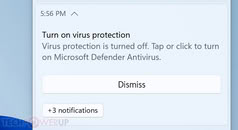
After installing the latest Defender Antivirus update for Windows 11, users have started reporting that their operating system is sending notifications stating "Microsoft Defender Antivirus is turned off." Despite the Defender Antivirus protection working correctly, Windows has been pushing these notifications to users, with many of the TechPowerUp staff experiencing the error themselves. These notifications typically appear when the operating system is freshly booted up or immediately afterward. Interestingly, Defender Antivirus can send out notifications even when notification settings are turned off, and all versions of Windows or Windows Server are affected. Microsoft acknowledged the issue, stating:
 For those running the Windows Defender August update with Platform number 4.18.26080.3, Engine version 1.1.26080.3, and Security intelligence number 1.1.159.11.0, be sure to check for more updates in the coming weeks. Microsoft has been focusing on improving security threat detection and increasing scanning, which inadvertently affected notification settings. Especially since the company is now dealing with hundreds of AI-discovered vulnerabilities, keeping Defender Antivirus up to date is a good idea.
Source:
Microsoft
MicrosoftWe are working to release a resolution in a future Microsoft Defender Antivirus update and will provide more information when it is available.


47 Comments on PSA: Windows is Reporting Fake "Defender Antivirus Turned Off" Warnings
Defender can only perform simple, basic functions, just like most other free antivirus programs.
If you want Defender, buy the paid version.
Of course not - and due to similar reasoning, there is zero need to be paying for any anti virus or malware software. Never has been, either. That was, is, and will always remain the territory of the tech-averse boomers who have their Norton install fuck up everything while they're oblivious. Anti virus software is like the bottom of the bottom of the IT landscape lol... a weird mix of fakery, instilling fear in the userbase, and then trying to profit off said fear.
By the way:Deskmodder (de)
Incidentally, I set the scan interval to 4 hours via GPO.
Safety first, right?
Regards,
Fred.
I use Norton on Windows few years, and my benchmark results were taken with it running in the background—and as you can see, they’re good ;) Here, too, it doesn’t interfere or cause any problems; 20 years ago, yes, it was a bad product.
In a business environment, you need antivirus software (any good one works) because most users there don’t know the difference between spam and legitimate email, or between ads and real websites—they just click on them. If the IT department wants fewer headaches, it needs antivirus software installed on users’ devices. And Free Defender doesn’t help at all—it usually just causes problems.
ESET is pretty good though, although I can't remember if it's a home of business version I have
Only happens a couple of times every year other anti viruses do not do this.
payloads by LLM delivery with 0day pipeline churning malware 24/7 for 4$ cybercriminal SaaS subscribe.
I have 0 active AV stuff at any given time, I use clamav occasionally when something tries to call random c&c
network. In short, you need a proper network security first (and router default magic "firewall" checkbox is not part of that setup)
Instead of analyzing files keep actively analyzing your network anomalies, no network no c&c, no exfil, no problems.
Windows Firewall and Defender are mainly there to keep M$ data extraction pipeline intact and not keep you, the user
safe from anything because it never was its function.