Monday, September 28th 2026

Framework Desktop with Ryzen AI Max+ Pro 495 Gets Official Pre-Order Date

After teasing the AMD Ryzen AI Max+ Pro 495 upgrade to the Framework Destkop mini PC, Framework has officially announced that pre-orders for the SFF desktop will start on Wednesday, 30 September. The announcement came in a post on the OEM's official X account, where it also confirmed that, as is typical with its Framework Laptop upgrades, the rest of the motherboard and case will remain the same, for backwards compatibility purposes.

Currently, it is unclear how much the new AMD Ryzen AI Max+ Pro 495-powered mini PC will cost, but it'd be a safe bet to assume it will be more expensive than the current-generation Ryzen AI Max+ 395 model, especially on the high-end version, topping out at 192 GB of LPDDR5X-8533 memory where the 395 version tops out at 128 GB.
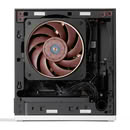

Having an identical design means that the SFF Framework Desktop will still use a full-size Flex ATX PSU, feature a PCIe ×4 slot—primarily for networking—and a choice of cooling fans, ranging from the Noctua NF-A12×25 HS-PWM to the Cooler Master Mobius 120 or 120P. Framework has also said that it will continue shipping the Framework Desktop with either Fedora or Windows 11 for the pre-built versions.
Source: Framework on X
Add your own comment

18 Comments on Framework Desktop with Ryzen AI Max+ Pro 495 Gets Official Pre-Order Date

#1
kondamin
It’s a single board in a box, I don’t see the point of framework doing their thing around it.
Posted on Reply
#2
KLMR
, topping out at 192 GB of LPDDR5X-8533 memory where the 395 version tops out at 128 GB.
I really hope framework will survive the AIpocalipse.
Posted on Reply
#3
dgianstefani
TPU Proofreader
KLMRI really hope framework will survive the AIpocalipse.
They're making their profit like everyone else.
Posted on Reply
#4
Parn
I like their idea of a self-assembled laptop. But I don't see much of a point for this. There are many other far better mini-ITX builds.
Posted on Reply
#5
Philaphlous
I love my Mini ITX build. Considering I can fit a full size 3-4 slot GPU it's not super tiny but small enough. I'm just not looking forward to the day where I spend all day shortening the 24pin power cable by a foot... at least my soldering skills will likely improve.
Posted on Reply
#6
dgianstefani
TPU Proofreader
PhilaphlousI love my Mini ITX build. Considering I can fit a full size 3-4 slot GPU it's not super tiny but small enough. I'm just not looking forward to the day where I spend all day shortening the 24pin power cable by a foot... at least my soldering skills will likely improve.
I love custom cables and have Mini ITX ~13 L build myself. But word of advice, don't make it exact length, give yourself 5-10 cm of leeway so when you upgrade/change things, you don't necessarily have to do it again.
Posted on Reply
#7
TheinsanegamerN
Disappointed they haven't fixed the lack of porta. Only two on the front and four on the back, two of which are type c. So if you want anything beyond a mouse and keyboard, you're gonna need dongles.

Other Strix halo mini PCs often have 2 additional USB 2 ports for this purpose, and have other options like a built in sd card reader. IDK why framework refuses to put those on the board, there is plenty of room. And don't forget the expansion slot awkwardly placed in a case with no external slot so you have to modify the case to fit most cards.
ParnI like their idea of a self-assembled laptop. But I don't see much of a point for this. There are many other far better mini-ITX builds.
Can you point to all these other Strix halo mini ITX boards?
Posted on Reply
#8
dgianstefani
TPU Proofreader
TheinsanegamerNCan you point to all these other Strix halo mini ITX boards?
Builds, not so much boards.

Because of the nature of the soldered RAM, it seems most OEMs are releasing entire mini PCs, but sometimes in barebones, where you supply your own ssd and os.
Posted on Reply
#9
TheinsanegamerN
dgianstefaniBuilds, not so much boards.

Because of the nature of the soldered RAM, it seems most OEMs are releasing entire mini PCs, but sometimes in barebones, where you supply your own ssd and os.
Pedantic on my part, but mini PCs are not MINI ITX builds. MITX builds use MITX components, otherwise every micro PC built by dell, HP, ece would be a "MITX build" and the term would become meaningless.

The big selling point of frameworks build is that it uses an actual mini ITX board, a standard flex ATX psu, and can use normal cases. The only other brand to do that is minisforum.
Posted on Reply
#10
MikOnTopGG
One, day, I dream of a miniITX build. Not for AI computing, but for portable gaming. Banana included
Posted on Reply
#11
Hattu
I've been wondering for a long time: is there a (non gaming) performance penalty, if one chooses smaller ram than the maximum? Like 32GB or 64GB instead of 128GB, or something similar with these newer 192GB parts? All the talk is about maximum ram configs and AI.
Posted on Reply
#12
dgianstefani
TPU Proofreader
TheinsanegamerNThe big selling point of frameworks build is that it uses an actual mini ITX board, a standard flex ATX psu, and can use normal cases. The only other brand to do that is minisforum.
But what's the point of that when the RAM is soldered, the CPU is soldered, the IO is kind of disappointing, and there's non-standard parts.

The Mini-PCs I understand since they are typically much smaller.
The full ITX builds I understand because they are fully modular.

This Framework seems a mish-mash of both, with some of the advantages of both, but most of the disadvantages, too. It's not cheap either. I consider it to be laptop hardware with a PCIE slot and better cooling.
Posted on Reply
#13
Parn
dgianstefaniBut what's the point of that when the RAM is soldered, the CPU is soldered, the IO is kind of disappointing, and there's non-standard parts.

The Mini-PCs I understand since they are typically much smaller.
The full ITX builds I understand because they are fully modular.

This Framework seems a mish-mash of both, with some of the advantages of both, but most of the disadvantages, too. It's not cheap either. I consider it to be laptop hardware with a PCIE slot and better cooling.
well said. If I were shopping around for something small, I'd go for a mini-PC. On the other hand if I'd like to tinker while keeping the footprint small, mITX will be my choice. This Framework sits in between with no obvious advantages but extra cost associated with its brand name/logo.
Posted on Reply
#14
TheinsanegamerN
dgianstefaniBut what's the point of that when the RAM is soldered, the CPU is soldered, the IO is kind of disappointing, and there's non-standard parts.

The Mini-PCs I understand since they are typically much smaller.
The full ITX builds I understand because they are fully modular.

This Framework seems a mish-mash of both, with some of the advantages of both, but most of the disadvantages, too. It's not cheap either. I consider it to be laptop hardware with a PCIE slot and better cooling.
Well any mini ITX Strix halo build will have a soldered CPU and memory. That is a platform limitation.

The soft benefits are what sell here. Being able to get ahold of an actual support team from framework, being able to use your own case, and having a standard, replaceable power supply and re configurable ports are the benefits here.

As for it being a laptop chip, you have it backwards. This is a desktop class CPU that can be choked back to fit in a laptop. There is a noticeable performance increase from having the 120+ watt TDP available in desktop form that laptops cannot achieve.
Posted on Reply
#15
dgianstefani
TPU Proofreader
TheinsanegamerNWell any mini ITX Strix halo build will have a soldered CPU and memory. That is a platform limitation.
It's a platform limitation that applies to the chip FW chose for their desktop. So it's a FW desktop limitation.
TheinsanegamerNAs for it being a laptop chip, you have it backwards. This is a desktop class CPU that can be choked back to fit in a laptop. There is a noticeable performance increase from having the 120+ watt TDP available in desktop form that laptops cannot achieve.
This is specifically a laptop APU without a socket (unlike desktop) and soldered RAM. It may be "desktop class" but it's designed for laptops and Mini-PCs. Intel/AMD have used the same dies for desktop/laptop for some time. The difference being primarily socketed CPUs and replaceable RAM on desktop, and a lot more PCIe/IO. The reason FW desktop doesn't come with more ports is that the APU, like most laptop APUs, doesn't have easy support for more than what it has, nor does it have lots of lanes like desktop chips, that can be used for IO.

Laptops have been able to cool 200+ W for some time.
Posted on Reply
#16
cacarr
If I were inclined to drop this sort of many for such a machine, I think I would wait for Medusa Halo. Hopefully that drops before 2028.
Posted on Reply
#17
bug
dgianstefaniLaptops have been able to cool 200+ W for some time.
Yeah, no. My employer got me a 165H which will boost to 115W. Inside a Dell Precision, so not the cheapest design. That thing just thermally throttles all day long. If I select "best power efficiency" profile in Windows, it makes no difference wrt noise. That's how undersized the cooling solution is.
Some DTRs may be able to handle this better, but I would not confidently say laptops can cool 200W+. Not when we're recommending heatsinks that can go over 1kg on the desktop for the same task.
Posted on Reply
#18
dgianstefani
TPU Proofreader
bugNot when we're recommending heatsinks that can go over 1kg on the desktop for the same task.
It's not 1:1. Those heatsinks on desktop have to contend with a IHS, which is quite the bottleneck, especially on AM5. Laptops are the equivalent of direct die, and higher temperatures of around 80-100 C are normal.
bugYeah, no. My employer got me a 165H which will boost to 115W. Inside a Dell Precision, so not the cheapest design. That thing just thermally throttles all day long.
Some gaming laptops can sustain 175 W GPU and ~75 W CPU. Many can sustain 150 W GPU and 50 W CPU, concurrently. Just because a laptop is expensive doesn't mean it has good cooling.

From about 35 W to 110 W Strix/Gorgon Halo scale well, above 110 W is marginal gains, below, things like Lunar Lake and Panther Lake destroy it. Definitely laptop class considering it's both CPU/GPU, and some handheld makers have even put it in those tiny things.

This is what a laptop cooling system that can sustain 185 W looks like. Not the desktop replacement tier, but not a macbook air either.


More expensive options use vapour chamber cooling etc. You'd be surprised how heavy those cooling systems are.

Here's a (more expensive) vapour chamber cooling system that can sustain 290 W and peak at over 320.
During the stress test, we measure up to 381 Watts, which quickly drops to around 360 Watts
Full system power including the display, mind you.
Posted on Reply
Add your own comment
Nov 25th, 2026 17:28 CST change timezone

New Forum Posts

Popular Reviews

TPU on YouTube

Controversial News Posts