Friday, October 23rd 2026

Microsoft Brings Its Customizable File Explorer Context Menu to Windows 11 Beta Insiders
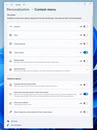
Microsoft's redesigned File Explorer context menu is now rolling out to Windows Insiders in the Beta channel with build 26220.9757. The new menu first showed up in the Experimental channel back in August, when the File Explorer team admitted that the Windows 11 right-click menu had grown cluttered and sluggish over time, partly because every app that adds its own entries makes the menu do extra work each time it opens. The redesign trims the top level down to commonly used actions and adds a new Settings page, reachable through a "Customize menu" link at the bottom of the menu, where users can pick what shows up.
Going by Microsoft's August post, the customization goes fairly deep. Built-in commands such as Send to and Create shortcut can be toggled on or off, Print can be added, and app extensions can sit in the main menu or a submenu, or be hidden entirely. Cut, Copy, Paste, Rename, Delete, and Share can also be shown as text instead of a row of icons, and Properties can be moved to the bottom. A first-time teaching tip may also pop up to point people toward those options. Microsoft says it will keep refining the design based on Insider feedback, so some of this could still change.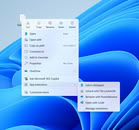
 The redesign arrives alongside other File Explorer cleanup efforts. Microsoft is also pulling eight OneDrive-based Copilot actions from the right-click menu, reportedly starting in mid-November, after earlier announcing plans to preload File Explorer in the background to speed up launch times. There's no word yet on when the new menu will reach regular Windows 11 users.
Sources:
Windows 11 Insider Beta Preview, Microsoft
Going by Microsoft's August post, the customization goes fairly deep. Built-in commands such as Send to and Create shortcut can be toggled on or off, Print can be added, and app extensions can sit in the main menu or a submenu, or be hidden entirely. Cut, Copy, Paste, Rename, Delete, and Share can also be shown as text instead of a row of icons, and Properties can be moved to the bottom. A first-time teaching tip may also pop up to point people toward those options. Microsoft says it will keep refining the design based on Insider feedback, so some of this could still change.


5 Comments on Microsoft Brings Its Customizable File Explorer Context Menu to Windows 11 Beta Insiders