Thursday, February 14th 2013
Unigine Announces Valley GPU Benchmark
Valley Benchmark is a new GPU stress-testing tool from the developers of the very popular and highly acclaimed Heaven Benchmark. The forest-covered valley surrounded by vast mountains amazes with its scale from a bird's-eye view and is extremely detailed down to every leaf and flower petal. This non-synthetic benchmark powered by the state-of-the art UNIGINE Engine showcases a comprehensive set of cutting-edge graphics technologies with a dynamic environment and fully interactive modes available to the end user.
Offering a rare chance to experience a breath of untapped, crystal clear air, Valley Benchmark allows you to encounter a morning high up in the mountains when the snow-capped peaks are just barely glittering in the rising sun. Be it flying over the vast green expanses or hiking along rocky slopes, this journey continues as long you wish. Unique in every corner, this open-space world provides a wonderfully relaxing experience under the tranquil music and sounds of nature.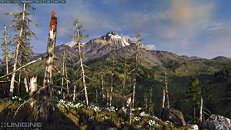 DOWNLOAD: Unigine Valley for Windows, Mac OS X, Linux
"Living in Siberia, we wanted to show how beautiful the nature is here. It is full of contrasts, and flowers can grow through the deadfall right next to brutal mountains," said Andrey Kushner, lead technical artist at UNIGINE Corp. "It was an interesting challenge to create this huge, yet detailed world. Moreover, our engine is so flexible that we could place all objects procedurally and recreate this valley with photorealistic graphics."
Features
Offering a rare chance to experience a breath of untapped, crystal clear air, Valley Benchmark allows you to encounter a morning high up in the mountains when the snow-capped peaks are just barely glittering in the rising sun. Be it flying over the vast green expanses or hiking along rocky slopes, this journey continues as long you wish. Unique in every corner, this open-space world provides a wonderfully relaxing experience under the tranquil music and sounds of nature.

"Living in Siberia, we wanted to show how beautiful the nature is here. It is full of contrasts, and flowers can grow through the deadfall right next to brutal mountains," said Andrey Kushner, lead technical artist at UNIGINE Corp. "It was an interesting challenge to create this huge, yet detailed world. Moreover, our engine is so flexible that we could place all objects procedurally and recreate this valley with photorealistic graphics."
Features
- Extreme hardware stability testing
- Per-frame GPU temperature and clock monitoring
- Multi-platform: Windows, Linux, Mac OS X
- Advanced visual technologies: dynamic sky, volumetric clouds, sun shafts, DOF, ambient occlusion
- 64,000 square kilometers of extremely detailed, seamless terrain
- Procedural object placement of vegetation and rocks
- The entire valley is free to be explored in interactive fly-by or hike-through modes
- User-controlled dynamic weather
- Support for stereo 3D and multi-monitor configurations
- Benchmarking presets
- Command line automation support
- Highly customizable reports in CSV format
56 Comments on Unigine Announces Valley GPU Benchmark
Catalyst 13.2 Beta 3 drivers used on Radeon HD 7950 with stock clocks.
A patch will fix this
A small bump to the cpu/gpu's -
Although it is easy to integrate displacement mapping (tessellation) in LOD system, art production should be zbrush/mudbox style rather than polygon modelling - so if you don't have original object in extreme poly-count version, tessellation is not as straightforward.
Pop-ins should not exist by today's standards, I've seen LOD systems with smooth transitions (and i don't mean that pixelated dissolve shader ubisoft uses)
Too bad I cannot properly bench it @ 1920x1080 without triggering a [probably a bug in the driver]. *shakes fist*
So I ran it on 1600x900 and 1280x720. "Deal with it, nerds." -Fork Parker
@1280x720
@1600x900
P.S. Yesh. Beautiful. Sux I only noticed this news post "leik, half an hour ago".
1920x1080 one 7970:
1920x1080 two 7970's:
2560x1600 one 7970:
2560x1600 two 7970's:
All four tests report 3x GPU, but this is false.
As expected, D3D11 ran noticeably faster than OpenGL - OGL scored ~17% less on Windows and ~15.5% less on Linux compared to D3D11.
*wonders it that mostly the driver's or the benchmark's fault. Or both.*
*bets on the driver being less optimized for OGL.*
And alas, just like in some previous benchmarks I did, on Linux, OpenGL is faster than on Windows. Although, the gap is much smaller w/ 313.xx drivers - Windows driver IS catching up. (The gap was rather horrible before. Don't ask.)
The results:
@1280x720:
In OGL:
In D3D11:
@1600x900
In OGL:
In D3D11:
Link; thumb broken
P.S. I don't even know why I am actually posting those, knowing that most of You probably !care about this completely.
If they dont, go ahead, i will join you with pitchfork.
Read this:(yes, I am quoting myself :banghead:)
4.5 ghz HT off.
4.8 ghz HT on.
Sry for low res pic.Give it a couple of years, everyone will ;)
I see that the minimum FPS is slightly better on the Linux side while the max goes the other way around. More love for Pilediver on the free side?
Benchmarks I did (unpublished publicly) shows both Bulldozer and Piledriver get much more love under Tux' wing. And as *better not tell who* commented, that this is also related to microcode issues that are taken care of while on Linux, along with the "usual" Win7 scheduling issues. Also, there's one more possible BD&PD-related issue on Windoze I'd better not speak about.
P.S. On Win7, CPU scheduling is simply horrible when it comes to switching between active tasks.