Wednesday, August 19th 2026

CachyOS and AlmaLinux Beat out Windows 11 in Workstation Benchmarks
With the advent of the Steam Deck and the bump in Linux adoption that we've seen since then, a number of Linux distributions have appeared that make tweaks to the Linux kernel in the hopes of gaining performance. CachyOS is one such Linux distribution, and it appears that those kernel performance tweaks are paying off, according to some recent testing by Phoronix.
In a comparison between CachyOS, AlmaLinux 10.2, Ubuntu 26.04, Fedora Workstation 44, and Windows 11, CachyOS consistently performed at or near the top of the list, with CachyOS in performance mode claiming first place in the geometric mean of the results of a workstation benchmark. Windows 11 Pro was right at the bottom of the chart, coming in 14.9% slower than CachyOS in performance mode.
 It's worth reading the full write-up at Phoronix for the in-depth results, especially if you're using benchmarks to determine which operating system to use with specific software, because there are enough cases in which Windows scores a decent victory that an application-specific approach is warranted.
The tests comprised of a mix of CPU and GPU benchmarks on a $46,000+ HP Z4 G6i workstation PC with a 48-core Intel Xeon 678X Granite Rapids WS CPU, 128 GB of DDR5-6400 memory, and an NVIDIA RTX Pro 6000 Blackwell workstation GPU. First up was 3D rendering and modelling, which tested Blender and IndigoBench 4.4 in both CPU and GPU rendering modes. Here, almost surprisingly, given NVIDIA's reputation in the Linux community, CachyOS and AlmaLinux were both faster than Windows 11 in both CUDA and CPU compute. The biggest differences in the render workloads came from CPU-only rendering, where Windows 11 was up to 12% slower than CachyOS. Ubuntu and Fedora were both measurably slower than CachyOS, but only by about 3-4%.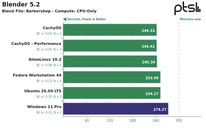 Tides turned with Chaos Group's V-Ray 6.0 rendering engine, where RTX testing resulted in 6% more rays on Windows, while CUDA rendering resulted in a 2% advantage for Windows. In CPU rendering, Linux was once again ahead, with CachyOS leading the pack at 18% faster than Windows but only marginally faster than the other Linux distributions tested. Neatbench video benchmarking, GravityMark 1.87, Unigine Superposition 1.0, and OctaneBench also saw CachyOS pulling ahead, although in some tests, gains were minimal, and in Octane, only CachyOS in Performance mode and AlmaLinux managed to pull ahead of Windows. In FluidX3D fluid dynamics simulations, performance was largely identical, but Windows 11 did manage to technically edge out a lead, even if only by fractions of a percent.
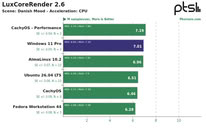
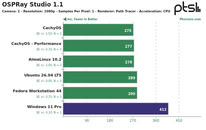 OSPRay Studio and LuxCoreRender produced peculiar results, with Windows matching or edging out Linux in a number of tests but losing badly to all of the Linux distributions in others. 7-Zip compression benchmarks once again saw Linux beating Windows by a decent margin, although it was basically a wash between the different Linux distributions.
Source:
Phoronix
In a comparison between CachyOS, AlmaLinux 10.2, Ubuntu 26.04, Fedora Workstation 44, and Windows 11, CachyOS consistently performed at or near the top of the list, with CachyOS in performance mode claiming first place in the geometric mean of the results of a workstation benchmark. Windows 11 Pro was right at the bottom of the chart, coming in 14.9% slower than CachyOS in performance mode.


The tests comprised of a mix of CPU and GPU benchmarks on a $46,000+ HP Z4 G6i workstation PC with a 48-core Intel Xeon 678X Granite Rapids WS CPU, 128 GB of DDR5-6400 memory, and an NVIDIA RTX Pro 6000 Blackwell workstation GPU. First up was 3D rendering and modelling, which tested Blender and IndigoBench 4.4 in both CPU and GPU rendering modes. Here, almost surprisingly, given NVIDIA's reputation in the Linux community, CachyOS and AlmaLinux were both faster than Windows 11 in both CUDA and CPU compute. The biggest differences in the render workloads came from CPU-only rendering, where Windows 11 was up to 12% slower than CachyOS. Ubuntu and Fedora were both measurably slower than CachyOS, but only by about 3-4%.


87 Comments on CachyOS and AlmaLinux Beat out Windows 11 in Workstation Benchmarks
Well, one can dream.
By the way, I finaly installed Windows 11, due to new motherboard. Using just the Rufus options to remove CoSlop and telemetry, it's so much faster than the "stock" Windows 11 experience, almost as fast as Windows 10, but with better support.
CachyOS, Alma, Bazzite and many others are becoming very worthwhile alternatives to Windows. Better? That is highly subjective and depends on what you want to do with your PC.
- It comes with OEM pre-installed bloat
- It has all optional Virtualization Based Security features enabled, none of which exist on Linux
- It also has optional Spectre/Metldown mitigations enabled while the Linux installations only have the default mitigations
On Windows VBS and Spectre/Metldown mitigations can really hurt performance.Phoronix should have performed a clean installation of Windows so they could have compared the out-of-box performance of the operating systems.
Windows 11 is crap once you've tried Linux you see just how crap it really is,Linux being much more smooth to use without bloat, forced updates breaking things, ads, and spyware, although of course ignorance is bliss.
Bazzite is fast, too, but there are restrictions, it's like closed Linux. Also, Bazzite is Fedora-based, while CachyOS is fork of Arch.
Do want to add the goal was to test catchyos so there was never a real focus on the windows benchmark, and flaws aside, generally in these tests linux outperforming windows is the expected outcome.
VBS costs performance, yes, but if it is enabled by default, its gonna be enabled on most PCs.
Optimized LTSC versions may be faster, yes, but that is not what is on the average Users PCs.
i am not sure, tehy may have backported or reused git related code. To rephrase it, code which is in development etc.
do i want git related code in my linux kernel. nope.
This will hit sooner or later the stable branch anyway. The linux kernel release are very fast compared to other projects.
I do get their point to increase marketing and to increase their speed benefits for the usual microsoft windows user who has no idea
I did bother for years with ricer gcc flags and gave up. You can do it when you want it but there are other means to increase speed and productivity and the memory footprint. get rid of most kde, gnome, qt and gtk apps and of course systemd.
my source: Gentoo/comments/1vp82dp/try_out_the_cachyos_kernel_on_gentoofeel Free to dig into those reddit claims and find out if i posted nonsense or if this is a starting point.
Rant: A few have possible xpertise but so many trolls and kids on reddit.
--
I personally miss, not sure if it was stated here, what does cachyos differently?
What are they doing in .config?
what are they copying over?
In the early gentoo years i abused the forums.gentoo.org a lot and got at lesat one ban which i asked to be removed years later. In those years, the performance claims were always below 5%.
The 10% performance claims from cachyos sounds too good to be true. My cooling setup is not optimal on my gentoo box. I did not had the fun yet to replace the cooler and all cpu case fans. Those testing will generate heat which is better done in the cold months so i indirectly will heat my room again.
On the other hand, after that every Windows-Gamer would want to migrate from home/pro to Enterprise/LTSC...
I do use my refurbish notebook with official microsoft refurbisher microsoft windows 11 pro on a lenovo l15 gen 1 wiht amd cpu/gpu = apu which is around 5 years old.
The windows explorer crashed yesterday, windows update took forever to reboot, more than 6 minutes, and moving files from my notebook to my tablet caused only two of 3 files being moved. although i waited more than 5 minutes after the windows explorer showed it as completed. the advertisement in the windows 11 pro startmenu, for whatsapp - that was recently added without me wanting too, and other offensive advertisment makes windows not ready as a mature desktop.
Those random crashes i had in past years, 21 years on gentoo but other experience also, came only from testing for uefi values for DRAM.
I accept windows user say always it is not mature, but i use it since 1996 and linux kernel version 2.0.0. I doubt many of those claims come from users who really use both stuff regularly. AND In some extents. i also installed arch linux and had it on my disk for 1 or 2 years from 2006 onwards, same with gentoo. still i did not bootup a lot arch. I had several years of pleasure and blue screens with windows 10 pro on different hardware with microsoft office at work. Display corruption etc. usb not working etc. in windows 10 pro regardless of motherboard and whatever prebuild box it is.
Yes, I agree, windows is not a mature desktop operating system for non-programmers also.
Sheltered in windows 11 pro, on my main box, shows the circular mouse symbol while gaming offline. It seems windows defender cries, makes notification sound without being asked to. the changing of the mouse curser is a bug of windows 11 pro. I mostly use only the monthly windows 11 pro update packages from computerbase.de/downloads for windows 11 pro. the list is very long - why windows is not mature. (keeping cve generic binaries, game binaries and other cve binaries in cve windows 11 pro makes sense - and also smaller backups for my main box)I have a full list of CVE antimeasures active in my kernel. and my box is not optimised.
Shall i remove that and cross test? I could rip out all security measures, downgrade the motherboard uefi so it is faster etc.
Hardware gets slower because of the CVE fixes in UEFI and software. Taht also includes the kernel of teh operating system.
I felt so "PRO" at that time...
Same .config which I use. i dropped the few non related hardware changes.
there is also another section about protection features which could be also disabled. I do not have any userspace hypervisor in use on my single user box. The kernel hardening options for sure cost me performance with other options i have enabled.
For a gambling box only you could ditch all of that, even the uefi updates and downgrade the uefi for possible more performance