Monday, June 16th 2025

AMD Releases AGESA ComboAM5 1.2.0.3e to Patch fTPM Vulnerability

AMD began rolling out its latest AGESA ComboAM5 microcode for Socket AM5 platforms, as confirmed by an ASUS BIOS update for its ROG Crosshair X870E Hero motherboard. The company will likely get motherboard vendors and prebuilt OEMs to release BIOS updates with the new AGESA 1.2.0.3e microcode for both AMD 600-series and AMD 800-series chipset motherboards. Version 1.2.0.3e patches a security vulnerability with the firmware TPM (fTPM) component needed to establish a hardware root of trust. This is also a minimum system requirement for Windows 11. The vulnerability discovered by Trusted Computing Group, involves an OOB (out of bounds) read method that could compromise the root of trust.

Interestingly, the ASUS change-log mentions that AGESA 1.2.0.3e introduces support for an "upcoming CPU." We know from older reports that this upcoming CPU is the Ryzen 9000G "Gorgon Point" desktop APU. These processors are based on the 4 nm "Gorgon Point" monolithic silicon, which is a revision of "Strix Point," similar to how "Hawk Point" was to "Phoenix Point." There are no changes to the IP of either the CPU complex, or the iGPU, or even the NPU, but updates to their clock speeds or boosting algorithm. The CPU consists of two CCX, one with four "Zen 5" cores sharing a 16 MB L3 cache; and the other with eight "Zen 5c" cores sharing an 8 MB L3 cache. The iGPU is based on the RDNA 3.5 graphics architecture, and comes with 16 compute units. The NPU is based on XDNA 2, and offers at least 50 AI TOPS, giving the chip Microsoft Copilot+ local acceleration capability. The PCIe complex is Gen 4, and the main PEG interface is narrowed down to PCI-Express 4.0 x8.
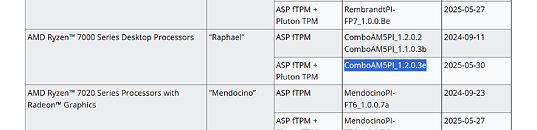
Sources: AMD, VideoCardz
Add your own comment

15 Comments on AMD Releases AGESA ComboAM5 1.2.0.3e to Patch fTPM Vulnerability

#1
ncrs
Intel is also affected by this since the issue is in the reference implementation, but the scope seems to be more limited (unless there's still more unpublished advisories) - INTEL-SA-01209.
Posted on Reply
#2
Tpanon
MSI had the same update on their site for a few days. It has been pulled now, and there are some angry costumers on their forums..
Posted on Reply
#3
_roman_
Another proof that windows 11 pro is bad. The tpm2 requirement is bad. The enforced tpm2 active mode for windows 11 pro updates is bad.

Note: my windows 11 pro desktop installation with ryzen 7600x, radeon 7800xt and current ASUS prime X670-p mainboard with added aftermarket wlan module wiht KC3000 2TB drive.

You may check this community spreadshet how some mainboard models do not ship any uefi updates.

docs.google.com/spreadsheets/d/12zg6yT_H7H-W1voyw1ZoIrj0GSE7WI4Ug-uLlv-Asa8/edit?gid=937453961#gid=937453961
Posted on Reply
#4
mtosev
Aha. Nice to hear that they have tackled this security issue.
Posted on Reply
#5
Tek-Check
I installed this AGESA on X870E ProArt yesterday. All good at the moment.
Posted on Reply
#6
Tomorrow
_roman_Another proof that windows 11 pro is bad. The tpm2 requirement is bad. The enforced tpm2 active mode for windows 11 pro updates is bad.
TPM has little do do with Win11 problems. These problems exist even if there was no TPM requirement.

There is no TPM enforcement for updates. Systems that do not comply still receive regular monthly updates.
Only once per year feature updates require a bit of tinkering but even these can be installed trough WU.
Posted on Reply
#7
_roman_
TomorrowTPM has little do do with Win11 problems. These problems exist even if there was no TPM requirement.
Some Windows 11 pro updates will not install without activated TPM2 module in the aSUS prime X670-p mainboard with ryzen 7600X. I was forced to do an upgrade mainboard flash which autoinstalled asus armory crate as i left the mainboard as is to get the windows 11 pro update done.

Note: just to make things 100% clear // it has to do with tpm2.

Are you talking from experience? Did you saw those error messages like i did? Do you also run a mainboard with windows 11 pro without active secure boot and without active tpm2 module?
Posted on Reply
#8
RejZoR
Is this the Microsoft's Pluto TPM bs? Isn't it ironic to include a "security" feature in CPU's, make it mandatory in Windows just for it to be exploited before it was even used for anything actually useful.
The other is Bitlocker activating by itself on user systems and them losing data when system fails. Which is what I had with one customer whose Bitlocker was activated somehow, then motherboard failed and now no one can get the data back. Yay to TPM! It really prevents access to any data, even to user itself.
Posted on Reply
#9
Tomorrow
_roman_Some Windows 11 pro updates will not install without activated TPM2 module in the aSUS prime X670-p mainboard with ryzen 7600X.
Only feature updates once a year.
_roman_Note: just to make things 100% clear // it has to do with tpm2.
The fact that yearly feature updates are not automatically installed has to do with the fact that the system has bypassed the requirements including TPM, but also Secure Boot.
_roman_Are you talking from experience? Did you saw those error messages like i did? Do you also run a mainboard with windows 11 pro without active secure boot and without active tpm2 module?
Yes i am. Im running X570 board (not ASUS) with Secure Boot and TPM disabled, but Win11 Pro installed.
My system fully support both, but i have deliberately disabled these since this is a desktop computer. Also BitLocker is disabled.

I have never had problems with monthly updates. Only yearly major feature updates have not automatically installed.
Like 23H2 which required manually downloading and running an "enablement package" update.
Getting 24H2 to install via WU was more difficult. After going trough that i made a script file to automate that process:


* Grant administrator privileges if the user is not already an administrator.
* Create a log file.
* Log commands and results.
* Enable showing file extensions.
* Set the target version to 24H2.
* Set the target version to Windows 11.
* Remove compatibility blocks.
* Add hardware bypass keys.
* Force Group Policy update.
* Ask the user if they want to restart the computer (10 seconds to decide. 10 seconds to restart if Y is selected).
* Launch Windows Update and open its user interface.
* Keep the command window open.


@Echo on
:: Elevate to admin if not already running as admin
NET FILE 1>NUL 2>NUL
if '%errorlevel%' NEQ '0' (
echo Requesting administrative privileges...
powershell -Command "Start-Process '%0' -Verb RunAs"
exit /b
)

:: Create error log file
set LOGFILE=%~dp0upgrade_log.txt
(echo Upgrade Log - %DATE% %TIME%) > "%LOGFILE%"

:: Enable showing of file extensions in File Explorer
echo Running command: reg add "HKCU\Software\Microsoft\Windows\CurrentVersion\Explorer\Advanced" /v HideFileExt /t REG_DWORD /d 0 /f >> "%LOGFILE%"
reg add "HKCU\Software\Microsoft\Windows\CurrentVersion\Explorer\Advanced" /v HideFileExt /t REG_DWORD /d 0 /f >> "%LOGFILE%" 2>&1

:: Set Windows Update target version to Win11 & 24H2
echo Running command: reg add "HKLM\SOFTWARE\Policies\Microsoft\Windows\WindowsUpdate" /v TargetReleaseVersion /t REG_DWORD /d 1 /f >> "%LOGFILE%"
reg add "HKLM\SOFTWARE\Policies\Microsoft\Windows\WindowsUpdate" /v TargetReleaseVersion /t REG_DWORD /d 1 /f >> "%LOGFILE%" 2>&1

echo Running command: reg add "HKLM\SOFTWARE\Policies\Microsoft\Windows\WindowsUpdate" /v ProductVersion /t REG_DWORD /d "11" /f >> "%LOGFILE%"
reg add "HKLM\SOFTWARE\Policies\Microsoft\Windows\WindowsUpdate" /v ProductVersion /t REG_DWORD /d "11" /f >> "%LOGFILE%" 2>&1

echo Running command: reg add "HKLM\SOFTWARE\Policies\Microsoft\Windows\WindowsUpdate" /v TargetReleaseVersionInfo /t REG_SZ /d "24H2" /f >> "%LOGFILE%"
reg add "HKLM\SOFTWARE\Policies\Microsoft\Windows\WindowsUpdate" /v TargetReleaseVersionInfo /t REG_SZ /d "24H2" /f >> "%LOGFILE%" 2>&1

:: Remove compatibility blocks
echo Running command: reg delete "HKLM\SOFTWARE\Microsoft\Windows NT\CurrentVersion\AppCompatFlags\CompatMarkers" /f >> "%LOGFILE%"
reg delete "HKLM\SOFTWARE\Microsoft\Windows NT\CurrentVersion\AppCompatFlags\CompatMarkers" /f 2>>"%LOGFILE%"

echo Running command: reg delete "HKLM\SOFTWARE\Microsoft\Windows NT\CurrentVersion\AppCompatFlags\Shared" /f >> "%LOGFILE%"
reg delete "HKLM\SOFTWARE\Microsoft\Windows NT\CurrentVersion\AppCompatFlags\Shared" /f 2>>"%LOGFILE%"

echo Running command: reg delete "HKLM\SOFTWARE\Microsoft\Windows NT\CurrentVersion\AppCompatFlags\TargetVersionUpgradeExperienceIndicators" /f >> "%LOGFILE%"
reg delete "HKLM\SOFTWARE\Microsoft\Windows NT\CurrentVersion\AppCompatFlags\TargetVersionUpgradeExperienceIndicators" /f 2>>"%LOGFILE%"

:: Add hardware requirement bypass keys
echo Running command: reg add "HKLM\SOFTWARE\Microsoft\Windows NT\CurrentVersion\AppCompatFlags\HwReqChk" /f /v HwReqChkVars /t REG_MULTI_SZ /s , /d "SQ_SecureBootCapable=TRUE,SQ_SecureBootEnabled=TRUE,SQ_TpmVersion=2,SQ_RamMB=8192," >> "%LOGFILE%"
reg add "HKLM\SOFTWARE\Microsoft\Windows NT\CurrentVersion\AppCompatFlags\HwReqChk" /f /v HwReqChkVars /t REG_MULTI_SZ /s , /d "SQ_SecureBootCapable=TRUE,SQ_SecureBootEnabled=TRUE,SQ_TpmVersion=2,SQ_RamMB=8192," >> "%LOGFILE%" 2>&1

echo Running command: reg add "HKLM\SYSTEM\Setup\MoSetup" /f /v AllowUpgradesWithUnsupportedTPMOrCPU /t REG_DWORD /d 1 >> "%LOGFILE%"
reg add "HKLM\SYSTEM\Setup\MoSetup" /f /v AllowUpgradesWithUnsupportedTPMOrCPU /t REG_DWORD /d 1 >> "%LOGFILE%" 2>&1

:: Force Group Policy update
echo Running command: GPUPDATE /FORCE >> "%LOGFILE%"
GPUPDATE /FORCE >> "%LOGFILE%" 2>&1

:: Ask user if they want to restart
CHOICE /M "Restart now to apply changes?" /C YN /D N /T 10
IF ERRORLEVEL 2 goto skip_restart
shutdown /r /t 10
exit

:skip_restart
:: Start Windows Update and open its UI
echo Running command: start ms-settings:windowsupdate >> "%LOGFILE%"
start ms-settings:windowsupdate
usoclient startscan >> "%LOGFILE%" 2>&1

:: Keep command window open
pause
Posted on Reply
#10
_roman_
RejZoRThe other is Bitlocker activating by itself on user systems and them losing data when system fails.
MY refurbished lenovo notebook bought a few months ago and setup with the oobybass thing had only a local user but was already bitlocker encrypted.
I needed special commands to remove bitlocker encryption, it was there but not activated. For some reason that notebook with a refurbisher windows 11 pro license does not update.


Do not trust windows explorer in windows 11 pro to show you if bitlocker is there or not. you need a special shell and special commands to see the status and to remove it.

edit: microsoft usees the same alorithm but mcuh weaker as I do for a long time already with not microsoft windows for hole encryption of the hole operating system. microsoft should increase the encryption strength.
Posted on Reply
#11
dyonoctis
_roman_MY refurbished lenovo notebook bought a few months ago and setup with the oobybass thing had only a local user but was already bitlocker encrypted.
I needed special commands to remove bitlocker encryption, it was there but not activated. For some reason that notebook with a refurbisher windows 11 pro license does not update.


Do not trust windows explorer in windows 11 pro to show you if bitlocker is there or not. you need a special shell and special commands to see the status and to remove it.
It seems that there's a difference between an encrypted drive by windows, and one encrypted by the bios. If the Bios handled the encryption, it won't show the lock in the explorer. IIRC any laptop with TPM activated will encrypt the system drive. initially designed to prevent people with physical acess to steal your data
Posted on Reply
#12
phints
Asus has had 1.2.0.3d sitting in beta for a while for their B850 boards and here comes 1.2.0.3e. Hopefully they get moving and release a new bios. My 9800X3D build has seemed flawless but can always be better :rockout:
Posted on Reply
#13
redzo
TpanonMSI had the same update on their site for a few days. It has been pulled now, and there are some angry costumers on their forums..
Indeed. I've actually updated to e. I will have to update again once they release e with this patch.
People were praising MSI for getting to e this fast ... now they are back to c :roll:
Posted on Reply
#14
_roman_
I put in my new MSI X670E gaming edge wifi mainboard. I'm now on AGESA C (what i remember). MSI is better as ASUS which was for ages on AGESA A.
Missing Version B, C,D and E annoys me quite more for the ASUS mainboard. I saw it ages before that there were newer AGESA and ASUS was stuck on purpose an AGESA A. Nothing wrong with less updates, but ASUS should than not ask 250€ for that mainboard, sometimes 230€.
Posted on Reply
#15
phints
phintsAsus has had 1.2.0.3d sitting in beta for a while for their B850 boards and here comes 1.2.0.3e. Hopefully they get moving and release a new bios. My 9800X3D build has seemed flawless but can always be better :rockout:
Replying to myself since I can't edit, looks like Asus jumped past this beta straight to a stable 1.2.0.3e bios release. Flashed it earlier today, restored optimized settings, then setup my bios how I like it with expo, etc. PC running great no issues to note.
Posted on Reply
Add your own comment
Nov 14th, 2026 18:58 CST change timezone

New Forum Posts

Popular Reviews

TPU on YouTube

Controversial News Posts