Monday, August 4th 2025
MoreClockTool 2.0 Debuts with Redesigned UI and Advanced AMD Radeon RX GPU Controls
The developer behind the original AMD Radeon GPU utility tool, MoreClockTool, has officially launched version 2.0. The new MCT 2.0 is now a complete Windows app, featuring a light or dark theme to choose from, along with new features that allow you to customize your AMD Radeon RX GPU in every possible way. Everything, from clock rates and power limits to GFX voltage, memory timing levels, and tuning profiles, is available for customization. For users of RDNA 2-based Radeon RX 6000 series GPUs and newer, tuning and fan settings are fully supported, with every feature in MCT 2.0 working. For this functionality, a driver-only install is sufficient, and AMD Adrenalin Software is not required for the tool to work correctly, as the driver provides the necessary interface for MCT 2.0 to direct the GPU's internals.
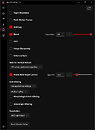
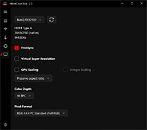
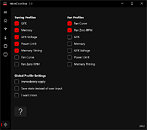
The tool allows up to 32 custom tuning and fan profiles in total. MCT 2.0 now features smooth sliders for customizable fan/voltage/power curve, allowing you to shape it with just your mouse, no keyboard required. Users can grab a corner of the window and drag to resize the controls, which grow or shrink right along with it. Shrink it down, and the sliders quietly disappear, leaving nothing but a slim little panel. Stretch it wide, and let the tool take over the whole screen. Being Windows-native now, it's much more user-friendly. Given that the MCT 2.0 development required a significant amount of engineering hours, the developer published the tool in the Microsoft Store for a small fee of $2.89. Check out the screenshots of the tool below, and click the link here to download it.


 More features are available for customization, as shown below:
Source:
MCT 2.0
The tool allows up to 32 custom tuning and fan profiles in total. MCT 2.0 now features smooth sliders for customizable fan/voltage/power curve, allowing you to shape it with just your mouse, no keyboard required. Users can grab a corner of the window and drag to resize the controls, which grow or shrink right along with it. Shrink it down, and the sliders quietly disappear, leaving nothing but a slim little panel. Stretch it wide, and let the tool take over the whole screen. Being Windows-native now, it's much more user-friendly. Given that the MCT 2.0 development required a significant amount of engineering hours, the developer published the tool in the Microsoft Store for a small fee of $2.89. Check out the screenshots of the tool below, and click the link here to download it.


13 Comments on MoreClockTool 2.0 Debuts with Redesigned UI and Advanced AMD Radeon RX GPU Controls
Also, unless MCT 2.0 allows for wider power limit range on RDNA4 (default -30% to +10%) i dont see a big advantage.
Perhaps it is more useful for RDNA2 and RDNA3 owners then...
And igorslab also answered the MS Store question. There is a legal way around. Write email ...
www.igorslab.de/en/moreclocktool-2-0-new-version-new-technology-and-now-in-the-microsoft-store-for-all/
I still do not understand if there is any real benefit for 7800xt. When i read the german igors lab summary the software seems more like another graphical user interface on top of the standard amd windows binary drivers.
So in theory this could replace Adrenalin and Afterburner partially. Naturally Adrenalin has more functions like game time tracking, game profiles etc and Afterburner has many extra functions i wont bother listing here (latest beta also supports RDNA4 with the exception of memory timings setting).
Also i just tested it and initially with local Win 11 account MS Store throws an error trying to install anything from the store (PUR-AuthenticationFailiure).
Also the following services need to be running in order to log in with MS account to the MS Store (only store, not windows). Run these via terminal or manually via services.msc:
Then log in in the store interface and then it will be possible to install MCT 2.0.
Services can be disabled afterwards as updating already installed apps via MS Store does not require sign-in.
The small price will vanish, as soon as i became a millionaire. 😜Yes, it uses the AMD library. But without any distractions and very precise. For this i also had to write a back-end for the UI, it is not that simple. Also no rocket science, but was a ton of work.
So, what is in for your RDNA3 card? I don't think you will need teh minimum GFX clock rate as RDNA2 did, and here MPT still helps a lot, as i understand. But, it might give you some features, like the profiles, you might like. With the free trial you can test it now, if it offers any benefits for you.Yes, and even when it runs MCT2 has a very small footprint. For benchmarks, you will gain a few points not having the permanent monitoring of the Adrenalin software in the background. But that is not the selling point, i guess this would be the profiles and the UI, easy, fast, no distractions and you can customize it.
MSI Afterburner might have more functions (a lot more with the hidden ones), but MCT2 is also a lot younger and without any backup from MSI or anyone. In terms of overclocking options MCT2 has more features and you can adjust a single setting, leaving the others on auto. Less restrictions than Adrenalin, too. In fact, no restrictions, but the driver won't allow everything, as usual.
It is not meant to replace Adrenalin, but to offer an easier, more convenient way to access driver settings, tuning and fan control. It is not meant to go against MSI Afterburner, which can handle Radeon cards, but i think is not a better choice than Adrenalin in terms of performance settings.You can use an external programmer. But you will need to take your card apart.
For the enthusiast class users who don't want to use an EVC2, you can speak with the PWM controllers of the card via Linux. Story is told on OCN.
So, no need for tears or hope. 🙂I sure hope so, sir. You can try it now for free and leave your opinion at igorsLAB or here at TPU. As every MxT before, it will be community driven developement. As long as it doesn't break the UI or anything, well, i can always make another check button or something like that..Yes. ADLX, AMD and the way its meant to be overclocked. However, i don't think the Aterburner will do things much different. But with having the same UI for Radeons and GeForce there are some limitations, as is said before, not just more options even for the 9000 series, RDNA2+3 will also find the minimum GPU frequency and if supportet the TDC. MCT2 gives you a fast, clean and precise way to adjust the performance settings of your card. Overclocking options are not the only thing.
As i said, you can try it now 7 days for free. Feel free to leave your opinion, even if you don't like it.
Merely the requirement for an account is already less convenient and there are other obstacles like not being able to backup the MSIX within the store. Im sure there are some commandline or third party tools that could do that, but that's another obstacle.
MS store is much better than it was in the past. On that i agree. The UI is much snappier etc.
But generally i avoid it as it has no mod support and the install is not portable to another PC. No commandline launch options. No multi user or custom directory install. No version control or rollback. No changelogs etc.
With your account and a short login, you are allowed to install the app on up to 10 PC's. This should take care about portability issues.
MCT 2.0 has no capabilities, no rights on system ressources, doesn't collect data or even connects to the internet. Therefore, there is no synchronization or anything for the profiles. Maybe i will implement some way to save the profiles to a file in future updates.
Other than that, with MCT 1.x and MCTslim are two freeware tools available that will at least cover the basic functionality, and some profile management. I also intend to keep them up to date.
For MCT 2.0, yes, framework and store were decisions i made, and i have to say, i am happy about it. Not just for the coffee, Microsoft actually has a proper support for developers. Takes its time, but offers uncomplicated help and good communication. Can't believe i say that, try to reach Microsoft support as a customer here in Germany.. not existent. Anyhow, i see many benefits not just for the developer. The store is a good way to distribute updates and the experience should be also convenient on the user end, i believe. And no worries about malware.
First time, let's see how this all works out. I put a lot of work in it, so this is the way for version 2.0.
Is it theoretically possible to use AMD library to get: recording, custom display color and custom resolution, performance overlay, noise suppression?
I would like to get rid of Adrenaline, but 3rd party recording has big performance hit. Im colorblind and i need color controls (ideally set per app) and i occasionally use custom res. to display ultrawide output on 16:9 screen. Noise suppression and perf. overlay (FPS, cpu/gpu avg. and hotspot temp, RAM consumption, % micro stutter, frame gen input lag) is nice to have.
How likely it is for MTC to receive those things?
Recording, i don't think i can do that with ADLX, the AMD library. I sure hope for the AI-update with FSR and maybe noise suppression, but i can't promise that either. Or give you a time window, sorry.