Friday, September 5th 2025

GIGABYTE AI TOP CXL R5X4 Card Adds 512GB Memory to Xeon and Threadripper Systems

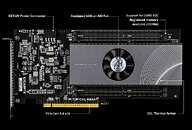
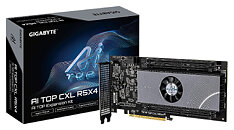
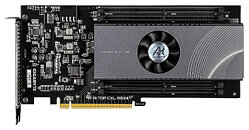
GIGABYTE has launched its AI TOP CXL R5X4 expansion card that can boost system memory by up to 512 GB using CXL technology. The AI TOP CXL R5X4 plugs into a PCIe 5.0 x16 slot and works with CXL 2.0/1.1 standards. It has four DDR5 RDIMM slots, each supporting memory modules up to 128 GB with ECC. This setup is different from built-in CXL options like Samsung CMM-D modules as it uses regular DDR5 memory so you have more choices for how much memory to add. The card is 120 mm x 254 mm and has a 16-layer HDI PCB. At full load, it uses about 70 W of power and needs an 8-pin EXT12V plug to work. An LED on the card shows if it's powered up while a single AIO fan cools the Microchip PM8712 controller.

Compatibility is still limited to certain GIGABYTE motherboards. Right now, the supported platforms include the TRX50 AI TOP for AMD Threadripper processors and W790 AI TOP for Intel Xeon systems. Also, CXL functionality isn't supported by all PCIe slots on these motherboards. The TRX50 AI TOP's PCIEX16_4 slot, for example, lacks CXL compatibility. GIGABYTE recommends contacting the company before purchase to verify system compatibility. There's no official pricing yet, although industry estimates suggest a $2,000-$3,000 retail price range based on comparable CXL products.
Sources: IT Home, Club386, GIGABYTE AI TOP CXL R5X4
Add your own comment

29 Comments on GIGABYTE AI TOP CXL R5X4 Card Adds 512GB Memory to Xeon and Threadripper Systems

#1
LabRat 891
RETVRN

:laugh:
[I know they're fundamentally different devices. Still, funny that this isn't Gb's first 'slot-in DRAM card']

In seriousness,
seeing these kinds of CXL cards come to market makes me hopeful that all those surplus Optane DCPMMs might someday be useful (again)
Posted on Reply
#2
overclockedamd
Why do I want one of these with 512GB for a primocache ramdisk just to flex on people in Crystaldisk....lord help my impure thoughts.
Posted on Reply
#3
LabRat 891
overclockedamdWhy do I want one of these with 512GB for a primocache ramdisk just to flex on people in Crystaldisk....lord help my impure thoughts.
oooo, big numbers go up


I feel ya though.

Hoping this 'kind' of AIC will become more common, and *maybe* if we're really really lucky...
we'll see CXL on next/coming-gen desktops.
Posted on Reply
#4
demu
2 CCD (12-16 cores) Threadripper Pro (7000 series) supports about 102GB/s (8 memory channels)
4 CCD (24-32 cores) Threadripper (7000 series) supports about 167-179 GB/s (4 memory channels)
4 CCD (24-32 cores) Threadripper Pro (7000 series) supports about 236 GB/s- 246 GB/s (8 memory channels)
8 CCD (64 cores) Threadripper (7000 series) supports about 240 GB/s (4 memory channels)
8 CCD (64 cores) Threadripper Pro (7000 series) supports about 453 GB/s (8 memory channels)
12 CCD (96 cores) Threadripper Pro (7000 series) supports about 720 GB/s (8 memory channels)

PCIe gen5 x16 supports up to 64 GB/sec speeds.
Why to add lot of expensive memory behind a very slow bus?
Posted on Reply
#5
r00tcz
This is really cool. I would love to see "budget" chipset for this, even if it would mean lower speeds. Like for DDR4 RDIMMs that are getting really cheap or even DDR3s that are now dirt cheap.
That Gigabyte ramdrive card was nice but same as this, mostly overpriced for what it did, so it never evolved or became more common.

EDIT: Here is the PDF specification for the controller: ww1.microchip.com/downloads/aemDocuments/documents/DCS/ProductDocuments/Brochures/SMC-2100-Smart-Memory-Controllers-00005431.pdf
It supports both DDR4 and DDR5 and there's also PCI-E x8 / 1 DDR channel version.
Posted on Reply
#6
LabRat 891
demuPCIe gen5 x16 supports up to 64 GB/sec speeds.
Why to add lot of expensive memory behind a very slow bus?
Cache(s) w/o impacting the system/processing pool
Dedicated LLM workspaces
Dedicated/Assigned DMA pool

NtM sometimes, they might just need even more RAM and the platform just cannot be expanded further.
Posted on Reply
#7
igormp
demu2 CCD (12-16 cores) Threadripper Pro (7000 series) supports about 102GB/s (8 memory channels)
4 CCD (24-32 cores) Threadripper (7000 series) supports about 167-179 GB/s (4 memory channels)
4 CCD (24-32 cores) Threadripper Pro (7000 series) supports about 236 GB/s- 246 GB/s (8 memory channels)
8 CCD (64 cores) Threadripper (7000 series) supports about 240 GB/s (4 memory channels)
8 CCD (64 cores) Threadripper Pro (7000 series) supports about 453 GB/s (8 memory channels)
12 CCD (96 cores) Threadripper Pro (7000 series) supports about 720 GB/s (8 memory channels)

PCIe gen5 x16 supports up to 64 GB/sec speeds.
Why to add lot of expensive memory behind a very slow bus?
Where did you get those numbers from? They don't really make much sense.

A 5200MHz DDR5 stick with its 64-bit bus provides 41.6GB/s of theoretical bandwidth, so that's your theoretical bandwidth per channel.
A 4-channel system of the above would provide 166.4GB/s, 8-channel would be 332.8GB/s

Even at 6000MHz with 8-channels it'd be at 384GB/s.

Anyhow, 64GB/s is more than a single channel of DDR5 memory, so one could think of those CXL memories as adding one extra channel with tons of extra capacity.
4 of those? 4 extra channels, with up to 2TB of extra capacity, which is not bad at all.
Posted on Reply
#8
Vya Domus
Bandwidth is pretty anemic for anything really high performance, it's hard to imagine a use case where the system memory wouldn't be enough.
Posted on Reply
#10
Wirko
igormpAnyhow, 64GB/s is more than a single channel of DDR5 memory, so one could think of those CXL memories as adding one extra channel with tons of extra capacity.
We shall also keep in mind that the transfer rate is 64 GB/s in each direction, which is a huge advantage for applications that require a lot of reading AND a lot of writing.
Posted on Reply
#11
r00tcz
Just found out the controller chip alone is $300 (in smaller quantities, may be cheaper for huge orders as usual), but I'd be surprised if this thing is under $500, probably more like $999.
But these enterprise chips from Microchip are always very expensive, same with PCI-E switches (if anyone is wondering, why motherboards don't have them anymore to offer more slots... this is why, they start at $250 for 24 total in+out lanes... for gen3!).
Still would be fun to play with this thing... so might pick one up on sale on Aliexpress in about 10 years... :rolleyes:
Posted on Reply
#12
Noci
Nah, I'm gonna skip this one for now. Expected price range of $ 2,000 - $ 3,000 and they forgot to implement aRGB or an information screen, doesnt even have other fancy thingies to show off :D .
Posted on Reply
#13
TheinsanegamerN
demu2 CCD (12-16 cores) Threadripper Pro (7000 series) supports about 102GB/s (8 memory channels)
4 CCD (24-32 cores) Threadripper (7000 series) supports about 167-179 GB/s (4 memory channels)
4 CCD (24-32 cores) Threadripper Pro (7000 series) supports about 236 GB/s- 246 GB/s (8 memory channels)
8 CCD (64 cores) Threadripper (7000 series) supports about 240 GB/s (4 memory channels)
8 CCD (64 cores) Threadripper Pro (7000 series) supports about 453 GB/s (8 memory channels)
12 CCD (96 cores) Threadripper Pro (7000 series) supports about 720 GB/s (8 memory channels)

PCIe gen5 x16 supports up to 64 GB/sec speeds.
Why to add lot of expensive memory behind a very slow bus?
Because any sufficiently large dataset would run WAY better on 64GB/s RAMDISKS than on a NVMe SSD or SCSI storage solution. Imagine editing a massive 4/8k video and having 512GB of additional memory to hold those files you are working on. That would make a massive difference in responsiveness.
Posted on Reply
#14
Chaitanya
LabRat 891RETVRN

:laugh:
[I know they're fundamentally different devices. Still, funny that this isn't Gb's first 'slot-in DRAM card']

In seriousness,
seeing these kinds of CXL cards come to market makes me hopeful that all those surplus Optane DCPMMs might someday be useful (again)
Optane died too soon and due to proprietary standard those DCPMMs are one thing that wont make a comeback and should be a relic of the past.
Posted on Reply
#15
demu
igormpWhere did you get those numbers from? They don't really make much sense.

A 5200MHz DDR5 stick with its 64-bit bus provides 41.6GB/s of theoretical bandwidth, so that's your theoretical bandwidth per channel.
A 4-channel system of the above would provide 166.4GB/s, 8-channel would be 332.8GB/s

Even at 6000MHz with 8-channels it'd be at 384GB/s.

Anyhow, 64GB/s is more than a single channel of DDR5 memory, so one could think of those CXL memories as adding one extra channel with tons of extra capacity.
4 of those? 4 extra channels, with up to 2TB of extra capacity, which is not bad at all.
Check here:
threadripper/comments/1azmkvg/comparing_threadripper_7000_memory_bandwidth_for
Posted on Reply
#17
_roman_
overclockedamdWhy do I want one of these with 512GB for a primocache ramdisk just to flex on people in Crystaldisk....lord help my impure thoughts.
I compile for years with DRAM. Less writes on HDD and SSDs and NVME. Less temp files to cleanup. Faster compile times.
I use a lot the DRAM for file storage. I will not bother with windows as Windows Vista does not exsits anymore, 7, 8, 8.1 and 10 soon. I do not waste my time with an os which may work or not with DRAM. My operating system was installed on hardware which shipped with windows Vista. 5x or more reinstalls needed by now with windows.

For a pure windows desktop box with word or a pure windows gaming box this product may not matter anyway.
Posted on Reply
#18
Wirko
@demu
See the whole reddit thread. The OP provided more calculations and explanations after the initial post. Those huge numbers over 700 GB/s are the bandwidth between the IOD and the CCDs.
Posted on Reply
#19
igormp
demuCheck here:
threadripper/comments/1azmkvg/comparing_threadripper_7000_memory_bandwidth_for
Look at the first comment from that post you shared, the higher numbers are bogus.
Wirko@demu
See the whole reddit thread. The OP provided more calculations and explanations after the initial post. Those huge numbers over 700 GB/s are the bandwidth between the IOD and the CCDs.
Not even IOD and CCD, since it's still not possible. It's actually measuring L3 cache somehow.
Posted on Reply
#20
InVasMani
LabRat 891RETVRN

:laugh:
[I know they're fundamentally different devices. Still, funny that this isn't Gb's first 'slot-in DRAM card']

In seriousness,
seeing these kinds of CXL cards come to market makes me hopeful that all those surplus Optane DCPMMs might someday be useful (again)
Just because it's Gigabyte and looks like I-Ram and acts like a I-Ram w/o the quirky annoying SATA bottlenecks of one doesn't mean it's a I-RAM 2.0 because they already did a 2.0 so it's the 3.0, but it's based on PCIE 5.0 which is kind of reminiscent of like Windows 9 basically making it a I-ram 6.0.
Posted on Reply
#21
kondamin
demu2 CCD (12-16 cores) Threadripper Pro (7000 series) supports about 102GB/s (8 memory channels)
4 CCD (24-32 cores) Threadripper (7000 series) supports about 167-179 GB/s (4 memory channels)
4 CCD (24-32 cores) Threadripper Pro (7000 series) supports about 236 GB/s- 246 GB/s (8 memory channels)
8 CCD (64 cores) Threadripper (7000 series) supports about 240 GB/s (4 memory channels)
8 CCD (64 cores) Threadripper Pro (7000 series) supports about 453 GB/s (8 memory channels)
12 CCD (96 cores) Threadripper Pro (7000 series) supports about 720 GB/s (8 memory channels)

PCIe gen5 x16 supports up to 64 GB/sec speeds.
Why to add lot of expensive memory behind a very slow bus?
makes me wonder if they ever had the idea to put 2 iod's on one package so the could create a system that had 16 memory channels
Posted on Reply
#22
Wirko
No one has mentioned latency yet. What is to be expected from a CXL.mem card? Something on the order of 100 ns, not including DDR5's own latency?
Posted on Reply
#23
AnotherReader
WirkoNo one has mentioned latency yet. What is to be expected from a CXL.mem card? Something on the order of 100 ns, not including DDR5's own latency?
CXL latency is higher than a remote socket's latency in a two socket system. The table below, adapted from the linked paper, compares locally attached and remotely attached CXL latency to local and cross-socket DRAM latency in two and eight socket systems from the Skylake X, Sapphire Rapids and Emerald Rapids generations.

LocalLocal+NUMA+NUMA
CPU DDR TypeSize (GB)Lat (ns)BW (GB /s)Lat (ns)BW (GB /s)L1D-L2-L3
SPR2S16×DDR52561142181919748KB-2MB-60MB
EMR2S16×DDR525611124619312048KB-2MB-160MB
SKX2S16×DDR419290521403232KB-1MB-13.8MB
SKX8S16×DDR438481109411732KB-1MB-38.5MB
CXL ConfigurationDDR TypeSize (GB)Lat (ns)BW (GB /s)Lat (ns)BW (GB /s)Type, CXL-Spec
CXL-A2×DDR41282142437514ASIC, CXL1.1, ×8
CXL-B2×DDR51282712247313ASIC, CXL1.1, ×8
CXL-C2×DDR4163941862114FPGA, CXL1.1, ×8
CXL-D4×DDR57682395233314ASIC, CXL1.1, ×16


Table 1: Experimental platform. “Local” refers to the performance measured by CPUs on the same socket while “+NUMA” indicates memory access from a remote socket.

The authors of the previously referenced paper presented at ASPLOS 2025 (link to PDF) where the DRAM configuration was different and the number of channels were included in the table. I have adapted the table below from the newer paper.
LocalLocalRemoteRemote
Server# of channelsSize (GB)Latency (ns)Bandwidth (GB/s)Latency (ns)Bandwidth (GB/s)# coresFrequency (GHz)L1D-L2-L3
SPR2S8xDDR512811421819197322.148KB-2MB-60MB
EMR2S8×DDR5128111246193120322.148KB-2MB-160MB
EMR2S8×DDR51536117236212119522.348KB-2MB-260MB
SKX2S6×DDR496905214032102.232KB-1MB-13.8MB
SKX8S6×DDR448811094107282.532KB-1MB-38.5MB
CXL Configuration# of channelsSize (GB)Latency (ns)Bandwidth (GB/s)Latency (ns)Bandwidth (GB/s)TypeCXL-SpecServer
CXL-A2×DDR41282142437514ASICCXL 1.1×8SPR2S/EMR2S
CXL-B1×DDR51282712247313ASICCXL 1.1×8SPR2S/EMR2S
CXL-C2×DDR4163941862114FPGACXL 1.1×8SPR2S/EMR2S
CXL-D2×DDR57562395233314ASICCXL 1.1×16EMR2S
r00tczJust found out the controller chip alone is $300 (in smaller quantities, may be cheaper for huge orders as usual), but I'd be surprised if this thing is under $500, probably more like $999.
But these enterprise chips from Microchip are always very expensive, same with PCI-E switches (if anyone is wondering, why motherboards don't have them anymore to offer more slots... this is why, they start at $250 for 24 total in+out lanes... for gen3!).
Still would be fun to play with this thing... so might pick one up on sale on Aliexpress in about 10 years... :rolleyes:
The idea behind CXL was that DRAM from older systems could be reused in newer systems to expand capacity beyond the usual maximum. Currently, 128 GB DDR4 RDIMMs are significantly cheaper than 128 GB DDR5 RDIMMs so using those to expand the capacity of a DDR5 system would save quite a bit of money.
Posted on Reply
#24
A Computer Guy
LabRat 891Cache(s) w/o impacting the system/processing pool
Dedicated LLM workspaces
Dedicated/Assigned DMA pool

NtM sometimes, they might just need even more RAM and the platform just cannot be expanded further.
Would such things be good for VRAM Cache?
LastDudeALiveHave you seen the benchmarks for the "ramdisk" in the L3 cache of a 7800X3D? www.tomshardware.com/news/amd-3d-v-cache-ram-disk-182-gbs-12x-faster-pcie-5-ssd
I've said this before. It would be awesome if AMD would allow some kind of mode to configure the cache for general purpose use. Not necessarily as a ram disk but for example games or drivers that could take advantage of very high speed read/write access to data structures. I disagree with the article stating that the current cache capacity isn't useful. 96MB to 128MB is a ton of useful memory.
InVasManiJust because it's Gigabyte and looks like I-Ram and acts like a I-Ram w/o the quirky annoying SATA bottlenecks of one doesn't mean it's a I-RAM 2.0 because they already did a 2.0 so it's the 3.0, but it's based on PCIE 5.0 which is kind of reminiscent of like Windows 9 basically making it a I-ram 6.0.
I can imagine i-ram without ecc must have been a disaster. I went the quirky SATA route with ANS-9010 and can tell you if you didn't run it with ECC ram or using the on-chip ECC function with regular ram your data will get corrupted within minutes. Of course those were DDR2 days.
Posted on Reply
#25
LabRat 891
A Computer GuyI can imagine i-ram without ecc must have been a disaster.
I have one. Yet to have powered it up since I bought it, though...

I don't recall there being issues w/ non-ECC, but it was kind of a niche device for rapid-swapping whole system images. I imagine it was primarily used by HWbot'ers and Benchmarkers.
Posted on Reply
Add your own comment
Nov 14th, 2026 03:59 CST change timezone

New Forum Posts

Popular Reviews

TPU on YouTube

Controversial News Posts