Friday, September 5th 2025

GIGABYTE AI TOP CXL R5X4 Card Adds 512GB Memory to Xeon and Threadripper Systems

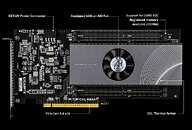
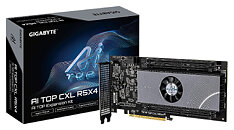
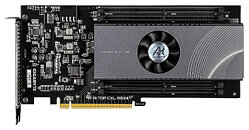
GIGABYTE has launched its AI TOP CXL R5X4 expansion card that can boost system memory by up to 512 GB using CXL technology. The AI TOP CXL R5X4 plugs into a PCIe 5.0 x16 slot and works with CXL 2.0/1.1 standards. It has four DDR5 RDIMM slots, each supporting memory modules up to 128 GB with ECC. This setup is different from built-in CXL options like Samsung CMM-D modules as it uses regular DDR5 memory so you have more choices for how much memory to add. The card is 120 mm x 254 mm and has a 16-layer HDI PCB. At full load, it uses about 70 W of power and needs an 8-pin EXT12V plug to work. An LED on the card shows if it's powered up while a single AIO fan cools the Microchip PM8712 controller.

Compatibility is still limited to certain GIGABYTE motherboards. Right now, the supported platforms include the TRX50 AI TOP for AMD Threadripper processors and W790 AI TOP for Intel Xeon systems. Also, CXL functionality isn't supported by all PCIe slots on these motherboards. The TRX50 AI TOP's PCIEX16_4 slot, for example, lacks CXL compatibility. GIGABYTE recommends contacting the company before purchase to verify system compatibility. There's no official pricing yet, although industry estimates suggest a $2,000-$3,000 retail price range based on comparable CXL products.
Sources: IT Home, Club386, GIGABYTE AI TOP CXL R5X4
Add your own comment

29 Comments on GIGABYTE AI TOP CXL R5X4 Card Adds 512GB Memory to Xeon and Threadripper Systems

#26
rhqq
A Computer GuyI went the quirky SATA route with ANS-9010 and can tell you if you didn't run it with ECC ram or using the on-chip ECC function with regular ram your data will get corrupted within minutes. Of course those were DDR2 days.
I have one, what's more - I still use it from time to time. non-ecc memory, 8x 4GB sticks. I don't recall having data corruption issues...
Posted on Reply
#27
A Computer Guy
rhqqI have one, what's more - I still use it from time to time. non-ecc memory, 8x 4GB sticks. I don't recall having data corruption issues...
Do you have the ECC emulation jumper in place? ( it's the 2nd jumper from the left when looking at the rear of the unit upside down, or 2nd jumper from the right when looking at it right side up ) When the jumper is installed it disables ECC emulation. The instructions are printed on the bottom of the unit.
Posted on Reply
#28
PR0PH3CY
This is freaking awesome! I'm glad Gigabyte stepped up again with these. I have a bunch of the Gigabyte GC-RAMDISK PCI and even the rare 5.25" variant. I got them even before the Linus Tech Tips video. I didn't even know the 5.25" version was even produced until I randomly emailed someone on Amazon and they offered it. The person told me someone at NASA was using them. I pay around $100 for it all. What's surprising on ebay they still had new-old stock of the batteries! I know there was a DDR2 5.25" bay one as well by another company. And then later a DDR3 variant by AllOne but thousands of dollars and difficult to even try to buy. I don't care if other people don't find it useful or economical, I think it's cool as heck and hope to buy one. Just a cool piece since I enjoy various addon card collecting. I like their implementation way more than other CXL memory addon cards shown so far purely because it looks like most enthusiast cards, which I love. Maybe if they make a 2.0 version, the RAM can be slotted horizontal like the AllOne, so it's more of a 1 slot card, not 2 slot.

www.thessdreview.com/our-reviews/allone-cloud-disk-drive-101-ramdisk-review-500k-iops-ddr3-storage

And the last image is my boxes from a few years ago I posted on HardForum:


Posted on Reply
#29
ZeDestructor
AnotherReaderCXL latency is higher than a remote socket's latency in a two socket system. The table below, adapted from the linked paper, compares locally attached and remotely attached CXL latency to local and cross-socket DRAM latency in two and eight socket systems from the Skylake X, Sapphire Rapids and Emerald Rapids generations.

LocalLocal+NUMA+NUMA
CPU DDR TypeSize (GB)Lat (ns)BW (GB /s)Lat (ns)BW (GB /s)L1D-L2-L3
SPR2S16×DDR52561142181919748KB-2MB-60MB
EMR2S16×DDR525611124619312048KB-2MB-160MB
SKX2S16×DDR419290521403232KB-1MB-13.8MB
SKX8S16×DDR438481109411732KB-1MB-38.5MB
CXL ConfigurationDDR TypeSize (GB)Lat (ns)BW (GB /s)Lat (ns)BW (GB /s)Type, CXL-Spec
CXL-A2×DDR41282142437514ASIC, CXL1.1, ×8
CXL-B2×DDR51282712247313ASIC, CXL1.1, ×8
CXL-C2×DDR4163941862114FPGA, CXL1.1, ×8
CXL-D4×DDR57682395233314ASIC, CXL1.1, ×16


Table 1: Experimental platform. “Local” refers to the performance measured by CPUs on the same socket while “+NUMA” indicates memory access from a remote socket.

The authors of the previously referenced paper presented at ASPLOS 2025 (link to PDF) where the DRAM configuration was different and the number of channels were included in the table. I have adapted the table below from the newer paper.
LocalLocalRemoteRemote
Server# of channelsSize (GB)Latency (ns)Bandwidth (GB/s)Latency (ns)Bandwidth (GB/s)# coresFrequency (GHz)L1D-L2-L3
SPR2S8xDDR512811421819197322.148KB-2MB-60MB
EMR2S8×DDR5128111246193120322.148KB-2MB-160MB
EMR2S8×DDR51536117236212119522.348KB-2MB-260MB
SKX2S6×DDR496905214032102.232KB-1MB-13.8MB
SKX8S6×DDR448811094107282.532KB-1MB-38.5MB
CXL Configuration# of channelsSize (GB)Latency (ns)Bandwidth (GB/s)Latency (ns)Bandwidth (GB/s)TypeCXL-SpecServer
CXL-A2×DDR41282142437514ASICCXL 1.1×8SPR2S/EMR2S
CXL-B1×DDR51282712247313ASICCXL 1.1×8SPR2S/EMR2S
CXL-C2×DDR4163941862114FPGACXL 1.1×8SPR2S/EMR2S
CXL-D2×DDR57562395233314ASICCXL 1.1×16EMR2S


The idea behind CXL was that DRAM from older systems could be reused in newer systems to expand capacity beyond the usual maximum. Currently, 128 GB DDR4 RDIMMs are significantly cheaper than 128 GB DDR5 RDIMMs so using those to expand the capacity of a DDR5 system would save quite a bit of money.
For us hobbyists and smaller businesses sure, but for the big places doing things that need lots of memory, the primary interest is just moar main memory than can fit in 8 sockets.
A Computer GuyWould such things be good for VRAM Cache?


I've said this before. It would be awesome if AMD would allow some kind of mode to configure the cache for general purpose use. Not necessarily as a ram disk but for example games or drivers that could take advantage of very high speed read/write access to data structures. I disagree with the article stating that the current cache capacity isn't useful. 96MB to 128MB is a ton of useful memory.


I can imagine i-ram without ecc must have been a disaster. I went the quirky SATA route with ANS-9010 and can tell you if you didn't run it with ECC ram or using the on-chip ECC function with regular ram your data will get corrupted within minutes. Of course those were DDR2 days.
There's no real need to designate cache as a seperate memory pool - due to where it lives in the system, you get basically all the performance as manually managing it, without actually needing to suffer and manually manage it.

Personally, I wish AMD would stop being prats and enable CXL support on AM5 already! I want more than 96GiB of RAM on my system, but I don't want to slow down the more used segment of my memory by going 2DPC.
Posted on Reply
Add your own comment
Nov 14th, 2026 03:49 CST change timezone

New Forum Posts

Popular Reviews

TPU on YouTube

Controversial News Posts