Friday, December 5th 2025

Microsoft Brings Modern Run Dialog in Windows 11 After 30 Years
After 30 years of keeping the same UI, Microsoft is quietly testing a refreshed Run dialog in recent Windows preview builds, introducing a modern interface while keeping the classic Run box intact. The new variant adopts Fluent Design principles, including rounded corners and a more open layout, and is offered as an optional experience rather than a forced replacement. Users who prefer the familiar Win32 dialog can continue to use it, while those who enable the new interface will see it appear when they press Win+R. However, you will need Windows 11 build 26534 to see the new dialog.
The modern Run appears to be built on WinUI 3 and brings several practical refinements. Early test builds show a larger text entry field, a list of recent commands above the box, and app icons when matches are found. Microsoft has placed the feature behind an advanced toggle in Settings > System > Advanced settings, which keeps it disabled by default and signals a careful rollout. Importantly, the tool still functions as a direct command launcher and is not intended to replace broader system search features.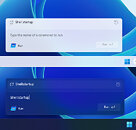
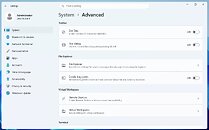 This update is significant because Run has remained largely unchanged since the 1990s. Modernizing it while preserving backward compatibility and functionality has been a top priority for Microsoft. By offering the refreshed Run as an opt-in feature, power users and developers can experiment without disrupting existing workflows. If testing goes well, this small refresh could be the first step toward updating other long-standing dialogs across Windows, eventually replacing all UI elements imported from early Windows builds and fully adopting the new WinUI 3.
Source:
@phantomofearth on X
The modern Run appears to be built on WinUI 3 and brings several practical refinements. Early test builds show a larger text entry field, a list of recent commands above the box, and app icons when matches are found. Microsoft has placed the feature behind an advanced toggle in Settings > System > Advanced settings, which keeps it disabled by default and signals a careful rollout. Importantly, the tool still functions as a direct command launcher and is not intended to replace broader system search features.


37 Comments on Microsoft Brings Modern Run Dialog in Windows 11 After 30 Years
Seriously, not everything that MS does with Windows is automatically terrible (even if most things are).
In fact it removes the button to browser for a file to run, and moves the title bar into the bottom left corner just so there's no UI consistency whatsoever with any other panels.
What a joke. But I guess we didn't yet have a "Windows 11 broke something" today...
Also, it looks disgusting, like 3 day old c*m smeared on glass and text printed on that.
We're probably going to find out that the Copilot-written slop code that did this also automatically runs all processes from this as Administrator, or something like that.
CLAP CLAP CLAP CLAP
Pats on the backs for the whole team involved in this incredible feat!
With a friendly smile,
Fred.