Friday, December 5th 2025

Microsoft Brings Modern Run Dialog in Windows 11 After 30 Years

After 30 years of keeping the same UI, Microsoft is quietly testing a refreshed Run dialog in recent Windows preview builds, introducing a modern interface while keeping the classic Run box intact. The new variant adopts Fluent Design principles, including rounded corners and a more open layout, and is offered as an optional experience rather than a forced replacement. Users who prefer the familiar Win32 dialog can continue to use it, while those who enable the new interface will see it appear when they press Win+R. However, you will need Windows 11 build 26534 to see the new dialog.

The modern Run appears to be built on WinUI 3 and brings several practical refinements. Early test builds show a larger text entry field, a list of recent commands above the box, and app icons when matches are found. Microsoft has placed the feature behind an advanced toggle in Settings > System > Advanced settings, which keeps it disabled by default and signals a careful rollout. Importantly, the tool still functions as a direct command launcher and is not intended to replace broader system search features.
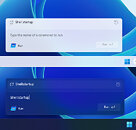
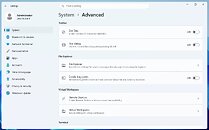
This update is significant because Run has remained largely unchanged since the 1990s. Modernizing it while preserving backward compatibility and functionality has been a top priority for Microsoft. By offering the refreshed Run as an opt-in feature, power users and developers can experiment without disrupting existing workflows. If testing goes well, this small refresh could be the first step toward updating other long-standing dialogs across Windows, eventually replacing all UI elements imported from early Windows builds and fully adopting the new WinUI 3.
Source: @phantomofearth on X
Add your own comment

37 Comments on Microsoft Brings Modern Run Dialog in Windows 11 After 30 Years

#26
RejZoR
They keep changing shit, but apparently actually removing the idiotic dumbass "Recommended" section from Start menu has been too much to ask for considering they haven't removed it when it's disabled in what now, a decade?
Posted on Reply
#27
Chrisy
cinemawareDid you read the (short) article? They modernized the UI and added some features. I don't care for the modern look but the mismatch of styles is a bit silly. And adding the "recent commands" thing is very useful.

Seriously, not everything that MS does with Windows is automatically terrible (even if most things are).
Adding "recent commands" is a privacy issue.
I don't want everyone standings next to me see what my last command was when I am about run a command.
Posted on Reply
#29
Pets4Ever
LastDudeALiveYes, we can. That's how Windows is now. They're breaking things we didn't even know about, things that we'd never in a million years of have thought could break.
Like the Task Manager instances not closing with the window leading to a build-up of Task Manager processes eating your ram
Posted on Reply
#30
A Computer Guy
lexluthermiesterWhy and how is this "modern"? No need to change what is working perfectly.
LOL I completely missed the Win+R movement and just open a command prompt to run commands.

Windows 10 screenshot.
lexluthermiesterYou're right, the browse button is gone. WTH is with that?
I think your supposed to type explorer and hit enter.
ChrisyAdding "recent commands" is a privacy issue.
I don't want everyone standings next to me see what my last command was when I am about run a command.
What kind of commands are you running that would lead to such embarrassment?
Posted on Reply
#32
Scrizz
OnasiThat’s what I don’t get with MS and people going on about “modernizing” aspects of Windows - the desktop functionality has been long perfected, there isn’t anything to change. Making it shinier is not useful. What would be useful is to fix the outstanding issues of the OS, but none of them have to do with “modernization” of the GUI or of the OS kernel - those two things have been absolutely fine. In fact, take the latest NT kernel and slap the “classic” style GUI on top and the OS is basically as good as it needs to be. Update internals and compatibility as needs arise. That’s literally all the users want - for OS to get out of their way.
It's the same people that complain that their "app" on their phone hasn't been updated in awhile, but it still functions perfectly even on the latest OS.
I don't know why some people think that things need to be constantly updated. If it works perfectly fine, and there are not security flaws, why should it be updated?
Posted on Reply
#33
lexluthermiester
A Computer GuyI think your supposed to type explorer and hit enter.
And if Explorer is having an issue?
A Computer GuyWhat kind of commands are you running that would lead to such embarrassment?
You're not taking into account security and confidentiality situations. It's a VERY valid point.
Posted on Reply
#34
aktpu
Well, at least they didn't replace it with AI dialog box
Posted on Reply
#35
FR3D1
Ninja Cat
RejZoRThis is peak stupidity.
I showed you a way to activate the new Start menu, including “updated” settings [Recommended (can be hidden)]. Instead of thanking me, you prefer to complain. Then just wait for the “official” activation! Which, of course, depends on certain factors.... However, please don't come back and complain about something that Redmond has already solved.

Wishing you a pleasant and peaceful St. Nicholas Day.

With a friendly smile,
Fred.
Posted on Reply
#36
RejZoR
FR3D1I showed you a way to activate the new Start menu, including “updated” settings [Recommended (can be hidden)]. Instead of thanking me, you prefer to complain. Then just wait for the “official” activation! Which, of course, depends on certain factors.... However, please don't come back and complain about something that Redmond has already solved.

Wishing you a pleasant and peaceful St. Nicholas Day.

With a friendly smile,
Fred.
Yeah, I complain because a multibillion corporation can't make a competent GUI design and expects us to fix their dumb BS by doing some weird witchcraft hacking their product apart just so it works in a half sane and logical way that should literally just be a single radio selection or a checkbox in official Windows settings for Start menu. It's literally there, it just doesn't allow a clickable option for some dumb reason for like a decade now.

This has nothing to do with you offering me the solution to an problem that shouldn't be a "problem" in a first place if said mega corporation would just do their stupid job right. So, don't feel I'm being ungrateful, I'm just telling it's a stupid "problem" that should be fixed by Microsoft. 10 years ago or whatever.
Posted on Reply
#37
Wirko
lexluthermiesterYou're not taking into account security and confidentiality situations. It's a VERY valid point.
I can think of commands that include username and password as parameters, so yes.

To be fair, the same problem exists in Windows 95 and everything newer (but not 3.11). This new dialog box just wastes more space because the entry field and the history list are separate.
aktpuWell, at least they didn't replace it with AI dialog box
Can we be reasonably sure it wasn't designed and implemented by Mico or another rogue copilot?
Posted on Reply
Add your own comment
Nov 27th, 2026 05:16 CST change timezone

New Forum Posts

Popular Reviews

TPU on YouTube

Controversial News Posts