Tuesday, December 9th 2025

Latest Steam Client Beta Unofficially Backported to Windows 7 and Windows 8
The latest Steam Client beta build dated to December 4th has unofficially been backported to Windows 7 SP1 x64 and Windows 8.x x64. While these operating systems have long been abandoned by Microsoft, an enthusiast "EAZY BLACK" has managed to make an unofficial backport of Steam's Client beta build. Both Windows 7 SP1 x64 and Windows 8.x x64 are platforms that Valve officially stopped supporting in early 2024. This means that any future support will come solely from the gaming community, as a dedicated effort to ensure that no one is left behind, even if they are using an unsupported operating system.
The distribution comes as compact 230 MB packages hosted on w7revived.chefkiss.dev and mirrored by BobPony. Each package is accompanied by an intriguing security warning that Windows builds must be first updated to their latest versions, which happened years ago on both Windows 7 and Windows 8. A screenshot shared with the post shows Steam operating on Windows 7 with the About dialog visible and several Half-Life titles listed, indicating that core features are functioning. Community reaction has been mixed, with many users expressing gratitude for renewed compatibility.
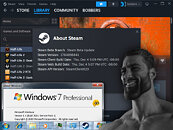 Running an unsupported operating system alongside an unofficial client poses a significant security risk. Users are always advised to keep their software updated with the latest patches to prevent security vulnerabilities. Therefore, we urge those considering trying this backported client to exercise caution and carefully consider the risks before using unofficial software.
Source:
The Bob Pony on X
The distribution comes as compact 230 MB packages hosted on w7revived.chefkiss.dev and mirrored by BobPony. Each package is accompanied by an intriguing security warning that Windows builds must be first updated to their latest versions, which happened years ago on both Windows 7 and Windows 8. A screenshot shared with the post shows Steam operating on Windows 7 with the About dialog visible and several Half-Life titles listed, indicating that core features are functioning. Community reaction has been mixed, with many users expressing gratitude for renewed compatibility.


42 Comments on Latest Steam Client Beta Unofficially Backported to Windows 7 and Windows 8
Keeping software up to date is the last approach in my viewpoint. There are far more important steps before that.
I really wonder if w8 or w7 runs on legacy hardware or up to date, supported common platforms like am4 or am5. platform which get uefi updates, etc. graphic cards which gets updates and so on.
(IIRC, that's a requirement for Chromium, integrated into Steam.)
AM2 / SktF remains the earliest AMD hardware that will run Steam, and the earliest that will run Win10x64.
The systems it would be most-interesting and fun to run it on, it remains incompatible.
If the system is UEFI compatible, just install SteamOS, Bazzite, etc.Win7x64 ran great on Pre-UEFI legacy x86-64 hardware, it's what it was meant to run with (more/less).
www.3dmark.com/fs/29046490 [16GB Vega 10 + Dual S940 Opty 880, Win7x64]
Early UEFI and 'HybridEFI' era, Windows 7 and 8 are probably your 'most-appropriate options'. (Intel 6-series chipset era, etc.)
Officially, Win7x64 is supported up to the Ryzen 3000 series with AMD 300 series chipsets.
Unofficially, people are running both XP and 7 (and W98SE) on 9800X3Ds :D
From AMD, the RX 6000 series are the last GPUs w/ 1st party Win7 support.
IMO, RX 5700 and Vega are 'about sweet spots' for near-Legacy Windows x64. HD 7970 (Tahiti), if you're multi-booting back to XP.
From nVidia, the 1080Ti and Titan Xp are the fastest nVidia GPUs w/ 1st party Win7 support.
Personally, I'd look at the 980Ti for a multi-booting build; the 780Ti's XP driver is easily modified to support the 980Ti.
474.11 driver
The wider game page layout broke video controls and full screen viewing of images. Also, a recent purchase would not appear in my library until I logged out and in again.I think the latest update may be from this year, just took this screenshot on my Win 7 rig:
This time it was an exception because since nov 25, steam beta client switched to 64bit. Latest stable is from nov 22 and has 32bit steam.exe
It isnt hard to apply same patch for newer versions
I will also open source the wrappers later this week
Thanks for porting the latest build!
I picked the "upgrade existing installation" option in the installer, and the process completed successfully. Upon re-starting Steam the icon for the client appears in the taskbar, but the app never launches.
After multiple attempts, I was able to get the client to run by launching the app again when it was already running. This would eventually bring up a mostly non-responsive dialog window showing that Steam WebHelper wasn't running. I chose to restart WebHelper and the client finally launched after some time.
In my limited testing the store could be browsed, the library and wishlist could be viewed, and the image gallery worked correctly. Notifications also work. I was able to install and uninstall a game, but the client would hang intermittently during the process.
Once again thanks for the effort @EAZYBLACK. Hopefully the next version will be more stable :)
someone reported steam taking a minute to launch when nvidia gpu
do you also happen to have nvidia
i only tested on AMD GPU sorry
Oh yea sorry i forgot to say, you need to have a 2015+ kernel update (just install sha2 KB4474419 update)
and also you need KB2999226 (Universal C Runtime Update)
not having those can cause webhelper to not launch.
Although now I've managed to start the client first try. It took about 15 minutes to launch, so I guess I just wasn't patient enough previously :laugh: Plus, it takes up to a minute to load a game page in the library.
This is on an FX-8300 at 4.5 GHz with 2400 MT/s DDR3 RAM, a SATA SSD and an HD7970.. Yes it's an old PC, but obviously there's a software issue here.
i think its having trouble loading DWrite (i have w10 dwrite dll in cef folder)
Try this patched file of chromehtml.dll (replace in bin folder of steam)
this patched file makes steam run with single process instead of many process and also disables DWrite requirement (although can add 1s delay when switching games in library, but better than nothing ig)
i will have to investigate why DWrite fails on you
I'll be happy to do more troubleshooting if you need it.