Tuesday, January 20th 2026

BenQ Launches the RD280UG Flagship Programming Monitor
BenQ, a global leader in display technology with over 20 years of professional display manufacturing expertise, today announced the RD280UG, a flagship programming monitor designed to deliver exceptional display clarity and eye comfort for programmers. Building on BenQ's RD Series philosophy of "See Clearly, Code Perfectly," the RD280UG reinforces the company's commitment to creating user-driven displays that support long-hour productivity and sustained focus.
The RD Series, introduced in 2024, is the world's first monitor line designed specifically for programmers. The BenQ 28-inch, 4K+, 120 Hz RD280UG builds on the success and trust of the RD280U/UA and RD320U/UA by enhancing programmers' most-requested features.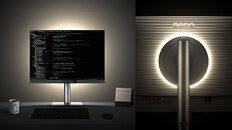

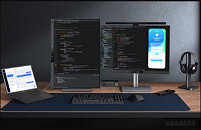
Software development demands sustained concentration and clear visual structure, yet screen glare and poor contrast often reduce visibility and increase eye strain. The RD280UG addresses these challenges with a Nano Matte Panel that minimizes reflections and glare, paired with BenQ-exclusive Coding Modes tuned specifically for text clarity across different development environments and themes, including:
The RD280UG's 120 Hz refresh rate ensures lag-free scrolling and ultra-smooth visuals, helping reduce visual fatigue during prolonged coding sessions. By minimizing lag and motion blur, the 120 Hz refresh rate makes it easier to track and navigate lines of code with greater comfort and clarity for sustained productivity. Beyond programming, the same 120 Hz performance provides ultra-smooth visuals for everyday tasks and casual gaming.
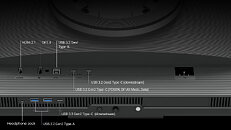
For productive programming sessions, the 3:2 aspect ratio expands vertical workspace to display more lines of code at once. With a 2000:1 contrast ratio, refined by Enhanced Local Contrast and High Pixel Contrast technologies, the RD280UG delivers sharper text, clearer shadows, and finer detail to improve readability in the IDE and provide vibrant visuals for movies, images, and games after the workday. Single-cable USB-C connectivity with up to 90 W Power Delivery further streamlines productivity by powering laptops while handling display and data through one cable, helping reduce desk clutter and set up friction.
Optimized for Long Working Sessions with MoonHalo
Designed for day-to-night comfort, the RD280UG features MoonHalo bias backlighting for balanced ambient illumination and Night Hours Protection, which uses minimum brightness technology to help reduce eye strain.
Ergonomic flexibility is supported by a ±90° rotating hinge with auto pivot, allowing easy adjustment between portrait and landscape orientations. BenQ's leading eye-care technologies support comfortable, long-term use including Visual Optimizer, auto brightness and color temperature adjustment, and TÜV certified Low Blue Light to help reduce eye strain during extended sessions. For developers working across multiple systems, the built-in KVM Switch enables seamless control of two devices using a single keyboard and mouse, supporting efficient multitasking and uninterrupted workflows.
Seamless Software Support and Control Across Platforms
The bundled software, Display Pilot 2, is fully compatible with macOS, Windows, and Linux, with robust Linux support to better serve the broader developer community. A dedicated Coding Hotkey allows programmers to instantly adjust Coding Modes, brightness, contrast, and eye-care settings, for quick customization without interrupting focus.
The BenQ RD280UG is available for pre-order at BenQ.com and select retail partners for a MSRP of $759.99.
Source:
BenQ
The RD Series, introduced in 2024, is the world's first monitor line designed specifically for programmers. The BenQ 28-inch, 4K+, 120 Hz RD280UG builds on the success and trust of the RD280U/UA and RD320U/UA by enhancing programmers' most-requested features.


"Programmers require displays designed specifically for long hours of focused work, and the RD280UG was built with their real-world visual needs in mind," said Jeffrey Hsieh, Director of the Consumer Line of Business at BenQ. "As the first brand to introduce Eye-Care Monitors, the RD280UG delivers advanced eye-care technologies, precise visuals, and a thoughtful design to support focus, comfort, and long-term productivity."Relax and Code with Clarity Using Exclusive Coding Modes
Software development demands sustained concentration and clear visual structure, yet screen glare and poor contrast often reduce visibility and increase eye strain. The RD280UG addresses these challenges with a Nano Matte Panel that minimizes reflections and glare, paired with BenQ-exclusive Coding Modes tuned specifically for text clarity across different development environments and themes, including:
- Dark Theme: Enhances readability, boosts coding speed, and sharpens debugging precision for dark theme IDE programmers.
- Light Theme: Maintains clarity while reducing eye strain for light theme IDE programmers.
- Paper Color Mode: Recreates the soft visual comfort of reading on paper, ideal for fatigued eyes.
The RD280UG's 120 Hz refresh rate ensures lag-free scrolling and ultra-smooth visuals, helping reduce visual fatigue during prolonged coding sessions. By minimizing lag and motion blur, the 120 Hz refresh rate makes it easier to track and navigate lines of code with greater comfort and clarity for sustained productivity. Beyond programming, the same 120 Hz performance provides ultra-smooth visuals for everyday tasks and casual gaming.
For productive programming sessions, the 3:2 aspect ratio expands vertical workspace to display more lines of code at once. With a 2000:1 contrast ratio, refined by Enhanced Local Contrast and High Pixel Contrast technologies, the RD280UG delivers sharper text, clearer shadows, and finer detail to improve readability in the IDE and provide vibrant visuals for movies, images, and games after the workday. Single-cable USB-C connectivity with up to 90 W Power Delivery further streamlines productivity by powering laptops while handling display and data through one cable, helping reduce desk clutter and set up friction.
Optimized for Long Working Sessions with MoonHalo
Designed for day-to-night comfort, the RD280UG features MoonHalo bias backlighting for balanced ambient illumination and Night Hours Protection, which uses minimum brightness technology to help reduce eye strain.
Ergonomic flexibility is supported by a ±90° rotating hinge with auto pivot, allowing easy adjustment between portrait and landscape orientations. BenQ's leading eye-care technologies support comfortable, long-term use including Visual Optimizer, auto brightness and color temperature adjustment, and TÜV certified Low Blue Light to help reduce eye strain during extended sessions. For developers working across multiple systems, the built-in KVM Switch enables seamless control of two devices using a single keyboard and mouse, supporting efficient multitasking and uninterrupted workflows.
Seamless Software Support and Control Across Platforms
The bundled software, Display Pilot 2, is fully compatible with macOS, Windows, and Linux, with robust Linux support to better serve the broader developer community. A dedicated Coding Hotkey allows programmers to instantly adjust Coding Modes, brightness, contrast, and eye-care settings, for quick customization without interrupting focus.
The BenQ RD280UG is available for pre-order at BenQ.com and select retail partners for a MSRP of $759.99.
15 Comments on BenQ Launches the RD280UG Flagship Programming Monitor
DP 1.4 is something I personally do not want to see ever again in 2026. DP 2.0 or better in the common old size, no USB-C etc.
The lack of 4x USB-a mechanical ports is another no go.
the lack of specs or explanation which linux kernel they use, buzzward linux was used made me a bit upset after seraching the product homepage: www.benq.com/en-us/monitor/programming/rd280ug.html
overview, compare, faq -> where are the specifications? manual? datasheet? DP 1.4 I would also hide personally in 2026, old electronics.
www.benq.eu/en-uk/monitor/programming/rd280ug/spec.html
16:10 or even some other more square-ish aspect ratio would be great as well.
I personally don't care about 120hz, but lots of folks do, so that part is fine.
Guess I will continue happily with my 42" C2. OLED is really nice for reading text during multiple hours, specially on dark themed applications. I run it at 60hz due to limitations in my USB-C KVM, but I honestly don't mind at all about higher refresh rates, specially for just reading/writing code all day long.
They have cheaper 60 Hz versions.
Pretty sweet then! Scaling issue still stands, but it's really nice nonetheless.
www.benq.eu/en-uk/monitor/programming/rd280ug/spec.html
- Power Consumption (normal)
- Power Consumption (max)
That's quite a lot. Any ideas when this display draws 250W?30 W
250 W
The other ports are listed on the spec page. So that's over 120 W just for the USB ports.
A big PSU on a monitor is quite special. Sometimes I wish I had a desk that tidy.