Tuesday, February 10th 2026

Microsoft is Refreshing Secure Boot Certificates on Millions of Windows PCs
On your Windows PC, the Unified Extensible Firmware Interface (UEFI) firmware has a Secure Boot Certificate that mandates only verified software starts the boot-up sequence. Microsoft is preparing to refresh these certificates, and the company announced that millions of Windows PCs in circulation will receive new Secure Boot Certificates in an industry-wide gradual rollout to replace aging certificates that are expiring soon. According to the latest Windows Blog, the original Secure Boot Certificates introduced way back in 2011 are reaching the end of their planned lifecycle, with the expiration date set for late June 2026. This not only mandates updating but also requires a massive staged rollout from OEMs and Microsoft's partners to ensure that all Windows devices stay secure.
According to Microsoft, this is one of the largest industry collaborations that spans the Windows ecosystem, including servicing, firmware updates, and countless device configurations from OEMs and other hardware makers. Firmware makers are at the center with their UEFI BIOS patches, which will now have to replace their aging Secure Boot Certificates. The blog also states that OEMs have been provisioning updated certificates on their new devices, with some devices from 2024 and almost all PCs from 2025 updated to support the new certificate. Interestingly, older PCs and devices that were shipped prior to these years will also be taken care of, with major OEMs providing their own guidance on updating the certificate. If you don't see your OEM offering an update, be patient as the rollout is gradual.
 For those wondering what happens if you don't upgrade your certificate, the PC will continue to run just fine with no issues for now. However, Microsoft describes this as a "degraded security state," where PCs become prone to new boot-level security vulnerabilities. These vulnerabilities are discovered very often, and they can become a weak point for systems without new certification in place. Microsoft also notes that without new Secure Boot Certificates, systems may face compatibility issues as new hardware, software, and firmware that are Secure Boot-dependent may become a point of failure. Basically, the system may face corruption and won't continue to work in the future updates unless a new certificate is applied.
Source:
Windows Blog
According to Microsoft, this is one of the largest industry collaborations that spans the Windows ecosystem, including servicing, firmware updates, and countless device configurations from OEMs and other hardware makers. Firmware makers are at the center with their UEFI BIOS patches, which will now have to replace their aging Secure Boot Certificates. The blog also states that OEMs have been provisioning updated certificates on their new devices, with some devices from 2024 and almost all PCs from 2025 updated to support the new certificate. Interestingly, older PCs and devices that were shipped prior to these years will also be taken care of, with major OEMs providing their own guidance on updating the certificate. If you don't see your OEM offering an update, be patient as the rollout is gradual.


65 Comments on Microsoft is Refreshing Secure Boot Certificates on Millions of Windows PCs
a typical low quality technical half fact of microsoft. more access and faster updates would prevent that. uefi is the problem and secure boot was never a fix. with active secure boot that cve would have given access to my data on that asus motherboard. note: i restrict to my previous motherboard. i do not bother researching how msi, gigabyte, etc handled that,
whataboutism, first search result, there are more facts to show very low quality technical expertise of microsoft in regards of amd64 platforms
cybersecuritynews.com/uefi-secure-boot-bypass-vulnerability/corruption? data corruption? because an outdated signature is used? previous tech sites claimed boxes will still boot as it was speculated the end timer was never checked or implemented.
i really wonder what is that corruption in which aspect and how do i see or notice that corruption.
In case of doubt research why ID documents like passports and national IDs from most countries have expiration dates. The reasons are pretty much the same, if extrapolated in some cases.
support.microsoft.com/en-gb/topic/registry-key-updates-for-secure-boot-windows-devices-with-it-managed-updates-a7be69c9-4634-42e1-9ca1-df06f43f360d
On my old Z97 machine which it didn't work on, Windows would completely freeze as soon it tried to do the update, that was 3 months ago ish. Changing the registry back stops it trying, so fixes it...
SecureBoot is a worthless thing.
I know because my business utilizes this facility for our signed preboot environment. It IS a useful facility in such a context.I don't know, we should probably see how well the rollout actually goes before declaring anything either way.
I have been using it for this very reason since 2012 and recommend everyone to do the same. I only know “malware” from the word itself. By the way, I also recommend using a DNS-based ad blocker.
@Onasi
If so, that answers your question; What happens when Secure Boot certificates expire in Windows 11 and Windows 10?
Deskmodder (de)
Deskmodder (de)
With a friendly smile,
Teflon Fred
This is exactly the kind of opaque non-answer I was talking about. No idea why you thought this clarifies anything pr that I was unaware of the official explanation. Cut out that patronizing bullshit. Someone said above that the “readiness” of Windows itself is controlled by a reg flag, which is all well and good, but has absolutely no bearing on how things will go on the firmware side of things.
Again - if this rollout will necessitate manual BIOS updates from a large portion of users it WILL be a shitshow. No doubt about that. Alternatively, we can face a situation down the line where people with active Secure Boot who didn’t get the new certs because of the concerns I raised suddenly find themselves with misbehaving PCs. That very well might occur. And, for everyone saying “just turn off SB, bro” - a lot of people, for example, play games that have AC requiring it being enabled and who aren’t particularly PC savvy. They aren’t going to fuck around with BIOS, no way.
I find the most fun part in the Linux Bros who think they are superior, not realizing their system is running Microsoft created and signed code to boot.As are any Linux distributions that use LVFS (all of them?)Name one case where a non-Microsoft OS was prevented from loading by software signed by Microsoft.
Just one.
First things first: if 2026 July comes, and leaves, nothing will happen to many (old, but still functional) PCs. Because those dont even have UEFI! Yes, those are stone-age, pre-2011 / pre-2010 PCs, Core2 Duos etc. Those were manufactured even before UEFI was a thing, therefore they are all completely immune to this shenanigans.
Or they already have UEFI, but has beeen using the PC in legacy BIOS compatible mode. Called as CSM mode, that is by default ON in many many BIOS system, even up until couple of years ago. Not today anymore, though.
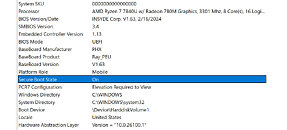
Tricky question #1: how many of you even know, if your PC is running in full UEFI mode, or in CSM mode right now? This one is a valid question actually, msinfo32.exe can tell you the answer.
Tricky question #2: If you have GPT partition table under your currently running OS, does it automatically mean your PC is operating in UEFI-mode? If you use MBR, can you still be in full UEFI mode, or not?
Or they are immune to this, as running in UEFI mode, but have that bloody Secure Boot mode never turned ON.
Note: be careful if you are messing with Secure Boot! There is an ordered list of steps that MUST be followed if you are about to enter the key database. You cannot simply just jump between the various key databases, editing one but not changing the other, cannot skip any essential step during this maintenance process (which one is essential and which one not? really good question, glad you asked!). Otherwise incorrectly changing settings in this territory is guaranteed to result in complete AND persistent boot failure. If you start working with the resolution of this issue, you can render your whole PC unbootable in a click, where not even clearing the motherboard CMOS settings can recover from. Even certain GPUs from the past 6-7 yrs have problem displaying signal, if you are in SecBoot mode! It can even happen that until the OS starts loading, you wont even get a picture on your monitor. Guess how funny it will be to enter the UEFI, if your GPU cannot display anything. And all of this, just because you turned Secure Boot ON. Have experienced it myself with an RX5700 couple of months ago. Your only hope in such situation if your CPU has iGPU, and you switch the monitor cable from the dGPU into the mothetboard HDMI connector. Too bad most of the AM4 CPUs do NOT have iGPU in them.
Tricky question #3: how many of you even know, if your PC is running in full UEFI mode, and has Secure Boot mode been turned ON? This one is easier to answer, than #1 actually, as msinfo32.exe clearly tells you whether Secure Boot is ON or Not in your currently running OS.
Ok lets move further: you may still be running an old Windows 7 (yes, I know, I know, unsecure, we are all gone die, etc.). That one doesnt even support Secure Boot. Not everyone runs Windows 11 26H2 yet...
Moving on to the confusing territory: just because your PC was manufactured before 2025/2024 (but still more recent than the above example of stone-age pre-2011 PCs), does it automatically mean, you are affected? Does a simple BIOS/UEFI update from the past 6 month takes care of this issue AUTOMATICALLY, or you still need this manual intervention?
Microsoft has done it again: to confuse ordinary people, and in this case, even ITpros! It would make a great poll here on TPU, how many people, especially ITpros feel confident about the entire Secure Boot / UEFI topics? Ordinary people are being scared about this whole 2026-july-apocalypse, forcing them to rather buying new hardware just to be on the safe side. (And as a coincidence, to speed-up Windows Copilot PC sales, if we are there!) As they honestly, dont understand a fkin word about that MSFT KnowledgeBase article. Which is no surprise, that KB article was written for IT professionals, and company-wide system administrators. Not in a clear language, with clear background explanation, that ordinary people would ever understand.
Again, microsoft forcing completely fine working hardware to be dumped into the landfill with their scare-tactics, and implanting fear and uncertainty into the minds of hundred-millions of ordinary PC users.
Its a very actual and valid topic to still talk about in the coming months.
Grub isn’t an OS anyway. You wouldn’t be able to answer the original question, would you?Oh, I just saw your use of M$. I thought I was having a discussion of the facts with a mature adult. Nevermind.
They both return "true" if everything is OK.
From: www.dell.com/support/kbdoc/en-us/000385747/how-to-check-secure-boot-certificates