Tuesday, February 10th 2026

Microsoft is Refreshing Secure Boot Certificates on Millions of Windows PCs

On your Windows PC, the Unified Extensible Firmware Interface (UEFI) firmware has a Secure Boot Certificate that mandates only verified software starts the boot-up sequence. Microsoft is preparing to refresh these certificates, and the company announced that millions of Windows PCs in circulation will receive new Secure Boot Certificates in an industry-wide gradual rollout to replace aging certificates that are expiring soon. According to the latest Windows Blog, the original Secure Boot Certificates introduced way back in 2011 are reaching the end of their planned lifecycle, with the expiration date set for late June 2026. This not only mandates updating but also requires a massive staged rollout from OEMs and Microsoft's partners to ensure that all Windows devices stay secure.

According to Microsoft, this is one of the largest industry collaborations that spans the Windows ecosystem, including servicing, firmware updates, and countless device configurations from OEMs and other hardware makers. Firmware makers are at the center with their UEFI BIOS patches, which will now have to replace their aging Secure Boot Certificates. The blog also states that OEMs have been provisioning updated certificates on their new devices, with some devices from 2024 and almost all PCs from 2025 updated to support the new certificate. Interestingly, older PCs and devices that were shipped prior to these years will also be taken care of, with major OEMs providing their own guidance on updating the certificate. If you don't see your OEM offering an update, be patient as the rollout is gradual.
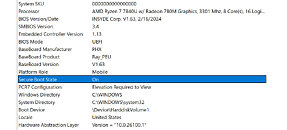
For those wondering what happens if you don't upgrade your certificate, the PC will continue to run just fine with no issues for now. However, Microsoft describes this as a "degraded security state," where PCs become prone to new boot-level security vulnerabilities. These vulnerabilities are discovered very often, and they can become a weak point for systems without new certification in place. Microsoft also notes that without new Secure Boot Certificates, systems may face compatibility issues as new hardware, software, and firmware that are Secure Boot-dependent may become a point of failure. Basically, the system may face corruption and won't continue to work in the future updates unless a new certificate is applied.
Source: Windows Blog
Add your own comment

65 Comments on Microsoft is Refreshing Secure Boot Certificates on Millions of Windows PCs

#51
Raptor_i
N3utroFyi if you want to check if your windows PC is already using the updated secure boot certificate use these commands in powershell:

([System.Text.Encoding]::ASCII.GetString((Get-SecureBootUEFI db).bytes) -match 'Windows UEFI CA 2023')

([System.Text.Encoding]::ASCII.GetString((Get-SecureBootUEFI dbdefault).bytes) -match 'Windows UEFI CA 2023')

They both return "true" if everything is OK.

From: www.dell.com/support/kbdoc/en-us/000385747/how-to-check-secure-boot-certificates
This should be a sticky, thanks for the info ... that's why reading TPU comments is a must.
Posted on Reply
#52
Dr. Dro
Raptor_iThis should be a sticky, thanks for the info ... that's why reading TPU comments is a must.
Note that this command requires administrator privileges, or it will fail to run. I got the update on Windows 10, some time ago. It's KB5073724, OS build 19045.6809. If your Windows version is this or higher, you should have the Secure Boot update installed and you should get the certificates promptly, as long as your computer is eligible.

support.microsoft.com/en-us/topic/january-13-2026-kb5073724-os-builds-19045-6809-and-19044-6809-bd960b49-050e-432f-a9d5-2454cb377fed

Posted on Reply
#53
R-T-B
EasoSo far doing tests at my work it seems it as long as your BIOS is not too outdated PC's are ready for the switch.
Same. I even had it update an old "unsupported" Ivy Bridge Thinkpad successfully. So far so good?
Posted on Reply
#54
lexluthermiester
Dr. Droas long as your computer is eligible.
That is a key point. Not all systems will be.
R-T-BSame. I even had it update an old "unsupported" Ivy Bridge Thinkpad successfully. So far so good?
Really? Wouldn't have called that.
Posted on Reply
#55
R-T-B
lexluthermiesterThat is a key point. Not all systems will be.


Really? Wouldn't have called that.
You can also fire the updated certs manually if for some reason they don't auto-update, there are numerous guides online.
lexluthermiesterReally? Wouldn't have called that.
Me neither, though I did fire the update script manually instead of waiting, so might not happen automatically.
Posted on Reply
#56
lexluthermiester
R-T-BMe neither, though I did fire the update script manually instead of waiting, so might not happen automatically.
Ok, that makes a bit more sense.
Posted on Reply
#57
R-T-B
I'm still kinda surprised it worked at all though, not gonna lie.
Posted on Reply
#58
FR3D1
Ninja Cat
@AleksandarK @Onasi
Updates for Secure Boot certificates explained
(Update March 8, 2026): Tomorrow, March 9, 2026, at 3:00 p.m., Microsoft will launch a live video explaining the updates for Secure Boot certificates. It is certainly intended more for administrators in companies, but some of you may find the information revealed there quite interesting.
Deskmodder (de)

With a friendly smile,
Fred.
Posted on Reply
#59
FR3D1
Ninja Cat
March 10, 2026—KB5079473 (OS Builds 26200.8037 and 26100.8037)
  • [Secure Boot] With this update, Windows quality updates include additional high confidence device targeting data, increasing coverage of devices eligible to automatically receive new Secure Boot certificates. Devices receive the new certificates only after demonstrating sufficient successful update signals, maintaining a controlled and phased rollout.
Windows Secure Boot Update Before Expiry

About

A simple guide and ready-to-use .reg file to manually update Windows Secure Boot UEFI CA certificates before they expire in June 2026.
I'll take the liberty of doing the update. Including repairing/cleaning up the component store. Which always seems to be necessary with Windows 11.

May the update be with you,
Fred.
Posted on Reply
#60
azrael
When the March 2026 update for Windows 10 still didn't update the Secure Boot certificates I was slightly worried. When searching for a solution (or at least an explanation) I found this. The instructions on how to *install* the certificate update and not just check for it actually helped. I still have no clue why this didn't happen automatically, though.

If anyone else is having trouble getting the certificates updated, give it a try.

Can see it's pretty similar to what @FR3D1 posted. No idea what the original source for the procedure is.
Posted on Reply
#61
:D:D
N3utroSecure boot doesn't restrict the liberty to run anything, it just makes sure that what you have decided to boot on has not been tampered with.
Not true for Windows. I have a number of Windows drivers that are self signed and have nothing to do with the boot chain. They require 'testsigning' to be set which is disabled when secure boot is enabled.
Posted on Reply
#62
Visible Noise
:D:DNot true for Windows. I have a number of Windows drivers that are self signed and have nothing to do with the boot chain. They require 'testsigning' to be set which is disabled when secure boot is enabled.
That’s because you aren’t a CA.
Posted on Reply
#63
:D:D
Visible NoiseThat’s because you aren’t a CA.
BCDEdit testsigning option and self signed drivers has nothing to do with certificate authorities.
Posted on Reply
Add your own comment
Nov 20th, 2026 15:59 PST change timezone

New Forum Posts

Popular Reviews

TPU on YouTube

Controversial News Posts