Thursday, April 2nd 2026

Windows Security App Gains Secure Boot Certificate Status Ahead of Major Certificate Refresh
On your Windows PC, the Unified Extensible Firmware Interface (UEFI) uses Secure Boot certificates to ensure that only trusted software initiates the startup sequence. The certificates currently in use were originally issued in 2011 and are set to expire in late June 2026. To address this, Microsoft has been quietly rolling out updated certificates through Windows Update. Starting in April 2026, users can check their device's status via a new indicator in the Windows Security app. By navigating to Device security and then Secure Boot, a color-coded badge will show whether your device is fully updated, awaiting an update, or requires immediate attention.
The badge system is simple yet significant. A green checkmark indicates that the new certificates are installed and no further action is needed. A yellow caution badge, which will start appearing in May 2026, means the update is either pending or has been blocked by a hardware or firmware limitation. A red stop icon is the most serious state and could appear as early as June 2026, once older certificates start expiring. When this occurs, the device will no longer be able to receive critical boot-level security updates. The same status is reflected in the Windows Security system tray icon, so warnings are visible even when the app is closed.
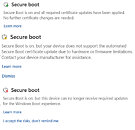 For most users, the process is automatic, and keeping Windows Update active is all that is required. Devices from 2025 are largely covered, and most 2024 hardware has been addressed as well. Older machines will be updated gradually, with major OEMs providing firmware guidance as needed. Microsoft directs users who encounter issues to aka.ms/getsecureboot for further assistance. While it is technically possible to dismiss the yellow or red warnings, Microsoft advises against it, as devices without the updated certificates are left in a degraded security state, making them more vulnerable to boot-level exploits and potentially incompatible with future Windows security patches.
Sources:
Microsoft, Thanks to FR3D1 for the tip!
The badge system is simple yet significant. A green checkmark indicates that the new certificates are installed and no further action is needed. A yellow caution badge, which will start appearing in May 2026, means the update is either pending or has been blocked by a hardware or firmware limitation. A red stop icon is the most serious state and could appear as early as June 2026, once older certificates start expiring. When this occurs, the device will no longer be able to receive critical boot-level security updates. The same status is reflected in the Windows Security system tray icon, so warnings are visible even when the app is closed.


8 Comments on Windows Security App Gains Secure Boot Certificate Status Ahead of Major Certificate Refresh
secure boot is questionable for your "bring your own device" anyway. for a corporate device my opinion does not matter. the corporation is responsible for updates, software rollout and the hardware in question.
msi and asus are very slow with uefi updates. what does this really bring for beenefits when i usually rewrite the bootfiles several times per week and the uefi was replaced every few months. it is a windows issue again not to do checksum on the vfat or "fat32" based - everyone can change boot files.
i usually rewrite those bootfiles multiple times per week / at least per month as i suspect cve hidden in the source code which got silently fixed.
windows should not be allowed to have low level access right to write firmware. remove that feature totally as amd did the same with their graphic cards and the issue is fianlly solved.
wrong correction measures for a most often windows only issue, but some issues are generic as amd refuses to implement coreboot, libreboot or any other similar alternatives
i suspect the anti cheat measures are the new windows keys for the bad feature secure boot
2026-03-20: www.msi.com/Motherboard/X670E-GAMING-PLUS-WIFI/support
I have updated "cert" for windows 11 but apparently it wont be applied? till get get firmware update which means bios update which my z170 isnt getting bios update. I also read things like I need to "disable" or reset secure boot "keys" before anything would happen
No person is gona "contact" there hw vender about cause most people dont even know what this, the wont been bother unless there system stops working, and funny hah thing about updates not being pushed to "systems" if it cant be updates is, most people wont care cause windows 11 updates have become joke and running meme over past 1+ years cause "issues"