Wednesday, February 11th 2026

MSI Afterburner 4.6.7 Beta 2 Adds 16-Pin GPU Protection and RTX 5090 Lightning Support
MSI has released MSI Afterburner 4.6.7 Beta 2, adding support for its upcoming GeForce RTX 5090 Lightning series and introducing new PSU-level protection features tied to 16-pin (12VHPWR / 12V-2×6) power connectors. The headline addition is integration with MSI's GPU Safeguard+ system, available on select MEG Ai1x00 and MPG Ai1x00TS power supplies. A new PSU.dll plugin enables telemetry monitoring directly inside Afterburner, including voltage, current, power, temperature, efficiency, and fan speed. Supported MPG units can also report per-pin current data for 12VHPWR and 12V-2×6 connectors. If overcurrent or current imbalance is detected on the 16-pin connector, the app will load reduce the GPU power limit (typically to 75% on NVIDIA GPUs, 25% on AMD GPUs) and display an on-screen warning, allowing users to inspect the cable connection. Sound alerts can also be enabled.
Beyond PSU integration, Afterburner 4.6.7 Beta 2 updates the Voltage/Frequency curve editor with zoom and pan controls, adjustable node sizes, and improved curve manipulation with preserved per-point offsets. While adding support for upcoming RTX 5090 Lightning cards in advance is nice, the more notable addition is the monitoring-to-action pipeline that links PSU connector telemetry directly to automatic GPU power reduction in case of a fault.
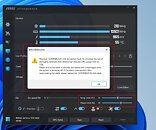
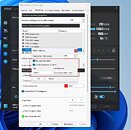
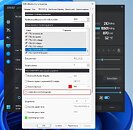 Here is the changelog for MSI Afterburner 4.6.7 Beta 2
Sources:
MSI (product page), via Videocardz
Beyond PSU integration, Afterburner 4.6.7 Beta 2 updates the Voltage/Frequency curve editor with zoom and pan controls, adjustable node sizes, and improved curve manipulation with preserved per-point offsets. While adding support for upcoming RTX 5090 Lightning cards in advance is nice, the more notable addition is the monitoring-to-action pipeline that links PSU connector telemetry directly to automatic GPU power reduction in case of a fault.


- Added MSI RTX 5090 Lightning cards support
- Improved Voltage/Frequency curve editor:
- Default size of V/F nodes is now adjustable via the configuration file, so you can make nodes bigger if the default node size is too small and uncomfortable for your eyes
- Now you may zoom the work area of the V/F curve editor window with the mouse wheel in 100%-500% range. The size of V/F nodes is also zoomed in this mode.
- Now you may pan the work area of the V/F curve editor window by pressing the right mouse button and dragging the work area with the mouse cursor.
- Now you may restore the default view mode and reset the zoom and pan position of the V/F curve editor with the <V> keyboard shortcut.
- Improved functionality of linear voltage curve interpolation mode with fixed anchor point (<Ctrl> + node dragging). Now this mode can be applied to selection; the farthest node inside the selected range is used as an anchor point in this mode.
- Added arbitrary linear interpolation mode. Now you may select a source node and press the <I> key to activate arbitrary interpolation mode, the source node will start flashing to indicate started interpolation process. After selecting the source node simple click the destination node to finalize the process. This will result in generating linearly interpolated frequency offsets between source and destination nodes.
- Improved functionality of V/F curve movement with preserved per-point offsets (<Alt> + node dragging). Now this mode can be applied to the selection
- Added command line switch for loading predefined emergency profile with lowered GPU power consumption (75% power limit on NVIDIA GPUs, -25% on AMD GPUs). A new command line switch can be selected inside the predefined applications list when you manually configure a command line-based action for an alarm in the hardware monitoring module
- Added command line switch for displaying a custom text message when applying a profile
- Improved monitoring plugins:
- Now the plugins can specify string names for enum values for a data source, e.g., "No, Yes" or "Safe, Alarm" for binary 0/1 values. Such string names are being used to interpret enum values displayed in the On-Screen Display.
- Now the plugins can customize the appearance of critical threshold-related options for some specific hardware monitoring data sources and replace "Alarm when value is out of range" options inside the "Monitoring" tab with a single custom checkbox. Plugins can use such functionality to provide a simplified one-click way to enable pre-configured critical thresholds and alarm settings for some specific data sources.
- Added new PSU.dll plugin:
- New plugin provides native hardware monitoring support for MSI MEG Ai1x00 and new MSI MPG Ai1x00TS power supplies
- New plugin provides traditional PSU 12 V / 5 V / 3.3 V voltages, currents, output power, efficiency, temperature, and fan speed monitoring functionality on MSI MEG Ai1x00 series power supplies and additional per-pin current monitoring for 12VHPWR/12V-2x6 connectors on new MSI MPG Ai1x00TS power supplies.
- New MSI MPG Ai1x00TS power supplies with per-pin 12VHPWR/12V-2x6 current monitoring support the plugin, which also provides two additional alarm sensors, which report 0 when each connector pin's current is in a safe range and 1 when at least one pin's current reach critical threshold or the difference between any two pins is higher than a critical delta. With such additional alarm sensors, you do not need to monitor each 12VHPWR/12V-2x6 pin's current independently and can easily detect overcurrent or current imbalance state by monitoring just a single alarm sensor. The plugin provides both PSU firmware-based and software-based alarm sensor implementations. For software-based alarm sensor implementation, power users may redefine the maximum current threshold and the maximum current difference values via editing the plugin's configuration file
- 12VHPWR/12V-2x6 alarm sensors can be used in conjunction with MSI Afterburner's programmable critical thresholds supported by a hardware monitoring module. When you set a critical threshold for such a sensor, you may see alarms from 12VHPWR/12V-2x6 overcurrent or current imbalance in the monitoring window, in the On-Screen Display, enable sound alarm, load some specific emergency MSI Afterburner profile (e.g., a profile with drastically lowered power limit), perform emergency system shutdown, and so on
- 12VHPWR/12V-2x6 alarm sensors use the new functionality of monitoring plugins to simplify the process of configuring critical thresholds and alarm settings associated with alarm sensors. The new "Enable GPU Safeguard+" option is displayed for the alarm sensors instead of "Alarm when value is out of range", so beginners can easily enable pre-configured protective features with a single click. The following features are automatically enabled when you tick the GPU Safeguard+ checkbox:
- "Play sound on alarm" option is being enabled.
- "Launch application on alarm" is being enabled, and MSI Afterburner is configured to launch itself to load the emergency profile with reduced GPU power limit and display a notification message to inform the user about a potential 12VHPWR/12V-2x6 connection fault.
- Experienced users can configure the alarm manually and customize it further, e.g., disable alarm sound, apply a different custom-made emergency profile with even lower GPU power limit, and additional GPU downclocking, and so on
5 Comments on MSI Afterburner 4.6.7 Beta 2 Adds 16-Pin GPU Protection and RTX 5090 Lightning Support
MPG Ai1600T-PCIE5 does look nice for an 80 Titanium/Cybnetics Titanium unit though, but its a bit expensive (US $600+), but does have a 12 year warranty. Probably worth it for heavy workloads.
They won't be cheap, either - the previous Ai1600T model is $769. For that price you could buy a Seasonic TX-1600 and a Thermal Grizzly WireView Pro II.