Friday, March 20th 2026
IceWhale Launches ZimaCube 2 Compact NAS Series
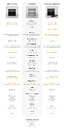
The ZimaCube 2 compact NAS and mini-server platform from IceWhale has been announced and is now listed for pre-orders. The lineup is built around 12th Gen Intel Alder Lake processors and includes a standard model with an i3-1215U CPU, a Pro variant with the i5-1235U processor, and a Creator Pack with added GPU support. Measuring 240 x 221 x 220 mm, it's compact but roomy enough to handle high-end configurations without feeling cramped. In terms of storage, you will get six bays supporting 3.5-inch or 2.5-inch drives, either SATA III or NVMe, and up to four M.2 slots for additional capacity. Total storage can reach 164 TB depending on configuration. Expansion includes two PCIe slots, a full-size PCIe 4.0 x16 (physically x4 lanes) for GPUs, and a PCIe 3.0 x8 (physically x2). The latter supports network cards or NVMe expansion. Connectivity is solid with dual Thunderbolt 4 ports, four USB 3.0 Type-A ports, two 2.5 GbE Ethernet ports, plus optional 10 GbE on higher models. HDMI and DisplayPort outputs are included for display support.
As an operating system, it runs ZimaOS Plus, a Linux-based OS optimized for self-hosted services like file storage, media servers, virtual machines, and containerized workloads. The base unit starts at $799, equipped with 8 GB of DDR5 RAM, a 256 GB NVMe SSD, and an Intel Core i3-1215U. The Pro model is priced at $1,299 and features the more powerful i5-1235U CPU along with 16 GB of memory. For users needing higher performance in virtualization, rendering, or machine learning tasks, a Creator Pack version is available for $2,499, this includes the same Core i5 processor, 64 GB of DDR5 RAM, a 1 TB SSD, and an NVIDIA RTX Pro 2000 GPU.


 The base model is silver; the Pro version comes in black. Pre-orders are now live on IceWhale website, with shipping expected later this year.
Sources:
ZimaSpace, via Notebookcheck
As an operating system, it runs ZimaOS Plus, a Linux-based OS optimized for self-hosted services like file storage, media servers, virtual machines, and containerized workloads. The base unit starts at $799, equipped with 8 GB of DDR5 RAM, a 256 GB NVMe SSD, and an Intel Core i3-1215U. The Pro model is priced at $1,299 and features the more powerful i5-1235U CPU along with 16 GB of memory. For users needing higher performance in virtualization, rendering, or machine learning tasks, a Creator Pack version is available for $2,499, this includes the same Core i5 processor, 64 GB of DDR5 RAM, a 1 TB SSD, and an NVIDIA RTX Pro 2000 GPU.


14 Comments on IceWhale Launches ZimaCube 2 Compact NAS Series
Zima has done a few strange boards on Kickstarter over the years, all very weird, custom stuff.
As for ECC, not supported by the CPU, so it would be quite pointless and just add cost for nothing. Keep in mind that most consumer NAS devices don't have ECC support, large due to the Intel CPUs used, not having support for it.
Meanwhile I just bought a used B150M + CPU for $50, uses 15 watts in idle, could probably force it under 10 watts with a pico psu. Put in a x550 or AQC113 network card, an ASM1166 SATA card, and I have a home made NAS for a third of the price.
Yes, anyone can hobble together a cheap NAS, but a DIY NAS will never have some of the features a purpose built NAS has.Yeah, this is the problem, as all the Nxxx CPUs that end up in NAS devices don't support ECC, nor does the mobile CPUs which seems to be used by almost all the NAS makers these days.
I do believe there are a few too many paranoid home NAS users out there though, as it's not like there are a lot of reports of people detecting that their data has been damage due to lack of ECC memory in computers or phones.
We have a review of Ugreen's NASync iDX6011 Pro coming next week, it sort of blows these out of the water feature wise. The only thing it doesn't have is that nifty seventh drive bay for the M.2 drives.
AMD is not great either, but at least you can shop around for a motherboard with ECC baked in with a standard chipset (without having to pay 2x or 3x for the W variant), asrock is usually the safest bet, some gigabyte boards as well.
Hot-swappable drive bays, yes, you can do this on a DIY NAS, but it's not cheap and it requires that you have four or more 5.25" drive bays in your case.
Sure, there are a handful of mini-ITX cases on the market that comes with a backplane and drive caddies as well, but they don't come cheap and aren't really readily available in many countries.
The integration of all the other hardware, but maybe you don't care about this either.
The OS, as the NAS operating systems are quite different from the DIY options.
Support, which you might not need, but most consumers do.
On higher-end models you obviously get features like Thunderbolt/USB4 and more recently, even OCuLink, but these probably don't matter to most people.
There's also things like memory card readers and one button backup on some models as well.
I ran my DIY NAS for over seven years, but it was in an actual NAS chassis that I acquired from a company in Taiwan, but it's a chassis that you can't buy as a consumer.
Not the best picture of it, but it was a very tight fit to get it all in. Unfortunately the hot swappable drive bays still required SATA cables to the motherboard and those were the only ones I had at the time.
Yes, I squeezed in a 120 mm liquid cooler in the case, as it was the only cooler that really fitted in the tight space. I swapped it for a better model a handful of years later.
Compared to a purpose built NAS, it's still kind of a mess and I had to squeeze in a couple of slim-line 120 mm fans to help cool the drives.
It's still about 30% bigger than purpose built 4-bay NASes though.
The OS side of things is more murky, I would not use or thrust any of the built in stuff besides maybe synology, so a diy or purpose built would be the same for me, it would have to be able to run one of the popular alternativies or bare linux.
Both TerraMaster and Ugreen allow you to run whatever OS you want, it's not all that hard to do either.
They're paying for a complete package, with support.
At least those two companies gives you the option to relatively easily install your own OS, unlike the traditional NAS brands and I presume that is the case with this product as well.