Monday, May 25th 2026

Microsoft Copilot Returns as a Sidebar in Windows 11
Microsoft is still experimenting with how to integrate its Copilot AI into the Windows 11 operating system, and the company seems determined to make its AI companion a primary feature on the desktop. According to a change that is gradually rolling out, Copilot now appears as a sidebar application, returning to the original form that Microsoft advertised back in 2024. By default, the first version of Copilot was a standalone application. However, Microsoft has updated the application to include an option to dock Copilot as a sidebar, which pushes all other applications aside. This change aims to increase product visibility and encourage users to discover any productivity benefits from the application. The new Copilot AI sidebar can be docked to either the left or right side, depending on user preference. In response, Windows 11's UI automatically resizes and moves desktop applications to accommodate the sidebar.
For those who remember, when Copilot launched in 2024, its original design was as a sidebar application, which was later changed to a standalone desktop design. After several iterations, we are now back to the original design, which is more integrated with desktop context menus, applications, icons, and other UI elements in Windows 11. The new design can be seen below, courtesy of Windows Latest.
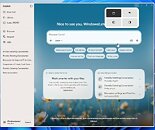 Fortunately, Microsoft now also offers two distinct ways to remove the Copilot application. One method involves a registry edit, while the other is a group policy setting, which will help system administrators remove Copilot from all enterprise systems.
The first method is a Windows Registry edit. This involves opening the Registry Editor, navigating to "HKEY_CURRENT_USER\Software\Policies\Microsoft\Windows," right-clicking on the Windows key, selecting New > Key, and naming the new key "WindowsAI." Next, users should go to the "HKEY_CURRENT_USER\Software\Policies\Microsoft\Windows\WindowsAI" path, right-click on the right side, select New > DWORD (32-bit), name it "RemoveMicrosoftCopilotApp," then double-click the new entry and set the value to one (1). This should instruct Windows to remove the Copilot AI app and its elements, which should be visible after a restart.
The second method is through a group policy setting. Users can navigate to User Configuration > Administrative Templates > Windows Components > Windows AI and remove the Microsoft Copilot App. This only works if users did not install the application themselves.
Sources:
Windows Latest #1, Windows Latest #2
For those who remember, when Copilot launched in 2024, its original design was as a sidebar application, which was later changed to a standalone desktop design. After several iterations, we are now back to the original design, which is more integrated with desktop context menus, applications, icons, and other UI elements in Windows 11. The new design can be seen below, courtesy of Windows Latest.


The first method is a Windows Registry edit. This involves opening the Registry Editor, navigating to "HKEY_CURRENT_USER\Software\Policies\Microsoft\Windows," right-clicking on the Windows key, selecting New > Key, and naming the new key "WindowsAI." Next, users should go to the "HKEY_CURRENT_USER\Software\Policies\Microsoft\Windows\WindowsAI" path, right-click on the right side, select New > DWORD (32-bit), name it "RemoveMicrosoftCopilotApp," then double-click the new entry and set the value to one (1). This should instruct Windows to remove the Copilot AI app and its elements, which should be visible after a restart.
The second method is through a group policy setting. Users can navigate to User Configuration > Administrative Templates > Windows Components > Windows AI and remove the Microsoft Copilot App. This only works if users did not install the application themselves.
92 Comments on Microsoft Copilot Returns as a Sidebar in Windows 11
No lessons learned, just moving along with missing the point until you actually lose the market. Like Windows Phone did (eventually).
Let's go, Microsoft, that bubble isn't going to pop itself, really.
they have to sell it most likely as there are so many copilot services available, afaik around 90 different copilot modules
if they have the same vision as "gamers nexus" has shown recently with the nvidia news piece - they have to integrate it so everyone has a ai personal computer. they talked about that everyone uses soon only an ai personal computer. // that concept was really news to me before i watched that gamers nexus video a few hours ago (on youtube of course)
We know that is not happening anywhere. :laugh:
(WGOS is the Walled Garden Operating System)You mean inference? There won't be much learning/training on our PCs with RAM smaller than... what's the proper unit of measure again... a kilowatt.To be fair, they counted everything with "Copilot" in the name, up to and including the Copilot key.
But a $200 license you'd expect nothing less, and Microsoft has a dang long way to go to being a "good" OS---this doesn't excuse Microsoft's neglect of it's users and the severely off-putting blind-deaf-and-dumb forcing of AI into everything and calling it innovation. It's not innovation; its a product they couldn't sell so they forced it into what they could sell.
Microslop just doesn't get it. They need to figure out how to make a product that is actually appealing to the users and how to offer it in a way, and on terms, that people will actually want to use it and perhaps even pay for it. Shoving useless trash forcefully ain't gonna work, I'm afraid.
Gemini 3.5 flash is a downgrade over 3.1
Retrun of the bad,
Return of the bad,
It only made me mad
the good, the bad and the ugly. So which one was the bad? the good? The ugly is obvious Windows 11. the good was windows 2000. The bad was Windows XP
-- in reference to a movie: en.wikipedia.org/wiki/The_Good,_the_Bad_and_the_Ugly
Then you have the option of the endless class: time: ext: patterns nobody knows. class:folder time:yesterday WTF is that?
Not to mention system files.
Easy things you want to do like finding some old receipts or invoices its almost impossible, but you can ask Copilot to generate a puppy driving a ferrari.
Absurd times.
(20 years ago)
wasn'tisn't the worst. Itwasis the baddest.Windows is already full of "optional" features that nobody uses so MS knows for a fact if they want you to use their stuff they have to do whatever they can to push it down your throat.
The best we can hope for is a way to uninstall that crap without bricking the OS.
The second best we can hope for is a way to disable that crap without bricking the OS.
The third and final option is to welcome the brainwashing and accept that all MS does is born out of the infinite love they have for their users. We shall open our souls and our wallets and hold nothing back in our devotion to our corporate overlord. All hail MS!!!! :roll:
WP was also more strict on hardware requirements, but thanks to that, their 100€ entry-level phones were actually usable. which is still something that isn't true for Android. I used a 120€ Redmi A3 last year, and that thing is hot garbage (basic operations are putting that phone on its knees).
They mostly failed because they refused to follow the trend and thought that people wanted the same old Windows mobile phones rather than the keyboardless slab of glass that Apple (and eventually Google) sold.
With Copilot, they are jumping on the trend...just not understanding that people would rather directly use ChatGPT rather than Copilot as a proxy of ChatGPT. People don't know that using Copilot is basically the same as using ChatGPT. Microsoft just got zero trust when it comes to making new consumer stuff beyond Windows and Office. (XBox being a slight anomaly. Seriously, their failure rate of diversifying beyond Windows and Office for the consumer market is insanely high. If they didn't jump into the cloud, they would have probably been bought by now)
Another very interesting thing is how the company will defend its EU presence in the near future. The acceptance of Azure is dropping like a stone in top tier business and government. For anything mission critical, its likely to get replaced.
Once a company gets that big it takes a very specific combination of factors --a literal miracle-- for it to go down. Case in point: IBM. Once a name everyone knew, now pretty much faded from the collective memory. Ask anyone born this millenium about them and 99 times out of 100 you'll get a "Huh?". Now look at their market cap. Can you really call them irrelevant? And MS has made a point of staying on top of every new trend no matter how stupid. Siri? Cortana! Skype? Not any more, use Teams instead! Google Chrome?
Crappy EdgeChromium Edge! AWS? Azure! ChatGPT? Copilot! If anything they're now reacting faster than ever to new tech, which completely rules out techonological obsolescence. That leaves bankrupcy . . . not happening.