Monday, May 25th 2026

Microsoft Copilot Returns as a Sidebar in Windows 11
Microsoft is still experimenting with how to integrate its Copilot AI into the Windows 11 operating system, and the company seems determined to make its AI companion a primary feature on the desktop. According to a change that is gradually rolling out, Copilot now appears as a sidebar application, returning to the original form that Microsoft advertised back in 2024. By default, the first version of Copilot was a standalone application. However, Microsoft has updated the application to include an option to dock Copilot as a sidebar, which pushes all other applications aside. This change aims to increase product visibility and encourage users to discover any productivity benefits from the application. The new Copilot AI sidebar can be docked to either the left or right side, depending on user preference. In response, Windows 11's UI automatically resizes and moves desktop applications to accommodate the sidebar.
For those who remember, when Copilot launched in 2024, its original design was as a sidebar application, which was later changed to a standalone desktop design. After several iterations, we are now back to the original design, which is more integrated with desktop context menus, applications, icons, and other UI elements in Windows 11. The new design can be seen below, courtesy of Windows Latest.
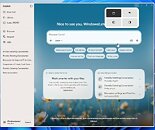 Fortunately, Microsoft now also offers two distinct ways to remove the Copilot application. One method involves a registry edit, while the other is a group policy setting, which will help system administrators remove Copilot from all enterprise systems.
The first method is a Windows Registry edit. This involves opening the Registry Editor, navigating to "HKEY_CURRENT_USER\Software\Policies\Microsoft\Windows," right-clicking on the Windows key, selecting New > Key, and naming the new key "WindowsAI." Next, users should go to the "HKEY_CURRENT_USER\Software\Policies\Microsoft\Windows\WindowsAI" path, right-click on the right side, select New > DWORD (32-bit), name it "RemoveMicrosoftCopilotApp," then double-click the new entry and set the value to one (1). This should instruct Windows to remove the Copilot AI app and its elements, which should be visible after a restart.
The second method is through a group policy setting. Users can navigate to User Configuration > Administrative Templates > Windows Components > Windows AI and remove the Microsoft Copilot App. This only works if users did not install the application themselves.
Sources:
Windows Latest #1, Windows Latest #2
For those who remember, when Copilot launched in 2024, its original design was as a sidebar application, which was later changed to a standalone desktop design. After several iterations, we are now back to the original design, which is more integrated with desktop context menus, applications, icons, and other UI elements in Windows 11. The new design can be seen below, courtesy of Windows Latest.


The first method is a Windows Registry edit. This involves opening the Registry Editor, navigating to "HKEY_CURRENT_USER\Software\Policies\Microsoft\Windows," right-clicking on the Windows key, selecting New > Key, and naming the new key "WindowsAI." Next, users should go to the "HKEY_CURRENT_USER\Software\Policies\Microsoft\Windows\WindowsAI" path, right-click on the right side, select New > DWORD (32-bit), name it "RemoveMicrosoftCopilotApp," then double-click the new entry and set the value to one (1). This should instruct Windows to remove the Copilot AI app and its elements, which should be visible after a restart.
The second method is through a group policy setting. Users can navigate to User Configuration > Administrative Templates > Windows Components > Windows AI and remove the Microsoft Copilot App. This only works if users did not install the application themselves.
92 Comments on Microsoft Copilot Returns as a Sidebar in Windows 11
Can't help it. Those rhymes brought old Finnish death(?) metal band Deathchain to my memories...
(Lyrics at Approx 0:40)
"
Serpent of the deep,
Serpent of the deep,
Serpent of the deep,
Awake from eternal sleep.
"
And no. I don't want AI on anything by default.
W11 works worse and worse and takes more and more memory while memory is scarce and expensive.
ORG CHARTS
Would it not make much more sense for an OS, to give the User the ability to load the LLM locally that they want to use into the Copilot structure?
Like Copilot being just the shell integration for AI, then the User can decide what AI they want to use with it, or if they even want to use it at all!
I think that is how it should have been from the beginning.
It is basically like it was with the Browser thing. People should be allowed to use the Browser they want to use! And i think by AI it should be based on the same logic!
I don't want to sound I defend MS's version of AI, but I have people around me paying for Chat GPT others for Copilot, perhaps there are fans of Gemini as well. You have a choice, but I guess you mean with fresh install of Win11 you get Copilot built-in app like Windows explorer in the previous years.
But MS is forcing you to have its own AI integrated into the OS. And that is just WRONG!
Narrowly specialized models like those used in image editing apps to remove noise or isolate the subject are only few hundred MBs and can run on a CPU, but general purpose LLMs, that "can answer any questions", are normally over 10 GB and require a powerful GPU or NPU. There are smaller ones but they're not nearly as usable.
For someone used to ChatGPT or Gemini local LLMs would be inadequate and disappointing, assuming it would even run. We're not there yet.
Aaaaaand.... going back on topic: none of this matters. What matters is all this AI stuff, local or not, must be optional, not installed by default and not baked in into the system and not running all the time, so people who don't want it won't have to jump through hoops to remove it. There needs to a single, simple, obvious, no dark patterns option during the OS installation or setup to remove all AI. Not to "disable it" but to remove all AI software from my PC if I choose not to use it and it must never be installed again.
An optional, standalone app would be fine and suficient for most, but no integrations, no sidebars.
If CoPilot isn't running calculations locally, how can it hog so much memory except by being pile of shit?
www.windowslatest.com/2026/04/05/new-copilot-for-windows-11-includes-a-full-microsoft-edge-package-uses-more-ram/Oh, they have direction.... Dictated by MBA scammer: Making everything more shittier and sloppier bloat.There's error in that image: Devolution would be closer to what Microslop has been doing to icons.
At this rate it won't take long for ASCII graphics to look better.
Why would anyone want to not use it, especially for security reasons?
You know, its the same thing as 'but look at Tata Steel'... yeah. Whatever :) I'm sure I use their steel in various places. But I don't really know, and don't need to care. Irrelevant.
Nvidia similarly... those trillions get moved in business lines that are of zero relevance to us as consumers. At the same time, Nvidia loses relevance for us, because they price their shit out of comfort zone.Honestly all I see is a parallel with the US government, the tech bros at large, and all their ventures into the unknown.
We're just looking at the top 1% grabbing whatever the fuck they can get their hands on, don't try to find too much reason behind it. Bean counters said this was the way forward, so they go forward. Ethics, vision? Neh. Just cold hard cash, and short term planning, and hard lobbying on a strategic level to punch the world into submission, supported by a US government that has become anti-everyone else.
Microsoft is just a pawn. Everything we get these days is forever in beta, subject to change, and irresponsible as fuck in terms of its effects on society. If it adds to their idea of control and power over information, it gets done.
Cut ties as much as you possibly can, as fast as you possibly can, I say.
Has any of that made MS irrelevant? No, absolutely not. If anythig it's made more relevent because instead of not wasting time thinking about who's software I'm using I have to be even more aware of it and waste both money and my limited time looking for alternatives.
The only way to actually get rid of MS is to completely switch to a different OS and by complete I mean not using anything that MS has touched, ever. Once enough people have done that MS will be irrelevant in the consume space.
Will that ever happen? Everything is possible, so maybe.
Will that happen any time soon? No.
tl;dr You can start calling MS irrelavant once Windows marketshare drops and stays below 5%. Keep in mind at that point they'll be about as relevant as Linux is today.
OpenShell is entirely the better option.No, what's making them increasingly irrelevant is things like the following;
- all of that is just a drop in the bucket
- every year this century has been the year of Linux
- asking about Linux is not the same a migrating to Linux and the 25% (that you're proudly extrapolating to the whole world) will get home try some games, fail, try some guides, fail again and then proceed to format the drive and install Windows and you'd be lucky if 0.1% actually keeps using Linux.
Like I said: let me know when Linux surpases Windows in marketshare. And I'll sit while I wait because that's not going to happen any time soon because Linux isn't fighting against Windows. Linux is fighting against social innertia. And don't get me wrong, I'd love it if everyone and their mother suddenly decided Windows was no good because that's the only way MS will actually get serius about it except everyone and their mother are busy watching tiktok videos and instragram reels and don't give a crap about MS or Windows and even less about Linux. Every time you hear some geek say "I changed my mother's laptop from Windows to Linux and she didn't notice" what you are actually hearing is "she didn't care enough to notice".Let me ask you something. When you said "my shop" does it mean you either own or work at a bussiness selling computer hardware, correct?
Do you sell pre-builts?
Does the customer have a choice between Linux and Windows (same hardware)?
Do you sell the Linux and the Windows variants at the same price?
The reason I'm asking is hardware shops usually have the Windows variant at a higher price than the No-OS/DOS/Linux variant and the difference is usually large enough for customers to notice. Less tech-savy customers usually go for the Windows variant but more informed customers might go for the other variant knowing they'll pay less and can throw a Windows Home on top for free.
So?