Monday, May 25th 2026

Microsoft Copilot Returns as a Sidebar in Windows 11
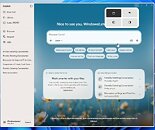
Microsoft is still experimenting with how to integrate its Copilot AI into the Windows 11 operating system, and the company seems determined to make its AI companion a primary feature on the desktop. According to a change that is gradually rolling out, Copilot now appears as a sidebar application, returning to the original form that Microsoft advertised back in 2024. By default, the first version of Copilot was a standalone application. However, Microsoft has updated the application to include an option to dock Copilot as a sidebar, which pushes all other applications aside. This change aims to increase product visibility and encourage users to discover any productivity benefits from the application. The new Copilot AI sidebar can be docked to either the left or right side, depending on user preference. In response, Windows 11's UI automatically resizes and moves desktop applications to accommodate the sidebar.
For those who remember, when Copilot launched in 2024, its original design was as a sidebar application, which was later changed to a standalone desktop design. After several iterations, we are now back to the original design, which is more integrated with desktop context menus, applications, icons, and other UI elements in Windows 11. The new design can be seen below, courtesy of Windows Latest.
 Fortunately, Microsoft now also offers two distinct ways to remove the Copilot application. One method involves a registry edit, while the other is a group policy setting, which will help system administrators remove Copilot from all enterprise systems.
The first method is a Windows Registry edit. This involves opening the Registry Editor, navigating to "HKEY_CURRENT_USER\Software\Policies\Microsoft\Windows," right-clicking on the Windows key, selecting New > Key, and naming the new key "WindowsAI." Next, users should go to the "HKEY_CURRENT_USER\Software\Policies\Microsoft\Windows\WindowsAI" path, right-click on the right side, select New > DWORD (32-bit), name it "RemoveMicrosoftCopilotApp," then double-click the new entry and set the value to one (1). This should instruct Windows to remove the Copilot AI app and its elements, which should be visible after a restart.
The second method is through a group policy setting. Users can navigate to User Configuration > Administrative Templates > Windows Components > Windows AI and remove the Microsoft Copilot App. This only works if users did not install the application themselves.
Sources:
Windows Latest #1, Windows Latest #2
For those who remember, when Copilot launched in 2024, its original design was as a sidebar application, which was later changed to a standalone desktop design. After several iterations, we are now back to the original design, which is more integrated with desktop context menus, applications, icons, and other UI elements in Windows 11. The new design can be seen below, courtesy of Windows Latest.


The first method is a Windows Registry edit. This involves opening the Registry Editor, navigating to "HKEY_CURRENT_USER\Software\Policies\Microsoft\Windows," right-clicking on the Windows key, selecting New > Key, and naming the new key "WindowsAI." Next, users should go to the "HKEY_CURRENT_USER\Software\Policies\Microsoft\Windows\WindowsAI" path, right-click on the right side, select New > DWORD (32-bit), name it "RemoveMicrosoftCopilotApp," then double-click the new entry and set the value to one (1). This should instruct Windows to remove the Copilot AI app and its elements, which should be visible after a restart.
The second method is through a group policy setting. Users can navigate to User Configuration > Administrative Templates > Windows Components > Windows AI and remove the Microsoft Copilot App. This only works if users did not install the application themselves.
92 Comments on Microsoft Copilot Returns as a Sidebar in Windows 11
Deskmodder (de)
Happy Whit Monday!
Fred.
The direction of the whole development chose to keep its efforts guard railed by the initial objective instead of adapting to the market and ended-up missing the point: The Windows Store did not compete with other stores and there was only full integration with their own services. Google poured more money into exclusivity, but it was not due to architecture limitations that Apps would not be ported to WP.
The Lumias were great, no doubt, but that alone didn't sell the ecosystem.
I had a 520 and used MS services. It was great if all I had to do was mail, browsing and skype. Turns-out I could already also do that with other OSes plus more.
CoPilot is jumping on the trend, yes, but doing the same steps of missing the point. Instead of alluring interest for a new technology, they're doing the equivalent of throwing it like a water balloon at the face of unsuspecting passer-byes, at night.
That's missing the point.
Like others have said it should OPT IN not OPT OUT and it has to completely obvious what your OPT IN for is the AI stuff. and definitely need to be removable easily i dont see regedit or gpedit "easy" cause one would have know in firstplace that it can be disable that way most time we do not.
Fred.
Shit.... so much for "making Windows 11 more responsive" and "more native UI code" promises. This whole K2 initiative is just a pile of bullshit, it looks like. For every promise that Microslop has made in the last few months, they did something totally opposite.
There is something very seriously wrong with this company. It's like their left hand doesn't know what their right hand is doing and the brain is permanently on vacation.... they lack any direction, any idea of where they're going, it's disturbing.
Glad I'm running enterprise IOT LTSC of win11 on my own computers. No copilot force install crap.
hehe, see what I did there?
:pimp:
Regards,
Fred.
So it's a matter of years until the exclusivity deal ends and Microsoft just picks another model. If CoPilot is still relevant by then, it's another case for analysis (by humans).
- Lots, lots, lots of collected telemetry (look for *.measure.office.net in your DNS logs).
- Trying to save to OneDrive by default.
- Copilot everywhere.
- Cannot even activate it without a MS account.
- Connected Services, a.k.a. Connected Experiences enabled by default.
The list goes on. Some of it might not apply to the non-365 version but here is the short version: I have free Office licences and I still choose to use LibreOfficeon my Windows 11 PC.