Friday, May 29th 2026

MSI to Debut World's First Triple Mode QD-OLED Gaming Monitor at Computex

MSI will showcase its latest QD-OLED lineup at COMPUTEX 2026. The MPG OLED 322URDX36 highlights this showcase with a brand new exterior design. It features a market-leading 4K 360 Hz QD-OLED panel and debuts Triple Mode, setting a new milestone for OLED gaming monitors.

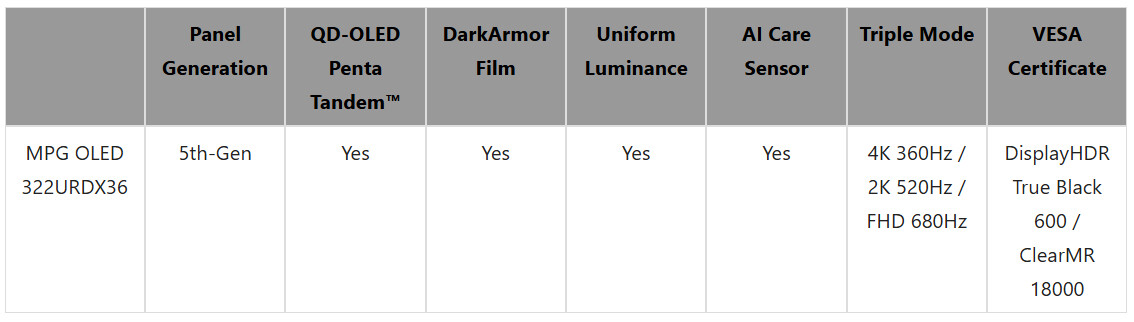
The MPG OLED 322URDX36 is the world's first 31.5-inch 4K 360 Hz gaming monitor on the market to feature the innovative Triple Mode configuration. This technology allows players to switch freely between 4K 360 Hz, 2K 520 Hz, and FHD 680 Hz based on their preferences, meeting the specific performance demands of various game genres. The monitor utilizes a 5th-gen QD-OLED panel with Penta Tandem technology. Its RGB Stripe sub-pixel layout minimizes color fringing and ensures text clarity. The display is equipped with the DarkArmor Film, which improves black levels by 40% and increases scratch resistance by 2.5 times. Additionally, Uniform Luminance supports HDR curve customization, ensuring accurate and consistent visuals across all gaming environments.
Designed for advanced gaming stations, the MPG OLED 322URDX36 reaches a peak HDR brightness of 1500 nits, achieves VESA DisplayHDR True Black 600 and ClearMR 18000 certifications, and integrates an AI Care Sensor that leverages accurate human detection to provide real-time OLED panel protection without compromising user privacy. For connectivity, it offers a full bandwidth DisplayPort 2.1a (UHBR20) alongside a USB Type-C port delivering 98 W power delivery to help maintain a clean workspace. Furthermore, the exclusive Gaming Intelligence app allows users to effortlessly tailor their visual profiles and monitor settings.

Attendees can visit the MSI booth during COMPUTEX 2026 to learn more about the features and new exterior design of the MPG OLED 322URDX36.
Source: MSI
Add your own comment

26 Comments on MSI to Debut World's First Triple Mode QD-OLED Gaming Monitor at Computex

#2
Kwadratowicz
Trrrryt
It reminds Me of crt OC where if the pixel count times refresh rate is stable, You can decrease resolution to get higher framerate :D
Posted on Reply
#3
JIWIL
Do these display modes use all of the screen real-estate, or are the 1440/1080 modes 'view ports' in the center of the screen?
Posted on Reply
#4
Churros
Wow this looks like a panel I actually want, nice brightness, RGB, the whole package !
Posted on Reply
#5
TheLostSwede
News Editor
JIWILDo these display modes use all of the screen real-estate, or are the 1440/1080 modes 'view ports' in the center of the screen?
My understanding is that they use the entire screen.
Posted on Reply
#6
Noci
I just hope triple mode does not also mean tripled price ;) .
Anyway it will be an expensive product.

Also I think I'll put it on my wishlist because the specs are great, just not at any price.
Posted on Reply
#7
Grimling
JIWILDo these display modes use all of the screen real-estate, or are the 1440/1080 modes 'view ports' in the center of the screen?
At least the 1080p mode should be pixel perfect full screen, because in that case 4 pixels will be made one.
In the 1440 mode i guess there is some scaling going on? But i do not know.
Posted on Reply
#8
LordAlu
This actually looks ideal!

I've been wanting a 32" OLED that is 1440p for gaming (yes I should probably upgrade my RTX 3080), so having that option immediately puts this on top of the list.

Will keep an eye on this one for reviews and impressions :)
Posted on Reply
#9
JIWIL
Thanks, these new panels seem promising.
Posted on Reply
#10
Grimling
LordAluThis actually looks ideal!

I've been wanting a 32" OLED that is 1440p for gaming (yes I should probably upgrade my RTX 3080), so having that option immediately puts this on top of the list.

Will keep an eye on this one for reviews and impressions :)
Yeah this looks really nice. It even has the new RGB-Sripe layout, so the text issue will be totally gone.
Posted on Reply
#11
cucol
LordAluThis actually looks ideal!

I've been wanting a 32" OLED that is 1440p for gaming (yes I should probably upgrade my RTX 3080), so having that option immediately puts this on top of the list.

Will keep an eye on this one for reviews and impressions :)
Be carefull, this mode will not be pixel perfect as you cant divide 2016 and 1440.

AND afaik the dp 2.1 has not enoguh bandwitdh to do 4k 360hz, so this will be done with DSC. I love this monitor but i will use it with DSC disabled at 4k 240hz. Maybe 1080p 480hz or more if can be native over dp 2.1
Posted on Reply
#12
529th
Should be interesting!
Posted on Reply
#13
BorisDG
Computex often feels like "monitors, monitors, and more monitors." It’s essentially the same two or three panels repackaged across a hundred different brands and models. The market is a mess.
Posted on Reply
#14
Grimling
cucolAND afaik the dp 2.1 has not enoguh bandwitdh to do 4k 360hz, so this will be done with DSC. I love this monitor but i will use it with DSC disabled at 4k 240hz. Maybe 1080p 480hz or more if can be native over dp 2.1
Is it even possible to get 360 Hz with DSC and DP1.4? Because my GPU has only DP 1.4.
Posted on Reply
#15
cucol
GrimlingIs it even possible to get 360 Hz with DSC and DP1.4? Because my GPU has only DP 1.4.
Probably not.
cucolProbably not.
Dsc can do 3:1 Max, so afaik the max refresh rate for dp 1.4 with dsc should be 4k@240
Posted on Reply
#17
star-affinity
Nice. Like the new design better than the previous too.
Posted on Reply
#18
Visible Noise
cucolBe carefull, this mode will not be pixel perfect as you cant divide 2016 and 1440.

AND afaik the dp 2.1 has not enoguh bandwitdh to do 4k 360hz, so this will be done with DSC. I love this monitor but i will use it with DSC disabled at 4k 240hz. Maybe 1080p 480hz or more if can be native over dp 2.1
There’s nothing wrong with DSC. Turning it off just makes for a poorer experience for people that think bigger numbers are better without looking at the literature.
Posted on Reply
#19
Cheeseball
Not a Potato
GrimlingAt least the 1080p mode should be pixel perfect full screen, because in that case 4 pixels will be made one.
In the 1440 mode i guess there is some scaling going on? But i do not know.
This has yet to be seen man. All the dual-mode monitors I've tried and tested seem to be using some sort of bicubic interpolation or just simply stretching the pixels, which would obviously not be cleaner/crisp to look at. The only one that did this right is the Alienware AW2725QF with an IPS panel, BUT when in 1080p mode it has some input lag which defeats the purpose of the lower resolution mode in the first place. :mad:

Others have said that those 1440p/720p OLED monitors (PG27AQWP-W) that go up to 720Hz (in 720p mode :laugh:) have integer scaling, but I was not able to test them. I would consider 720p to be too blurry for me at 27".
Posted on Reply
#20
TaipanX
Sooooo elephant in the room. Display Port 2.1a maxes out at 80 Gbit/s which is rated for 4k@240hz.
HDMI 2.2 ups that a little to 96 Gbit/s, but even with DSC 1.2a it only maxes out at 288Hz. So current cable technology can not actually achieve this 4K@360Hz
Posted on Reply
#21
Grimling
CheeseballThis has yet to be seen man. All the dual-mode monitors I've tried and tested seem to be using some sort of bicubic interpolation or just simply stretching the pixels, which would obviously not be cleaner/crisp to look at. The only one that did this right is the Alienware AW2725QF with an IPS panel, BUT when in 1080p mode it has some input lag which defeats the purpose of the lower resolution mode in the first place. :mad:

Others have said that those 1440p/720p OLED monitors (PG27AQWP-W) that go up to 720Hz (in 720p mode :laugh:) have integer scaling, but I was not able to test them. I would consider 720p to be too blurry for me at 27".
All the dual monitors so far (4k to 1080p) have pixel perfect scaling, because the 4k resolution is exactly 2× larger in both dimensions. This means each 1080p pixel maps cleanly to a 2×2 block of pixels on your monitor, resulting in sharp, crisp rendering with no blur or interpolation.
So that's why i know that 1080p will be an absolutely clean full screen image without any interpolations.
When scaling 1440p (2560×1440) to a standard UHD 4K display (3840×2160), the scaling factor is precisely 1.5× in both width and height. Because 1.5 is not an integer, you cannot achieve true pixel-perfect scaling without some form of interpolation or subpixel blending. We have to see how they solved that problem.
Posted on Reply
#22
Cheeseball
Not a Potato
GrimlingAll the dual monitors so far (4k to 1080p) have pixel perfect scaling, because the 4k resolution is exactly 2× larger in both dimensions. This means each 1080p pixel maps cleanly to a 2×2 block of pixels on your monitor, resulting in sharp, crisp rendering with no blur or interpolation.
So that's why i know that 1080p will be an absolutely clean full screen image without any interpolations.
When scaling 1440p (2560×1440) to a standard UHD 4K display (3840×2160), the scaling factor is precisely 1.5× in both width and height. Because 1.5 is not an integer, you cannot achieve true pixel-perfect scaling without some form of interpolation or subpixel blending. We have to see how they solved that problem.
While I understand your general logic, in reality none of the current 4K+1080p dual-mode monitors are actual clean 2x pixels (proper integer scaling) unfortunately. They have some sort of blur when in their 1080p modes.

I have tested 7 dual-mode monitors:
Alienware AW2725QF (this one has proper integer scaling, but has noticeable input lag)
LG 32GS95UE-B (this is currently one of my personal monitors)
LG 27G850A
AOC U27G4
LG 45GX950A-B (this one is 5K to "2K", but still shows blurry pixels in the 2560x1080 mode)
Dough Spectrum Black
ASUS ROG Strix XG32UCG

Aside from the Alienware one I mentioned above, none of them have pixel-perfect scaling from 4K to 1080p. Comparison was done with AMD and NVIDIA's integer scaling from the GPUs, which does show proper 4:1 pixels but the monitor still receives a 4K signal since the GPU is doing the scaling.
Posted on Reply
#23
cucol
Visible NoiseThere’s nothing wrong with DSC. Turning it off just makes for a poorer experience for people that think bigger numbers are better without looking at the literature.
Imho you are wrong here, its not about image quality but about doing alt+tab and waiting 3 seconds to see the windows desktop. So ill never use DSC until i actually cant tell if its enabled or disabled in 3 seccionds on a blind test.
CheeseballWhile I understand your general logic, in reality none of the current 4K+1080p dual-mode monitors are actual clean 2x pixels (proper integer scaling) unfortunately. They have some sort of blur when in their 1080p modes.

I have tested 7 dual-mode monitors:
Alienware AW2725QF (this one has proper integer scaling, but has noticeable input lag)
LG 32GS95UE-B (this is currently one of my personal monitors)
LG 27G850A
AOC U27G4
LG 45GX950A-B (this one is 5K to "2K", but still shows blurry pixels in the 2560x1080 mode)
Dough Spectrum Black
ASUS ROG Strix XG32UCG

Aside from the Alienware one I mentioned above, none of them have pixel-perfect scaling from 4K to 1080p. Comparison was done with AMD and NVIDIA's integer scaling from the GPUs, which does show proper 4:1 pixels but the monitor still receives a 4K signal since the GPU is doing the scaling.
Good to know, i was specting it to be pixel perfect, so for now ill never use the 1080p mode if this is the case.
Posted on Reply
#24
Grimling
CheeseballWhile I understand your general logic, in reality none of the current 4K+1080p dual-mode monitors are actual clean 2x pixels (proper integer scaling) unfortunately .... Aside from the Alienware one I mentioned above, none of them have pixel-perfect scaling from 4K to 1080p. Comparison was done with AMD and NVIDIA's integer scaling from the GPUs, which does show proper 4:1 pixels but the monitor still receives a 4K signal since the GPU is doing the scaling.
If you do GPU Scaling, then of course you do not have Pixel perfect 1080p because you are still in the 4k Mode!
But those monitors a Dual-Mode, that means you select 1080p in the Monitor itself, it then appears in Windows as a native 1080p Monitor, and will get a native 1080p signal from your GPU! That is how you can have pixel perfect 1080p!
Posted on Reply
#25
Cheeseball
Not a Potato
GrimlingIf you do GPU Scaling, then of course you do not have Pixel perfect 1080p because you are still in the 4k Mode!
But those monitors a Dual-Mode, that means you select 1080p in the Monitor itself, it then appears in Windows as a native 1080p Monitor, and will get a native 1080p signal from your GPU! That is how you can have pixel perfect 1080p!
Dude, they are not pixel perfect visually, they do not use integer scaling. Yes, they do report as a 1080p monitor when in the appropriate mode, but the display panels themselves are unfortunately not scaling cleanly. They seem to be using some sort of bilinear or bicubic interpolation, when it should be nearest neighbor (integer scaling).

GPU scaling (in integer scaling mode) has a crispier-look because the pixels are mapped correctly.
cucolGood to know, i was specting it to be pixel perfect, so for now ill never use the 1080p mode if this is the case.
Despite me having a LG 32GS95UE-B with a not-so-perfect 1080p mode, 480Hz and the bigger (albeit blurry) pixel density make it easier to click on heads in CS2/Valorant/Apex. :rockout:
Posted on Reply
Add your own comment
Nov 12th, 2026 21:44 PST change timezone

New Forum Posts

Popular Reviews

TPU on YouTube

Controversial News Posts