Friday, May 29th 2026

Intel Launches Thunderbolt Share for PC-to-PC File and Peripheral Sharing on Windows 11
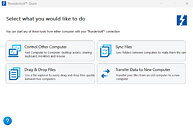
Following the recent release of the Intel USB4Stream protocol enabling direct PC-to-PC file and peripheral sharing on Linux, Intel has officially released Thunderbolt Share for Windows, which accomplishes the same thing on Windows over a Thunderbolt 4 or 5 connection. Thunderbolt Share allows the same peripheral and file sharing, backup, and migration capabilities as the Linux USB4 protocol, but with an official GUI and somewhat more limited compatibility thanks to a required Thunderbolt Share certification. The software is currently available to download from Intel directly.
Thunderbolt Share works with a direct PC-to-PC connection as well as in cases where two systems are connected via an accessory, like a dock, hub, or monitor. Additionally, only one device in the chain needs to be Thunderbolt Share licensed. There is a list of Thunderbolt Share licensed products on a website hosted by Intel, although it currently appears to be limited to a handful of MSI laptops, nine ASUS, HP, and Lenovo pre-built desktops and DIY motherboards, a smattering of Thunderbolt docks and hubs, an ASUS Thunderbolt 5 expansion card, and a Sparkle Thunderbolt 5 eGPU dock.

Sources:
Intel, Thunderbolt Share Support
Thunderbolt Share works with a direct PC-to-PC connection as well as in cases where two systems are connected via an accessory, like a dock, hub, or monitor. Additionally, only one device in the chain needs to be Thunderbolt Share licensed. There is a list of Thunderbolt Share licensed products on a website hosted by Intel, although it currently appears to be limited to a handful of MSI laptops, nine ASUS, HP, and Lenovo pre-built desktops and DIY motherboards, a smattering of Thunderbolt docks and hubs, an ASUS Thunderbolt 5 expansion card, and a Sparkle Thunderbolt 5 eGPU dock.


14 Comments on Intel Launches Thunderbolt Share for PC-to-PC File and Peripheral Sharing on Windows 11
Ah, it truly is 2026.
Apart from that, they should just have released USB4Stream for Windows as well, without the licensing requirements.
I can see why someone might want the option to transfer files directly without having to set up shares or some sort of network server
Anyways, a non-licensed file transfer protocol exists, we all use it, all PCs speak it in the role of hosts - that's MTP. Why Windows can't support it over USB C-to-C cable to make the PC serve as an MTP device (= file server) is totally unclear to me.
Also, in theory, this should be easier to setup.MTP sucks IMO. If a broader thing like usb4stream is also released for WIndows without any licensing requirement it'd be nice to do things such as migrating from one laptop to another.
They should have just worked with Microsoft to integrate it into Windows 11's Nearby Share feature.