Tuesday, September 15th 2026

Microsoft Rolls Out Emergency Windows 11 Patch, But AMD GPU Driver and File Explorer Crashes Remain
Microsoft today rolled out an out-of-band emergency Windows 11 patch with KB5129195, which is being distributed to everyone. This emergency update is automatically downloading across every PC, as it fixes crucial issues and patches privilege elevation vulnerabilities. The list of fixes in this update includes a patch for CVE-2026-62721, issues with remote desktop connection, and importantly, a partial fix for faulty USB audio. If readers recall, Microsoft's previous September update disrupted USB audio output on many PCs, affecting USB Audio Class 1.0 devices, where systems that used to work produced no sound. In the latest patch rolling out today, Microsoft noted that 8-channel and 3D audio modes are being fixed, but several other issues remain. For example, the lack of volume controls and the complete lack of audio output are still present for some USB audio devices, so this release doesn't completely fix the problem.
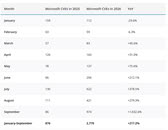
Next, there are a few unconfirmed issues in the previous KB5124008 September update that sites such as Windows Latest are tracking. Today's out-of-band KB5129195 doesn't fix them. These include issues with AMD Radeon GPU users, who are reportedly experiencing system freezing, crashing, driver timeouts, black screens, missing display output, and even immediate errors after reinstalling the driver stack. Separately, Windows Latest also spotted users complaining about File Explorer failing to start or crashing immediately, as well as not being able to access file history. This issue is present in some enterprise environments such as Citrix UPM, FSLogix, Horizon, or ProfileUnity ProfileDisks on both Windows 11 24H2 and 25H2. Possibly, the focus on security issues has resulted in Microsoft introducing many new bugs into the operating system, as the age of AI has brought down the wall that defended Windows before. With the help of internal AI tools to fight AI-introduced system vulnerabilities, Microsoft is rolling out security patches. However, in the process of fixing them, the OS is constantly breaking, just as we see today. Windows Latest also compiled a list with a number of CVE patches fixed, and if readers recall, it was nearly 1,000 patches applied a few days ago.
Source:
Windows Latest
Next, there are a few unconfirmed issues in the previous KB5124008 September update that sites such as Windows Latest are tracking. Today's out-of-band KB5129195 doesn't fix them. These include issues with AMD Radeon GPU users, who are reportedly experiencing system freezing, crashing, driver timeouts, black screens, missing display output, and even immediate errors after reinstalling the driver stack. Separately, Windows Latest also spotted users complaining about File Explorer failing to start or crashing immediately, as well as not being able to access file history. This issue is present in some enterprise environments such as Citrix UPM, FSLogix, Horizon, or ProfileUnity ProfileDisks on both Windows 11 24H2 and 25H2.


61 Comments on Microsoft Rolls Out Emergency Windows 11 Patch, But AMD GPU Driver and File Explorer Crashes Remain
Millions are sticking with Windows 10, some due to the TPM thing Windows 11 requires not being in their hardware and others, like me, because Windows 11 is a downgrade in so many ways.
As Microsoft don't like people moving to Linux it won't surprise me if Windows 10 will keep getting safety patches for years to come. Especially since with crazy prices for ram and storage, it will mean more people hanging on to the current computers which means non tech people that would other wise get Windows 11 by default hangs on to Windows 10.
At work I do run Windows 11 and I struggle to find anything positive, even with me mostly doing office stuff there is just stupid Microsoft all over - it is like they want Windows to be more like MacOS only they copied the worst parts and done it badly :banghead:
You can run your intel iGPU with outdated drivers for any time you want.
2. Irrelevant.
And no begging on forums mate.
Preview for the next update is out, and not a single word about the GPU drivers problem (which I seem to be affected by).