News Posts matching #25H2

Return to Keyword Browsing

Microsoft Turns On Memory Integrity for More Windows 11 PCs With November Update

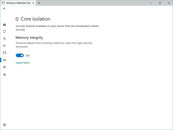
Plenty of Windows 11 PCs upgraded from Windows 10 could find Memory Integrity switched on after this month's Patch Tuesday. The November security update, KB5132061, carries over a change from the optional October 28 preview (KB5127936) that lets Windows enable Memory Integrity, also called Hypervisor-Protected Code Integrity (HVCI), on eligible devices during the update. Microsoft first announced the plan in September, and the change applies to Windows 11 25H2 and 26H2 as a gradual rollout. PCs where a user or IT admin already turned the feature off are left alone.

Memory Integrity depends on Virtualization-Based Security (VBS), with driver verification handled inside a hypervisor-managed environment, so malware that takes over the kernel still can't sneak in an unverified driver. Windows runs readiness checks on hardware, drivers, and performance first, and also enables VBS on PCs that lack it. It looks like eligible systems need at least an 8th Gen Intel or AMD Zen 2 processor. The performance cost hasn't gone away, though. Tom's Hardware's 2023 testing with a Core i9-13900K and RTX 4090 showed an average drop of around 5% in games, up to 10% in some titles. Microsoft told gamers in a 2022 support article, since pulled, to disable it for better performance, which is a bit awkward next to its promise to make Windows the best place to play.
Microsoft Adds Cloud Rebuild Recovery to Windows 11 in Latest Preview Update

Microsoft has introduced Cloud Rebuild, a recovery option that can wipe and reinstall Windows 11 by pulling a fresh image and the PC's drivers from Windows Update, even when the system refuses to boot. It ships with KB5127936, the optional preview update released on October 28 for Windows 11 25H2 and 26H2, and it's rolling out gradually. If Windows still loads, the option sits under Settings > System > Recovery as "Rebuild PC." If it doesn't, the PC falls back to the Windows Recovery Environment (WinRE) after a few failed boots, where Cloud rebuild shows up under the Troubleshoot menu.

The "Reset this PC" menu has had a Cloud download mode for a while. According to Microsoft, Cloud rebuild goes a step further by grabbing drivers as well and by not depending on the installed copy of Windows being intact. It is a clean slate, though. The system drive gets reformatted, wiping apps, settings, user accounts, and local files, and only data synced to services like OneDrive survives. Anyone handing the PC off can pick a sanitize mode that has the drive securely erase itself first, and IT admins can kick off a rebuild remotely through the Recovery CSP.

Microsoft Warns Windows Update Will Stop Working on Unpatched PCs Next Year

Microsoft is replacing the certificates that Windows PCs use to confirm they are talking to genuine Windows Update servers, and machines that miss the changeover will stop receiving updates. The company announced the rotation on October 8, and the current certificates expire on May 17 and June 19, 2027. Most users apparently won't have to do anything, since the replacements ship inside the regular monthly security updates. Windows 11 25H2 and later, including the recently launched 26H2, need no action. Windows 11 24H2 needs the September 2025 security update or newer, while other supported Windows 11 and Windows 10 versions need the July 2026 update or later before June 19. Windows 10 Enterprise 2019 LTSC, Windows Server 2019, and Windows Server 2016 face the earlier May 17 deadline.

Microsoft says devices on unsupported versions "will lose access to Windows Update services and won't receive any updates as a result," and its only advice is to upgrade. For home users, that mostly points at Windows 10 PCs that were never enrolled in Extended Security Updates (ESU) after the OS reached end of life in October 2025. Those machines probably never got the July 2026 patch. Microsoft extended ESU coverage to October 12, 2027, so it looks like enrolling and installing the offered updates before June should bring the new certificates along. The warning also comes months after Microsoft began refreshing Secure Boot certificates that were due to expire in late June 2026. Readers are advised to check their update history for a cumulative update from July 2026 or later.

Microsoft Launches Windows 11 26H2 Update

Microsoft today released its latest Windows 11 26H2 update, bringing a new milestone for Windows 11 users. In this release, Microsoft is highlighting a few features that Windows 11 25H2 users have not yet experienced. These include a smarter File Explorer with new capabilities such as summarization, additional archive formats, and AI productivity enhancements. Additionally, Windows Search has been improved to prioritize searching through your files before resorting to web searches, while also handling typos and partial application names more effectively. Frequently used folders will receive automatic indexing, making them easier to find. Other optimizations include updates to Magnifier with new zoom and screen tint options, Narrator adding a Braille Viewer, and Voice gaining a wider range of voice-driven commands on Copilot+ PC. Finally, the Start menu and Taskbar now offer new customization options, positioning changes, and a smaller view option.

Interestingly, this update focuses more on resetting the support cycles that Microsoft is implementing, rather than introducing major features or overhauls. For those upgrading, the main change will be an extension of the support cycle as users transition to the 26H2 release. Starting September 29, 2026, there will be 36 months of servicing support for Enterprise and Education editions of Windows 11, version 26H2. Home and Pro editions will receive 24 months of support.

Microsoft Rolls Out Emergency Windows 11 Patch, But AMD GPU Driver and File Explorer Crashes Remain

Microsoft today rolled out an out-of-band emergency Windows 11 patch with KB5129195, which is being distributed to everyone. This emergency update is automatically downloading across every PC, as it fixes crucial issues and patches privilege elevation vulnerabilities. The list of fixes in this update includes a patch for CVE-2026-62721, issues with remote desktop connection, and importantly, a partial fix for faulty USB audio. If readers recall, Microsoft's previous September update disrupted USB audio output on many PCs, affecting USB Audio Class 1.0 devices, where systems that used to work produced no sound. In the latest patch rolling out today, Microsoft noted that 8-channel and 3D audio modes are being fixed, but several other issues remain. For example, the lack of volume controls and the complete lack of audio output are still present for some USB audio devices, so this release doesn't completely fix the problem.

Next, there are a few unconfirmed issues in the previous KB5124008 September update that sites such as Windows Latest are tracking. Today's out-of-band KB5129195 doesn't fix them. These include issues with AMD Radeon GPU users, who are reportedly experiencing system freezing, crashing, driver timeouts, black screens, missing display output, and even immediate errors after reinstalling the driver stack. Separately, Windows Latest also spotted users complaining about File Explorer failing to start or crashing immediately, as well as not being able to access file history. This issue is present in some enterprise environments such as Citrix UPM, FSLogix, Horizon, or ProfileUnity ProfileDisks on both Windows 11 24H2 and 25H2.

Windows 11 26H2 Goes Into Release Preview Channel

Microsoft has released Windows 11 version 26H2 to the Release Preview Channel, with build number 26300.9278, for Windows Insiders. As we mentioned just a few days ago, Windows 11 26H2 is one of the more boring releases in terms of new features. This update focuses on resetting the support cycles that Microsoft is implementing, rather than introducing major features or overhauls. For those upgrading, the main change will be an extension of the support cycle as users transition to the 26H2 release.

Since late 2024, support and updates have been rolled out across every OS branch, with each new release cycle activating these features rather than leaving them dormant in the kernel. Enablement packages (eKB) are central to this process, as downloading an update essentially involves eKBs that activate certain functionalities. For instance, on a device running Windows 11 24H2 or 25H2, a simple eKB is needed to upgrade to the latest Windows 11 26H2 version. For older versions like 22H2 and 23H2, which are on an older servicing branch, Windows 11 26H2 will be a full feature update.
Windows 11 26H2 Update

Windows 11 26H2 Update Focuses on Extended Servicing, Not New Features

According to Windows Latest, Microsoft's upcoming Windows 11 26H2 is expected to be one of the most uneventful releases in terms of new features. Instead, this release focuses on resetting the support cycles that Microsoft is implementing, rather than introducing major features or overhauls. For those who are not aware, Microsoft has altered its update approach for Windows 11 for some time now. Since Windows 11 24H2, the company has adopted a shared servicing model applied to the Windows 11 24H2 and 25H2 branches. Since late 2024, support and updates have been rolled out across every OS branch, with each new release cycle activating these features rather than leaving them dormant in the kernel. Enablement packages (eKB) are central to this process, as downloading an update essentially involves eKBs that activate certain functionalities.

For instance, on a device running Windows 11 24H2 or 25H2, a simple eKB is needed to upgrade to the latest Windows 11 26H2 version. For older versions like 22H2 and 23H2, which are on an older servicing branch, Windows 11 26H2 will be a full feature update. In terms of new functionality with 26H2, Microsoft's focus is on resetting the support cycle timeline. The 26H2 version will receive regular support for 24 months on Home and Pro versions, while Enterprise and Education versions will receive 36 months of support. Starting from 2026, this support will extend until October 2028 for Home and Pro, and until October 2029 for Enterprise and Education. For those already running Windows 11 24H2 and 25H2 with the latest updates and patches, 26H2 will not introduce any new features.

Microsoft is Forcing Windows 11 25H2 Update to 24H2 Users

Microsoft is now force-installing the latest version of Windows 11, the 25H2, for users of the older 24H2 version of the operating system. Through what Microsoft calls a "machine learning-based intelligent rollout," the company is automatically updating 24H2 users to Windows 11 25H2 when their devices are ready. This forced update is part of a staged update plan for Windows 11, where Microsoft is gradually updating systems worldwide to phase out the 24H2 version, as support for this operating system will officially end on October 13, 2026. It makes sense to upgrade users to an operating system with a longer support period. However, Windows 11 users might be frustrated with the constant forced upgrades that Microsoft is pushing, which seem to offer little real-world benefit beyond regular security maintenance.

Regarding Windows versions, the situation has been a bit confusing recently. Microsoft has dedicated the 26H1 update exclusively for Windows-on-Arm devices, supporting new silicon, including the Snapdragon X2 Elite and X2 Plus platforms, as well as the potential launch of NVIDIA's N1/N1X laptop SoCs. The latest feature and security updates have been delivered through both the 24H2 and 25H2 versions, which have been the primary focus for x86-based PC systems. However, as support for 24H2 is coming to an end, the focus is gradually shifting to 25H2. There is still time before October of this year, and Microsoft is using AI for a staged rollout. Importantly, users cannot refuse this update. They can only schedule the restart for the update to be applied or postpone it slightly before it is finally installed.

Windows 11 Will No Longer Trust Old Drivers by Default Under New Kernel Policy

Microsoft is finally updating its long-standing kernel policy, which previously allowed old drivers with expired certificates to run and be trusted by the Windows 11 NT Kernel. This change means that Microsoft's early 2000s program for cross-signing root programs as valid will no longer function. This program had enabled NT Kernel-trusted code signing programs to execute even after their certificates expired. As a result, third-party driver developers, such as printer makers with their old printer drivers, could run old drivers on Windows 11 without a valid security certificate. However, this is coming to an end, as Microsoft will use its April update to instruct the Windows NT Kernel to only accept new drivers signed through the Windows Hardware Compatibility Program (WHCP).

The WHCP will ensure that each driver receives a valid security certificate that meets Microsoft's security standards. This update will be implemented with OS versions Windows 11 24H2, 25H2, 26H1, Windows Server 2025, and future releases. Despite this change, Microsoft will still allow Windows to load older, trusted drivers to maintain backward compatibility and its long-standing plug-and-play feature. The April 2026 Windows update will begin enforcing the new policy in evaluation mode on supported systems. During this period, Windows will monitor driver activity and only fully activate the policy once it determines that doing so will not cause compatibility issues. Microsoft is also maintaining a curated allow list of reputable cross-signed drivers, ensuring that widely used software and hardware can continue to function where necessary, easing the transition.

Microsoft Removes Registry Hack for Faster NVMe SSDs in Windows 11

Microsoft has quietly removed a registry hack workaround that enabled faster NVMe SSD speeds by activating a native NVMe software stack. Late last year, Microsoft gradually introduced native NVMe SSD support in Windows Server 2025 as an opt-in feature. This was significant news for Windows Server users who had been dealing with non-native NVMe SSD processing, which was emulated through a series of commands. For instance, Windows converted NVMe drive commands into SCSI commands, resulting in processing latency and overhead, which slowed down read/write speeds in typically high-performing storage configurations. With native NVMe support, the entire stack and I/O processing have been redesigned to achieve optimal SSD performance, running at native speeds.

Within the Windows enthusiast community, there were a series of registry hacks that allowed the system to run native NVMe processing through various unofficial OS modifications. Below is the old method, which Microsoft has now blocked. Perhaps the reason for blocking this hack is that Microsoft is preparing to launch native NVMe SSD processing with the upcoming Windows 11 25H2 update for everyone and the 26H2 update for Windows-on-Arm devices. For now Windows 11 doesn't support the native NVMe SSD processing, and instead relies on the older drive commands conversion into SCSI.

Windows 11 March Update Gets Emergency Patch for Microsoft Sign-In Issues

Microsoft has released the KB5085516 out-of-band (OOB) update to address sign-in issues caused by the Windows 11 March update on certain applications. These issues included sign-in failures in the free version of Microsoft Teams, OneDrive, Microsoft Edge, Excel, Word, and Microsoft 365 Copilot. In Windows 11 versions 24H2 and 25H2 with the March update KB5079473, OS Build 26100.8037, users experienced problems when trying to sign in to their Microsoft accounts. Now, the company is distributing the OOB update for OS Builds 26200.8039 and 26100.8039. Microsoft claims there are no known issues with this OOB update, suggesting that most concerns have been resolved and users can safely apply the update again.

The problem originally occurred when a device entered a specific network connectivity state that the Windows 11 March update did not handle well, causing some Microsoft applications to mistakenly identify the device as offline. Initially, Microsoft advised users to simply restart their devices to fix the issue, but the connectivity state where Microsoft accounts wouldn't sign in would often return. There was a significant chance that the device might revert to this specific networking state, resulting in repeated sign-in errors. However, now this has been resolved with the KB5085516 OOB update, which fixes networking states, so your device can continue running smoothly.

Windows 11 March Update Blocks Microsoft Account Sign-In in Office and Copilot Apps

Microsoft's Windows 11 March update has a confirmed issue affecting Windows 11 versions 25H2 and 24H2 with KB5079473. This issue causes sign-in failures in some Microsoft applications, including the free version of Microsoft Teams, OneDrive, Microsoft Edge, Excel, Word, and Microsoft 365 Copilot. After installing the Windows 11 March update, you might encounter a message saying, "You'll need the Internet for this. It doesn't look like you're connected to the Internet," even when your device is connected. This problem occurs when a device enters a specific network connectivity state that the Windows 11 March update does not handle well, causing some Microsoft applications to mistakenly identify the device as offline. It's important to note that this issue only affects Microsoft accounts.

To resolve this issue, Microsoft recommends simply restarting your device. This should fix the connectivity state that causes the connection to Microsoft accounts to fail. However, there is a significant chance that the device might return to this specific networking state, resulting in repeated sign-in errors. Microsoft is working on a fix, which is expected to be released in the coming days. As the week ends, the release will likely be early next week. No server platforms are affected by this issue; it only impacts Windows 11 versions 24H2 and 25H2 with the March update KB5079473, OS Build 26100.8037.

Updated Windows 11 Taskbar Features Built-in Network Speed Test - Available Now in Preview

Yesterday, Microsoft's insider program debuted Windows 11 Builds 26100.7918 and 26200.7918 (KB5077241). Enjoyers of the Release Preview Channel can play around with some nifty new features and improvements, within the 24H2 (Build 26100) and 25H2 (Build 26200) releases. The North American megacorp's Windows Insider blog outlines two separate rollouts: "gradual" and "normal." Within the former, a brand-new "Taskbar & System Tray" tool has attracted the most media attention over the past day. The official company description details this nice-to-have feature: "(a) built-in network speed test is now available from the taskbar. Open it from the Wi-Fi or Cellular Quick Settings, or by right-clicking the network icon in the system tray."

Continuing that line of thought, the blog proceeds with: "the speed test opens in the default browser and measures Ethernet, Wi-Fi, and Cellular connections. This feature helps check network performance and troubleshoot issues." Normally, modern-day Windows users rely on third-party apps or relevant websites for this type of diagnostic data. An official and handy integrated alternative will be welcomed by network speed demons. Last Friday (February 13), the phantomofearth social media account shared an early insight, days ahead of the official introductory blog entry's publication. The self-described "Windows Insider and older Windows beta" tester noted that the snazzy tool sends privileged previewers to (Microsoft's preferred default) "Bing to do the speed test."

Windows 11 26H1 Limited to New Arm-based Processors, Other PCs Remain on 25H2

Microsoft's Windows 11 26H1 update, initially expected to offer only new silicon support without a host of new features, is now dedicated exclusively to new and upcoming Arm-based processors like the Snapdragon X2 Elite/Plus. This marks a significant shift in Windows 11's development path—a first divergence in Windows deployment in the recent timeline, and a first for Windows 11. As a result, regular PC users with x86-64 and older Arm-based platforms will continue to use the Windows 11 25H2 as a feature update. According to the latest Windows IT Pro Blog, "Windows 11, version 26H1 is not a feature update for version 25H2," indicating that a different version will serve as the next feature update for Windows 11, rather than the anticipated 26H1.

Microsoft is concentrating on providing full support for the new Windows-on-Arm platforms, some of which are already available. These platforms include Qualcomm's Snapdragon X2 Elite processors and NVIDIA's N1 and N1x SoCs. This new hardware requires optimization from Microsoft to ensure the best experience on Windows 11, so the company is dedicating most of its efforts for the 26H1 update to this task. Since new silicon requires fine-tuning, such as specific power profiles and hardware optimizations to extract maximum performance, Microsoft is separating Windows 11 into another branch to make sure that servicing and updates are easier, and also that shipping customized power/performance settings doesn't end up corrupting the build for non-Arm CPUs.

Windows 11 January 2026 Update Triggers Black Screens, Outlook Failures, and Emergency Patches

Microsoft's first Patch Tuesday of 2026 has become a troubleshooting nightmare for Windows 11 users. The KB5074109 update is causing widespread issues, affecting everything from home PCs to enterprise servers. Released on January 13 for versions 24H2 and 25H2, this cumulative patch was intended to deliver about 100 security fixes, including three critical zero-day protections and an NPU fix. Instead, it has left many systems struggling with black screens, locked Outlook installations, and broken connections to Azure Virtual Desktop. One of the most noticeable problems is sudden black screen episodes, which freeze the desktop for one or two seconds before returning to normal. This glitch affects machines with both NVIDIA and AMD graphics cards, though the exact cause remains unclear.

Some users found relief by adjusting their monitor's DisplayPort settings, temporarily switching from version 1.4 to 1.2 and back. Others discovered their desktop backgrounds had reset to solid black after the update, requiring them to manually reapply their wallpaper or Spotlight settings through the personalization menu. On the productivity front, Outlook Classic users with POP email accounts face a weird and frustrating bug. The update causes Outlook to appear closed while the outlook.exe process continues running in the background, preventing any attempts to restart the application. Users either see nothing happen when they click the Outlook icon or receive an error stating the program is already open. The only temporary solution is to open Task Manager and forcibly end the process, though this must be repeated each time Outlook is closed. Microsoft has confirmed the issue but has not yet released a fix.

Microsoft's Hardware-Accelerated BitLocker Brings Massive Performance Gains

Microsoft has unveiled a new hardware-accelerated BitLocker encryption system for Windows 11, which shifts cryptographic operations from software to dedicated accelerator units integrated into future CPU microarchitectures. Historically, software-based BitLocker in Windows 11 has caused massive performance degradation. For example, in Windows 11 going from no BitLocker to software-based BitLocker has caused average number of cycles per I/O to skyrocket from roughly 400,000 cycles to about 1.9 million cycles. This is a 375% increase in cycles per I/O, and can cause significant storage performance degradations. However, Microsoft is finally bringing hardware-based encryption to solve this.

The new hardware acceleration, announced at Ignite 2025 in November, is now available in Windows 11 version 25H2 and Windows Server 2025 with the September update. Early testing shows that some workloads experience double the storage performance while reducing CPU usage by over 70%. The system offloads AES-XTS-256 encryption processing from the main processor to a fixed-function cryptography engine embedded within the SoC. Encryption keys are hardware-wrapped to enhance security against memory-based attacks. The initial rollout will target Intel vPro platforms with the upcoming Core Ultra Series 3 "Panther Lake" processors, but Microsoft plans to extend support to other vendors as well.

Windows 11 November Update Brings Redesigned Start Menu and Battery Icon

Microsoft has officially rolled out the Windows 11 November Tuesday update, aiming to fix previous bugs and introduce a new design language for the battery icon and Start menu. The update, labeled KB5067035 with build 26200.7121, remains seated on the 25H2 branch. It addresses a highly requested user feature by adding a battery percentage display. This numerical/visual indicator is conveniently located on the Taskbar, providing instant visibility of the remaining charge without any extra steps. Additionally, the battery icon has been redesigned with a larger size and intelligent color shifting to reflect different power states and charging conditions. This will help with easy visualization of the battery charge.

The Start menu has also seen significant changes, starting with adaptive sizing. The interface now scales appropriately based on monitor dimensions, creating a more balanced visual experience. Microsoft has introduced several customization tools, allowing users to control what appears in their workspace. The application library view has been moved to a more accessible location, and users can now add more app shortcuts to the Start menu. Those who find the recommended content section unnecessary can now disable it completely, which is a welcome improvement. We applied the latest update, but we aren't seeing these changes. We assume gradual rollout is in place. Below is Microsoft's explanation of the new Start menu, as well as battery icon comparison from Windows Latest.

Windows 11 Finally Fixes "Update and Shut Down" Functionality After a Decade

If you ever tried the infamous "Update and shut down" option in any Windows build, it often leads to a reboot instead to an actual shutdown. Now, Microsoft has finally fixed this issue starting with Windows 11 25H2 Build 26200.7019 (or 26100.7019 on 24H2). According to the Windows Latest, Microsoft has shipped this broken functionality way back with Windows 10, and has never fixed it since. However, the Windows teams working behind the update have finally managed to ship a working solution with a note stating in Windows 11 experiences that the new build: "Addressed underlying issue which can cause "Update and shutdown" to not actually shut down your PC after updating."

Microsoft has not disclosed the exact cause of the failure, but Windows Latest speculates it might be due to a race condition or an issue within the Windows Servicing Stack. When a user selects "Update and shut down," the operating system must complete two sequential tasks: applying all pending updates and then shutting down the computer. This process isn't straightforward because Windows needs to reboot into an offline servicing phase to replace locked system files, as indicated by the "working on updates" message. After this phase, the machine should power off, but instead, it returns to the login screen. The most likely explanation is that the Servicing Stack either fails to save or never receives the shutdown instruction, with the directive possibly getting lost during the reboot due to a timing conflict or interference from features like Fast Startup.

Windows 11 25H2 October Update Bug Renders Recovery Environment Unusable

It seems like Microsoft has encountered a significant issue with the latest Windows 11 25H2 October update, KB5066835. The company confirmed that this update disrupts mouse and keyboard functionality within the Windows Recovery Environment (WinRE), making them unresponsive and unusable. As a result, the WinRE feature is completely inoperative. WinRE is a built-in troubleshooting toolkit included with Windows. It's intended to assist users when their computer encounters startup problems or system issues. WinRE activates automatically when Windows crashes or fails to boot properly, but users can also access it manually to utilize various repair tools.

However, with the current problem affecting keyboard and mouse input, WinRE is essentially ineffective. Microsoft stated that "the USB keyboard and mouse continue to work normally within the Windows operating system," and assured users that they are "working to release a solution to resolve this issue in the coming days. More information will be provided when it is available." This is yet another incident related to the recent Windows 11 updates, which have previously caused localhost issues. The list of Windows 11 problems continues to grow as the latest updates are released. Microsoft maintains a Windows 11 version 25H2 known issues and notifications website that provides status updates on the latest problems, including this one.

Update October 21 16:05 UTC: Microsoft has issued a hot fix. The company claims that "this out-of-band (OOB) update includes quality improvements. This update is cumulative and includes security fixes and improvements from the October 14, 2025, security update (KB5066835)..." which you can check out here.

Microsoft Readies Windows-on-Arm for Gaming With AVX/AVX2 Support

With the release of the October 2025 cumulative update (KB5066835) for Windows 11 versions 24H2 and 25H2, Microsoft has expanded Prism emulation for Arm64 devices. This update enables Windows to emulate x86 vector instructions such as AVX and AVX2 on Arm PCs. As a result, many apps and games that previously couldn't run on Arm hardware can now at least launch. Intel's AVX is a set of SIMD instructions commonly used by media tools, game engines, and creative applications to speed up tasks like video encoding, physics, and effects. Arm-based chips like Snapdragon do not natively support Intel's proprietary AVX instructions, which often led to failures or poor performance in these programs. Prism's emulation translates AVX instructions, allowing these programs to run on Arm devices. However, because it is emulation, there is additional CPU overhead, and performance will vary significantly depending on the application.

Arm, on the other hand, offers the Scalable Vector Extension (SVE), which enhances vector processing capabilities in the Armv8-A architecture, with SVE2 being its successor in Armv9-A. Unlike traditional SIMD designs with fixed-size vectors, SVE supports flexible vector lengths from 128 to 2048 bits in 128-bit increments. This flexibility allows chip manufacturers to select the vector size that best suits their processors. The main advantage is that programs written for SVE can run on any SVE-compatible processor without recompilation, regardless of the processor's vector size.

Microsoft Releases Windows 11 25H2... With Zero New Features?

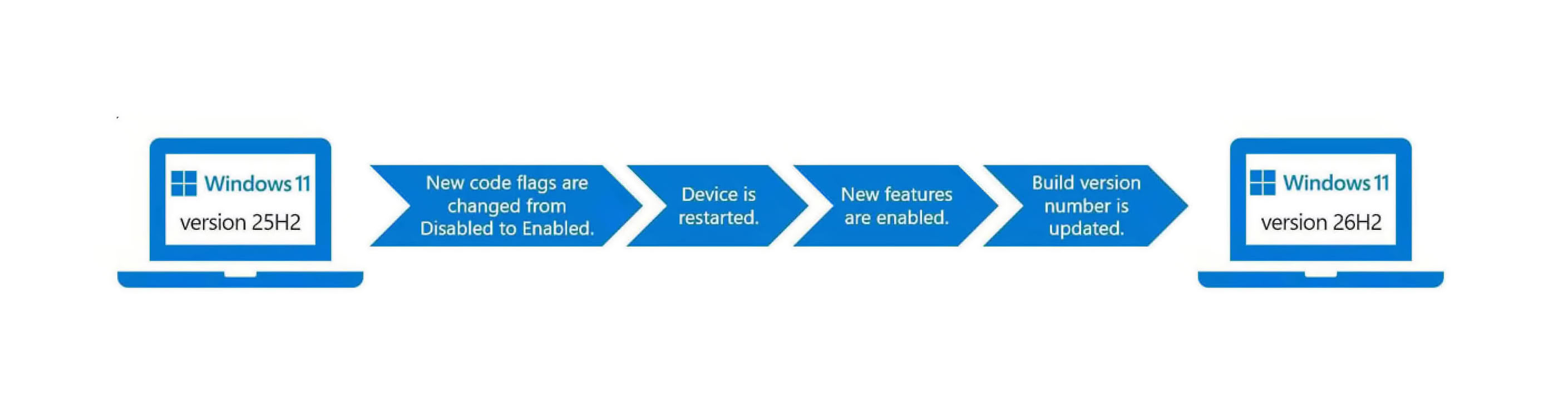
Microsoft has officially released Windows 11 version 25H2 after months of testing and previews. Delivered as a lightweight enablement package (eKB), 25H2 update is not a complete OS replacement but a light switch that turns on feature code already present on machines running 24H2. Microsoft stages new features inside regular cumulative updates in a disabled state. When the eKB is installed, it flips those flags, and a single restart activates the features, upgrading the device to 25H2 with minimal downtime. Because 24H2 and 25H2 share a servicing branch, they utilize the same codebase and servicing pipeline, which provides annual feature updates with the same efficiency and reliability as monthly updates. That helps reduce package size and installation time, making the transition from 24H2 to 25H2 about as easy as rebooting. The only difference between 25H2 and 24H2 is the support duration. For example, 25H2 Enterprise and Education Windows 11 versions move to a 36-month cycle, while Pro editions follow a 24-month cycle, typical for all Windows 11 24H2 builds.

With the 25H2 update, Microsoft is not focusing on significant under-the-hood changes or a visual overhaul, which were common in previous updates. Instead, the emphasis is primarily on security improvements. For instance, Microsoft is removing features like PowerShell 2.0 and Windows Management Instrumentation command-line (WMIC) during installation. These features were previously deprecated due to vulnerabilities to security exploits. Additionally, IT administrators now have the ability to remove pre-installed Microsoft default apps using Group Policy/MDM CSP on Enterprise and EDU devices.

Windows 11 Revives DreamScene With Live Video Wallpapers Returning

Windows OS is bringing back live wallpapers, reminiscent of the Windows Vista era. Originally known as DreamScene, this feature enabled video files, such as MP4 or MKV, to be used as live wallpapers on Windows desktop PCs. Microsoft is currently testing this feature again, as noted by @phantomofearth on X. In the latest Windows 11 Dev/Beta build 26x20.6690, there is a hidden option that lets you use video files as live wallpapers. Microsoft is also testing support for external files, which means we might see the company include a selection of customized live wallpapers in the next Windows 11 update.

To enable this feature, you need to be a part of the Windows Insider program. Once you become a part of this feature-preview program, you need to enable feature ID 57645315 and restart your explorer.exe, so Windows can apply it. However, the timeline for this feature is uncertain, and it might be part of next year's major updates. As of now, no significant features have been added this year. Microsoft isn't aiming for more under-the-hood changes for the 25H2 update, nor a visual makeover that prior updates were usually known for. Instead, the updates are primarily focused on security and are delivered as an enablement package. For changes like this, we assume Microsoft needs more bug testing before rolling out the feature to stable channels.

Windows 11 25H2 Preview Arrives as Lightweight Enablement Package

Microsoft has released the latest Windows 11 version 25H2 (Build 26200.5074) in the Release Preview Channel for customers who want to preview what the new OS will offer before the general, widespread release cycle later this year. Microsoft isn't aiming for more under-the-hood changes for the 25H2 update, nor a visual makeover that prior updates were usually known for. Instead, the updates are mostly focused on security. For example, Microsoft removes some of its features with the installation, like PowerShell 2.0 and Windows Management Instrumentation command-line (WMIC). Both of these were previously deprecated, as they were vulnerable to various security exploits. Additionally, IT administrators can remove pre-installed Microsoft default apps via Group Policy/MDM CSP on Enterprise/EDU devices.

Interestingly, the 25H2 update is delivered as an enablement package, or eKB, so it's not a complete OS replacement but a light switch that turns on feature code already present on machines running 24H2. Microsoft stages new features inside regular cumulative updates in a disabled state. When the eKB is installed, it flips those flags, and a single restart activates the features, upgrading the device to 25H2 with minimal downtime. Because 24H2 and 25H2 share a servicing branch, they utilize the same codebase and servicing pipeline, which provides annual feature updates with the same efficiency and reliability as monthly updates. That helps reduce package size and installation time, making the transition from 24H2 to 25H2 about as easy as rebooting. The process also resets support timelines for affected editions, for example, Enterprise and Education move to a 36-month cycle, while Pro editions follow a 24-month cycle. This keeps feature rollouts controlled and reversible until the eKB enables them.

Windows 12 Delayed as Microsoft Prepares Windows 11 25H2 Update

Microsoft has quietly set aside plans for a standalone "Windows 12" release and will instead introduce its next major feature update as Windows 11 version 25H2 later this year. On Friday, the company confirmed that the latest Insider Preview build is now available for testers, with a broader rollout scheduled in the second half of 2025. From a technical perspective, version 25H2 builds on the same platform and servicing stack as the current 24H2 release. This shared-branch strategy allows devices already running 24H2 to receive a small enablement package and then restart. The entire process is designed to feel no different from installing a routine monthly update, avoiding a lengthy reinstall. At this stage, the 25H2 preview offers the same feature set that appeared in the 24H2 Beta Channel.

Microsoft has explained that upcoming enhancements are already staged within the 24H2 branch in a disabled state. As each feature reaches maturity, its code will be bundled into the monthly cumulative updates for 24H2 and then activated via the enablement package, following the model first introduced with Windows 10 version 1909. As official support for Windows 10 ends in October 2025, launching version 25H2 in the September-October window could encourage any remaining Windows 10 users to upgrade. Enterprises and educational institutions will benefit from a renewed 36-month support cycle, while consumer editions will gain 24 months of servicing. Microsoft has not yet provided an exact date for general availability, but Windows Insiders can begin exploring the 25H2 preview today and submit feedback. When the update becomes widely available, users can perform a simple restart to activate Windows 11 version 25H2.
Return to Keyword Browsing
Nov 19th, 2026 20:14 CST change timezone

New Forum Posts

Popular Reviews

TPU on YouTube

Controversial News Posts