Thursday, September 17th 2026

Gnome 51 Launches With Smoother Desktop Performance and Myriad QoL Updates

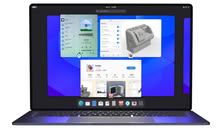
It's been just over six months since Gnome 50 launched into beta, in the process, ditching X11 and issuing a number of updates to Mutter, its compositor, including VRR and fractional scaling. Now, the Gnome Foundation has officially announced the public release of Gnome 51, which features myriad updates, both to the user interface and to the underlying tech, all of which is aimed at making Gnome easier to adopt and use as an average computer user and make "the desktop feel smoother and more responsive than ever."

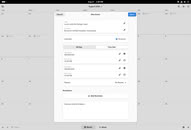
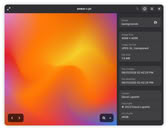
Most notably, Gnome 51 improves frame scheduling, which should make the system feel more responsive, especially under load; faster screen capture with the screenshot tool, and streamlined support for NVIDIA GPUs, which will now all be consolidated into a single, modern management UI. Some of the other major changes include new settings dialogues for smoother fingerprint enrollment, an Auto Rotate option in display settings, for portable devices with accelerometers, and more intuitive window snapping with a new center snap option. Gnome 51 will also let users automatically disable the touchpad when a mouse is connected.
Other notable quality-of-life and feature improvements include:

  • Papers features visual signatures for document signing.
  • An end-of-life warning when trying to install unmaintained package in Gnome Software
  • Plentiful updates to Maps, including offline maps, live departures, and real-time delays for public transit, as well as walking time estimates
  • Reliability fixes for the password manager in Gnome Web
  • Faster and snappier launching and operation of the built-in calendar
  • Revamped File Previewer utility to match the design language of the rest of the desktop environment
  • Infinitely scalable SVG cursors
  • More image information in the Image Viewer (color profile, camera and lens used, editing and creation software, and
Along with the aforementioned under-the-hood and UI updates, Gnome 51 also introduces new desktop wallpapers with glossy new aesthetics that seem to take more than a little inspiration from the likes of Apple's Liquid Glass UI design language.
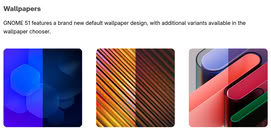
Source: Gnome Release Notes
Add your own comment

9 Comments on Gnome 51 Launches With Smoother Desktop Performance and Myriad QoL Updates

#1
darakian
> Gnome 51 will also let users automatically disable the touchpad when a mouse is connected.

Huh.... that could be a neat feature
Posted on Reply
#2
_roman_
Are there any bootable livecds with gnome 51 available? Or any other usable gnome livecds with the most common cli tools, so i can test out the gnome desktop but use it as a recovery media?

I wonder is gnome worse as kde in regards of UI bugs and performance penalty.
Posted on Reply
#3
aktpu
_roman_Are there any bootable livecds with gnome 51 available? Or any other usable gnome livecds with the most common cli tools, so i can test out the gnome desktop but use it as a recovery media?

I wonder is gnome worse as kde in regards of UI bugs and performance penalty.
Fedora Linux latest beta
Posted on Reply
#4
Darmok N Jalad
_roman_Are there any bootable livecds with gnome 51 available? Or any other usable gnome livecds with the most common cli tools, so i can test out the gnome desktop but use it as a recovery media?

I wonder is gnome worse as kde in regards of UI bugs and performance penalty.
I've always found Gnome to be fast and trouble free, even on older setups.
Posted on Reply
#5
phints
These idiots still don't have even have an optional taskbar with icons like every other DE and OS in the world. Sure it's in an extension but I can't take Gnome seriously because of it.
Posted on Reply
#6
Darmok N Jalad
phintsThese idiots still don't have even have an optional taskbar with icons like every other DE and OS in the world. Sure it's in an extension but I can't take Gnome seriously because of it.
I dunno, adding dash to dock isn’t so bad. While I don’t find base gnome the most useful, I can understand how it could appeal to a keyboard warrior who wants max screen space. Triggering the menu and typing is something I’m doing more and more, but I still like a visible dock along the left side.
Posted on Reply
#7
Arrakis9
phintsThese idiots still don't have even have an optional taskbar with icons like every other DE and OS in the world. Sure it's in an extension but I can't take Gnome seriously because of it.
and how many customization options do you have to go through with KDE to get it exactly as you like? More than 3 button clicks i take it? You shouldn't bash on a DE for its design choices which can easily be changed just because its popular to do so. You could argue that KDE has too many options buried menu under menu to customize the functionality which is off putting for a lot of people and can't be taken seriously as a DE either. It's all a manner of perspective and preference. If you don't like Gnome don't come into a thread about Gnome just to harp on it, just ignore it and move on.
Posted on Reply
#8
Cpt.Jank
Arrakis9and how many customization options do you have to go through with KDE to get it exactly as you like? More than 3 button clicks i take it? You shouldn't bash on a DE for its design choices which can easily be changed just because its popular to do so. You could argue that KDE has too many options buried menu under menu to customize the functionality which is off putting for a lot of people and can't be taken seriously as a DE either. It's all a manner of perspective and preference. If you don't like Gnome don't come into a thread about Gnome just to harp on it, just ignore it and move on.
I actually like Gnome, and even I struggle with the whole concept, because its philosophy is to ship something with a clear set of design guidelines that requires limited tinkering, but in order to get something that's usable as an end-user, you need to install a bunch of stuff, which fragments the experience. Half the time, when I was using Gnome, I couldn't remember if an option I was looking for was in Gnome Tweaks, some extension, or the settings app/menu itself.

Again, I like the way Gnome looks and feels, but I just think they've taken things a little far with the minimalism.
Posted on Reply
#9
Darmok N Jalad
Cpt.JankI actually like Gnome, and even I struggle with the whole concept, because its philosophy is to ship something with a clear set of design guidelines that requires limited tinkering, but in order to get something that's usable as an end-user, you need to install a bunch of stuff, which fragments the experience. Half the time, when I was using Gnome, I couldn't remember if an option I was looking for was in Gnome Tweaks, some extension, or the settings app/menu itself.

Again, I like the way Gnome looks and feels, but I just think they've taken things a little far with the minimalism.
Yeah, its base configuration reminds me a lot of launch Win8, where app launching is hidden until an interaction is made.
Posted on Reply
Nov 17th, 2026 20:10 CST change timezone

New Forum Posts

Popular Reviews

TPU on YouTube

Controversial News Posts