Saturday, September 5th 2026

New DLSS 5 Swapper Tool Brings Neural Rendering to Games NVIDIA Never Supported
A new tool called DLSS 5 Swapper, published on GitHub by developer rakanki911, automates installing DLSS 5's Neural Rendering into games, including ones that never officially got support for it. Users can drag and drop a game into the app, or let it scan the drive for installed titles on its own. For games that already ship with DLSS, the swap is simple. For everything else, the tool relies on DLSS5-Feeder, a community mod that emulates the DLSS calls required to trigger Neural Rendering, paired with ReShade for the depth buffer and motion data that DLSS needs to work. That combination reportedly runs across titles from DirectX 9 through DirectX 12, and even on a handful of emulators like PCSX2, Dolphin, and Xenia.
Perhaps even more interestingly, the app also extends DLSS 5 support to RTX 20-series and RTX 30-series graphics cards, sidestepping NVIDIA's RTX 50-series requirement. This tool builds on the same leaked DLSS 5 files that surfaced in NBA 2K27's pre-launch build, files modders have spent weeks getting to run on older GPUs and non-DLSS games. DLSS 5 Swapper mostly bundles that scattered work into a single app; however, since it's unofficial and has no ties to NVIDIA, it's important to verify the download source before installing anything. Given how far these mods have already spread, this tool is likely to become the most popular way for people to try Neural Rendering, at least until NVIDIA offers something similar itself.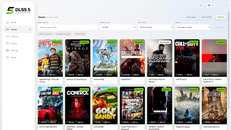
Source:
DLSS 5 Swapper on GitHub
Perhaps even more interestingly, the app also extends DLSS 5 support to RTX 20-series and RTX 30-series graphics cards, sidestepping NVIDIA's RTX 50-series requirement. This tool builds on the same leaked DLSS 5 files that surfaced in NBA 2K27's pre-launch build, files modders have spent weeks getting to run on older GPUs and non-DLSS games. DLSS 5 Swapper mostly bundles that scattered work into a single app; however, since it's unofficial and has no ties to NVIDIA, it's important to verify the download source before installing anything. Given how far these mods have already spread, this tool is likely to become the most popular way for people to try Neural Rendering, at least until NVIDIA offers something similar itself.

17 Comments on New DLSS 5 Swapper Tool Brings Neural Rendering to Games NVIDIA Never Supported
EDIT - I can confirm, this application does work. It's much simpler than doing it manually and it sources all the files itself. However, it is a bit irritating in that one of its features requires a background application to be open and running. Upon closing the app, the background application stays open and takes a small amount of resources. What all it actually does I don't know, but having to go to task manager to shut it down completely every time I use it is quite obnoxious.
Just using native dlss 5 libraries works nice and sweet.
I get bombarded these days on youtube of people implementing dlss 5 in all kind of games (last one was nfs pro street) and my take on it is that it just does too much, i think if it was more subtle it would be better.
It's like someone is wearing too much make up and in the case of that NFS game (which yes it's unofficial) it totally breaks up in Motion.
(ugly typical AI image merging/breakup)
Too me dlss 5 reminds me of the early days of dlss, remember? when everything looked like it was covered in vaseline?
Off
On
Btw, I'm using OptiScaler to implement the latest NR dll.
I have my reason why i compile for 21 years my stuff myself. Even when you compile it yourself, who has the time to understand and read the full source code. _And when it is obfuscated you will not see it anyway.
50kb of code is enough to get issues
Even reading what an unofficial mouse software from github took me quite a while. I only did that to see why hte mouse software communicated with the gibhub owners mouse.
What is better to get * users * to download and install certain software to get something which you want from them as such DLSS5 wonder software.
i hope most users have their data and password separated from the windows 11 pro gambling installation with unknown sourced binaries with questionable contents and lots of CVE.
CVE are enough fact and proof how nasty some coders are on how to ship certain features which you do not want in certain downloaded binaries.
-- What I hate the most, i can not fact check or argue. "Where the fuck is hte usual section, how to build?" most github devs are friendly and write down the how to build segmetn on the landing page
github.com/rakanki911/DLSS5-Swapper
--
I did not saw it so i handed it over, recent featuers on the net AI
chatgpt told me politics view and nonsense
perplexity was next with the same prompt. I wanted to know, show me where the fuck are the build instruction + github link, i quote perplexiyN O P E!
These are aI halluzinations. Usually you write down, which toolchain etc you used. the build requirements.
Which software is needed? Which version? Which build requirements? Which operating system was used to build?
claude crashed and could not answer
gemini refused, but later--
edit
it seems zig may behave like gcc. whatever cig is
homepage says there is zig 16 or zig 17 availabe
the github code refers to a very old version
homepage ziglang.org/download/
github.com/rakanki911/DLSS5-Swapper/blob/main/scripts/build-overlay.ps1
seems some windows platform may was used
$zig = $toolRoots | ForEach-Object { Join-Path $_ 'tools/zig-x86_64-windows-0.14.1/zig.exe' } | Where-Object { Test-Path -LiteralPath $_ } | Select-Object -First 1
that may look like compilation etc, firs time i see zig
& $zig cc -target x86_64-windows-msvc -x c++ -std=c++17 -O2 -fno-exceptions -fno-rtti -nostdinc -nostdlib -c (Join-Path $appRoot 'overlay/imgui-abi.cpp') -o $abiObject
those option sound similar to those gcc flags i know from 21 yearrs of gnu getnoo linux usage, reading gcc: fno-exceptions -fno-rtti -nostdinc -nostdlib
source: github.com/rakanki911/DLSS5-Swapper/blob/main/scripts/build-overlay.ps1
LEt's assume the builder used zig 14.1. Why using an outdated version, which is over 1 year old?
0.14.1
- 2025-05-21
I assume the reshade reference is: reshade.me/releases/10326-6-8EDIT Soo uhh after browsing my Starfield install folder a folder had been added: DLSS5 Screenshots, and there were a whole bunch of screenshots I have not taken. And they were not taken when I turned DLSS on or off, this is just me playing the game without changing settings.
Don't use this program.
I was using the above before I tried out this one. It works just as well despite being a bit slower and is much less shady. No background processes or anything.
I know of another app called DLSS 5 Manager that's much better. Its interface is very fast, and it's not a single EXE file. It's very stupid to have only one EXE file; it's driving my antivirus crazy.
One of the hints of something wrong, is when the program tries to install in C:\users, which bypasses some of the Windows security prompts.
Uninstall this program and use a virus scanner, but reinstalling windows from a formated drive is probably the safest method. Who knows what it downloaded and installed on your system.
An examination of the extracted package and network requests revealed the cause of the alarm. The file believed to be a virus turned out to be the dgVoodoo2 library, used to support older graphical API interfaces. Its unusual name was the result of a typo. The .part extension, on the other hand, is temporarily assigned by the runtime environment during file download and remains until the download is complete.
All components come directly from the official repository of the developer, Dege. The tool verifies their SHA-256 cryptographic hashes and immediately deletes any files whose hashes do not match, completely preventing file substitution.
Windows Defender reported a Win32/Kepavll!rfn threat when the tool attempted to inject DLLs into game processes. The alert was triggered by standard heuristics. Such warnings often appear with digitally unsigned graphics modifiers and mod loaders.
No functions were found in the analyzed code that collect user data, read cookies, or access authorization tokens. The GitHub repository was automatically blocked following a flood of reports from alarmed users, which triggered the moderation system.
The tool is safe, and the entire situation was the result of mass panic.