Saturday, October 31st 2026

Dragging the Windows Taskbar To Move It Is Dead, and That's a Feature

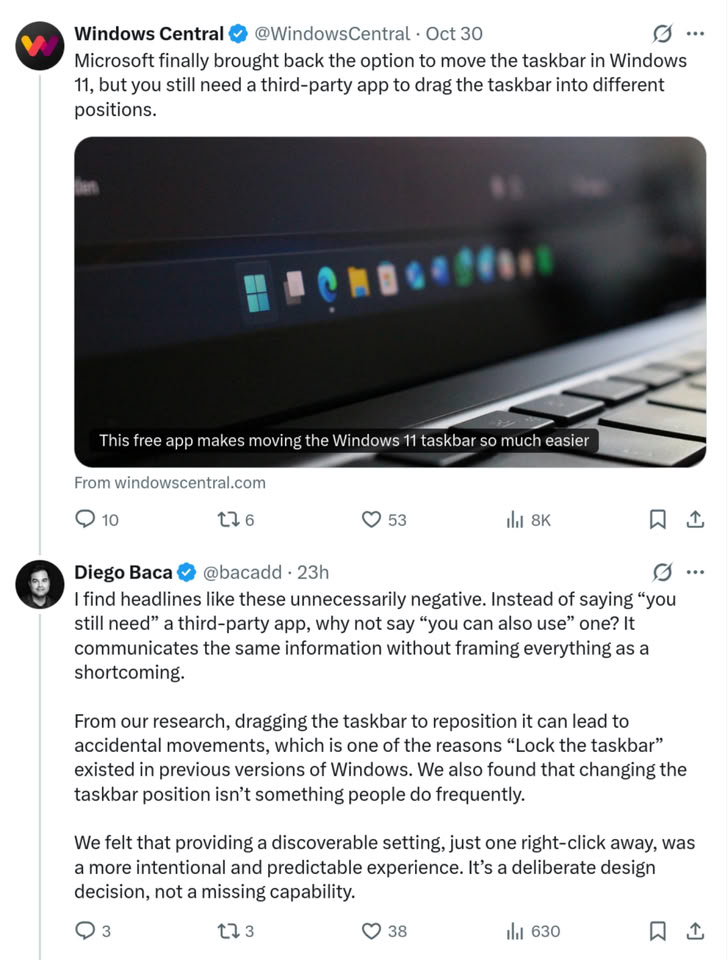
Microsoft recently restored the ability for Windows users to move the Taskbar to any screen edge, nearly five years after Windows 11 launched. The Windows 11 implementation, however, is not the same as it was in Windows 10, where users could click and drag to move the Taskbar and lock it in place when they were happy with its position. Instead, Windows 11 makes users go into the settings app to change the Taskbar position, and now, in response to a news story about a third-party utility that allows Taskbar dragging, Windows Vice President of Design, Diego Baca, explains that this is indeed a feature, not a bug, and that the drag-and-drop repositioning often caused accidental movements.

Diego Baca, Windows Vice President of Design at MicrosoftFrom our research, dragging the Taskbar to reposition it can lead to accidental movements, which is one of the reasons "Lock the Taskbar" existed in previous versions of Windows. We also found that changing the Taskbar position isn't something people do frequently.

We felt that providing a discoverable setting, just one right-click away, was a more intentional and predictable experience. It's a deliberate design decision, not a missing capability.
Removing Taskbar repositioning for so long with Windows 11 was a pain point for many Windows users, because it broke decades-old habits that had been formed by Windows design decisions in Windows 10 and long before that, and moving the Taskbar position options behind a settings window likely resulted in much of the same frustration from those who did move their Taskbar frequently. In another reply, Baca notes that he is "100% supportive of third-party software that extends Windows and gives people more choice," but justifies the current setup by saying that "having the setting accessible with a single right-click is hardly buried. I'd argue it's exactly where it should be!"
Source: Diego Baca on X
Add your own comment

34 Comments on Dragging the Windows Taskbar To Move It Is Dead, and That's a Feature

#26
FR3D1
Ninja Cat
TheLostSwedeThis fixes a lot of Windows 11 issues.
Or adds new ones. The question of blame is settled in advance. Redmond! Windows 11, the eternally outdated operating system. It needs countless mods to bring it up to the level of Windows 10, which even supports the transparent taskbar out of the box.

Regards,
Fred.
Posted on Reply
#27
Synthwave
It's a really shitty design decision.

But just one of the reasons why none of my computers will ever see Win 11 on them.
Posted on Reply
#28
TheLostSwede
News Editor
SynthwaveIt's a really shitty design decision.

But just one of the reasons why none of my computers will ever see Win 11 on them.
You can still move it, just not drag it...
Posted on Reply
#29
computerdave911
I was Dell tech support when xp came out, we used to get a lot of calls people moved the taskbar and did not know how they moved it or how to get it back
Posted on Reply
#30
bug
HoakWindows 11 is not an Operating System in form or by any objective metric including lines of code -- Microsoft openly admits this and that they do not respect you, your privacy or your time. Use any polite marketing slimy speak you prefer -- but it's industrial mal/spyware, that under license (whether you paid for it or not) revokes ownership of your data, to even some extent your PC, and even makes you liable to a considerable extent for Microsoft's malfeasance in the event they abuse copyright material purloined from what was your PC..
en.wikipedia.org/wiki/Malware
Malware (a portmanteau of malicious software) is any software intentionally designed to cause disruption or destruction to a computer, server, client, or computer network, leak private information, gain unauthorized access to information or systems, deprive access to information, or interfere with the user's computer security and privacy without their knowledge.
en.wikipedia.org/wiki/Spyware
Spyware (a portmanteau for spying software) is any malware that aims to gather information about a person or organization and send it to another entity in a way that harms the user by violating their privacy, endangering their device's security, or other means.
en.wikipedia.org/wiki/Paranoia
Posted on Reply
#31
Valent117
Great !
Still not "upgrading" but it was definitly one of the things that bothered me, on my laptop I installed a soft named "windhawk" with an addon to get a vertical taskbar and it worked mostly great
Posted on Reply
#32
Synthwave
TheLostSwedeYou can still move it, just not drag it...
Will never install Win 11, even if it can do 360° no zoom kickflips. : D
Posted on Reply
#33
TheLostSwede
News Editor
SynthwaveWill never install Win 11, even if it can do 360° no zoom kickflips. : D
The "who cares" club has made a note of it, thanks.
Posted on Reply
#34
Synthwave
TheLostSwedeThe "who cares" club has made a note of it, thanks.
Apparently you do, since you bothered with typing a pointless response, chief lmao.
Posted on Reply
Add your own comment
Nov 20th, 2026 19:58 PST change timezone

New Forum Posts

Popular Reviews

TPU on YouTube

Controversial News Posts