Monday, November 9th 2026

AMD Confirms Excessive SSD Writes in Radeon Drivers, Fix Coming with Adrenalin 26.11.1

AMD has confirmed that the current versions of Radeon drivers, Adrenalin 26.10.1 and Adrenalin 26.10.2, are experiencing an issue that causes excessive SSD writing. This problem results in the SSD writing dozens of gigabytes of data unnecessarily. The culprit appears to be AMD's External Events Client Module, which runs under the name atieclxx.exe on Windows systems. This module is causing some users' system drives to be constantly busy with writes. Reports indicate that the write rate ranges from 0.3 MB/s to 1.5 MB/s, with one Reddit user reporting sustained activity at 5 MB/s. The process is part of AMD's External Events Utility, which manages tasks such as detecting monitors and responding to Radeon software hotkeys. Unfortunately, it has entered an infinite loop of data writing.

While this may seem like a small amount, it's important to remember that systems can run for extended periods, and the writing can accumulate over time, potentially leading to SSD wear and tear. SSD lifespan largely depends on its ability to endure constant random writes, and forcing random writes onto an SSD will undoubtedly shorten its lifecycle. This is particularly concerning given the high cost of NAND Flash, as users are operating expensive SSDs that could undergo unnecessary wear. In response, AMD plans to release an update to its Adrenalin drivers with version 26.11.1, which will address this issue.

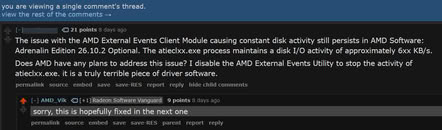
For users needing an interim workaround, there is an option to disable the AMD External Events Utility or disable Resizable BAR. However, choosing the first option might lead to some display issues, while the second option could cause additional performance issues. Either way, it is best to wait for an official driver update before making a decision.
Sources: Reddit, via VideoCardz
Add your own comment

26 Comments on AMD Confirms Excessive SSD Writes in Radeon Drivers, Fix Coming with Adrenalin 26.11.1

#1
wolf
Better Than Native
Not great for the drivers reputation they've been slowly trying to undo for a while, but nonetheless good to admit it and address it.
Posted on Reply
#2
AleksandarK
News Editor
wolfNot great for the drivers reputation they've been slowly trying to undo for a while, but nonetheless good to admit it and address it.
Modern GPU drivers are incredibly complex, and sometimes these edge cases happen, so I understand. We talked with AMD about this, and they have a massive lab for testing GPU drivers, which sometimes can't easily catch these conditions before shipping a new driver version. Thankfully, they are able to quickly patch things and get them released, so their reputation is slowly improving, I'd say.
Posted on Reply
#3
Hecate91
I haven't noticed this on 26.10.1 on W11, but it's good they're fixing this soon because unnecessary SSD writes aren't great with how pricey new ones are.
Modern GPU drivers from either company aren't perfect either, but I see some users still keep the "AMD drivers bad" mentality.
Posted on Reply
#4
Blazeoptimus
I wonder if there's any impact to Linux systems, or if this is a windows only bug.
Posted on Reply
#5
ObscureAngelPT
BlazeoptimusI wonder if there's any impact to Linux systems, or if this is a windows only bug.
It's a Windows only bug, and even on Windows it's not happening to every single person.
For me on my RX 6700 XT it's not happening, not sure if only affects a family of GPUs or if it is related with NVME or not.

What I know is some people on reddit claimed that disabling ReBar solves it.
I would just downgrade the drivers but okay.
Posted on Reply
#6
Rulumi
BlazeoptimusI wonder if there's any impact to Linux systems, or if this is a windows only bug.
No, it's because a Windows component in AMD drivers. AMDGPU lately has been having a lot of annoying bugs there and there however, but that's a different thing.
ObscureAngelPTIt's a Windows only bug, and even on Windows it's not happening to every single person.
For me on my RX 6700 XT it's not happening, not sure if only affects a family of GPUs or if it is related with NVME or not.
RDNA 1 and RDNA 2 drivers are different in a way older codebase (maintenance mode and all), so I wonder if these would even be affected to begin with, maybe not?
Posted on Reply
#7
Jism
No idea,

But give AI full access, and ask it to check for a thing like this. On both PC's here no such thing as a out of control service of AMD, but you can patch it without having to wait for a driver update.

Posted on Reply
#8
Makaveli
Known about this issue for awhile since it was covered in another forum a few weeks ago.

However on my system the service is only doing 0.6 mb/s writes


My SSD after 3 years of use

I'm on Win 10 also

Posted on Reply
#9
PierreJG
ObscureAngelPTIt's a Windows only bug, and even on Windows it's not happening to every single person.
For me on my RX 6700 XT it's not happening, not sure if only affects a family of GPUs or if it is related with NVME or not.

What I know is some people on reddit claimed that disabling ReBar solves it.
I would just downgrade the drivers but okay.
Same I have not experience anything unusual with my RX 6600 XT but in general, Windows has more problems with Drivers than Linux. I have an RX 470 that would time out in certain games on another PC. Same games in Linux 0 errors.
Posted on Reply
#10
Lew Zealand
Not seeing any writes on my RX 6600 XT machine running 26.10.1 and Win 10. I'll check later on to see if maybe something triggers it.
Posted on Reply
#11
Alan Smithee
This happens every few years because AMD has a bunch of debug #ifdef in their code that enable enhanced logging of one feature or another. What happens is they turn on one or more of these flags to debug a problem, but forget to turn them off before compiling the release version. When I was with Microsoft, I first encountered this problem in 2010 and reported it to AMD. At the time, when playing video, it would write a "I'm playing video" debug entry for every frame of the video played. It's amazing this bug still comes back periodically. They really should have some automated check in the build process for release versions.
Posted on Reply
#12
Darmok N Jalad
AleksandarKModern GPU drivers are incredibly complex, and sometimes these edge cases happen, so I understand. We talked with AMD about this, and they have a massive lab for testing GPU drivers, which sometimes can't easily catch these conditions before shipping a new driver version. Thankfully, they are able to quickly patch things and get them released, so their reputation is slowly improving, I'd say.
Seems like this would be a good place for AI in the internal testing phase. Could it pick up on significant resource changes before the drivers get published?
Posted on Reply
#13
mechtech
Squeaky wheel gets the grease.
Posted on Reply
#14
_roman_
We had some user posts who reported this. I consider this now as a proven fact.
Lew ZealandNot seeing any writes on my RX 6600 XT machine running 26.10.1 and Win 10. I'll check later on to see if maybe something triggers it.
You need the process explorer software etc. and you need to watch the process of teh amd gpu drivers in windows
Posted on Reply
#15
Lew Zealand
_roman_We had some user posts who reported this. I consider this now as a proven fact.

You need the process explorer software etc. and you need to watch the process of teh amd gpu drivers in windows
Thanks for the recommendation of Process Explorer. Sorting by I/O Read bytes and then I/O Write bytes, AMD software is 2 orders of magnitude below Firefox so looks like no issues here. Listed 9th in Writes and 3rd in reads, 77.3 MB Read, 126.5 MB Write. This matches the minimal to zero Disk MB/s I see in Task Manager.

Played a game for about 15 minutes and it's up to 108W/140R. Just opening Firefox again exceeded these numbers. So not of concern to everyone though some clearly have the problem since AMD confirmed and is working on the fix.
Posted on Reply
#16
AsRock
TPU addict
I had a issue like this one and a reboot was needed to be done, what did it for me though was the recording software.
Posted on Reply
#17
AleXXX666
AleksandarKModern GPU drivers are incredibly complex, and sometimes these edge cases happen, so I understand. We talked with AMD about this, and they have a massive lab for testing GPU drivers, which sometimes can't easily catch these conditions before shipping a new driver version. Thankfully, they are able to quickly patch things and get them released, so their reputation is slowly improving, I'd say.
I can install Nvidia drivers without the unnecessary (for me) "APP", can install Intel drivers "driver only", AMD drivers too - driver only. Then all the "complexity" disappears magically and one could wonder WTF is with all these GIGABYTE sized DRIVERS...:kookoo::oops::rolleyes::mad:
Posted on Reply
#18
Jtuck9
I'm pretty sure the kernel was mentioned in one of the replies from the AMD guys *(although the HAGS issue was also mentioned)*, so not sure if this is something to do with the recent driving signing changes by Windows. Windows 11 seems to frequently change it's mind about flagging Chromium at the moment.
Posted on Reply
#19
NorthByte
Good to see AMD acknowledging it quickly - until 26.11.1 drops, disabling the in-game overlay and Instant Replay in Adrenalin stops the background cache from constantly hammering the boot NVMe drive.
Posted on Reply
#20
Recus
Perfectly vibe coded AMD drivers strike again.
Posted on Reply
#21
Veseleil
Shout out: AMD External Events Utility service isn't mandatory anymore for VRR/Freesync. I've just tested it disabled, did a reboot and everything. Problem solved.
Posted on Reply
#22
_roman_
just for information. that topic should have been refernenced here, or even merged
3x0 in Warning for Windows 10 and 11 users running newer AMD GPU driversThere seems to be a big bug in newer AMD drivers in combination with newest Windows 10 21H2 and 22H2 update (LTSC and consumer branches). The process atieclxx (AMD External Events Client Module) const…
It is the same scope. So sad, known since 09 / 2026 or earlier
Posted on Reply
#23
Fluffmeister
On Windows 11 and stuck with 26.9.2 as I didn't feel the need to upgrade to the 26.10.x drivers. All good here!
Posted on Reply
#24
Lew Zealand
Still not seeing this bug in Win 10 22H2 and 26.10.1 driver. I wonder what the true trigger is if I'm not seeing it. Driver cache full? ReLive running in the background?
Posted on Reply
#25
Drash
Lew ZealandStill not seeing this bug in Win 10 22H2 and 26.10.1 driver. I wonder what the true trigger is if I'm not seeing it. Driver cache full? ReLive running in the background?
My understanding is not W10 and not RDNA 2/Nvidia, so you good. I'm w11 & RDNA 2 and also ok.
Posted on Reply
Add your own comment
Nov 29th, 2026 11:04 CST change timezone

New Forum Posts

Popular Reviews

TPU on YouTube

Controversial News Posts