News Posts matching #Resizable BAR

Return to Keyword Browsing

Radeon Users Get a Stopgap Open-Source Fix for AMD's SSD Write Bug

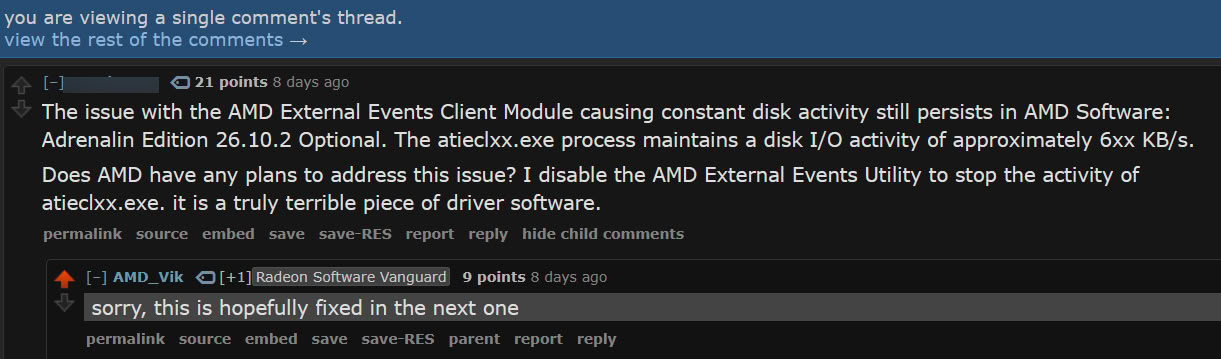
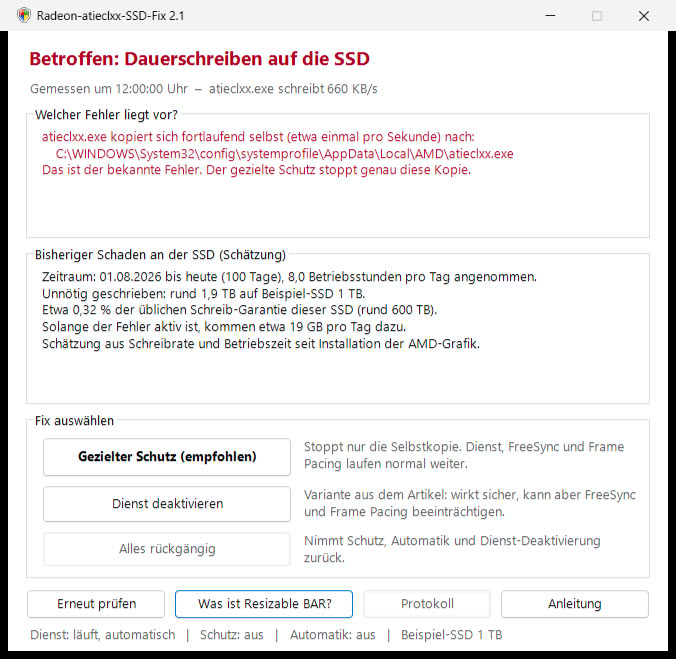
AMD's Radeon SSD write bug now has a community workaround that doesn't require disabling the External Events Utility. ComputerBase forum member Necandi (necanditool on GitHub) has released Radeon-atieclxx-SSD-Fix, a free, open-source tool that blocks the writes but leaves the service running. The developer found that atieclxx.exe keeps copying its own 660 KB executable out of the driver folder and into the Windows SYSTEM profile every second, or roughly 56 GB of writes per day. User reports put the write rate between 0.3 MB/s and 5 MB/s, and the top end works out to a massive 432 GB a day.

The tool uses Windows file permissions to deny the SYSTEM account write access to that one copied file, so each copy attempt fails and nothing new lands on the drive. Since the service stays active, FreeSync, frame pacing, and Radeon hotkeys should keep working. It also checks whether a PC is affected first, estimates the writes so far, and adds a scheduled task that reapplies the block after driver updates. Apparently, it can even lift the protection on its own once AMD patches the bug. The interface is only in German for now, and it is an unofficial tool, so readers are advised to use it at their own risk.


AMD Confirms Excessive SSD Writes in Radeon Drivers, Fix Coming with Adrenalin 26.11.1

AMD has confirmed that the current versions of Radeon drivers, Adrenalin 26.10.1 and Adrenalin 26.10.2, are experiencing an issue that causes excessive SSD writing. This problem results in the SSD writing dozens of gigabytes of data unnecessarily. The culprit appears to be AMD's External Events Client Module, which runs under the name atieclxx.exe on Windows systems. This module is causing some users' system drives to be constantly busy with writes. Reports indicate that the write rate ranges from 0.3 MB/s to 1.5 MB/s, with one Reddit user reporting sustained activity at 5 MB/s. The process is part of AMD's External Events Utility, which manages tasks such as detecting monitors and responding to Radeon software hotkeys. Unfortunately, it has entered an infinite loop of data writing.

While this may seem like a small amount, it's important to remember that systems can run for extended periods, and the writing can accumulate over time, potentially leading to SSD wear and tear. SSD lifespan largely depends on its ability to endure constant random writes, and forcing random writes onto an SSD will undoubtedly shorten its lifecycle. This is particularly concerning given the high cost of NAND Flash, as users are operating expensive SSDs that could undergo unnecessary wear. In response, AMD plans to release an update to its Adrenalin drivers with version 26.11.1, which will address this issue.

NVIDIA App Update Adds DLSS Override Support to 19 More Games

NVIDIA has released NVIDIA App 11.0.9.585, a small update that adds DLSS Override profiles for 19 games and Optimal Settings profiles for six. The list mixes older titles like PUBG: Battlegrounds, The Witcher 3: Wild Hunt, and Dragon's Dogma 2 with Control Resonant, Silent Hill: Townfall, Ace Combat 8: Wings of Theve, Gears of War: E-Day, and Star Wars: Galactic Racer, all of which were scheduled to launch in September or October. Oddly enough, 007 First Light was already listed in the main 11.0.9 release, and Active Matter showed up back in 11.0.8. NVIDIA doesn't explain the repeats, and it doesn't say which overrides each game supports either.

The changelog otherwise only mentions "various stability/security fixes" without any details. This build follows two bigger ones that added significantly more features. The main 11.0.9 release brought DLSS 4.5 Ray Reconstruction and per-game Resizable BAR controls, while 11.0.9.565 added RTX Spark support, a local MCP server for AI agents, and a faster Performance Mode for DLSS Frame Generation. As a refresher, DLSS Override lets GeForce RTX owners use newer DLSS models, or modes like DLAA, that a game may not offer on its own. It sits under Graphics > Program Settings > Driver Settings. Below is the full list of games.

Resizable BAR Comes to Haswell Motherboards Thanks to a Community UEFI Driver

Haswell owners finally have a way to get Resizable BAR running on Intel 8-series motherboards. As spotted by Haze on X, a developer going by roschank has released reBART, an open-source UEFI driver for Z87, H87, Q87, B85, Q85, and H81 boards. Back in 2020, it was reported that Intel CPUs since Haswell support Resizable BAR, pending firmware updates from motherboard makers that never came for 8-series. The developer went digging after failing to get Above 4G Decoding working on their own B85 board, and found that Intel's 8-series platform code skips mapping memory above 4 GB altogether, something both 7-series and 9-series firmware handle. Apparently, every board maker they checked inherited the same gap, so the 4G toggle some of these BIOSes expose likely does nothing.

reBART lets the board boot normally and only kicks in right before the OS loads. At that point, it shifts the GPU's memory window up past the 4 GB line and points the boot display at the new location too. Unlike ReBarUEFI, it doesn't need module patching, though a DSDT patch is still required. Newer builds added experimental support for Intel Arc cards and multi-GPU setups, which is important since Intel once told Arc buyers without ReBAR to stick with other vendors. One user reports an Arc A750 and an Arc B580 both working with an unlimited BAR size on a Gigabyte GA-Z87M-D3H under Ubuntu. Of course, going this route means flashing a modified BIOS, and at least one ASUS Z87-Plus owner couldn't get the board to boot after the DSDT patch. The developer hasn't shared any performance numbers yet either.

New Linux Tool Brings Resizable BAR to Intel Arc GPUs on Old Motherboards

Intel Arc cards have always leaned heavily on Resizable BAR, to the point where Intel once told Alchemist buyers without it to stick with other vendors, and TechPowerUp's B580 review listed it as required for good performance. As spotted by Videocardz, developer Rod Burlamaqui has now released arc-rebar, a Linux tool that turns it on for Arc GPUs on motherboards that never got a ReBAR option. It runs from the initramfs at every boot, before the GPU driver loads, and doesn't touch the BIOS, kernel, or Intel's drivers. That sets it apart from earlier workarounds like ReBarUEFI, which has to be added to the motherboard's firmware.

The fix targets the PCIe switch built into Arc cards, whose small upstream BAR blocks Linux from enlarging the GPU's memory window. arc-rebar writes the card's ReBAR register, then removes and rescans the root port. Intel engineers have proposed a kernel-level fix for this, though it hasn't been merged yet. On a Supermicro X9DRH-7TF with dual Xeon E5-2670 v2 CPUs and a 2015 BIOS, a B580 went from 256 MiB of CPU-visible VRAM to a 16 GiB window covering all 12 GB. Measured VRAM bandwidth jumped from 15 GB/s to 392 GB/s, and a 4K Vulkan blur that used to stall ran at 39 to 50 FPS.

Resizable BAR Control Options Are Coming to NVIDIA App

The NVIDIA App will soon gain an additional control option for Resizable BAR, according to NVIDIA GeForce Evangelist Jacob Freeman. In a post on X, Freeman mentioned that the NVIDIA App build will include Resizable BAR options such as Auto, Enabled, and Disabled. The default option in the application will be Auto, which will switch between enabled and disabled modes depending on the use case and system requirements. Interestingly, the post didn't reveal if the feature will be available with the latest NVIDIA App update, or is it now in beta. We still need an update from NVIDIA to confirm that.

For those wondering, Resizable BAR is a relatively new consumer PC feature that allows multiple CPU-to-GPU memory transfers to occur simultaneously. Before the introduction of Resizable BAR, the CPU could only access the graphics card's memory in 256 MB chunks, making it slow to read and update data. Now, the CPU can read the GPU's entire memory at once, helping the system with easier transfers and better reading of the whole GPU memory. When the feature was introduced in April 2021, there was a dedicated NVIDIA GeForce driver update and a list of conditions that needed to be met. Performance enhances followed, but stayed in the low single percentage digits.

TechPowerUp GPU-Z v2.67.0 Released

TechPowerUp today released the latest version of TechPowerUp GPU-Z, the handy and lightweight standalone utility that gives you graphics subsystem information, diagnostics, and monitoring. Version 2.67.0 comes with several new updates. To begin with, we've updated our kernel-mode driver to harden system integrity. Previously, the driver could write to any physical memory, including the OS kernel. While the driver already required admin rights to run—so this wasn't a privilege escalation—the behavior could have allowed malware with admin access to bypass protections like Windows Defender's Tamper Protection. This is fixed now.

Support has been added for NVIDIA GeForce RTX 5050, both desktop and mobile, RTX 3050 A based on AD106-A, RTX PRO 6000 Blackwell Max-Q and Server; GRID A100D-40C, and Tesla PG503-216. For AMD, support was added for the Radeon AI PRO R9700. Among the new Intel chips supported are the Arc PRO B50 and B60.

Besides the fixes to the kernel driver, we added the correct release date for the Radeon RX 9070 GRE, fixed 0 MHz clock readings on some AMD/ATI GPUs with no driver installed; improved detection of Windows Server OS versions, and fixed Windows XP sometimes incorrectly showing Resizable BAR as supported. Subvendor support was added for Manli. The Tongfang Subvendor name has been updated to Alstone (they renamed the company). Grab TechPowerUp GPU-Z from the link below.

DOWNLOAD: TechPowerUp GPU-Z v2.67.0
The change-log follows.

The Last of Us Part II Remastered Patched to v1.1 - Improves Performance & Addresses Stability Issues

Hey everyone, Patch 1.1 is out now for The Last of Us Part II Remastered! This update fixes various crashes, and we've addressed long stalls that could occur in some locations. We've also fixed several bugs related to the user interface and ultrawide cinematics. Check out the patch notes below for more details. We are aware of player reports of autosave issues and are actively working on a fix.

Our investigation shows that issues can occur when OneDrive or similar cloud services block the save file from being written. As a workaround, we suggest that you pause OneDrive while playing the game: Right-click the OneDrive icon in the Windows taskbar, click the gear icon and Pause sync. The teams at Nixxes and Naughty Dog are keeping a close eye on player feedback and crash reports and are working on additional updates with more bug fixes and improvements. Thank you all for playing The Last of Us Part II on PC and sharing your feedback with us!

NVIDIA Releases GeForce 572.42 WHQL Game Ready Drivers

NVIDIA today released the latest version of GeForce drivers. Version 572.42 WHQL comes Game Ready for "Indiana Jones and the Great Circle." including support for DLSS 4. Other new optimized titles include "Avowed" and "Wuthering Waves." The driver also offers early optimization for "Sid Meier's Civilization VII." Among the gaming bugs fixed with this release include a crash-to-desktop (CTD) noticed at launch with "Valorant," a system freeze noticed when exiting "Final Fantasy XVI," and performance loss noticed in "Delta Force" with resizable-BAR enabled. Unexpectedly low score for RTX 50-series "Blackwell" GPUs in 3DMark DXR feature test has been fixed. A compatibility issue caused by library version mismatch has been fixed.

DOWNLOAD: NVIDIA GeForce 572.42 WHQL

TechPowerUp GPU-Z v2.59.0 Released

TechPowerUp today released the latest version of the popular GPU-Z graphics sub-system information, monitoring, and diagnostic utility. Version 2.59.0 adds support for new GPUs, but also fixes a few important issues with the application. To begin with, support is added for the NVIDIA RTX 2000 Ada and RTX 1000 Ada Laptop GPUs. An application launch error on Windows 7 and Windows 8 systems reading "unsigned driver cannot load" has been fixed.

The other issues resolved mainly concern the way PCI resizable BAR status is detected. On external GPUs, resizable BAR status was appearing as "enabled." This has been fixed. eGPUs lack resizable BAR support due to the limitations of USB interconnect. On notebooks with NVIDIA Optimus GPUs that support resizable BAR, the status was being reported as "disabled" when the discrete GPU is sleeping, which has been fixed. Lastly, instances where resizable BAR support is reporting as "Yes" instead of "enabled" or "disabled" has been fixed. Grab TechPowerUp GPU-Z from the link below.

DOWNLOAD: TechPowerUp GPU-Z 2.59.0

NVIDIA RTX 20-series and GTX 16-series "Turing" GPUs Get Resizable BAR Support Through NVStrapsReBAR Mod

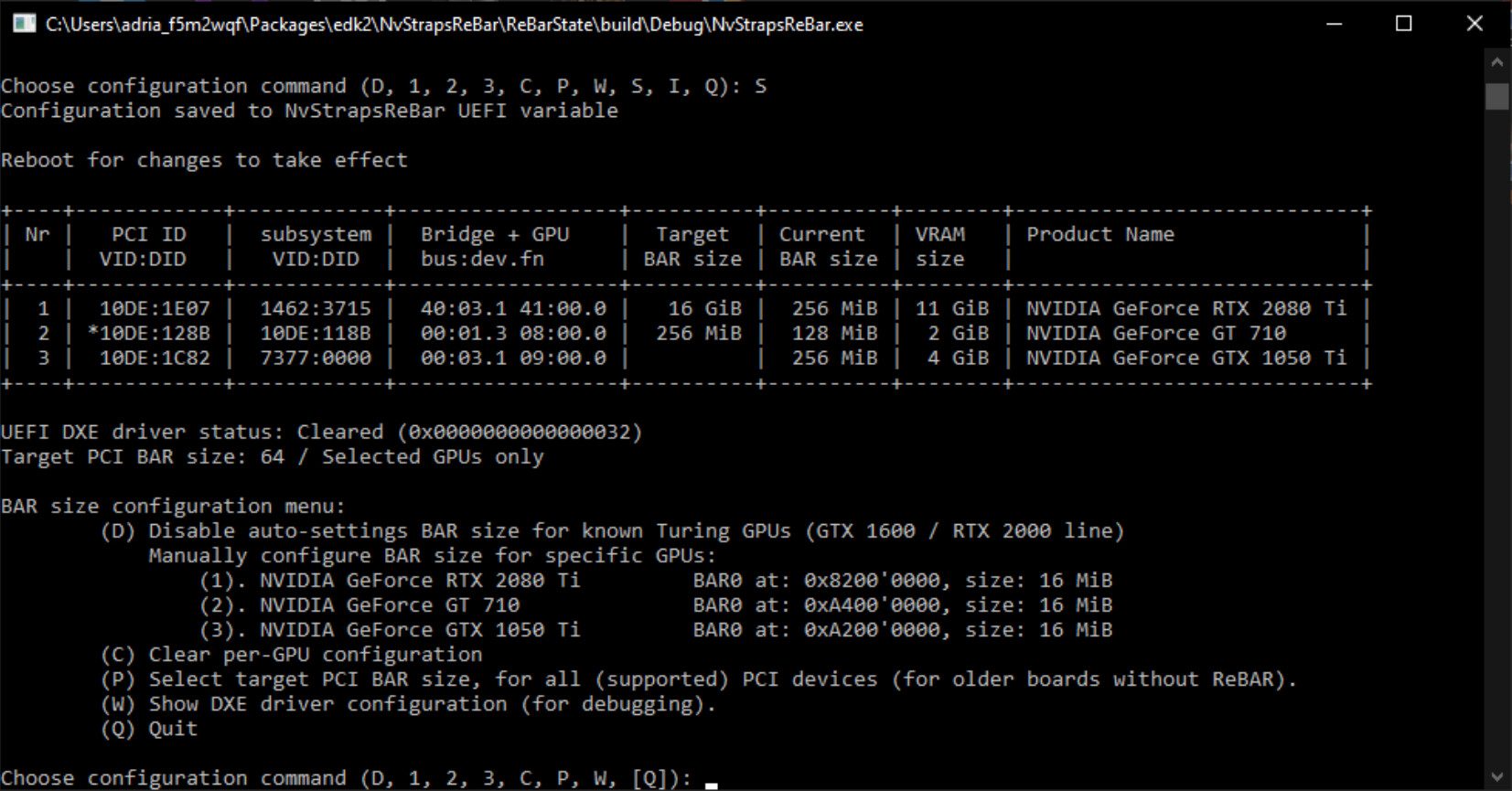
February saw community mods bring resizable BAR support to several older platforms; and now we come across a mod that brings it to some older GPUs. The NVStrapsReBAR mod by terminatorul, which is forked out of the ReBarUEFI mod by xCurio, brings resizable BAR support to NVIDIA GeForce RTX 20-series and GTX 16-series GPUs based on the "Turing" graphics architecture. This mod is intended for power users, and can potentially brick your motherboard. NVIDIA officially implemented resizable BAR support since its RTX 30-series "Ampere" GPUs in response to AMD's Radeon RX 6000 RDNA 2 GPUs implementing the tech under the marketing name Smart Access Memory. While AMD would go on to retroactively enable the tech for even the older RX 5000 series RDNA GPUs, NVIDIA didn't do so for "Turing."

NVStrapsReBAR is a motherboard UEFI firmware mod. It modifies the way your system firmware negotiates BAR size with the GPU on boot. There are only two ways to go about modding a platform to enable resizable BAR on an unsupported platform—by modding the motherboard firmware, or the video BIOS. Signature checks by security processors in NVIDIA GPUs make the video BIOS modding route impossible for most users; thankfully motherboard firmware modding isn't as difficult. There is an extensive documentation by the author to go about using this mod. The author has tested the mod to work with "Turing" GPUs, however, it doesn't work with older NVIDIA GPUs, including "Pascal." Resizable BAR enables the CPU (software) to see video memory as a single contiguously addressable block, rather than through 256 MB apertures.

MSI BIOS Update Brings 256 GB DDR5 Memory Support to Intel 700 & 600 Boards

MSI released an intriguing AMI BIOS update on January 31 for their Intel 700 and 600 chipset mainboards—hardware tipster chi11eddog noticed this quiet announcement and proceeded to get his Z790 Carbon MAX WIFI motherboard running on beta version 7D89v1B1. This preliminary release enables "capacity support up to 256 GB" for DDR5 Memory—chi11eddog noted that you previously had to jump through several hoops to get this configuration in working order: "As per a friend in the industry, before this, it needs to disable Above 4G/Resizable BAR/remapping to support 256 GB on Intel systems. MSI has fixed this. No need to disable Above 4G/Resizable Bar."

His MSI Z790 test platform featured an Intel Core i9-14900K CPU and 256 GB (4 x 64 GB) DDR5-4800 of memory—Wccftech's reportage proposes some extra tests: "it would be interesting to see what the maximum speeds are supported when using high-capacity memory kits but for those who prefer capacity over speed, well the solutions are now out there." The Compression Attached Memory Module (CAMM) standard has been adopted by the laptop memory segment, and manufacturers are believed to be transferring technological innovations to desktop form factors. Upcoming 64 GB DDR5 modules offer twice the capacity over the best previous-gen solutions. The proliferation of non-binary DIMM kits—from 24 to 48 GB—in 2023 brought (total) desktop memory capacities to a maximum of 192 GB.

Intel Graphics Releases Arc GPU Graphics Drivers 101.4369 WHQL

Intel Graphics releases Arc GPU Graphics Drivers version 101.4369 WHQL. These drivers significantly improve performance for "The Outlast Trials," with gains of up to 65% and 52% to be had at 1080p and 1440p, respectively, compared to the previous 101.4355 drivers. The drivers also offer 4% to 11% uplifts for "Starship Troopers: Extermination" Early Access. The drivers introduce an all new version of Arc Control, which adds fan speed settings, VRR control, a new Search bar that finds features and settings; improved background replacement for virtual camera, and the ability to select more than one device for telemetry. It also fixes UAC requirements to launch Arc Control, improved Resizable BAR status reporting, and live performance monitoring.

DOWNLOAD: Intel Arc GPU Graphics Drivers 101.4369 WHQL

DirectX 12 API New Feature Set Introduces GPU Upload Heaps, Enables Simultaneous Access to VRAM for CPU and GPU

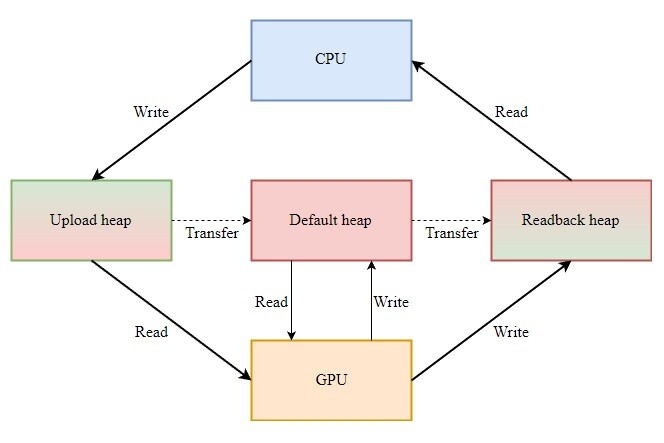
Microsoft has implemented two new features into its DirectX 12 API - GPU Upload Heaps and Non-Normalized sampling have been added via the latest Agility SDK 1.710.0 preview, and the former looks to be the more intriguing of the pair. The SDK preview is only accessible to developers at the present time, since its official introduction on Friday 31 March. Support has also been initiated via the latest graphics drivers issued by NVIDIA, Intel, and AMD. The Microsoft team has this to say about the preview version of GPU upload heaps feature in DirectX 12: "Historically a GPU's VRAM was inaccessible to the CPU, forcing programs to have to copy large amounts of data to the GPU via the PCI bus. Most modern GPUs have introduced VRAM resizable base address register (BAR) enabling Windows to manage the GPU VRAM in WDDM 2.0 or later."

They continue to describe how the update allows the CPU to gain access to the pool of VRAM on the connected graphics card: "With the VRAM being managed by Windows, D3D now exposes the heap memory access directly to the CPU! This allows both the CPU and GPU to directly access the memory simultaneously, removing the need to copy data from the CPU to the GPU increasing performance in certain scenarios." This GPU optimization could offer many benefits in the context of computer games, since memory requirements continue to grow in line with an increase in visual sophistication and complexity.

SAM/ReBAR Stripped Out of AMD Open-Source OpenGL Driver RadeonSI Gallium3D

Support for AMD's Smart Access Memory and the overarching Resizable BAR technologies has been removed from the RadeonSI Gallium3D OpenGL driver as of today's Mesa 22.3.7 release. The comment in the announcement simply reads, "Disable Smart Access Memory because CPU access has large overhead." The nail in the coffin seems to have been this bug ticket submitted last month for the game Hyperdimension Neptunia Re;Birth1, in which the user reported the game running oddly slow on their RX 6600 while previously they had no issues on the much older R9 380. The solution provided was to simply disable ReBAR/SAM either with radeonsi_disable_sam=true or via UEFI. In the comments of the ticket lead RadeonSI developer Marek Olšák states, "We've never tested SAM with radeonsi, and it's not necessary there."

Apparently the performance advantages weren't panning out for RadeonSI, and since direct optimizations of these features was not a primary goal the decision was made to cut them out. Attempts to optimize SAM with RadeonSI date as far back as December 2020 and Mesa 21.0, but support for SAM under Linux goes further back. None of the changes to RadeonSI will affect other drivers such as RADV, the open-source Radeon Vulkan driver, and this code change is limited to only the RadeonSI OpenGL driver.
Dead Space Performance Jumps 46% with Resizable BAR Enabled

The PCI Resizable BAR feature can have a major impact on the performance of "Dead Space" (the 2023 reboot). sxKYLE on Reddit discovered that his GeForce RTX 4080 "Ada" experienced a major performance jump from 76 FPS up to 111 FPS (+46%) with resizable BAR enabled. NVIDIA Profile Inspector was used to enable resizable BAR for the game. The feature allows the CPU to see the graphics card's video memory as a single, continuously-addressable block, rather than through 256 MB apertures. We can imagine how "Dead Space" in particular could benefit from the feature, as the game's campaign is a single continuous action sequence with assets being constantly streamed to the GPU (and no level load screens).

Intel Lists Resizable BAR Support as an Arc GPU Requirement for Optimal Performance

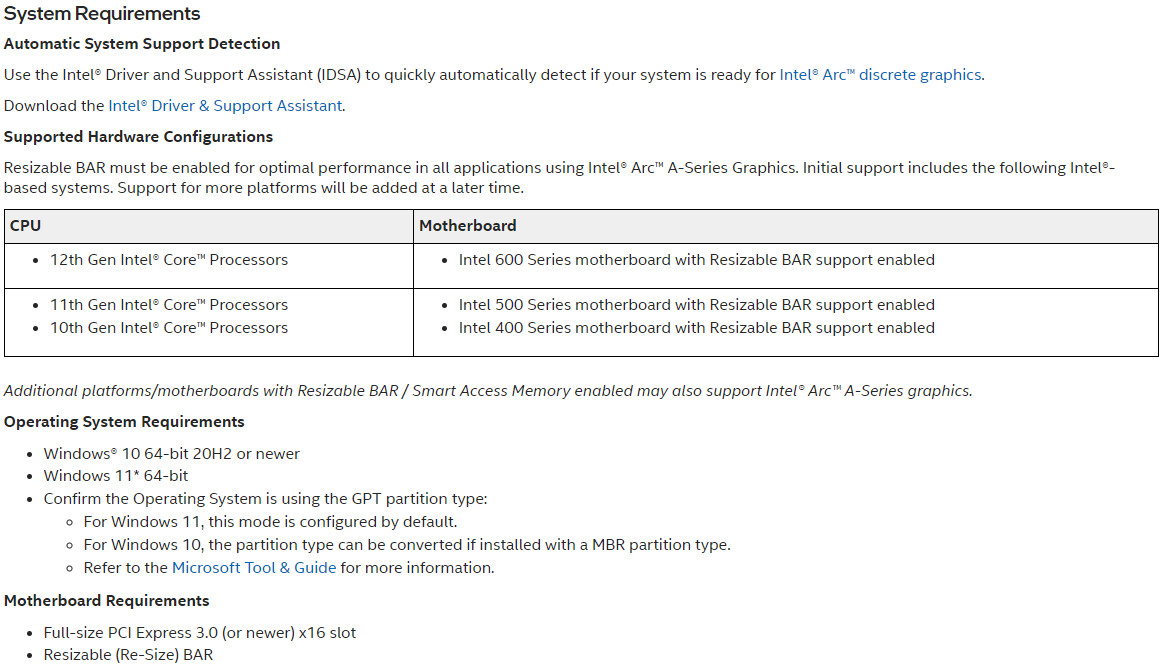
Intel has recently published a document outlining the requirements for Arc GPU support on desktop including the supported platforms. The guide states that supported processors are limited to 12th Gen Core "Alder Lake", 11th Gen Core "Rocket Lake", and 10th Gen Core "Comet Lake" with Resizable BAR support enabled on the motherboard. The document also notes that other platforms supporting Resizable BAR / Smart Access Memory may work with Intel Arc graphics cards indicating potential unofficial support for AMD platforms also. Intel has also specified that only Windows 10/11 is supported and installations must be using the GPT partition type. The page contains instructions to enable Resizable BAR support and switch to a GPT partition but no information is provided as to whether the cards will work without this functionality.

AMD Unveils 5 nm Ryzen 7000 "Zen 4" Desktop Processors & AM5 DDR5 Platform

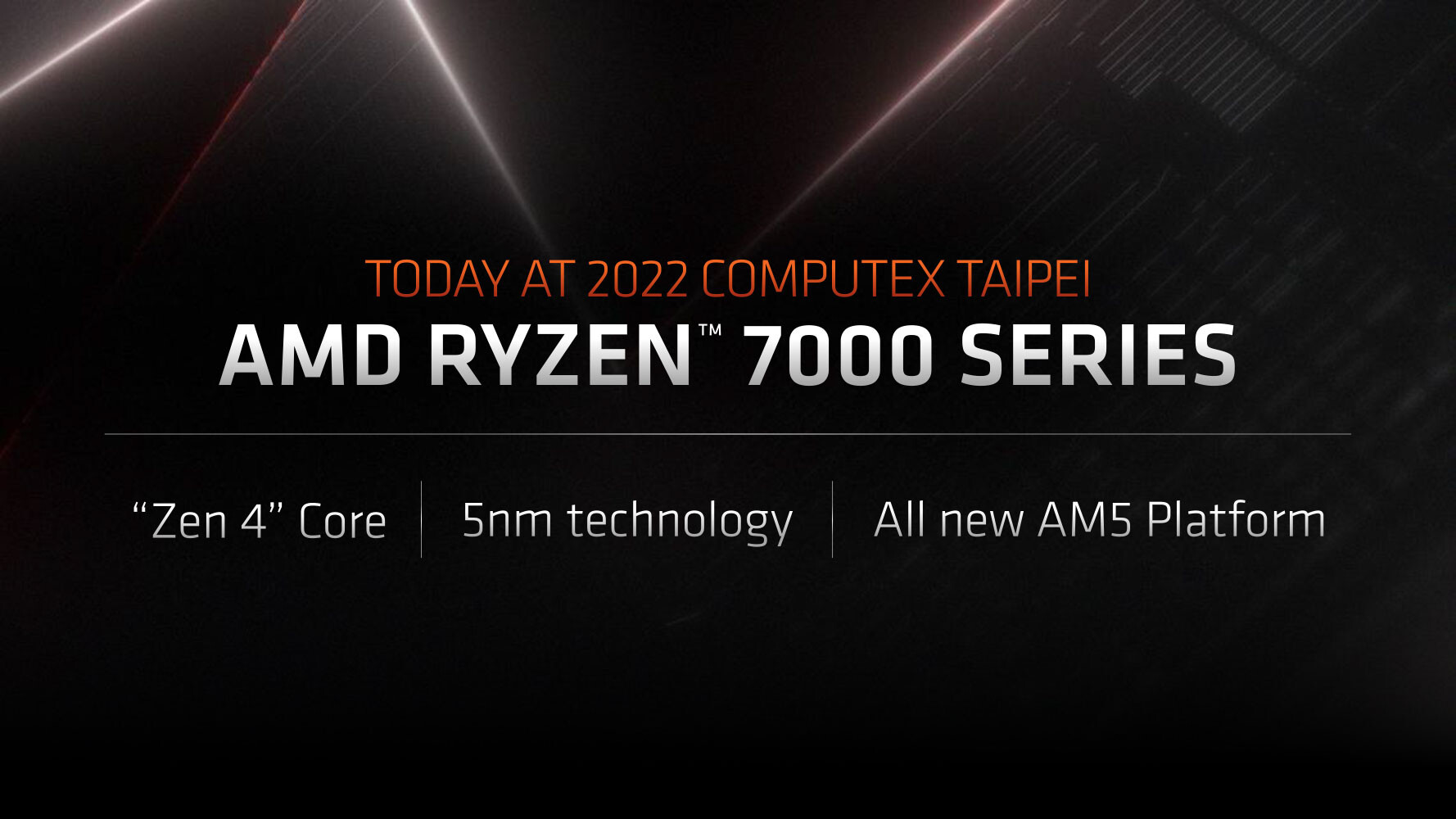
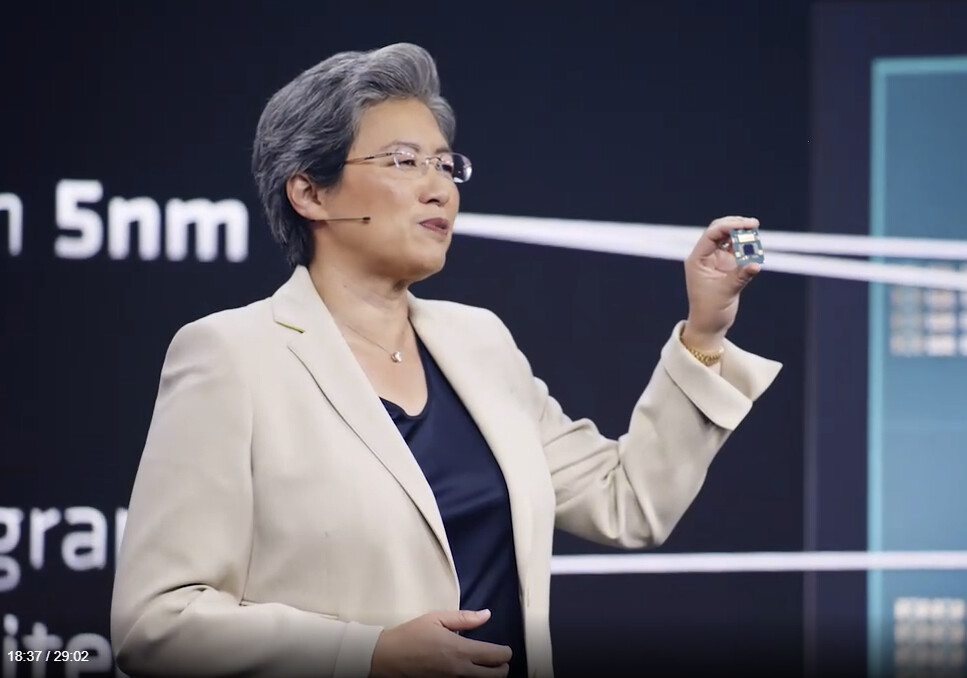
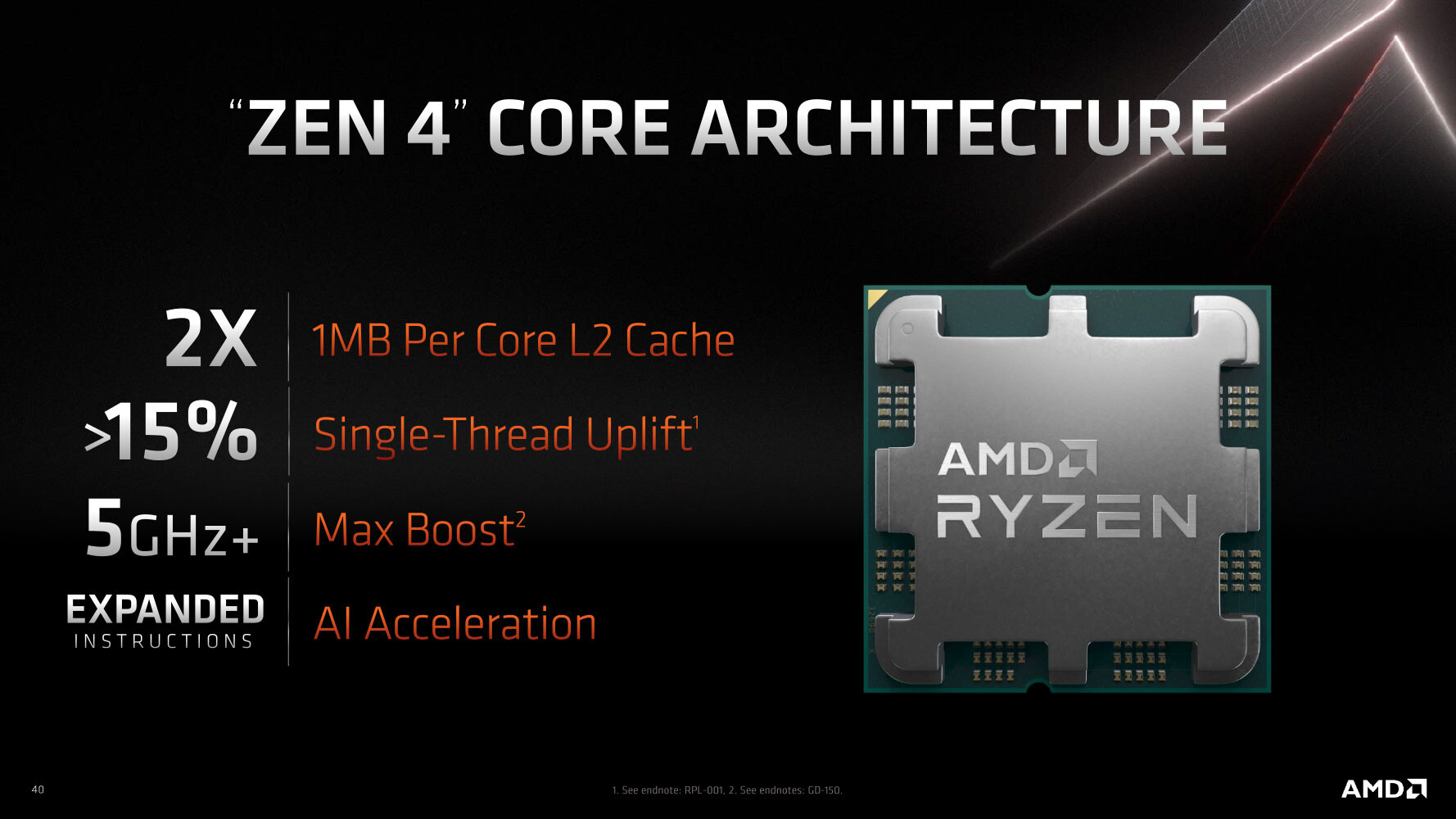
AMD today unveiled its next-generation Ryzen 7000 desktop processors, based on the Socket AM5 desktop platform. The new Ryzen 7000 series processors introduce the new "Zen 4" microarchitecture, with the company claiming a 15% single-threaded uplift over "Zen 3" (16-core/32-thread Zen 4 processor prototype compared to a Ryzen 9 5950X). Other key specs about the architecture put out by AMD include a doubling in per-core L2 cache to 1 MB, up from 512 KB on all older versions of "Zen." The Ryzen 7000 desktop CPUs will boost to frequencies above 5.5 GHz. Based on the way AMD has worded their claims, it seems that the "+15%" number includes IPC gains, plus gains from higher clocks, plus what the DDR4 to DDR5 transition achieves. With Zen 4, AMD is introducing a new instruction set for AI compute acceleration. The transition to the LGA1718 Socket AM5 allows AMD to use next-generation I/O, including DDR5 memory, and PCI-Express Gen 5, both for the graphics card, and the M.2 NVMe slot attached to the CPU socket.

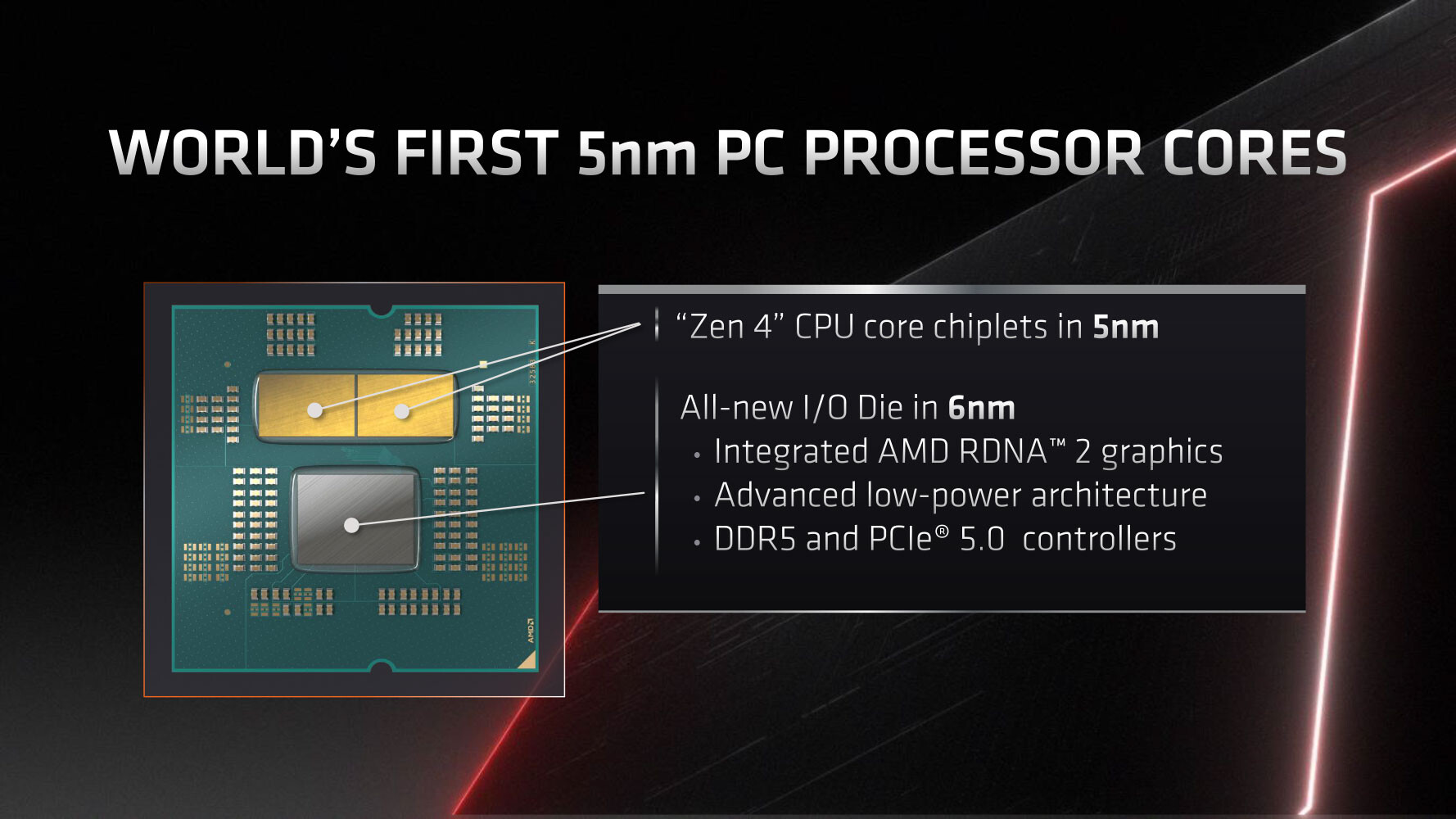
Much like Ryzen 3000 "Matisse," and Ryzen 5000 "Vermeer," the Ryzen 7000 "Raphael" desktop processor is a multi-chip module with up to two "Zen 4" CCDs (CPU core dies), and one I/O controller die. The CCDs are built on the 5 nm silicon fabrication process, while the I/O die is built on the 6 nm process, a significant upgrade from previous-generation I/O dies that were built on 12 nm. The leap to 5 nm for the CCD enables AMD to cram up to 16 "Zen 4" cores per socket, all of which are "performance" cores. The "Zen 4" CPU core is larger, on account of more number-crunching machinery to achieve the IPC increase and new instruction-sets, as well as the larger per-core L2 cache. The cIOD packs a pleasant surprise—an iGPU based on the RDNA2 graphics architecture! Now most Ryzen 7000 processors will pack integrated graphics, just like Intel Core desktop processors.

TechPowerUp GPU-Z v2.46.0 Released

TechPowerUp today released the latest version of TechPowerUp GPU-Z, the popular graphics sub-system information, diagnostic, and monitoring utility. Version 2.46.0 introduces support for the AMD Radeon RX 6950 XT, RX 6750 XT, and RX 6650 XT. It also improves support for Intel Arc "Alchemist" GPUs. Support is added for rare graphics cards, such as the GA107-based GeForce RTX 2050, and NVIDIA A30. Support is also improved for Xe LP-based iGPUs in "Alder Lake" mobile processors, and the Glenfly GPU. The core driver of GPU-Z has been updated to no longer require an SSE2-capable CPU. AMD's 2022-series drivers are correctly labeled as "AMD Software." Resizable BAR misreading on AGP graphics cards has been fixed.

DOWNLOAD: TechPowerUp GPU-Z 2.46.0

AMD Radeon Software Adrenalin 22.2.2 Released

AMD today released the latest version of Radeon Software Adrenalin. Bearing the fancy number 22.2.2, these drivers add optimization for "Total War: Warhammer III." The drivers also add major optimization for AMD Smart Access Memory (Resizable BAR) when you pair AMD "Cezanne" based processors with compatible Radeon RX 6000 and RX 5000 series GPUs, with game-specific performance improving by as much as 23%. Details of individual use-cases in the change-log below. With this release, the company didn't fix any new bugs, but identified several of them. Grab the drivers from the link below.

DOWNLOAD: AMD Radeon Software Adrenalin 22.2.2 beta

TechPowerUp GPU-Z v2.44.0 Released

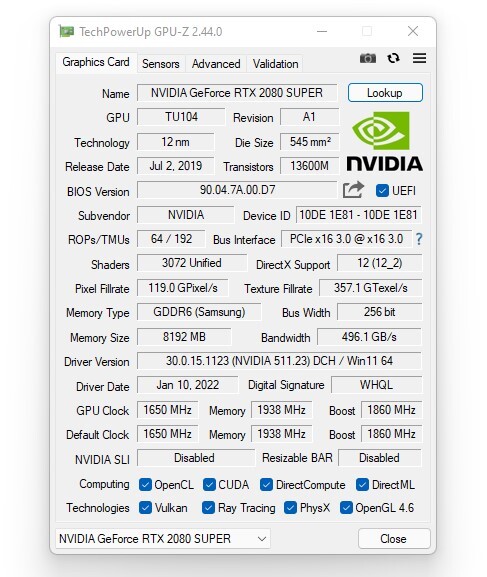
TechPowerUp today released the latest version of TechPowerUp GPU-Z, the handy graphics sub-system information and diagnostic utility for gamers and PC enthusiasts. Version 2.44.0 adds support for several new GPUs, feature updates to the Resizable BAR detection, and a handful other fixes. To begin with, GPU-Z adds support for NVIDIA GeForce RTX 3050, RTX 3080 12 GB, RTX 3070 Ti Mobile, RTX 3050 Ti Mobile, RTX 2060 12 GB, MX550, and a number of other mobile GPUs from NVIDIA. On the AMD front, you get support for Navi 24: Radeon RX 6500 XT, RX 6400, RX 6300M, RX 6500M, PRO W6300M, PRO W6500M, and PRO W660M. Support is also added for Intel "Alder Lake" non-K processors, "Alder Lake" mobile processors, and Xeon processors based on "Rocket Lake."

TechPowerUp GPU-Z can now report the exact base-address register (BAR) size when Resizable BAR is enabled. Find it in the Advanced Panel, under Resizable BAR. Detection of Resizable BAR has been improved. Detection of LHR in certain RTX 3060 cards has been improved to weed out misreporting of LHR. Vendor detection was added for Vastarmor. The internal Screenshot hosting utility now uploads screenshots over HTTPS. The 64-bit Windows Vista name will now include a space character, so "Vista 64" instead of just "Vista64." Grab GPU-Z from the link below.

DOWNLOAD: TechPowerUp GPU-Z 2.44.0

AMD Radeon Software Adrenalin 21.9.1 Released with Auto-Overclock, SAM for RX 5000 Series

AMD today released the latest version of Radeon Software Adrenalin. Version 21.9.1 is feature-packed with stuff enthusiasts are bound to love. To begin with, it introduces Smart Access Memory (PCI Resizable BAR) support for AMD Radeon RX 5000 series (RDNA) graphics processors, when used with a compatible platform. Next up, it adds optimization for "Call of Duty Vanguard Open Beta," and "Deathloop." The drivers also add a handful Vulkan API extensions, including VK_KHR_zero_initialize_workgroup_memory, VK_KHR_shader_integer_dot_product, VK_EXT_shader_atomic_float2, and VK_EXT_load_store_op_none. Perhaps the biggest new feature addition is AMD Auto Overclock.

On machines with AMD Ryzen 5000 series processors and Radeon RX 6000 series graphics, the Auto-Overclock feature detects CPU load, and automatically overclocks it in increments of 50 MHz, beyond the processor's rated maximum boost frequency. Just like manual overclocking, this comes with sizable costs to power consumption and cooling. The feature also automatically overclocks your RX 6000 series GPU. Using the feature is as easy as pulling up the Tuning tab in Radeon Software, and clicking on "Auto Overclock" in the Tuning Control tab. Lastly, Adrenalin 21.9.1 adds support for the upcoming Windows 11 operating system. The software is released alongside AMD's latest 3.09.01.140 Chipset Software, which also add Windows 11 support. A handful bugs have also been fixed, as described below.

DOWNLOAD: AMD Radeon Software Adrenalin 21.9.1 | AMD Chipset Software 3.09.01.140

AMD Announces Radeon RX 6600 XT Graphics Card

AMD today announced the new Radeon RX 6600 XT graphics card, its latest entrant to the RX 6000 series, based on the RDNA2 graphics architecture, with full DirectX 12 Ultimate support, including raytracing. The RX 6600 XT is suitable for AAA gaming at 1080p, or e-sports gaming at 1440p. The card debuts the new 7 nm Navi 23 silicon to the desktop, and maxes it out. It is endowed with 2,048 stream processors across 32 RDNA2 compute units, 128 TMUs, 32 ROPs, and a 128-bit wide memory interface, holding 8 GB of GDDR6 memory running at 16 Gbps (256 GB/s bandwidth). The chip also has 32 MB of Infinity Cache memory. With a board power of 160 W, the card can make do with a single 8-pin PCIe power connector. The game clocks are up to 2359 MHz.

As for performance, AMD claims that the RX 6600 XT offers a 2.2-2.5 times performance gain over the GeForce GTX 1060, providing a viable upgrade. It also offers a 40% performance uplift over the previous-generation RX 5600 XT, and runs consistently faster than the RX 5700, perhaps even trading blows with the RX 5700 XT. In the current generation, AMD claims a 15% performance lead over the GeForce RTX 3060 on average, with both cards having Resizable BAR / Smart Access Memory enabled, at 1080p. Available from August 10, the card starts at USD $379, and is a partner-exclusive, meaning that only custom-design cards will be available, the company will not sell reference design ones.

NVIDIA Announces GeForce RTX 3050 Ti Mobile and RTX 3050 Mobile

Alongside Intel's launch of the 11th Gen Core "Tiger Lake-H" desktop processor series, NVIDIA debuted its mid-range GeForce RTX 3050 Ti (mobile) and RTX 3050 (mobile) graphics processors. Both chips are designed with typical 3D power ranging between 35 W and 80 W. Both chips are based on the new 8 nm "GA107" silicon. This "Ampere" chip physically packs 2,560 CUDA cores across 20 streaming multiprocessors, with 80 tensor cores, 20 RT cores, and a 128-bit wide GDDR6 memory interface.

The GeForce RTX 3050 Ti (mobile) appears to be maxing out the GA107 silicon, featuring all 2,560 CUDA cores, 80 tensor cores, 20 RT cores, and 4 GB of GDDR6 memory across the chip's 128-bit wide memory bus. The RTX 3050 is slightly cut down, with 16 out of 20 SM enabled. This works out to 2,048 CUDA cores, 64 tensor cores, and 16 RT cores. The memory remains the same—4 GB GDDR6. Clock speeds will vary wildly depending on the notebook model, but typically, the RTX 3050 Ti can boost up to 1695 MHz, while the RTX 3050 can boost up to 1740 MHz. Both chips take advantage of PCI-Express 4.0 and Resizable BAR. The company didn't reveal memory clocks.

EVGA Precision X1 Adds Ability to Toggle Resizable BAR

EVGA GeForce RTX 30 Series utilizing NVIDIA Resizable BAR gives gamers an extra boost in gameplay framerate on select titles by letting the CPU directly access the GPU's entire frame buffer memory. EVGA Precision X1 simplifies the upgrade process and makes it more intuitive, so you can spend less time updating software and firmware and get back to your gaming! All EVGA GeForce RTX 30 Series now feature support for NVIDIA Resizable BAR after updating a brand new EVGA VBIOS.
Return to Keyword Browsing
Nov 11th, 2026 20:54 CST change timezone

New Forum Posts

Popular Reviews

TPU on YouTube

Controversial News Posts