Wednesday, December 17th 2025

Windows Server 2025 Gets Native NVMe SSD Support After 12 Years
Microsoft has introduced native NVMe SSD support in its Windows Server 2025 build, now available as an opt-in feature for users. After 12 years of NVMe's existence and years of support in the Linux kernel and Linux-based operating systems, native support has been added to the Windows Server stack. Previously, Microsoft converted NVMe drive commands into SCSI commands, which resulted in processing latency and overhead, slowing down read/write speeds in typically high-performing storage configurations. With native NVMe support, the entire stack and I/O processing have been redesigned to achieve optimal SSD performance.
System administrators don't need data to recognize the significant performance improvements that native NVMe support will bring. Windows Server 2025's native NVMe support fundamentally transforms storage performance by enabling direct multi-queue access to modern hardware. It delivers up to 3.3 million IOPS on PCIe Gen 5 SSDs and exceeds 10 million IOPS on HBAs, while reducing latency through streamlined, lock-free I/O paths. This leap in efficiency is essential because traditional SCSI-based processing, originally designed for rotational disks with a single-queue model limited to 32 commands, cannot fully utilize flash storage.
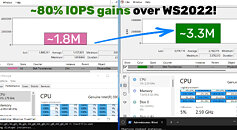
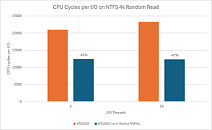
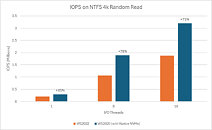 In contrast, NVMe was specifically designed for solid-state media with native support for 64,000 queues, each handling 64,000 simultaneous commands. This allows Windows Server 2025 to eliminate legacy translation layers, improve CPU utilization, and unlock next-generation storage capabilities. Microsoft says that this is a storage revolution and "a new foundation for Windows Server storage, built for the future." Microsoft even has a dedicated email for feedback and questions nativenvme@microsoft.com, which will likely serve as a feedback and bug logger hub. For Windows 11, there is no information on when the OS will bring native NVMe support, but we can assume that it will trickle down in the coming months.
Sources:
Microsoft, OC3D
System administrators don't need data to recognize the significant performance improvements that native NVMe support will bring. Windows Server 2025's native NVMe support fundamentally transforms storage performance by enabling direct multi-queue access to modern hardware. It delivers up to 3.3 million IOPS on PCIe Gen 5 SSDs and exceeds 10 million IOPS on HBAs, while reducing latency through streamlined, lock-free I/O paths. This leap in efficiency is essential because traditional SCSI-based processing, originally designed for rotational disks with a single-queue model limited to 32 commands, cannot fully utilize flash storage.


49 Comments on Windows Server 2025 Gets Native NVMe SSD Support After 12 Years
I didn't even know it didn't have native NVMe support since it appeared on market, 12 years? are you kidding me? if that's an opt-in on WS25, does that mean W10/11 don't have it either? that it should come in a future update?
if the latter is true then I cannot wait to see the bump up in performance we've been sitting on this whole time because no one bothered to check if they had the hardware support for a decade+ old industry standard
Wait, is THIS why NVMe drives have never shown any real benefit to consumer applications?
How do you screw that up?
Intel was ahead of their time with XPpoint.
commandlinux.com/statistics/linux-server-market-share/
I was one of the last vb.NET coders on the planet when everyone else jumped ship for C#. It's good, just not for me.
Real autists setup some PHP/LAMP server for whatever ops but I set things to work a minute from the power button.
Windows server versions are more complex and business critical, which means they typically receive updates long after they have been successfully tested on retail versions.
We start WinPE, load the driver, image Windows, bcdboot, reboot, done. Nobody cares about "native" oob support.
The drivers are already present for a good while though
Otherwise go back to 2019 or 2022 where your CPU is gonna suffer more to squeeze out that precious IO at tighter latency.
I'm not asking about the article. I'm looking at these comments trying to figure out wtf is happening.
BTFS with zstd 15 compression on that drive with caja is a lot more snapier
NTFS is outdated and old. File transfer also leads that BTRFS is better. the ntfs fuse module is very old and should be well optimised.
edit: I doubt many user can setup a drive correctly. That is a bit more compliated as it seems.
--
Linux, i talk about the kernel and not about the gnu userspace!, had everything put in the SCSI software corner. That is the reason why anything was shown as /dev/sdx for parallel ata and serial ata.
-- well microsoft ignored PCIE 3.0 and PCIE 4.0 devices and decided quite late with many PCIE 5.0 decives to finally implement a low level file io. The boot times for windows 11 pro are far much worse than for my efi-stub linux kernel with compression and encryption enabled and lvm2 in use.
Nothing which I did not saw already in 1996. Slow, slower, microsoft. the insane hardware requirements for nothing was obvious even in 1996. kde3 desktop on a pentium 1 wiht 120Mhz vs Windows does not run properly and can not play a single mp3.
That's my Windows 11 Enterprise with all it's Enterprise BS running in the background, only Outlook and Teams are open. If i open up all my applications that i need i'm will be hitting 25GB of RAM and I'm just an IT Sys Engineer. 🙄