Sunday, November 1st 2026

Microsoft Adds Cloud Rebuild Recovery to Windows 11 in Latest Preview Update
Microsoft has introduced Cloud Rebuild, a recovery option that can wipe and reinstall Windows 11 by pulling a fresh image and the PC's drivers from Windows Update, even when the system refuses to boot. It ships with KB5127936, the optional preview update released on October 28 for Windows 11 25H2 and 26H2, and it's rolling out gradually. If Windows still loads, the option sits under Settings > System > Recovery as "Rebuild PC." If it doesn't, the PC falls back to the Windows Recovery Environment (WinRE) after a few failed boots, where Cloud rebuild shows up under the Troubleshoot menu.
The "Reset this PC" menu has had a Cloud download mode for a while. According to Microsoft, Cloud rebuild goes a step further by grabbing drivers as well and by not depending on the installed copy of Windows being intact. It is a clean slate, though. The system drive gets reformatted, wiping apps, settings, user accounts, and local files, and only data synced to services like OneDrive survives. Anyone handing the PC off can pick a sanitize mode that has the drive securely erase itself first, and IT admins can kick off a rebuild remotely through the Recovery CSP.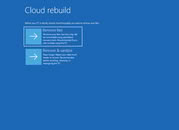
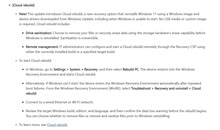 WinRE has to be healthy, and the PC needs to get online from inside it over Ethernet or Wi-Fi, using a network driver the manufacturer included. The same update lets WinRE reuse Wi-Fi profiles already saved in Windows. Microsoft also notes the rebuild fails if the device's drivers aren't published on Windows Update. WinRE itself hasn't always been dependable either, as an October 2025 update left keyboards and mice unresponsive inside it.
Sources:
Microsoft, via Videocardz
The "Reset this PC" menu has had a Cloud download mode for a while. According to Microsoft, Cloud rebuild goes a step further by grabbing drivers as well and by not depending on the installed copy of Windows being intact. It is a clean slate, though. The system drive gets reformatted, wiping apps, settings, user accounts, and local files, and only data synced to services like OneDrive survives. Anyone handing the PC off can pick a sanitize mode that has the drive securely erase itself first, and IT admins can kick off a rebuild remotely through the Recovery CSP.


22 Comments on Microsoft Adds Cloud Rebuild Recovery to Windows 11 in Latest Preview Update
Should have been added a long time ago but better late than never.
For backups I use Rescuezilla to make a full image of my C drive after I set everything up how I want, and install what apps I want etc. It's free, open source, and super easy to use.
Cloud Rebuild ~= Cloud Reinstall
AI AI AI / Cloud Cloud Cloud:roll:
Most people dont know how to do what you just wrote, and dont know how to make bootable USB drives. For them a simple GUI option is much easier to work with and, crucially, doesnt require a fully functional windows install to accomplish, as opposed to making a bootable USB drive.
Nobody is forcing you to use it. Not sure why letting you install without a USB drive is "bull".MS supports far more potential configurations then Apple does. Before 10 windows wouldnt even install drivers via windows update properly. Imagine giving a non techie a 7 install with no drivers.
Even then they had to get network manufacturers on board so all the supported network cards support the stock microsoft network adapter drivers and get system manufacturers to publish their drivers onto Windows update which has taken years to accomplish.
Like, what’s next, are we thinking that MS AI is reading your data while DISM pulls component storage off the servers when run as /Online?
Not saying that this can't be made into something useful. I don't understand why they can't just reinstall the OS without touching user data. Sure Windows is terrible when it comes to modularity, but I don't think many would object to wiping c:\windows. They could even have an algorithm to attempt to back appdata folders before wiping them.
ProgramData doesn't typically contain user data, neither does ProgramFiles (although it can be a pain to reinstall some applications). AppData may contain some data the user would be interested in maintaining, although I don't think their loss would be catastrophic.
As for drivers, I believe nuking them would -in most cases that involve OS recovery- be the desired approach.
Deleting user data - which in the common scenario stated above aren't backed up - isn't something that can be remediated.I don't think that I've read about why Windows does something that isn't prefaced with "because DOS/3.0/NT used to do so and so." :roll:
I despise Microsoft, but I gotta respect the engineers who keep this thing runnin' (excluding those pushing for this "modern" webdev-inspired plagues).
Lessons learnt, it is x86 keyboard layout wiht remapped keys.
The internet recovery was broken, yes it is nice to have it, but i had to put the newest operating system on it, which was worse as any linux installation in years. finding the image, and prepare teh installer media was even worse. the hdd was also sata based but had custom firmware
Yes in theory the internet recovery / installation method is nice, but it fails on the apple side, because it does not work / does not install the latest version.
-- I see the issue with windows with the mess of several partitions which are wasting space, inefficient file system and a lack of bootmanager and recovery option.
Technially 1 or 2 partitions should be enough.
I expect to see only 2 partitions and not only 4 partitons for w11 pro. W11 pro was installed from the microsoft website downloaded iso.
This is a tool to blow away your w local windows install and replace it in the event of a major system failure. Data collection isn't what this is for.Pot calling the kettle black.Man, hit a nerve eh? Do you always have a crash out when people point out your comments are built on nothing but baseless assumptions and conspiracy theories?
All I said was you didn't read the article. Which you then immediately prove by launching into a baseless conspiracy about how MS needs to slurp up your data by wiping your hard drive with their cloud. It's complete paranoid nonsense considering you're running windows already. A bit like worrying about spies stalking you through a window when you live in a glass house.Or that supporter
A) already set up data backups beforehand and can now walk the user through reinstall without having to ship the system across the country
Or
B) the supporter DGAF, the end user has been warned multiple times about backing up their data and they have pulled the classic Boomerism "oh well I don't understand computers and I revel in ignorance blah blah blah" so who cares? Your system is broken man, please follow these prompts so I don't have to have your laptop shipped to me. No your data is gone, sucks to be you.
Depending on which family member we are talking about I fall into either camp. Walking non techies through a windows install is like trying to convince them to attempt brain surgery, assuming they don't hyperventilate at the mere thought they give up a few prompts in. Now I windows can do it for them with pretty images of puppies to prevent a panic attack.
The reason users is not backed up is because Windows was never built around modular user files like Unix was. You'd have to write all that data, which means you'd have to have the space available, which most people are terrible at managing, and if it missed something or overwrote something it needed and screwed up people should have an apocalyptic meltdown.
Windows constantly reminds you to back up to one drive now, so most users shouldn't be relying on just local copies anymore.
wbAdmin start backup -backupTarget:D: -include:C: -allCritical -quiet
then when u want to restore backup u start pc, run windows installer and there u can restore it,
if things will go really bad.
it's not really hard, u dont need cloud for it.
who knows what MicroSlop doing with that.
Also, how do I install Windows in the first place?
I don't know if you even realize that whatever arguments you have will not land if you treat others like you do. You come off condescending and rude. No one wants to have a conversation with someone that just wants to tear them down.
Or better yet, just ignore my future comments and not reply to them. Thanks!
And here I have to ask: are you acting as a "marketing agent" for Microslop? :rolleyes: