News Posts matching #Windows 10

Return to Keyword Browsing

Windows 10 Market Share Dips Below 30% as Gamers Migrate to Windows 11

Gamers are aware of the end of life for Windows 10, which occurred on October 14, prompting a mass migration to Windows 11. They hope this new operating system will support their gaming sessions for the foreseeable future. The shift in market share between Windows 10 and Windows 11 has now become significantly pronounced, according to the latest November-based Steam Hardware and Software Survey. As the data shows, Windows 10 has dipped below 30% market share among operating systems, which is -2.08% reduction from October data. At the same time, Windows 11 gained +2.02%, which is seemingly the entire population that was lost from the Windows 10 transition.

An interesting development is the increase in Linux usage, which recorded a 0.15% gain, reaching its highest-ever share of 3.20%. This could be attributed to some Windows 10 users migrating to Linux-based operating systems. Another possibility is that from October to November, a significant number of users purchased handheld devices like the Steam Deck, which runs on SteamOS, a Linux-based system. Additionally, many gamers might have experimented with Linux operating systems in anticipation of Windows 10's end of life.

Preloading File Explorer in Windows 11 Doubles RAM Usage, Offers Minimal Speed Boost

Just a week ago, we discussed Microsoft's efforts to enhance File Explorer performance by preloading the application at startup. Recent testing by Windows Latest suggests that this approach results in diminishing returns, as the application uses more RAM while offering only marginal performance improvements. Microsoft has acknowledged the performance issues with File Explorer on Windows 11, which is concerning given its role as a core application within the operating system. To address this, Microsoft has started preloading File Explorer in the background to enable quicker access when users open the application.

Windows Latest testing now confirms that preloading works partially, allowing File Explorer to load faster, but not fast enough. In a virtual machine running the latest Windows 11 Insider Preview Build 26220.7271 (KB5070307) available in the Dev and Beta channels, the regular File Explorer launch uses 35 MB of RAM. However, the preloaded version nearly doubles that to 67.4 MB of RAM due to background processes. To the end-user, the change is barely noticeable as File Explorer still feels sluggish. The difference becomes apparent only when the speed of a video comparison is reduced to 0.25x, revealing the real difference. However, since real-world usage does not occur at 0.25x speed, the change makes little impact on everyday usage.

PC Sales Remain Flat Despite Windows 10 End of Life, Claims Dell

When Microsoft's beloved Windows 10 reached its end-of-life on October 14, it created an opportunity for Windows 11 to take center stage in PC sales. However, according to Dell, one of the largest PC manufacturers, the transition has been slower than expected. During a recent Q3 earnings call, COO Jeffrey Clarke remarked, "We have not completed the Windows 11 transition. In fact, if you were to look at it relative to the previous OS end of support, we are 10-12 points behind where we were with the previous generation." This indicates that PC industry sales have been relatively stagnant, and clients aren't updating their PCs as much as anticipated.

When Windows 10 reached its end of life, approximately 500 million PCs were unable to upgrade to Windows 11. At the same time, Extended Security Updates (ESU) are intended to ease the transition, not serve as a permanent solution. Through Microsoft's ESU program, eligible machines can continue to receive critical and important security patches for a limited time after support ends. Enrollment rules, pricing, and eligibility vary by region and whether the user is a consumer or an organization, and the program excludes new features and non-security fixes. According to Dell's COO, about 500 million additional PCs can transition to Windows 11 without needing a hardware update.

Windows 11 25H2 and 24H2 October Update Triggers BitLocker Recovery

Microsoft has encountered another unusual issue, this time mostly affecting Intel-based PCs. Users of Windows 11 versions 25H2 and 24H2, as well as some Windows 10 users, may unexpectedly find themselves in BitLocker recovery mode. Typically, BitLocker should not request the recovery key unless there have been changes to the system configuration. However, due to a new bug, users are being prompted to enter their recovery keys without any such changes. BitLocker encrypts the entire drive volume using AES encryption by default, ensuring the drive's security even if it is stolen, lost, or improperly decommissioned. "After installing Windows Updates released on or after October 14, 2025 (the Originating KBs listed above), some devices might encounter issues during restart or startup," notes Microsoft document for Microsoft 365 Business and Windows 11 Enterprise licensees.

From a portal not accessible to us (thanks to Windows Latest for images), it seems that Windows 11 25H2 with KB5066835 and Windows 11 version 24H2 with the same KB number are affected. Windows 10 version 22H2 is also impacted, with the originating ID KB5066791. The interesting part is the source of this issue. Since the launch of Windows 8, the Windows OS has included a Connected Standby feature. This power-saving feature allows the PC to stay connected to the network, receiving notifications and streaming music even while in standby mode. It was originally designed to extend battery life on laptops by maintaining a low-power state instead of draining the battery.

False "End of Support" Warning Appears in Windows 10 Despite Extended Support

Microsoft has acknowledged the issue on its Windows 10 OS installations that are incorrectly displaying "end of support" messages, despite the installation running on Extended Security Updates (ESUs). While Windows 10 reached end of life on October 14, Microsoft offers extended support for additional funds unless you are a member of the European Economic Area, in that case it is free for a year. If you're running Windows 10 version 22H2 Pro, Education, or Enterprise—and you've signed up for Extended Security Updates with the right product key—you are covered. Same goes for Windows 10 Enterprise LTSC 2021 and Windows 10 IoT Enterprise LTSC 2021.

However, the entire issue was that users with ESUs experienced errors with false "Your version of Windows has reached the end of support" flags in settings, which resulted in a lot of questions from paying users. Microsoft has officially acknowledged that the bug is also happening on their end as well, and the Redmond giant offers a workaround to using Known Issue Rollback (KIR). Microsoft released a cloud-based configuration fix to address this problem, but your computer may not receive it automatically if it lacks internet connectivity, has OneSettings disabled through Group Policy, maintains restrictive firewall settings, or blocks dynamic updates.

Windows 11 Finally Fixes "Update and Shut Down" Functionality After a Decade

If you ever tried the infamous "Update and shut down" option in any Windows build, it often leads to a reboot instead to an actual shutdown. Now, Microsoft has finally fixed this issue starting with Windows 11 25H2 Build 26200.7019 (or 26100.7019 on 24H2). According to the Windows Latest, Microsoft has shipped this broken functionality way back with Windows 10, and has never fixed it since. However, the Windows teams working behind the update have finally managed to ship a working solution with a note stating in Windows 11 experiences that the new build: "Addressed underlying issue which can cause "Update and shutdown" to not actually shut down your PC after updating."

Microsoft has not disclosed the exact cause of the failure, but Windows Latest speculates it might be due to a race condition or an issue within the Windows Servicing Stack. When a user selects "Update and shut down," the operating system must complete two sequential tasks: applying all pending updates and then shutting down the computer. This process isn't straightforward because Windows needs to reboot into an offline servicing phase to replace locked system files, as indicated by the "working on updates" message. After this phase, the machine should power off, but instead, it returns to the login screen. The most likely explanation is that the Servicing Stack either fails to save or never receives the shutdown instruction, with the directive possibly getting lost during the reboot due to a timing conflict or interference from features like Fast Startup.

Samsung Internet Browser Comes to Windows Desktop PCs

After more than a decade of focusing exclusively on mobile platforms, Samsung is finally bringing its Samsung Internet browser to Windows-based PCs. The company announced today that a beta version of the Chromium-based browser will be available for Windows 11 and Windows 10 systems running version 1809 or newer, starting October 30, 2025, in the United States and Korea. It is a significant decision for Samsung, which has maintained a mobile-first approach since the browser's inception, essentially leaving desktop users out in the cold while millions enjoyed the experience on their Galaxy devices. Additionally, it shows that Samsung may venture into more applications as the local AI integration takes off.

The desktop version is designed to create a unified browsing ecosystem across Samsung's product lineup, letting users carry their digital experience seamlessly between phones and computers. Users who log in with their Samsung Account will have their bookmarks, browsing history, and saved passwords synchronized through Samsung Pass, which should make authentication and form filling straightforward across devices. The browser also brings intelligent features powered by Galaxy AI, including Browsing Assist, which can summarize web pages and translate content on the fly. For those switching between their Galaxy phone and PC, the browser will prompt them to pick up where they left off, eliminating the hassle of hunting down tabs across different devices.

Turtle Beach Launches PC Edition of Victrix Pro BFG Reloaded Modular Controller

Leading gaming accessories maker Turtle Beach Corporation and its Victrix brand, today announced the launch of the new Victrix Pro BFG Reloaded Wireless Modular Controller - PC Edition. The Victrix Pro BFG Controllers have long been coveted by competitive esports gamers the world over, and the refined Victrix Pro BFG Reloaded Wireless Modular Controller - PC Edition adds powerful features. These latest upgrades include magnetic, anti-drift Hall Effect thumbsticks and triggers, a new touch-sensitive trackpad on the front of the controller, back buttons that can be mapped to any controller input as well as to keyboard and mouse inputs, and a 1 kHz polling rate for even faster input that's available when using the controller in wired mode.

The Victrix Pro BFG Reloaded Wireless Modular Controller - PC Edition is built for serious PC gamers and is available in North America as a Best Buy retail exclusive and directly from Turtle Beach at www.turtlebeach.com. Globally, the controller is also available on turtlebeach.com and participating retailers for $189.99|£159.99|€179.99 MSRP.

Microsoft Breaks Localhost with Windows 11 October Update, Users Forced to Revert

Just two days after Windows 10 reached its end of life, issues with Microsoft's latest Windows 11 October update have begun to surface. Users on Microsoft Support Forums, Stack Overflow, and Server Fault have reported that the localhost functionality in Windows 11 is now broken. This problem is affecting millions of web developers who are unable to run their applications on their own PCs. The update, KB5066835, focuses on security and enhances the September-issued KB5065789 package with additional quality improvements. However, it disrupts the localhost function, a virtual hostname that allows a PC to serve as its own server. This feature is commonly used by local developers to test websites or fully developed web apps. The disruption has significantly impacted developers, including those using Windows 11 on their local servers or workstations for production purposes.

The community has managed to solve the issue by simply deleting the October KB5066835 package, alongside its September KB5065789 sibling, if the first package uninstall doesn't work. Software engineers have reported connection failures and HTTP/2 protocol issues impacting various development tools, including ASP.NET compilation processes and Visual Studio debugging functionality. Investigation has revealed that the problem originated in build version 26100.6899, with the root cause identified in HTTP.sys—a kernel-level Windows component responsible for managing HTTP traffic on local systems.

Update October 17, 15:30 UTC: Microsoft confirmed the issue and stated: "We are working on releasing a resolution for this issue in a future Windows update. We will provide an update when more information is available."

End of an Era: Windows 10 Officially Reaches End of Life

Today is the day that marks the end of Windows 10. On October 14, 2025, Microsoft drew a line under an operating system that has powered millions of desktops since 2015. Beginning now, Windows 10 will no longer receive feature updates, routine quality-of-life improvements, or general technical support from the company. Devices running the system will continue to boot and run existing software, but the steady flow of system-level hardening and new capabilities that users came to expect will stop. For many households, schools, and small businesses, the change will be largely invisible at first, but the risk picture shifts as time passes.

Extended Security Updates (ESU) are meant to soften that landing, not to act as a permanent lifeline. Through Microsoft's ESU program, eligible machines can still receive critical and important security patches for a limited window after support ends. Enrollment rules, pricing, and eligibility differ by region and by whether a user is a consumer or an organization, and the program excludes new features and non-security fixes. For European Economic Area, ESUs packages are free for a year before Microsoft pulls the plug, but users must sign in with Microsoft Account. ESU can buy time for complex migrations, but it is explicitly a temporary measure. Relying on ESU's long-term leave systems exposed to unsupported components and growing incompatibilities with newer software.

Microsoft Breaks Windows Media Creation Tool Ahead of Windows 10 EOL

Microsoft has accidentally broken the Windows Media Creation Tool (MCT) just a day ahead of Windows 10 end-of-life. The company confirmed this case on its official documentation for Windows 10 22H2, which is perhaps the last update for that document page that we will see. "The Windows 11 media creation tool version 26100.6584, released September 29, 2025, might not work as expected when used on Windows 10 devices. The media creation tool might close unexpectedly, displaying no error message," says Microsoft page, adding the clarification about MCT "The media creation tool is used to create a bootable USB or DVD which can be utilized to perform a reinstall or clean install of Windows 11 on a new or used PC. Note that the Windows 11 media creation tool is not currently supported on Windows 10 devices that use Arm64 processors."

Of course, Microsoft offers a workaround. You can download bootable Windows 11 installation media directly from Microsoft's official download page here and select "Download Windows 11 Disk Image (ISO) for x64 devices" to get the ISO or follow the link for Arm64 build. Microsoft is preparing a fix that will be included in an upcoming update to the Windows 11 Media Creation Tool, and this document will be updated to reflect the resolution once that update is released. As a reminder, the Windows 10 reaches end-of-life tomorrow, October 14, when all security updates will stop and users would need to purchase separate extended security updates as a package, or switch to Windows 11.

European Economic Area Windows 10 Users Receive One Year of Free Security Updates

Microsoft is offering free Extended Security Updates (ESUs) to all Windows 10 users in the European Economic Area (EEA). As support for Windows 10 ends on October 14 this year, security vulnerabilities will become a concern for those still using the older operating system. While users with specific needs for Windows 10 can purchase ESUs, European customers will receive them at no cost due to strict EU regulations. To access these free ESUs, users must have an active Microsoft account. This is a significant benefit, as users outside the EEA must either pay for ESUs or upgrade to Windows 11 to continue receiving security updates and support. For Windows Central, Microsoft has confirmed that "In the European Economic Area, we're making updates to the enrollment process to ensure it meets local expectations and delivers a secure, streamlined experience. Our goal is to support customers and provide them with options as they transition to Windows 11, with uninterrupted access to critical security updates."

Additionally, Microsoft has clarified for Bleeping Computer that free ESUs will mandate sign-in with Microsoft account. The company claims that users need to "Sign in to your PC with a Microsoft account (MSA) and stay signed in to receive ESU updates at no additional cost. If your MSA is not used to sign in for a period of up to 60 days, ESU updates will be discontinued, and you'll need to re-enroll by signing in using the same MSA." For Windows 10 OS users in Europe, signing in with a Microsoft account seems like a no-brainer considering that the year of free updates can delay the need to transfer sensitive workloads to Windows 11.

Intel to Hike 13th Generation "Raptor Lake" CPU Pricing by 10%

Intel plans to raise prices on some 13th Generation "Raptor Lake" desktop processors by around 10%, according to DigiTimes. In the fourth quarter, Intel will reportedly adjust contracts to account for the increase. Standard RPL-S SKUs that have traded near $150 to $160 could move to about $170 to $180, driven by tight inventories and rising upstream costs for Intel to maintain older and multiple product portfolios. OEMs claim that constrained inventory ahead of major shopping events leaves them unable to stock competitive holiday deals, forcing hard choices between protecting margins and offering discounts. Even if Intel does not formally announce a hike, limited RPL-S availability combined with surging memory costs is squeezing PC makers. Some top brands report component shortages and reluctance to place long-term orders amid volatile pricing.

Older Raptor Lake parts are benefiting from buyers seeking value, while the latest Core Ultra processors have not created strong consumer demand for AI-enabled PCs. The Core Ultra 200S series has shown slowed market adoption due to its worse initial performance compared to Raptor Lake and Raptor Lake Refresh. Some vendors favor cost-effective prior-generation chips to hit aggressive price points, keeping Raptor Lake supply tight despite the parts aging in calendar years. The role of third-party foundries, which continue to support older process nodes, has also extended the lifespan of previous-generation CPUs, altering historical upgrade cycles. Reportedly, some Raptor Lake SKUs cost over $200 less than the latest SKUs, excluding the cost of a new motherboard and the transition from DDR4 to DDR5 memory. With the end of Windows 10 support and the upcoming holiday season, it will be interesting to see how PC makers respond with pricing.

Microsoft Claims 90% of Windows-on-Arm Usage Happens on Native Apps

Microsoft has published an interesting data point about the usage model of its Windows-on-Arm (WoA) devices. The company's corporate vice president Mike Adams claims that "The Arm app ecosystem continues to expand, with native Arm versions available for apps representing 90% of total user minutes, thus providing efficient, high-performance experiences across the scenarios that matter most to our customers." The Arm-based software ecosystem has matured to the point where the user experience is primarily occurring on native app builds, rather than relying on an x86-to-Arm translation layer. Microsoft is confident enough in this ecosystem's compatibility that it recommends users with older PCs running Windows 10—which will reach its end-of-life on October 14, 2025—consider transitioning to Arm-based Copilot+ AI PCs.

The company showcased various app use cases, all operating on their native build for Windows 11 on Arm. These include endpoint protection applications, VPN and Zero Trust Network Access (ZTNA) apps, endpoint management tools, productivity and creative apps, as well as social, web, and entertainment applications. Microsoft even made a list of compatible applications, which you can check out here. For consumers, the choice of WoA laptops is limited, but we can expect more announcements from Qualcomm and NVIDIA to kickstart more design wins and shipments of Arm-based processors to the general Windows PC users.

Google Launches Windows Desktop App for Local Files and Web Searches

Google has developed and released an application for Windows PCs. While it might seem unusual for Google to release a Windows app that isn't Chrome, this new app serves an intriguing purpose. Simply called the Google App, it enables users to search across various vectors on their Windows-based PCs, including local files, Google Drive files, installed applications, and the web. Emerging from Google's Search Labs, it is currently available only in supported countries for users to try out. After downloading it through a dedicated installer and following a straightforward installation process, the app can be activated using the Alt + Space keyboard shortcut. This interrupts any ongoing activity and runs as a layer above the current app, even if it's a game. Users can later change this shortcut in the settings.

The app includes Google's Lens, allowing users to search based on the current screen image or even tackle math homework. There are also options to disable Google's AI mode, which is now standard in many search queries. Initially, the app will be available only in the US, with expansion to other Google Labs-supported countries planned for the future. It is available exclusively in English and requires Windows 10 or higher. Interestingly, this app is similar to Apple's Spotlight, which is a built-in macOS search tool that scans your apps, files, emails, contacts, calendar events, system settings, and even the web. It seems that the days of separately searching through your files are over, as a single search engine can power the entire experience, from file management to web search, and even help you locate important information inside documents.

Intel Releases Arc GPU Graphics 101.6987 WHQL Drivers

Intel has released the latest 101.6987 WHQL version of its Arc GPU Graphics Drivers, bringing several new improvements and bringing Game On support for Battlefield 6 Open Beta and Mafia: The Old Country, as well as adding a performance boost to Doom: The Dark Ages running on Vulkan API and Arc B-series GPUs. Intel also added support for Shared GPU Memory Override control in Intel Graphics Software for built-in Intel Arc GPUs in Core Ultra (series 1 and 2) CPUs running on Windows 10 and 11, as well as added power management optimization for Intel Core Ultra 200V series (Arrow Lake H) CPUs, which should improve performance and frame pacing in low-power modes.

The latest 101.6987 Arc GPU Graphics Drivers fix a single issue where the Naraka Bladepoint game could freeze with Graphics Enhancements set to XeSS on Arc B-series GPUs. There are several known issues, including ones with Fortnite, PEAK, Call of Duty: Black Ops 6, Call of Duty: Warzone 2.0, Mafia: The Old Country, Marvel's Spider-Man 2, and other games and apps, but hopefully, Intel should fix those with the next driver release.

DOWNLOAD: Intel Arc GPU Graphics Drivers 101.6987 WHQL

No Secure Boot? No Battlefield 6 — EA Faces Backlash

As part of our ongoing commitment to Positive Play in Battlefield, Secure Boot is a requirement to play Battlefield 6 on PC. This supports the need for enhanced security while playing and utilizing new anti-cheat features in Battlefield. As cheat developers continue to evolve their tactics, we're stepping up our game too.

Requiring Secure Boot provides us with features that we can leverage against cheats that attempt to infiltrate during the Windows boot process. It also lets the Battlefield Positive Play team use its own features and related dependent security features like TPM to combat other forms of cheating, the most relevant of which include:
  • Kernel-Level Cheats and Rootkits
  • Memory Manipulation and Injection
  • Spoofing and Hardware ID Manipulation
  • Virtual Machines and Emulation
  • Tampering with Anti-Cheat Systems

Microsoft Details New Windows 11 Update System To Manage App Updates in Addition to Windows Systems and Drivers

Since the introduction of Windows 10, Microsoft has seemingly had ambitions to consolidate as much control over what gets installed on your PC as possible. A perfect example of this is the push towards using the Microsoft Store to install programs instead of relying on .exe files. The company's latest move in this direction sees Windows start handling more than just system updates. Notably, it seems as though Microsoft is planning to use this new system alongside the Store instead of as a replacement for it. These plans come in spite of Windows updates continuing to cause BSOD issues as recently as April.

According to a Microsoft blog on the topic, Windows will soon start handling everything from driver and firmware updates to app updates. Microsoft explains that the current update and management platforms lead to a fragmented ecosystem: "Updates across the Windows ecosystem can feel like a fragmented experience for IT admins managing applications that have their own update orchestrators (e.g., line of business) and commercial management tools that handle their own download, install, restart, and notifications today," adding that the way things are currently handled causes a number of issues, including CPU and network usage spikes, increased support costs, and a poor user experience due to "confusing or conflicting notifications." Microsoft aims to address this by introducing what it calls the Windows Update orchestration platform.

Intel Arc GPU Graphics Drivers 101.6795 Beta Released

Intel today released the latest version of the Arc GPU Graphics Drivers. Version 101.6795 Beta comes with optimization for "Dune: Awakening," "Elden Ring Nightreign," and "F1 25." The drivers also improve performance of Arc B-series "Battlemage" discrete GPUs in "Monster Hunter Wilds," with up to 9% seen at 1080p and 6% seen at 1440p. The drivers don't fix any game-specific, application-specific, or Graphics Software-specific bugs with this release, but identified a few new issues that it added to its "Known Issues" list, and will release fixes for in future releases. Grab the drivers from the link below.

DOWNLOAD: Intel Arc GPU Graphics Drivers 101.6795 Beta

Microsoft Forces Automatic Windows 11 24H2 Update on Pro and Home PCs

Microsoft has confirmed that the Windows 11 version 24H2 update is now in its final rollout phase and will soon be delivered automatically to millions of Home and Pro users around the world. As of May 2, 2025, any unmanaged device running Windows 11 versions 21H2, 22H2, or 23H2—or even Windows 10—will see the 2024 Update download in the background. After the download completes, users can choose when to install the update or postpone it by going to Settings, then Windows Update. This release introduces a variety of useful improvements. File Explorer search has become more intuitive, the Clock app now includes focus sessions to help you stay on task, and Snap Layouts provide greater flexibility when organizing open windows. If you own a Copilot+ PC, you will continue to receive additional AI-powered features in stages; these releases start within the Windows Insider community and may differ depending on your device's processor and region.

Although automatic delivery makes it easier to stay current, devices with limited storage may struggle if the update files consume too much space. To avoid disruptions, Windows Update offers a four-week postponement option. Should you need more time, you can use command-line tools or adjust local policies to stop or block the update permanently. Microsoft has published a detailed list of known issues and safeguard holds alongside the rollout information. For example, Azure Virtual Desktop users who experienced App Attach failures will see those problems fixed, and Remote Desktop freezes caused by the January 2025 preview update have been resolved. At the same time, devices running certain Dirac Audio drivers, sprotect.sys applications, or outdated Easy Anti-Cheat or Intel Smart Sound Technology drivers will not receive the update until compatible versions become available. Some wallpaper customization and camera-dependent apps may also encounter temporary glitches while patches are prepared. IT administrators looking for programmatic access to update health data can use the Windows Updates API in Microsoft Graph. For immediate assistance with update issues, open the Get Help app or visit the Microsoft Support website.

Microsoft Launches Recall and Integrates AI into Search, Plus Other Updates

Microsoft has deployed three AI features to Copilot+ PCs through the Windows 11 April 2025 non-security preview update. Users can finally access the long-promised Recall, Click to Do, and enhanced Windows Search by enabling "Get the latest updates as soon as they're available" in Settings > Windows Update. Recall operates as a background capture system that takes periodic screenshots, encrypts them via the device's TPM chip, and stores them locally. The system creates a searchable index organized by keywords, dates, and applications. Privacy controls include Windows Hello authentication for settings changes, app-specific exclusions, customizable retention periods, and snapshot deletion options. Windows E3 enterprise deployments can implement Group Policy controls for centralized management.

Click to Do functions at the window manager level, activated by Win + Click or touchscreen right swipe. The context-aware tool provides different capabilities based on content type, offering summarization and translation for text, and background removal and editing for images. Image processing works across all Copilot+ hardware, while text functionality currently supports only Snapdragon processors, with AMD Ryzen AI 300-series and Intel Core Ultra 200V compatibility scheduled for later release. The updated Windows Search implements a compact language model running directly on the device's NPU. This enables natural-language queries throughout Windows interfaces, allowing users to find content without exact filenames. The system operates on NPUs rated at over 40 TOPS and delivers 70 percent faster retrieval than Windows 10.

Razer Officially Launches PC Remote Play

Razer, the leading global lifestyle brand for gamers, today announced the official launch of Razer PC Remote Play, the ultimate platform for streaming PC games directly to mobile devices. Razer PC Remote Play unlocks the full potential of your gaming rig by streaming your favorite PC game titles to your phone, tablet, or Windows handheld with unmatched visual clarity and responsiveness. By leveraging the full frame rate and resolution of your mobile device gamers will experience pristine visuals without black bars.

Introduced at CES 2025, the beta version of Razer PC Remote Play received great fanfare amongst users. The official launch brings a redesigned interface on Razer Cortex PC, along with added support to all mobile gaming controllers compatible with iOS or Android operating systems, support for the AV1 video codec for improved quality and lower latency, and software updates that improves the gaming experience for seamless PC gaming on the go. Gamers can now look forward to ultra-smooth, high-fidelity gameplay on smartphones and tablets - anywhere, anytime.

Xbox Play Anywhere Initiative Embraced by 1000+ Developers

As we touched on last week, there are now over 1000 developers utilizing Xbox Play Anywhere (XPA) for their games, bringing their amazing experiences to players across a variety of devices they own. If you've never heard of XPA before, let us give you a refresher: when you buy a digital game that supports XPA through the Xbox Store or the Windows Store, it's available to play on your Xbox console, Windows 10/11 PC, and supported handheld gaming devices at no additional cost. Even better, your progression comes with you across all platforms.

While the benefits of XPA for players are clear, we wanted to show you how developers have embraced this feature for their games. At this year's annual ID@Xbox Showcase event at GDC, we chatted with the teams behind upcoming XPA games Clair Obsur: Expedition 33, Detective Dotson, and Towerborne to learn more about what influenced their decision to implement this feature and what benefits it may hold for their gaming communities.

Microsoft Introduces Copilot for Gaming

This morning on The Official Xbox Podcast, Xbox Corporate Vice President of Gaming AI, Fatima Kardar joined Vice President of Next Generation, Jason Ronald to reveal exciting AI-powered updates that are coming directly to Xbox players, to help you save time, find new games you're likely to love, or even to help ease you back into a game you may have stepped away from.

Copilot for Gaming Asset
On the podcast, Kardar introduced Copilot for Gaming, which Xbox Insiders can get an early preview of on mobile soon. This AI-driven sidekick is designed to be your personalized gaming companion, helping you get to your favorite games faster, coaching you to improve your skills, and connecting you better with your friends and communities. Copilot for Gaming will be there when you need it but out of the way if you don't.

Apple Silicon Macs Gain x86 Emulation Capability, Run x86 Windows Apps on macOS

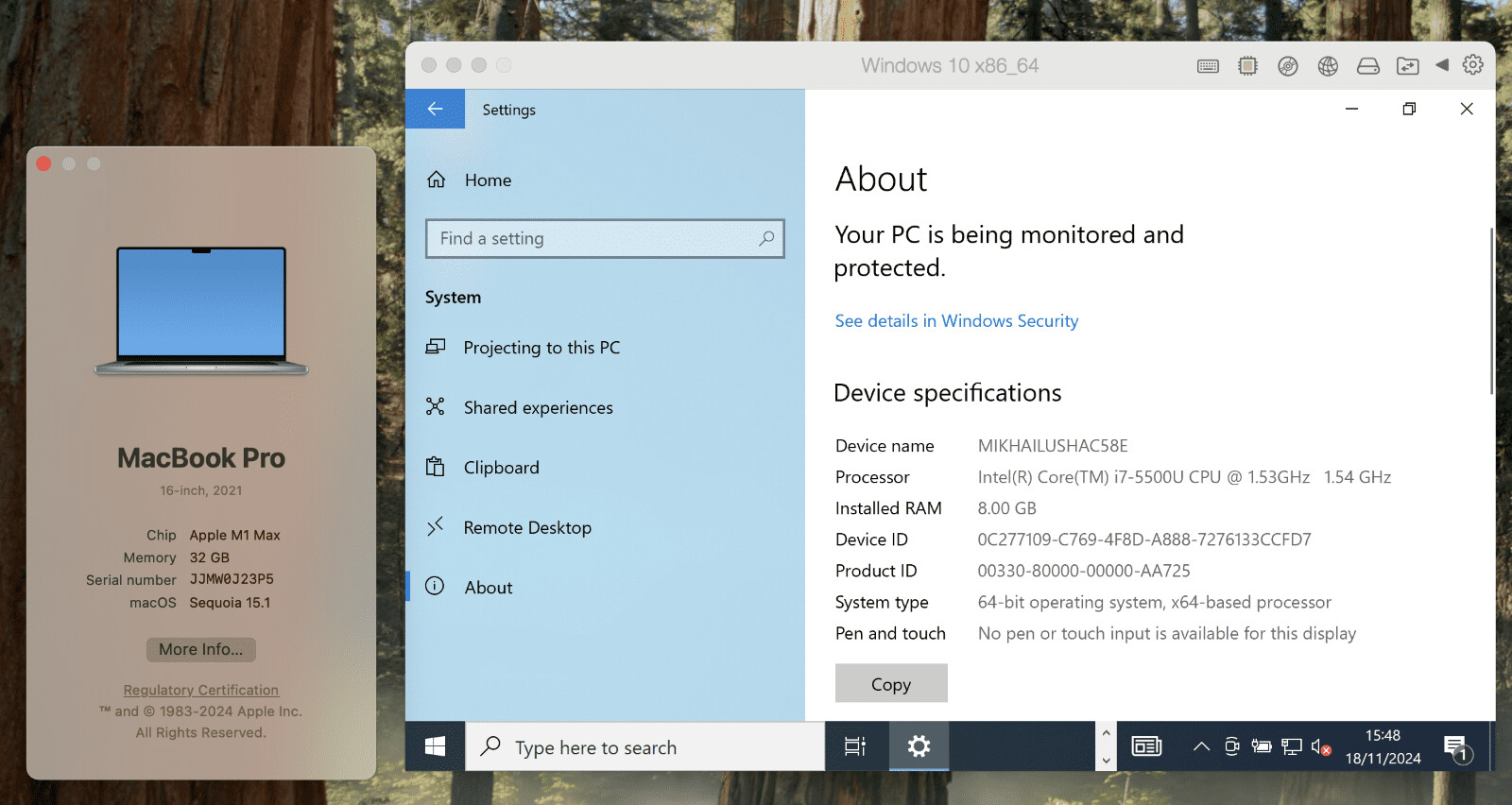
Parallels has announced the introduction of x86 emulation support in Parallels Desktop 20.2.0 for Apple Silicon Macs. This new feature enables users to run x86-based virtual machines on their M-series Mac computers, addressing a longstanding limitation since Apple's transition to its custom Arm-based processors. The early technology preview allows users to run Windows 10, Windows 11 (with some restrictions), Windows Server 2019/2022, and various Linux distributions through a proprietary emulation engine. This development particularly benefits developers and users who need to run 32-bit Windows applications or prefer x86-64 Linux virtual machines as an alternative to Apple Rosetta-based solutions.

However, Parallels is transparent about the current limitations of this preview release. Performance is notably slow, with Windows boot times ranging from 2 to 7 minutes, and overall system responsiveness remains low. The emulation only supports 64-bit operating systems, though it can run 32-bit applications. Additionally, USB device support is not available, and users must rely on Apple's hypervisor as the Parallels hypervisor isn't compatible. Despite these constraints, the release is a crucial step forward in bridging the compatibility gap for Apple Silicon Mac users so legacy software can still be used. The feature has been implemented with the option to start virtual machines hidden in the user interface to manage expectations, as it is still imperfect.
Return to Keyword Browsing
Nov 11th, 2026 04:07 CST change timezone

New Forum Posts

Popular Reviews

TPU on YouTube

Controversial News Posts