Monday, August 24th 2020

ClockTuner for Ryzen Simplifies "Zen 2" Overclocking, Squeezes Out Double-digit Percent Performance

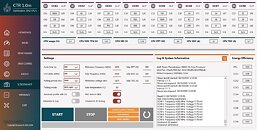
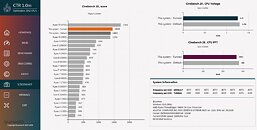
ClockTuner for Ryzen (CTR) by Yuri "1usmus" Bubliy, is an evolution of the DRAM Calculator for Ryzen utility. The utility goes beyond the functionality of the DRAM Calculator - which finds the most precise memory settings for Ryzen processors - and does your homework for Ryzen CPU overclocking. Optimized for processors based on the "Zen 2" microarchitecture, CTR has been designed both for Socket AM4 and sTRX4 (Threadripper) processors, and Linus Tech Tips in its announcement video of CTR demonstrated the tool's prowess in squeezing out a neat 10% performance gain for their Threadripper 3960X processor. Besides CPU and memory settings, the tool performs stability testing and benchmarking. 1usmus expects to release CTR 1.0 in September 2020.
Source: Guru3D
Add your own comment

78 Comments on ClockTuner for Ryzen Simplifies "Zen 2" Overclocking, Squeezes Out Double-digit Percent Performance

#26
thesmokingman
TheLostSwedeWhat does this have to with the software you're trashing? It doesn't even support your modules :wtf:
And yes, you clearly have no idea what you're talking about.
Get the F over yourself. Dram calc doesn't always work and the values get whacked from version to version. Not everyone has this dream experience and your odd fanboying is really weird.
Posted on Reply
#27
TheLostSwede
News Editor
Sorry, but incompetence doesn't make it a bad tool. Keep in mind what it is, it's a third party tool to get you started, it's not guaranteed to work and it's not from AMD.
Seriously, what are you people expecting? It works perfectly fine on my CJR modules, so I'm sorry to say, that it's most likely down to incompetence if you can't get it working and maybe if you can't do something as simple as changing a handful of setting in the UEFI, then maybe you shouldn't tinker around in there at all.

But yeah, it's all me, while it's apparently ok to attack the creator of this tool and call his software out as trash, makes perfect sense :kookoo:
Posted on Reply
#28
Max(IT)
TheLostSwedeSorry, but incompetence doesn't make it a bad tool. Keep in mind what it is, it's a third party tool to get you started, it's not guaranteed to work and it's not from AMD.
Seriously, what are you people expecting? It works perfectly fine on my CJR modules, so I'm sorry to say, that it's most likely down to incompetence if you can't get it working and maybe if you can't do something as simple as changing a handful of setting in the UEFI, then maybe you shouldn't tinker around in there at all.

But yeah, it's all me, while it's apparently ok to attack the creator of this tool and call his software out as trash, makes perfect sense :kookoo:
You seem to be very happy about DRAM calculator, and that’s fine.
And you are right about there is no point attacking 1usmus about his wonderful tools, which are useful and great.
But the DRAM calculator is not working for everyone, and that has nothing to do with incompetence. Sometimes DRAM modules are just too bad to go any faster than XMP values.
In my case (Hynix DJR on G.Skill 3600CL16 sticks) the suggested values worked but the performance gain were negligible at best, so I’d stick with defaults XMP.
night.foxCant wait to try this. I am basically settled with my settings but more fine tuning is better.

Linus did say however that as per 1usmus, this works better with a cpu with more ccx.
I’m intrigued about the LLC level 4 (Asus) suggested setting.
During my fine tuning of the Ryzen 9 3900X I was under the impression that LLC Level 4 on my Asus ROG Strix B550-F was providing a sort of benefit for my results.
I asked for advice here but someone told me “leave it on AUTO because you are overvolting without a reason”. Since I’ve just recently jumped ship from Intel (where I was quite expert with those settings) I didn’t argue about that.
Now it is interesting to see 1usmus to suggest the same setting I was using with my slightly undervolted 3900X.
Posted on Reply
#29
nangu
Max(IT)what about single core performance ? After you tuned the CPU for all core, I mean..
Single core is worse, but only measurable in benchmarking tools. While gaming, my fastest core at stock + PBO sustain 4.3 / 4.35 Ghz and jumping all over the place due to the boost algorithm, and very temperature dependant.

My CCX overclock is 4.35/4.35/4.25/4.25 @1.3v (1.26v after droop), so for gaming is the same as PBO, but I gain performance in multithreaded applications such as rendering, encoding, etc., at slightly more power draw, about 10 watts at 100% load, and performance is always the same regardless the ambient temp. Stock + PBO I loss performance in summer because the raised ambient temp and how the boost algorithm depends on that.

In a normal system, that you use everyday with Windows bloatware and a lot of background apps, I never saw my CPU sustain that 4.6Ghz single core in apps or games. The best I got was 4.4Ghz under certain scenarios, and around 4.5Ghz in benchmarks such as CB, AIDA or CPU-z, so the theoretical single core boost advertised by AMD has zero meaning in everyday usage in my opinion. It's only a peak, instantaneous value, sustained is much lower in a normal system with a lot of apps loaded. My all core sustained clocks @ stock are 4.05 / 4.2Ghz load dependant, so in my particular system, dialing a CCX overclock as I did is a no brainer.

For others with much better binned CPUs the situation would be different, of course.
Posted on Reply
#30
TheoneandonlyMrK
biffzinkerI’m curious enough to try tuning my 3800X. It would be one way to find out if it’s a gold bin.
It is what it is, they're are higher clocked stock chip's so I wouldn't worry about gold bins.

I'll try it too but doubt it is beating my best 4.5 all core run or my usual Oc tactics of defaults ,and memory OC.

Regardless Ty 1usmus I hope you prove me wrong and it's nice to have some tools to mess with, Ryzen master could be better, I like it ,but it could, per core clock's for example.
Posted on Reply
#31
nangu
theoneandonlymrkIt is what it is, they're are higher clocked stock chip's so I wouldn't worry about gold bins.

I'll try it too but doubt it is beating my best 4.5 all core run or my usual Oc tactics of defaults ,and memory Of.

Regardless Ty 1usmus I hope you prove me wrong and it's nice to have some tools to mess with, Ryzen master could be better, I like it ,but it could, per core clock's for example.
Agree, per core clock and AVX all core max clock and voltage would be great IMO.
Posted on Reply
#32
Max(IT)
nanguSingle core is worse
as usual... :rolleyes:
but only measurable in benchmarking tools.
most probably true.
While gaming, my fastest core at stock + PBO sustain 4.3 / 4.35 Ghz and jumping all over the place due to the boost algorithm, and very temperature dependant.
Well, gaming it’s not a single core duty...
Not many game engine can populate all the cores of the 3900X, but most modern games can spread the workload over many cores, so single core performance aren’t relevant even for gaming.
at stock on my 3900X using Doom Eternal I’m seeing 4.2/4.4 GHz on many cores. Same for AC Odyssey.
My CCX overclock is 4.35/4.35/4.25/4.25 @1.3v (1.26v after droop), so for gaming is the same as PBO, but I gain performance in multithreaded applications such as rendering, encoding, etc., at slightly more power draw, about 10 watts at 100% load, and performance is always the same regardless the ambient temp. Stock + PBO I loss performance in summer because the raised ambient temp and how the boost algorithm depends on that.
it could be just me, but I’m scared by fixed voltage on a cpu, so overclock in a Ryzen isn’t my kind of business...
In a normal system, that you use everyday with Windows bloatware and a lot of background apps, I never saw my CPU sustain that 4.6Ghz single core in apps or games. The best I got was 4.4Ghz under certain scenarios, and around 4.5Ghz in benchmarks such as CB, AIDA or CPU-z, so the theoretical single core boost advertised by AMD has zero meaning in everyday usage in my opinion. It's only a peak, instantaneous value, sustained is much lower in a normal system with a lot of apps loaded. My all core sustained clocks @ stock are 4.05 / 4.2Ghz load dependant, so in my particular system, dialing a CCX overclock as I did is a no brainer.
On my PC during everyday usage the CPU is hitting 4541 MHz on many cores, with 4616 MHz (the best I’ve ever seen) on the two best cores.
For others with much better binned CPUs the situation would be different, of course.
Yep. Every cpu is a different story. Mine is extremely temperature dependent.
Posted on Reply
#33
ThrashZone
TomorrowWell i hope this turns out better than DRAM Calc as that may work fine for B-Die but offers completly unusable numbers for RAM using Hynix chips (DJR, CJR, JJR)
Hi,
Hynix is useless memory anyway even on intel micron is hit and miss.
Posted on Reply
#34
nangu
Max(IT)Well, gaming it’s not a single core duty...
Not many game engine can populate all the cores of the 3900X, but most modern games can spread the workload over many cores, so single core performance aren’t relevant even for gaming.
at stock on my 3900X using Doom Eternal I’m seeing 4.2/4.4 GHz on many cores. Same for AC Odyssey.
That's correct. Even a heavily single core game (like IL-2 series) can't sustain high core clocks because there are a lot of things going on in Windows itself, so these high clock figures are almost impossible to reach outside benchmarks.
Max(IT)it could be just me, but I’m scared by fixed voltage on a cpu, so overclock in a Ryzen isn’t my kind of business...
I'm on a Gigabyte board. If you use offsets for core voltage, the CPU downvolts, downclock and put cores to sleep as usual, it's not like the fixed voltages as we seen in previous generations.
Max(IT)On my PC during everyday usage the CPU is hitting 4541 MHz on many cores, with 4616 MHz (the best I’ve ever seen) on the two best cores.
Yes, mine too, but these are clock spikes which last nanoseconds and when there are almost no load on the core, so not performance impacting in any meaningfull way. Which it's important here is sustained (or effective) clock speeds from start to finish for a given task. That effective clock speed is much lower than that spikes. On mu CPU, it's around 4.35 Ghz at stock + PBO.
Posted on Reply
#35
Max(IT)
still no news about the 1usmus tool ? :confused:
He wrote about a beta, on Twitter, but never released one.
Posted on Reply
#36
chevy350
Stated in Sept. no specific date :toast:
From OP "1usmus expects to release CTR 1.0 in September 2020."
Posted on Reply
#37
Max(IT)
chevy350Stated in Sept. no specific date :toast:
From OP "1usmus expects to release CTR 1.0 in September 2020."
Yep. I was hoping about a beta release...
Posted on Reply
#38
Max(IT)
according to last tweets from yesterday, he is improving the tool and there will be a late September beta release
Posted on Reply
#40
phill
Looking forward to it :D
Posted on Reply
#42
SeventhReign
lynx29the linustechtips video on it didn't show much benefit really, they were not able to replicate the 10% gain. at end of day Ryzen overclocks itself well enough, just leave everything default in BIOS. if you want fps gains, then you want to get good bdie ram and overclock it with dram calculator made by the same guy here 1usmus

but since all of us here do enjoy tweaking from time to time, I have to admit I will probably give this a shot at some point if it ends up supporting ryzen 4800x, seems neat anyway
This is a total lie. They may not have been able to get 10% but they DID see significant improvements to both performance and voltage. If you are going to spout nonsense, try not to do it about a video with several million views.
Posted on Reply
#43
Space Lynx
Astronaut
SeventhReignThis is a total lie. They may not have been able to get 10% but they DID see significant improvements to both performance and voltage. If you are going to spout nonsense, try not to do it about a video with several million views.
sure thing. enjoy your 3% gains. and voltage depends on mobo and BIOS used in said mobo, can't just take results from two setups and say its definitively better at voltage control prediction.
Posted on Reply
#44
biffzinker
phillLooking forward to it
It's here if you want to try. www.guru3d.com/articles-pages/clocktuner-for-ryzen-ctr-guide-download,1.html

Download Link: www.guru3d.com/files-details/clocktuner-for-ryzen-download.html

I downloaded everything just need to hop over to the bios and change a couple of settings.

It’s moved the clockspeed on the 3800X from 4,175 MHz all cores to 4,300 with the same voltage from the beginning at 1.25. Nvm it was sleep mode.

Energy Efficiency so far has went from 3.35 to 3.48

Looks likes moved on to testing the individual CCX1 & CCX 2. And it’s done.
Posted on Reply
#45
Space Lynx
Astronaut
biffzinkerIt's here if you want to try. www.guru3d.com/articles-pages/clocktuner-for-ryzen-ctr-guide-download,1.html

Download Link: www.guru3d.com/files-details/clocktuner-for-ryzen-download.html

I downloaded everything just need to hop over to the bios and change a couple of settings.

It’s moved the clockspeed on the 3800X from 4,175 MHz all cores to 4,300 with the same voltage from the beginning at 1.25. Nvm it was sleep mode.

Energy Efficiency so far has went from 3.35 to 3.48

Looks likes moved on to testing the individual CCX1 & CCX 2. And it’s done.
what do you mean by "nvm it was sleep mode"?
Posted on Reply
#47
Nordic
I have results. It says I have a silver sample while I thought I would have had a trash tier bronze sample. that is good to know. Efficiency is improved but performance is nearly the same. I am not even reaching the default performance for a 3900x but that could be because I have my memory set to 2133mhz for maximum stability.

***ClockTuner for Ryzen 1.0r by 1usmus***
```AMD Ryzen 9 3900X 12-Core Processor (870F10)
ASUSTeK COMPUTER INC. TUF GAMING X570-PLUS
BIOS ver. 2607 SMU ver. 46.63.00
DRAM speed 2133 MHz
09/29/2020 18:37:09


AVX light mode
Cycle time: 30000 ms
Reference frequency: 4050MHz
Reference voltage: 1175 mV
Voltage step: 6 mV


Manual overclocking mode enabled
Sets overclocking parameters...
CCX1 Quality 148 Frequency 4050 MHz Voltage 1175 mV
CCX2 Quality 130 Frequency 4050 MHz Voltage 1175 mV
CCX3 Quality 148 Frequency 4050 MHz Voltage 1175 mV
CCX4 Quality 130 Frequency 4050 MHz Voltage 1175 mV

Step# 1
Diagnostic VID voltage: 1175 mV
Stress test started! 09/29/2020 18:37:19
CPU Vdroop: 1 % CPU Temperature: 44.9°
Stress test stopped! 09/29/2020 18:37:53

Step# 2
Diagnostic VID voltage: 1169 mV
Stress test started! 09/29/2020 18:37:54
CPU Vdroop: 1.6 % CPU Temperature: 46.3°
Stress test stopped! 09/29/2020 18:38:28

Step# 3
Diagnostic VID voltage: 1163 mV
Stress test started! 09/29/2020 18:38:28
CPU Vdroop: 1.6 % CPU Temperature: 46.6°
Stress test stopped! 09/29/2020 18:39:02

Step# 4
Diagnostic VID voltage: 1157 mV
Stress test started! 09/29/2020 18:39:02
CPU Vdroop: 1.6 % CPU Temperature: 47.4°
Stress test stopped! 09/29/2020 18:39:36

Step# 5
Diagnostic VID voltage: 1151 mV
Stress test started! 09/29/2020 18:39:37
CPU Vdroop: 1.7 % CPU Temperature: 47.2°
SOC SVI2 1.013
Thread# 25 fall down, usage 87.9%
Stress test stopped! 09/29/2020 18:40:04

Step# 6
Diagnostic VID voltage: 1157 mV


Diagnostic results:
Energy efficient: 3.5
AMD Ryzen 9 3900X 12-Core Processor - Silver sample
Recomended values for Overclocking:
Reference frequency: 4250 MHz
Reference voltage: 1250 mV
Recomended values for Undervoolt:
Reference frequency: 4050 MHz
Reference voltage: 1150 mV```


Posted on Reply
#48
Mussels
Freshwater Moderator
Running this i just keep seeing 'error on CCX1' and ever decreasing clocks down to 2GHz at 1.25v?
Have i likely got something screwing with it, or am i missing how its meant to work?
Posted on Reply
#49
Calmmo
Looks neat, gave it a try just to see what it is, how it works. Just confirmed what i knew, that my ccd1 is pretty solid, ccd2 trash :roll:
Posted on Reply
#50
thevoiceofreason
I tried it with my early 3600 bin. Rated bronze by the software. It's running in an ITX-case with a single 120mm AIO so I wanted to optimize for thermals. Worked pretty well:

Voltage down from 1.367 to 1.225V
CCX1/CCX2 down from 4100/4100Mhz to 4000/4000Mhz
CB20 multi score down from 3680 to 3607 (-2%)
PPT from 82W to 64W (-22%!)
Temps from 73C to 66C in CB

Posted on Reply
Add your own comment
Nov 15th, 2026 04:54 CST change timezone

New Forum Posts

Popular Reviews

TPU on YouTube

Controversial News Posts