Monday, August 24th 2020
ClockTuner for Ryzen Simplifies "Zen 2" Overclocking, Squeezes Out Double-digit Percent Performance
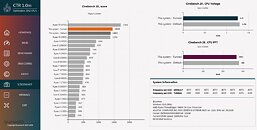
ClockTuner for Ryzen (CTR) by Yuri "1usmus" Bubliy, is an evolution of the DRAM Calculator for Ryzen utility. The utility goes beyond the functionality of the DRAM Calculator - which finds the most precise memory settings for Ryzen processors - and does your homework for Ryzen CPU overclocking. Optimized for processors based on the "Zen 2" microarchitecture, CTR has been designed both for Socket AM4 and sTRX4 (Threadripper) processors, and Linus Tech Tips in its announcement video of CTR demonstrated the tool's prowess in squeezing out a neat 10% performance gain for their Threadripper 3960X processor. Besides CPU and memory settings, the tool performs stability testing and benchmarking. 1usmus expects to release CTR 1.0 in September 2020.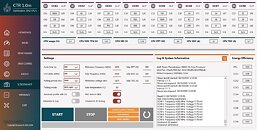
Source:
Guru3D


78 Comments on ClockTuner for Ryzen Simplifies "Zen 2" Overclocking, Squeezes Out Double-digit Percent Performance
It feels weird that my cpu is a silver sample and clocks so poorly. I cant imagine the poor souls who got a bronze sample.
I updated windows before installing and running this tool. At least I attempted to and windows asked for a restart. This morning I am being asked to restart windows in order to complete installation of Windows 10 x64 1909-2004. This version of windows or newer is one of the requirement for the software. Maybe I will get a different result after I upgrade.
This is compared to my own profile that is using much more voltage than stock.
Temp and clock are peaks. Voltage is sustained allcore.
Temp: 83c > 63c
Energy usage: 131W > 87W
Voltage: 1.42v > 1.25v
CB20: 4905/517 > 5158/497
Clock: 4550Mhz > 4275Mhz
So like i suspected i lost about 20 points ST perf and gained about 250 points MT perf.
Both of my CCX's appear almost equal but i also set the delta to only 25Mhz. If i had set it higher one might have boosted higher because 3800X is (even the early ones) some of the best binned models.
Edit1:
I have also run the program three times at 1.15v and I have received the near same result each time.
Edit2:
After the hotfix was released I have finally had a completely successful overclock run. 6% faster and 3% more efficient. I am going to keep testing but I think I like the 23% more efficiency from undervolting more.
I haven't re-ran it though, might do a touch better. Are there settings to allow it to try clock more aggressively by adding volts?
Efficiency is up but I dunno if I am benefiting at all with gaming. I don't use my PC for anything else just wanted to play around with the tool.
The problem is that I can't boot into Windows with 1Usmus's suggested settings (LLC 3, Phase control standard, CPU Current Capability 100%), so the below is with Auto on all setting including LLC.
The only thing I changed after resetting is the DOCP
For some inexplicable to me reason, I get BSOD's constantly using his settings.
My specs are in the first ss below. Anyone else run into the same problem?
Cheers!
as you can see the program says i have platinum sample ryzen 3600 . I'm on air cooler.
how i use the setting the program suggest?
...and also how to change them?
Just doing binary search trial-and-error and figured it must be:
400W PPT
450A EDC
300A TDC
But sometimes hacking in different values for TDC results in a "PPT too high!" error, although I havn't changed it?!
I'm runing my 3960X currently with a manually configured and fine-tuned setup with perCCX OC in BIOS using the following settings:
CCX1 - 44.00x
CCX2 - 44.00x
CCX3 - 43.50x
CCX4 - 43.25x
CCX5 - 44.00x
CCX6 - 43.75x
CCX7 - 44.00x
CCX8 - 44.00x
vCore 1.4V per BIOS, LLC High (~1.31V under prime95 SmallFFT load all-core)
Package Power Limit manually configured to 600W and cTDP manually configured to 500W in BIOS.
This runs Prime-stable, even with 4K SmallFFT. I just thought I could give CTR a chance to optimize this a bit further.
But without a raised PPT limit, this can not work. The system is pulling about 500W under max. load CPU alone.
What also bothers me is that somehow the reported CPPC values seem to have changed over time? I thought they were set fixed inside the CPU during manufacturing? When I bought the CPU back in April 2020, I started overclocking per CCX and used the values from the Windows event log using BIOS F5c (AGESA 1.0.0.3B). I recently upgraded to BIOS F5k (AGESA 1.0.0.4). Board is a Gigabyte TRX40 Aorus Master.
They were:
CCX1 - C01 = 175 (now: 167)
CCX1 - C02 = 171 (now: 163)
CCX1 - C03 = 167 (now: 160)
CCX2 - C04 = 163 (now: 156)
CCX2 - C04 = 159 (now: 152)
CCX2 - C04 = 156 (now: 149)
CCX3 - C04 = 140 (now: 134)
CCX3 - C04 = 137 (now: 131)
CCX3 - C04 = 133 (now: 127)
CCX4 - C04 = 129 (now: 123)
CCX4 - C04 = 125 (now: 120)
CCX4 - C04 = 125 (now: 120)
CCX5 - C04 = 182 (now: 174)
CCX5 - C04 = 178 (now: 171)
CCX5 - C04 = 182 (now: 174)
CCX6 - C04 = 152 (now: 145)
CCX6 - C04 = 148 (now: 142)
CCX6 - C04 = 144 (now: 138)
CCX7 - C04 = 125 (now: 120)
CCX7 - C04 = 125 (now: 120)
CCX7 - C04 = 125 (now: 120)
CCX8 - C04 = 125 (now: 120)
CCX8 - C04 = 125 (now: 120)
CCX8 - C04 = 125 (now: 120)
Anyone experienced something similiar?
These new values are the same in the Windows event log and in CTR btw.
- 280W PPT,
- 300A EDC,
- 215A TDC.
www.overclock3d.net/reviews/cpu_mainboard/amd_3rd_generation_ryzen_threadripper_tr_3960x_review/You shouldn't elevate them past this much if you want to save your chip down the line. Also, 1.31v is too high. Stay safe ~1.25v.
Unless you want single threaded performance, you don't need EDC all that much either and even if you are overclocking you should only make PPT 10% higher than EDC, no more. Again, these are best practice measures.
Precision Boost Overdrive should not interest users since it was intentionally developed for threadripper platform to curb temperature related power spikes from damaging the motherboard, a.k.a. Poole-Frenkel Effect. It doesn't overclock, instead it monitors consumption.
PS: okay, so I found out about 3960X's defaults.
Of course, it is up to user preference whether overclocking should be manual, but I insist pbo is just for threadripper power management.
What we can do is take a much lower EDC, but only after looking at how little voltage is enough for each cores random operation. They come with discrete power gates, why leave it at stock? Undervolt and overcurrent is my motto. If we curb voltage, that will double power efficiency but only linearly affect the speed bin. We can develop a voltage to maximum bin gradient and not waste overclock potential for the slower cores. They had this developed in 1800X testing, at low voltage the cpu was using less than half at sub-60°C temperatures. This is what any big die cpu user should consider imo.
The first is watts, the second core temperature. Even from this example the message should be clear - don't rely on voltage to do your overclocks for you.
Because you're not suppose to apply more than that on static speed/voltage.Have you consider degradation?
I dont really know, just asking...
If you want to reach peak current limits, you need to save on average consumption. Even if you cut down half of the cores on power(the way you do this is via the voltage setting) you leave the rest to EDC limits. Notice if you had throttled them with EDC instead, neither the good cores or the bad would overclock - they would all clock the same. So, there are ways to go about it. Be safe and smart: maximise EDC, but lower voltage and PPT wherever you may.