Wednesday, July 23rd 2025

Latest PlayStation 5 System Beta Update Intros Cross-Device DualSense Wireless Controller Pairing
Sony is going to preview a new feature that lets DualSense and DualSense Edge controllers connect to several devices at once (up to four devices simultaneously). This means users won't have to pair them again when they switch between PlayStation 5, PC, Mac, and mobile gadgets. Sony explains that this creates "a more flexible and seamless gaming experience" as "you can take your controller which you use with your PS5, then seamlessly switch connection to a PC to play PC games, or connect it to a smartphone to enjoy Remote Play from your PS5". The beta update also gives a peek at Power Saver mode, which aims to cut down on energy use in games that support it. This feature will come out on its own later on. Sony notes that "While this feature won't be available during the beta phase, once it officially launches, supported PS5 games will scale back performance and will allow your PS5 to reduce its power consumption when the feature is enabled optionally by gamers. If not enabled, or if games do not support the feature, the performance will not be scaled back and power consumption will not be reduced."
Right now, the beta is for people who've been invited in certain countries, however it'll be out worldwide in the next few months. If you're invited, you'll get an email telling you how to download it. Keep in mind that the features being tested might change or even be taken out before the final version comes out.
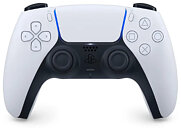 In order to connect or switch between devices, several quick steps are needed.
Multi-device pairing instructions for DualSense controllers
Assign devices to controller slots using PS button + action button combinations (triangle, circle, cross, or square). Disconnect any USB cables before pairing.
Switch between paired devices using the same button combinations assigned during setup.
Source:
PS5 Blog
Right now, the beta is for people who've been invited in certain countries, however it'll be out worldwide in the next few months. If you're invited, you'll get an email telling you how to download it. Keep in mind that the features being tested might change or even be taken out before the final version comes out.


Multi-device pairing instructions for DualSense controllers
Assign devices to controller slots using PS button + action button combinations (triangle, circle, cross, or square). Disconnect any USB cables before pairing.
- Ensure controller is off (light bar and player indicator dark)
- Hold PS button + desired action button for 5+ seconds until lights flash twice
- Enable Bluetooth on target device and search for new devices
- Select controller from detected devices list
Switch between paired devices using the same button combinations assigned during setup.
- Turn on target device
- Hold PS button + corresponding action button for 3 seconds
- Release when lights blink - controller connects to selected device slot
5 Comments on Latest PlayStation 5 System Beta Update Intros Cross-Device DualSense Wireless Controller Pairing
Next