Tuesday, October 21st 2025

Windows 11 25H2 October Update Bug Renders Recovery Environment Unusable
It seems like Microsoft has encountered a significant issue with the latest Windows 11 25H2 October update, KB5066835. The company confirmed that this update disrupts mouse and keyboard functionality within the Windows Recovery Environment (WinRE), making them unresponsive and unusable. As a result, the WinRE feature is completely inoperative. WinRE is a built-in troubleshooting toolkit included with Windows. It's intended to assist users when their computer encounters startup problems or system issues. WinRE activates automatically when Windows crashes or fails to boot properly, but users can also access it manually to utilize various repair tools.
However, with the current problem affecting keyboard and mouse input, WinRE is essentially ineffective. Microsoft stated that "the USB keyboard and mouse continue to work normally within the Windows operating system," and assured users that they are "working to release a solution to resolve this issue in the coming days. More information will be provided when it is available." This is yet another incident related to the recent Windows 11 updates, which have previously caused localhost issues. The list of Windows 11 problems continues to grow as the latest updates are released. Microsoft maintains a Windows 11 version 25H2 known issues and notifications website that provides status updates on the latest problems, including this one.
Update October 21 16:05 UTC: Microsoft has issued a hot fix. The company claims that "this out-of-band (OOB) update includes quality improvements. This update is cumulative and includes security fixes and improvements from the October 14, 2025, security update (KB5066835)..." which you can check out here.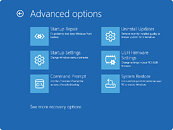
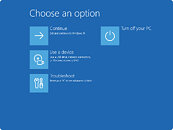 Early last week, Microsoft accidentally broke the Windows Media Creation Tool (MCT) just a day ahead of Windows 10's end-of-life. Additionally, the company began requiring Online Accounts for Windows 11 installations, making them increasingly difficult to bypass. Every previously reported issue has been addressed or resolved, except for the broken localhost functionality and now this WinRE problem. Without keyboard and mouse input, users are unable to initiate any recovery processes to resolve OS issues. Until Microsoft releases a patch, we must wait and hope that the OS remains stable without needing any intervention.
Sources:
Microsoft, via Windows Latest
However, with the current problem affecting keyboard and mouse input, WinRE is essentially ineffective. Microsoft stated that "the USB keyboard and mouse continue to work normally within the Windows operating system," and assured users that they are "working to release a solution to resolve this issue in the coming days. More information will be provided when it is available." This is yet another incident related to the recent Windows 11 updates, which have previously caused localhost issues. The list of Windows 11 problems continues to grow as the latest updates are released. Microsoft maintains a Windows 11 version 25H2 known issues and notifications website that provides status updates on the latest problems, including this one.
Update October 21 16:05 UTC: Microsoft has issued a hot fix. The company claims that "this out-of-band (OOB) update includes quality improvements. This update is cumulative and includes security fixes and improvements from the October 14, 2025, security update (KB5066835)..." which you can check out here.


170 Comments on Windows 11 25H2 October Update Bug Renders Recovery Environment Unusable
Had to use Rufus to disable the CPU and TPM 2.0 requirements. Of course this CPU does have all the *required* instruction codes.
I suspect the TPM firmware could be upgraded to 2.0, Dell just refuses to do it like they have with other, lesser models about the same age.
Windows 10 started out rather light and snappy. The first version of Windows with *lower* system requirements than its predecessor. Initially, 10 ran very well on a mid to high end Core 2 Duo with 4 gig RAM. I had it on an MPC Transport T2500 AKA Samsung x65 outside North America. All Micron, Micron PC, and MPC laptops were rebranded Samsung. A laptop made in 2008, 7 years old, ran the then latest Windows without a problem, other than Samsung's WTF choice of a CardBus slot (in 2008!) instead of ExpressCard. Not being able to pop in a USB 3.0 card was the main reason I parted ways with it.
The major thing I hated about Vista and 7 was the super light "highlight" color for selected items. I have troubles seeing some shades of blue, and the "highlight" color Microsoft chose for Vista was to me nearly indistinguishable from the color used for selected but not active item. Ie, when you click on a folder in the left side of Explorer then click something on the right side, I'd have to look very closely to tell the difference. What the fork were they thinking, going against decades of computer convention having selected things having *inverse text or colors* was a great idea?
Superlight barely visible blue VS Superlight very slightly darker blue "highlight". For 7 they made the selected item "highlight" *slightly more darker*. Did Microsoft hire the same people Apple had design the "stoplight" window buttons on early OS X? Do they all just hate everyone with any degree of color vision problems? Or did they just not think to put out a call for people with color vision issues to do usability testing?
Every previous "correction" or the so called "good" Windows was a response to user criticism.
They made a bad version because they though they new best. But they were humble enough to admit when they were wrong to course correct with the next version.
However that ended with Win 8.1. That was the last version where they listened to used feedback and least tried to make the update better, but it was just an update. It was no longer a ground up redesign based on user feedback.
With Win10 they went in the direction users were highly critical of. Users had to use Win10 (answering the inevitable question why Win10 market share grew so big despite the criticism) because Win7 and Win8 support was ending and new hardware outright forced users to Win10. Like when i moved to Zen 2 based system in 2019. I couldn't get USB working with Win7 on Zen 2 back then so i had no choice but to use Win10. Linux was not as good as it is today. Mac required dedicated hardware.
With Win11 Microsoft has continued ignoring user feedback and i very much doubt they will make any changes to Win12 based on feedback.
Hence there is no good-bad-good dynamic anymore.
It's just bad-worse-awful as profit margins and datamining users has taken precedence over user feedback and the overall narcissism in today's society has ultimately shaped Windows development and Microsoft as a whole.
All the ads showed them with heavy use of white, cyan, and magenta. All three used non-overlapping tiles/windows with active content. Windows Phone had a black bar up the right side in many photos of the phones. That reminded me of the black DOS command line at the bottom of the Windows 1.0 screen.
I called Windows 8.0 Windows 1.0 Build 2012. ;)
Whose great idea was it to use the default color palette for a then 31 year old PC video standard and spew it all over the "Modern" UI?
For most people, Windows 11 is broken. The issue is, will they actually put the time to fix it? From the start this particular OS suffers from hardware and software issues, which triggers critical system failures which turn into BSODs, look up the codes, search them and you will see that Micro$oft acknowledges them & tried to come up with patches & workarounds. Its all Micro$ofts fault for including a dump load of bloatware & AI nonsense.
Windows 11 should have been 110% compatible with everything Windows 10, but they choose otherwise.
Anyhow Millions of people have random Windows 11 issues, while others do not.Windows 11 is worse than Windows Vista, and Vista was a piece of garbage. Lol
I used Windows 11 for 12-14 months, and its simply garbage, hence why I'm back to Windows 10, that is 110% better in everything over 11.
I only owned one PC that came with Vista, a cheap, chunky Walmart Christmas sale "doorbuster" Acer laptop that with its black and gray housing without a straight line anywhere was pretty obviously aping the original iBook, but not closely enough to get sued. IIRC it only supported 3 gig RAM despite the chipset supporting 4. Had to use a 2 gig and a 1 gig. Unusual for a cheap consumer laptop, the socketed CPU was on the bottom, accessible along with every other replaceable part through one massive panel Acer called a "door". I quickly upgraded the RAM to 3 gig and the CPU from a Core Solo Celeron to a Core 2 Duo. 7 Pro went on it as soon as it was available.
Microsoft somehow managed to make fancy *not distracting* with Windows's 7's Aero Glass. It was like they made bits that were annoying when opaque in Vista fade into the background by literally making them fade into the background.
7's design was 99% Vista's, but the subtle toning down of colours gave it a soothing, pastel-like aesthetic. The taskbar was now translucent and bigger; the close buttons were duller and bigger. Maximising would keep translucency. The default wallpaper doubtless had an effect. All in all, polishing is such that, in most things, the last few per cent take an artefact from good to excellent. 7 benefited from all the hard work having been done in Vista. Here, it was a matter of sanding down the edges, perfecting what was already there.
Never had a reason to upgrade, nor even was able to fathom why folks would put a new OS on existing hardware. It's not like any OS upgrade **ever** ran faster on old er hardware. When Win95 came out it was 40% slower than WFWGs and tho the margin much improved with other upgrades, it still resulted in a reduction in performance.
I have had too many bad experiences with WU breaking things .... With Win XP, an upgrade at the corporate office left the entire CAD department twiddling their thumbs as a "day of release upgrade broke AutoDesk's licensing service, that took 4 days to "undo". At home office, we escaped as each individual update was paused at least a week until each KB was vetted. 24H2 also broke AutoDesk resulting in MS putting in a "detect" feature which prevented the install. It also caused 30+ other issues
With WAU Manager it's easy to adopt "let other people bleed" approach .... and think about it like you're crossing the street, look both ways 1st. The WinRE isssue was resolved w/ This KB5070773) as have almost all others.
AFAIK, the following 26H2 issues remain but is easily resolved ... no biggie if the msu is stored locally, tho it takes a while after reboot to show up in the install history.
ISSUE: Updates Installed via WUSA might Fail If Installed from a Shared Folder
Win 8.1 has shown to be surprisingly fast in tests besting all other versions etc.
There have been features that are much faster on new OS either trough supporting new technology or hardware etc.
The general rule I recommend to everyone: whenever a major update goes public, wait 4 to 6 months before letting it install.Um, not true. For Vista RTM and SP1? Yes. For Vista SP2, Win7 was more or less dead even with it for performance.
With Win 95 hen PC Mag did a PC performance comparison in which readers were puzzled as top why almost all the manufacturers made two submissions, one with WFWGs and one with Win95. They ran a test suite similar to TPU and readers were puzzled that they grouped them "by OS" 75 pages apart. I soon became obvious, the overall performance was down by 40%.
I remember once or twice the new version "claimed to be faster" and, while there was small improvement in gaming, that had everything to do with the newer version of Direct X that came with it. Everything else was slower. I had the fortunate circumstance of having an engineering firm where CAD performance gains justified the expense of high end CPUs, vector GFX cards, monitors , storage devices and even water cooling. A new Direct X for after hours gaming had to take 2nd place to daytime performance which funded thre equipment purchases, not to mention the fact that any performnce differences required benchmarks to measure.
Of course it did. This is based on my own experience and numerous others have corroborated this too.
It was not just marketing. The difference was measurable and visible.This was way before my time. I have used 95, 98 and 2000 and ME, but i consider XP as the start of my knowledge base as this was what came on my first OEM computer. I have used all but 8 and 8.1 after XP for years.
XP from 2005 to 2007.
Vista from 2007-2009. Yes Vista was slower than XP, but i disliked XP anyway.
7 from 2009-2019. Noticeably faster than Vista. Possibly the best they ever made.
10 from 2019 to 2023. Forced upgrade due to new hardware not supporting 7. But i never really liked 10. Hard to say how much slower was it because i ran it tweaked. The UI seemed faster because they got rid of skeuomorphic design, but it came at the cost of ugly, boxy flat 2D look.
11 from 2023 to today. Hardware stayed the same, but i liked the UI more than 10 with more 3D and better Dark Mode support. Slower than 10 unless tweaked.
Just to be clear - im not saying that every new Windows version was faster than it's predecessor - far from it.
But there have been exceptions. Saying that it never happened is completely false.
Also i'll post this here too:
What applications are running faster ?
Are we completing tasks in shorter time intervals ?
What increase in productivity are we seeing ?
What tasks are we accomplishing faster ?
What is the ROI (Return on Investment) on our time and money ?
Here's one very prominent example from personal experience that had a very positive upgrade result.
Our primary application is AutoCAD. When we started building our own PCs in 1990, "rotating a CAD drawing" was something you did before going to lunch and hope that it was done before you got back because, due to RAM / VM limitations, it had to write the entire file to disk before even beginning. In that aforementioned PC Mag article it was readily apparent that SCSI HDs significantly improved disk reads and writes. I spent $1,000 on a SCSI 1 GB HD, installed it, and it was a complete game changer., It had a significant and direct impact , not only for the PC to do it's job but also the CAD Operator wasn't occupying their wait time w/ a distraction and "getting back to it" 10 minute after it completed. The ROI (return on investment) was substantial. The investment included the $1,000 purchase (w/ controller card) , the downtime (hardware and driver install = -0.5 hours), and required no adjustment period for the operator.
Here's one very prominent example from personal experience where a very negative result was avoided.
A colleague asked me to build him a "killer AutoCAD box" .... he went on the internet, listed his current build and got the following advice.
-AutoCAD is a very powerful programs and therefore will benefit from as many cores as you can afford.
-Only raster based cards are certified by AutoCAD, so you need to spend a few $k on the best one you can afford
-Definately go RAID 0
The reality is ...
-AutoCAD is for the most part s single threaded application. It wasn't going to benefit from 32 cores.
-While Autodesk has several rendering applications that do excel with raster based cards, nothing runs autoCAD faster than vector based aka gaming cards.
-While AutoCAD benefitted from premium storage alternatives in the late 1990s, RAID currently offers no significant advantage.
Now if he was using raster based application like Maya, Inventor and various Adobe products, photo and video editing, etc. more threads and raster GFX would make perfect sense and there would have been a vey significant ROI.
In the infoworld Win 95 article, the OS upgrade investment required hardware, downtime, training and "operator adjustment" to new interface, The 40% performance penalty for Win 95 was based upon an average of application based benchmarks using scripts to perform certain tasks. Now it's important to note that this change for most involved a change from a 16 bit to a 32 bit OS, hence the hardware needs. But W4WGs already was a 32 bit OS .... no hardware, no downtime, no "adjustment" time for new interface. With an in place upgrade, you might have incompatible hardware which has to be replaced. How many hours to procure, install the new OS, reinstall new drivers. Now let's apply the yardstick ... what actual tasks do you perform on the computer that actually get done faster ?
I'm not talking about benchmarks showing that your fps in a partucular game went fro 92 - 95 fps which absent the benchark no one would notice and all it gets ya is bragging rights.
This is is why, in the corporate world, no one does in-house OS upgrades. When rolling out 100s or even thousands of PCs, it's simply cheaper to buy new boxes with everything preinstalled or rolled out simply by connecting to the network and runing a script. I am talking about actually running faster in a measureable and significant way such as to justify the investment in time.
Let's look at your video ... the 1st test brought a chuckle only because I had an employee back in 2010 or so ask me for a SSD after he claimed it would "improve his performance". Cost engineering being one of our services, I asked him to "justify" his request. and tell me the calculated ROI. He submitted an analysis and he was confident his one example would win the day. His argument, based upon a video like yours, was that system would boot 15 seconds faster. I said OK, let's do the math.
0.25 min x 220 workdays per year or 55 minutes a year. At his $60 / hr billing rate my company would save $55 a year, $165 over 3 years. The SSD was $180. IT time for purchase, install, OS and driver installation was 3 times that. That's a negative return on investment.
But that wasn't the point, then comes something I like to call "reality" .... when he came in the following morning, before we sat down and "did the math" I watched him arrive and start his day ... took off jacket, turned on PC, went and made fresh pot of coffee, chatted with secretary about the "cheaters" morning show on the radio, sitting down, eating his egg sandwich before actually "logging in" 25 minutes later. The SSD wasn't going to get anything done faster.
As for "youtubers", I would not include Linus and Jayz2cents among reliable sources. On top of that we did all the testing ourselves in actual production environments. Most of the "youtuber" crowd uses yardsticks that are not relevant to actual usage. Typical youtube performance testing will use benchmarks such as "opening 100 tabs in chrome." Who does that ? Which of the tests in this video are actual relevant to everyday usage across the typical programs in a production environment ? In the late 90s and early 2000s, AutoCAD performance was very much storage dependent. In that PC Mag article, with 100+ systems to compare most w/ IDE and about a dozen w/ SCSI.
How many PCs in production environments are actually represented by any of the tests in this video ? Upgrading an OS decisions in production environments have to be made based upon return on vestment. Time and money invested versus time and money reaped over time.
It's often difficult to measure how well applications run using benchmrks. Let's look at TPUs MS Office Benchmarks whiuch run a script of "a wide range of editing and creation tasks in Word, PowerPoint, Excel and Outlook." say here :
www.techpowerup.com/review/amd-ryzen-9-9950x3d/12.html
9950X3D ($676) 11798 points in Excel
7800X3D ($387) = 9465 points in Excel
Can we assume that we can justify a $300 upgrade from the 7800X3D to the 9950X3D because we can then ** run** Excel 25% faster ? Of course not. We can not because you or whomever is using the PC can't enter all the keyboard commands as fast as the script. can. Each KB press takes time, user is reading data from a source and excuting individual keystrokes. What has our CPU upgrade acutally accomplished ?
What you can say: "If I kept the old CPU, it would have taken me 25% longer to run the benchmark script."
What you can't say: "It used to taken me 10 hours to prepare all my monthly Excel reports and now w/ the new CPU I can do it in 8"
Justifying an upgrade should be about the user being able to complete required tasks faster ... benchmarlks do not = productivity. An OS upgrade, for most, is like buying a Porshe to get you work faster. You might feel better and have more fun knowing "what it can do", but in rush hour traffic, you will not benefit in any imaginable way in shortening the time it takes you to drive to work.
Now, of course there are exceptions. An OS upgrade can allow you to utilize next generation hardware, but we specifically excuded hardware and availability of things like new Direct X from consideration. If you are doing batch work in the photo or video field, oh yes, our hardare analogy shows that new CPU will pay huge dividends. But when the is the performance bottleneck, the better hardware or the newer OS almost always is not enough to justify the ROI.
In gaming, well that again has way to many factors to consider as hardware support and DirectX play a big role here. It also depends on your PoV.
Did it change the gaming experience ?
Did it eliminate any issues such as occassional fps dips ?
Can you now avoid situations wher the playing experience was dimished in any way ?
Is there an FPS increase and is it readily noticeable ... ?
Now if you are a competitve gamer where you can actually benefit from minor increases in fps, then you are probably using a custom OS. Benchmarks using many of the most popular games using custom OSs are readily on youtube. One I looked at has Stock Win 11 24H2 as 100% and the fastest alteranative at 108%
I lost stuff I'd done several times by closing when I wanted to minimize as I'd done since 1990!
There is someone who was a regular on another community I am a member off, he sadly was not in good health, and long retired, but used to be a software develop, and I think he used to work for Novell.
In a thread related to UI issues touch interface vs Desktop, I suggested that the two should be developed separately, that way mouse and keyboard experience isnt compromised by touch experience getting shoe horned in.
This person normally very calm, in no way argumentative, suddenly seemed really offended and said the attempt to maintain two different things back when he was working almost killed his company, I think the point he was making this is the opposite of the blueprint in a developer's head. Given my respect for him I stopped debating right away and left it at that.
But if you think where we are today, with websites often having tile layouts, for touch experience, pagination death, touch centric UI in software, it points to the same thing with developers not liking the idea of maintaining multiple branches of software for different devices. Since dev's make the software, they usually win out.
10 reintroducing a start menu (not the previous one though), as well as more compactness, and some other things that were removed in 8 were put back in 10, was a compromise for a temporary period of time.
11 and 12 are going to be taking us back to the original vision that they attempted in 8.
let's look "license, legal" way:oops::D: if Win 10, latest 22H2 gets you "vulnerable". But, consider what you are doing and what data you handle... just for thoughts...
if win 11, 21H2 and 22H2 are out of support (well, same as 10 22H2), but they are stable as f because of no updates (again, think what you prefer support vs stability, as long I'm not a government or billion corp. secret holder I'd think twice about "security concern" lol), 23H2 well officially out of support but still runs perfectly showing no "you are out of date sign" lol. 24H2 needs already major AI-decrap tweaks but well it works. 25H2 same. But you got me.
let's look: "I don't f--n care about license" way: Win 10 21H2 LTSC and Win 11 24H2 LTSC are the way to go. 10 is supported for a healthy year until Jan 2027 I think... there are IoT BS but I don't care, this is more mess than profit.... there is also older 10 1809 LTSC but won't recommend it no more.