Tuesday, October 28th 2025

Windows 11 Will Start Memory Scans After BSOD to Prevent Future Issues
The land of Windows 11 is finally getting a feature most users will appreciate, with the introduction of the new memory scanning for issues after a blue screen of death (BSOD) happens. "We're introducing a new feature that helps improve system reliability. If your PC experiences a bug check (unexpected restart), you may see a notification when signing in suggesting a quick memory scan," noted Windows Insider Program lead Amanda Langowski. Additionally, the "If you choose to run it, the system will schedule a Windows Memory Diagnostic scan to run during your next reboot (taking 5 minutes or less on average) and then continue to Windows. If a memory issue is found and mitigated, you will see a notification post-reboot."
Microsoft notes that this first wave flags every bug check so they can watch how memory glitches turn into blue screens, and they will refine targeting of these issues in the later updates. At the moment the preview will not run on Arm64 PCs, machines that have Administrator Protection turned on, or any BitLocker setup that boots without Secure Boot enabled. Users that are part of the Windows Insiders Dev and Beta channels will be able to access this feature. Windows 11 Insider Preview Build 26220.6982 (KB5067109) and Windows 11 Insider Preview Build 26120.6982 (KB5067109) are the first in the rollout, so they can beta test the feature before it hits the main stable Windows 11 branch.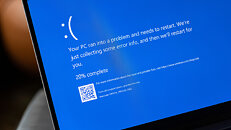
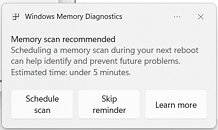 For everyday users, this new memory diagnostic prompt makes a significant difference. Instead of facing a confusing blue screen and wondering what went wrong, you receive a straightforward notification that guides you on what to do next. Windows now offers a one-click option to run a RAM check the next time you restart your computer. Importantly, it can detect memory problems early, preventing bigger issues like programs crashing frequently, files getting corrupted, or your entire system freezing. If you discover your RAM is failing, you can likely get it replaced if it is under warranty. Additionally, users no longer need to download unreliable third-party tools for this essential feature.
Sources:
via Bleeping Computer, Windows Blog
Microsoft notes that this first wave flags every bug check so they can watch how memory glitches turn into blue screens, and they will refine targeting of these issues in the later updates. At the moment the preview will not run on Arm64 PCs, machines that have Administrator Protection turned on, or any BitLocker setup that boots without Secure Boot enabled. Users that are part of the Windows Insiders Dev and Beta channels will be able to access this feature. Windows 11 Insider Preview Build 26220.6982 (KB5067109) and Windows 11 Insider Preview Build 26120.6982 (KB5067109) are the first in the rollout, so they can beta test the feature before it hits the main stable Windows 11 branch.


23 Comments on Windows 11 Will Start Memory Scans After BSOD to Prevent Future Issues
I would like to see Microsoft put the faulting driver vendor and model front and centre after a BSOD. They should’ve done it years ago. “CHONGKING driver has failed, and has been disabled to help ensure system stability.”
Aside that dig at microsoft, good on them for introducing an actually useful feature/prompt to use an existing feature that will actually prove useful to people (unless the diagnostics turn out to be as useful as their BSOD stop codes, which would be tragic).
With a friendly smile,
Fred.
The last year or so of BsoD I had was mainly caused by Nvidia's drivers or corrupted/data compiled shader data from 1 game (AC Valhalla).
Also, never seen a useful RAM checker under windows, only Memtest86 or Memtest86+ maybe GoldMemory which I used to run like 15 years ago
Last BSOD I've seen was back in Windows 10, and that was actually due to a bad RAM stick. It’s extremely rare I see a BSOD these days, thankfully, but if I do, it’s usually a hardware issue.
The only other BSOD issue besides RAM was a faulty 24-pin cablemod extension type cable connected to an AX16OOi PSU that went bad somehow after a year by causing my 3.3v rail to idle at 2.9v. Whenever my system went under heavy load like gaming, my 3.3v rail would drop even further to 2.6v and cause network issues, game freeze, SATA issues, and on rare occasions, a BSOD. That issue took me a while to identify. But changing that cable to a new cablemod cable fixed that issue immediately.
For some DRAM screenshots I really wonder if those are really stable settings. I do get the point why microsoft tries to run a memory check. We had a bad 8GIB DDR4 module in a premade HP cheap work computer. DRAM can cause issues in some scenarios.
DDR5 is much harder to diagnose as DDR4. I do not remember anymore, I'm not sure If i tried memtext86 to test DDR5. My opinion is, DDR5 can not be reliable tested with memtest86
Remove your manual overclock and reset to JEDEC speeds. RAM overclocks are the lowest yield overclock (generally quite pointless) and highest likelihood for system failure.
There was a SP1 release on Server 2008 that effectively fixed a LOT of ladder pulling, which I assume was the case for many people on Vista, so there's that.
The day I noticed a Server 2012 (not R2) update take out the system marked the start of the downhill roll. It was the point I moved onto R2 as a sanity check.
Then 2016, Win10, 2019, you know the rest.
Hopefully Microsoft have the foresight that the tool will suggest disabling factory overclock if it finds issues.
Drivers........hmmm, well on a mature OS like W11............they should be less of an issue.
Doesn't DDR5 have a pseudo ecc?? Does this mean MS thinks/knows DDR5 is more prone to error than DDR4??When building a new pc, I will run memtest or something like that for 8 hours pre-OS. After OS is installed I let it chew on P95 for 24 hours minimum.
I've never had a single system pass those tests.