Wednesday, January 14th 2026

NVIDIA DLSS 4.5 Comes to All GeForce RTX GPUs Today
NVIDIA's DLSS 4.5 was the one of the most interesting CES-centric announcements from the company's 2026 keynote. Today, the company confirmed to the community that DLSS 4.5 will be available for every GeForce RTX GPU from day one. This includes even the older RTX 20, RTX 30, and RTX 40 series, besides the latest RTX 50 series "Blackwell." To easily enable the latest DLSS 4.5, you can use the NVIDIA App with just a few clicks. Go to the Graphics tab and select "DLSS Override - Model Preset." You can apply this setting globally or on a per-program basis. Choose "Recommended," which sets Preset M to DLSS Performance mode, Preset L to DLSS Ultra Performance mode, and Preset K to the other available modes. Interestingly, this will work in more than 400 titles that support DLSS Super Resolution, and over 250 titles that work with the multi-frame generation of DLSS 4.
The most notable feature of the regular DLSS 4 was the shift from convolutional neural network (CNN) based AI models to a newer Transformer-based architecture, which significantly improved image quality. NVIDIA has since advanced this technology further with DLSS 4.5, updating the algorithm with an even more advanced Transformer model trained on a much larger dataset. This second-generation Transformer was developed with five times the computational investment of the first DLSS 4 Transformer upscaler and utilizes the FP8 data format, allowing for more processing with minimal precision loss. The new algorithm is more context-aware, and NVIDIA confirmed that the input for upscaling is used more intelligently, resulting in much more detailed and precise video output. For GeForce RTX 50 series GPUs, NVIDIA dedicated a dynamic multi-frame generation with 6x increase in rendered frames as an exclusive feature, while older RTX series are left on 2x.
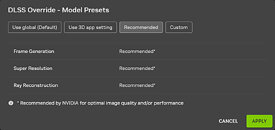 The company has noted the following:
Source:
NVIDIA
The most notable feature of the regular DLSS 4 was the shift from convolutional neural network (CNN) based AI models to a newer Transformer-based architecture, which significantly improved image quality. NVIDIA has since advanced this technology further with DLSS 4.5, updating the algorithm with an even more advanced Transformer model trained on a much larger dataset. This second-generation Transformer was developed with five times the computational investment of the first DLSS 4 Transformer upscaler and utilizes the FP8 data format, allowing for more processing with minimal precision loss. The new algorithm is more context-aware, and NVIDIA confirmed that the input for upscaling is used more intelligently, resulting in much more detailed and precise video output. For GeForce RTX 50 series GPUs, NVIDIA dedicated a dynamic multi-frame generation with 6x increase in rendered frames as an exclusive feature, while older RTX series are left on 2x.


NVIDIAThis new "Recommended" setting replaces "Latest" to better align with the two new DLSS 4.5 Super Resolution models: Model M is optimized for DLSS Super Resolution Performance mode, and Model L is optimized for 4K DLSS Super Resolution Ultra Performance mode. While both models are supported for both DLSS Super Resolution Quality and Balanced modes, and DLAA, users will see the best quality vs. performance benefits in Performance and Ultra Performance modes.
Please note that GeForce RTX 20 and 30 Series GPUs lack native FP8 support, so Models M and L carry a heavier performance impact for these GPUs. Those users may therefore prefer to remain on Model K (DLSS 4), for an optimal balance of performance and image quality. With the NVIDIA app's DLSS Overrides, you control the Model, and the balance between image quality and performance for your PC.
12 Comments on NVIDIA DLSS 4.5 Comes to All GeForce RTX GPUs Today
This kind of support is a ray of light (..) in the whole GPU shitshow we havr in the last year's.
In my case/at my resolution the performance hit is insignificant so I will default to 4.5 from now on.
Being able to sort of "set and forget" your target framerate is neat