Monday, February 23rd 2026

ASRock Industrial Lists NUCs Powered by Core Ultra Series 3 "Panther Lake" Processors

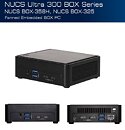
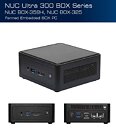
ASRock listed one of the first branded mobile-on-desktop platforms based on the latest Intel Core Ultra Series 3 "Panther Lake" processors, barely two months into the launch of the new processor generation. The new NUC Box-358H, NUCS BOX-358H, NUCS BOX-325, and NUC BOX-325 are powered by "Panther Lake-H" (mainstream laptop) variants of the chip, and are marketed by the Industrial sub-brand of ASRock that deals with IPCs and IIoT products. All four models are TAA-compliant. The NUC Box-358H and NUCS BOX-325 come with a thicker chassis measuring 117.5 mm x 110 mm x 49 mm (WxDxH), while the NUCS BOX-358H and NUC BOX-325 come in a slimmer chassis measuring 117.5 x 110 mm x 38 mm. All four feature active fan-based cooling for the SoC, and are barebones that exclude memory and storage.

For memory, all four models offer two DDR5 SO-DIMM slots, and support the latest CSODIMMs besides regular SO-DIMMs. For storage, all four offer two M.2-2280 slots, one of which is Gen 5. Intel BE200 Wi-Fi 7 WLAN adapters are standard. The thicker models come with two Intel 2.5 GbE wired Ethernet interfaces, while the thinner ones come with just the one. All four offer quad display outputs, including two HDMI 2.1, one DisplayPort 2.1 passed through a 40 Gbps USB4/Thunderbolt 4 port, and a second DisplayPort 1.4a passed through a USB 3.2 Gen 2x2 type-C port (alternate mode). All four come with 19 V, 120 W power bricks.
Sources: VideoCardz, ASRock Industrial
Add your own comment

6 Comments on ASRock Industrial Lists NUCs Powered by Core Ultra Series 3 "Panther Lake" Processors

#1
dgianstefani
TPU Proofreader
How many times...

Need USB-C on both sides! Front and back.

Not two on the left none on the right...
Not two on the back none on the front...

This allows plugging in a dock where needed, or using it as power, or power + display, without running cables where you don't want them...

It's a versatile port that can do one thing or several, but there's little point to that if they're in the wrong places.

For a NUC that can be VESA mounted to a display, simply run one cable between them, supplying display signal to the monitor, hub ports from the monitor, and power to the NUC.

Say you have a 10 GbE USB-C Ethernet port, you now have to plug it into the front of this unit. Same for a EGPU...
Posted on Reply
#2
zenlessyank
I want to like these NUC's, I really do but as stated above what is with the USB-C ports? I want ALL USB-C ports. I don't want to ever see another Type A port in my life. I have adapters. In fact, to be host I want all the ports to also be USB4 until USB5 is released. I will buy a low core count 'Ripper if I have to, just give me my damn ports.
Posted on Reply
#3
bonehead123
dgianstefaniHow many times...

Need USB-C on both sides! Front and back.

Not two on the left none on the right...
Not two on the back none on the front...

This allows plugging in a dock where needed, or using it as power, or power + display, without running cables where you don't want them...

It's a versatile port that can do one thing or several, but there's little point to that if they're in the wrong places.

For a NUC that can be VESA mounted to a display, simply run one cable between them, supplying display signal to the monitor, hub ports from the monitor, and power to the NUC.

Say you have a 10 GbE USB-C Ethernet port, you now have to plug it into the front of this unit. Same for a EGPU...
zenlessyankI want to like these NUC's, I really do but as stated above what is with the USB-C ports? I want ALL USB-C ports. I don't want to ever see another Type A port in my life. I have adapters. In fact, to be host I want all the ports to also be USB4 until USB5 is released. I will buy a low core count 'Ripper if I have to, just give me my damn ports.
Agreed on both of the above....however, since these are supposedly targeted towards industrial uses, most people here will probably not even give them more than a glance & then move on...
Posted on Reply
#4
Bobaganoosh
zenlessyankI want to like these NUC's, I really do but as stated above what is with the USB-C ports? I want ALL USB-C ports. I don't want to ever see another Type A port in my life. I have adapters. In fact, to be host I want all the ports to also be USB4 until USB5 is released. I will buy a low core count 'Ripper if I have to, just give me my damn ports.
These are still drop-in replacements for intel NUCs from almost 10 years ago (I can't say for form-factor prior to that, so it could be longer). Industrial folks (and places like medical offices) love these things and already have a pile of peripherals they don't want to swap out entirely so they do not want the type-A ports to go away. There are more of the industrial/office uses than individual consumers for these things, which is why they're also still just plain black boxes for the most part, so their needs will definitely come first.
Posted on Reply
#5
phints
Dual 2.5G would have made for a killer OpenWrt/pfSense box. Anyway this is still nice, if I ever wanted a desktop without doing my own builds it's a good option and could do some light gaming too.
Posted on Reply
#6
Cheeseball
Not a Potato
dgianstefaniHow many times...

Need USB-C on both sides! Front and back.

Not two on the left none on the right...
Not two on the back none on the front...

This allows plugging in a dock where needed, or using it as power, or power + display, without running cables where you don't want them...

It's a versatile port that can do one thing or several, but there's little point to that if they're in the wrong places.

For a NUC that can be VESA mounted to a display, simply run one cable between them, supplying display signal to the monitor, hub ports from the monitor, and power to the NUC.

Say you have a 10 GbE USB-C Ethernet port, you now have to plug it into the front of this unit. Same for a EGPU...
Side note, if its just for ethernet, they should just stick with Thunderbolt. TB4/TB5/USB4 40Gbps/80Gbps requires ethernet connectivity as per spec, so a simple (e.g. cheap) USB-C to ethernet adapter (WITHOUT its own NIC built-in) will suffice. Or straight TB/USB4-to-TB/USB4 will also work (20 Gbps) if directly between two devices.
Posted on Reply
Nov 11th, 2026 06:28 CST change timezone

New Forum Posts

Popular Reviews

TPU on YouTube

Controversial News Posts