Thursday, March 26th 2026
Global Shipments of OLED Monitors Surge 92% in 2025; ASUS Secures Market Leadership
TrendForce's latest findings show that global OLED monitor shipments hit 2.735 million units in 2025, a 92% YoY increase. This impressive growth was mainly fueled by aggressive promotional efforts by brands in the fourth quarter. Furthermore, 27-inch 240 Hz QHD models gained considerable popularity due to their excellent price-to-performance ratio, significantly increasing shipments. The launch of new 280 Hz models further energized the market.
Looking ahead to 2026, total shipments are expected to grow by 51% YoY as brands continue to roll out new products and marketing strategies gain further traction.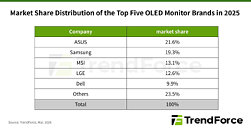 A breakdown of the shipment performance of major OLED monitor brands in 2025 shows that ASUS maintained its lead after surpassing Samsung in the third quarter to claim the top quarterly position. The company's ROG, ProArt, and ZenScreen product lines demonstrate strong competitiveness across high-end gaming, professional creator, and mobile productivity segments. By successfully translating brand influence into tangible shipment momentum, ASUS secured market leadership with a 21.6% share for the year.
Second-place Samsung took a 19.3% market share, driven primarily by strong shipments of new 27-inch 180 Hz models and aggressive year-end promotions targeting 49-inch and 27-inch UHD products. Samsung continues to exert strong competitive pressure by advancing simultaneously in both mainstream and high-end segments.
MSI has been actively expanding its presence in the OLED gaming monitor market in recent years, ranking third globally with a 13.1% market share in 2025. Amid intensifying industry competition, MSI has leveraged rapid product iteration and a broad lineup spanning multiple price tiers to precisely target gamer demand. In particular, it has built a strong image of technological leadership in the high-end OLED monitor segment and solidified its position as a mainstream brand.
LG Electronics (LGE) placed fourth with a 12.6% market share, with its UltraGear series widely recognized for product quality. Notably, LGE holds a near-monopolistic position in the 39-inch and 45-inch OLED monitor segments, providing a stable foundation for its overall sales performance.
Dell ranked fifth with a 9.9% market share, primarily entering the market for OLED monitors through its Alienware gaming brand. Strong product reliability and industry-leading after-sales service have allowed Dell to successfully capture the high-end gaming market. In 2025, the company further expanded its lineup by launching 120 Hz OLED monitors targeted at non-gamers, bringing OLED products closer to mainstream consumers while strengthening its market segmentation strategy.
Source:
TrendForce
Looking ahead to 2026, total shipments are expected to grow by 51% YoY as brands continue to roll out new products and marketing strategies gain further traction.

Second-place Samsung took a 19.3% market share, driven primarily by strong shipments of new 27-inch 180 Hz models and aggressive year-end promotions targeting 49-inch and 27-inch UHD products. Samsung continues to exert strong competitive pressure by advancing simultaneously in both mainstream and high-end segments.
MSI has been actively expanding its presence in the OLED gaming monitor market in recent years, ranking third globally with a 13.1% market share in 2025. Amid intensifying industry competition, MSI has leveraged rapid product iteration and a broad lineup spanning multiple price tiers to precisely target gamer demand. In particular, it has built a strong image of technological leadership in the high-end OLED monitor segment and solidified its position as a mainstream brand.
LG Electronics (LGE) placed fourth with a 12.6% market share, with its UltraGear series widely recognized for product quality. Notably, LGE holds a near-monopolistic position in the 39-inch and 45-inch OLED monitor segments, providing a stable foundation for its overall sales performance.
Dell ranked fifth with a 9.9% market share, primarily entering the market for OLED monitors through its Alienware gaming brand. Strong product reliability and industry-leading after-sales service have allowed Dell to successfully capture the high-end gaming market. In 2025, the company further expanded its lineup by launching 120 Hz OLED monitors targeted at non-gamers, bringing OLED products closer to mainstream consumers while strengthening its market segmentation strategy.
23 Comments on Global Shipments of OLED Monitors Surge 92% in 2025; ASUS Secures Market Leadership
I don’t feel like having the Start button permanently etched out of my screen.
- auto hide taskbar
- 2 minute timeout for screensaver which is just "Blank" which essentially just turns off all pixels
- Display fully turns off after 30 minutes after which it will do the pixel cleanup on its own if it ever gets idle for that long
- minimal desktop icons which I randomly shift from left to right side of screen when I do have them there
- I have a folder of many dark wallpapers that I grabbed from some wallpaper service looking for "dark wallpapers" and have them rotate randomly every 1 minute
- Image shift set to High in monitor settings
Apart from shuffling entire stack of icons back and forth every couple of days if I remember, the rest is automatic and is just kinda there. So far all good and I think I have it for almost 2 years now. Not that I expected burn-in in such time, but it could be visible. I managed to do cause slight burn-in on my phone by using it in landscape orientation for my car "infotainment" and I can see play controls slightly burned into display for using music player with display on the entire time while driving. And that happened in just 1 year of such use... So it is possible to create it, but using above setup it hasn't happened yet on any part of the screen yet. OLEDs probably do get dimmer and dimmer with time I'm guessing as pixels get cleaned up... but it's worth it if you're a gamer because man the pixel response time is just on some different level (and I went from TN to IPS which was horrible and very soon to OLED which is just wow).
:p
After 11 years of IPS I wanted to switch to 32" OLED, but it seems no company has even announced a "RGB stripe" monitor in this size yet... So I'm waiting on. I refuse to buy a very expensive monitor only to have worse sharpness than my old cheap one, even when I'm prepared to suffer the inevitable burn in eventually (or at least worse uniformity over time).
But you get use to it quickly, I have OLED and IPS next to each other and honestly use the IPS more because I don't need to babysit it.
WOLED has bad uniformity in dark scenes, which is the hole reason you buying OLED to have good contrast only to have bad uniformity. Which destroys the purpose of having OLED in the first place.
OLED on the other side, absolutely perfect pixel response time, absolutely zero smudging during motion, ZERO backlight bleeding (obviously), the perfectest blacks. If burnin is the only issue, setting the above once and forgetting about it I'm willing to do at any time. But yeah, if I knew display would have to be on the entire time, I'd go with modern TN any time. People still shit on TN technology only knowing it from 20 years ago, but for gaming it's still the goat. IPS pixels have a turn over rate of a lard sliding off a mildly inclined roof. It's horrendous.
Means OLED is shite.
Several things annoy me with the monitor, some of which are due to OLED/QD-OLED and others model-specific:
- The brightness control is slow to change. The repeat rate in the on-screen UI is like 5/sec, so changing from nighttime-level 40 brightness to daytime-level 90 brightness is annoying.
- The MSI desktop app is garbage, chews 500MB of RAM in the background, and offers hotkeys for everything except the features I actually want to control.
- The packaged DP cable is only 1.5m.
- My own DP cable works fine with a 4k60 LCD but has problems with the OLED. It can do 240Hz but DSC must be on even for 60Hz, and any jostling of the cable makes the screen go blank, so I can't use my monitor arm effectively.
- VRR flicker is terrible for games that hover around 60fps. I solve it by setting the monitor to 60Hz for AAA 3D games. 120Hz / 240Hz is only for desktop, or games that are a near-lock for framerate.
- True Black 1000 EOTF is annoyingly wrong (midrange scenes too dim) so I generally have to use True Black 400.
- There's black crush at higher refresh rates. sRGB 0->1 is distinguishable at 60Hz only. At 240Hz, 0..4 are indistinguishable.
- Even 100 brightness (265 nits) isn't enough sometimes. I need to use HDR mode on desktop to unlock higher brightness options.
- ClearType text fringing is slightly worse than on a 4K LCD. But reading on a 4K OLED is still miles better than on a 1440p LCD.
It'll probably burn in, but I simply don't care. I still use a plasma TV and I'm well acquainted with image retention. It's not the end of the world.All in all, it's an acceptable monitor, but if I could have waited a year I would rather have one of the upcoming 5K mini-LED models with 2304 zone backlights. I use a modern MacBook Pro with a similar display tech and would be content with that on desktop too.
And/or one of the G-Sync Pulsar displays, because although I'm comfortable with playing FPS 3D games at 60Hz, I find 60Hz 2D scrollers unenjoyable on LCD or OLED due to sample-and-hold blur (I still need to try ShaderBeam) and need to play those on the plasma TV instead.
Got air cleaner, it has a touch OLED display... yeah. All the numbers and letters are burn in too. Got a TV, 5 year old, almost clean but has a few logos here and there from games + TV channels. So yeah, Burn is not gone or solved. Good for you, mr lucky pants.
HDR mode isn't perfect either but I doubt I'm testing it correctly.
Gray scale uniformity is good enough for me (my plasma TV is much worse).
I personally only set my screensaver at 2min (black screen) and that's all. I don't hide the taskbar because it's annoying and even if it burns in it's not that noticeable since it's at the bottom of the screen. And of course have all the monitor anti-burn-in measures enabled.
PROS:
- black is black, I don't know where the panel ends and the bezel starts. Black it's not dark brown like on IPS/TN.
- the colors are much better than on IPS/TN.
CONS:
- ABL or OLED dimming, I hope I'm using the correct terms, from time to time the screen gets darker unless I'm switching to a lighter application or web page. Sometimes is enough to switch between applications.
- the fonts aren't as sharp as on IPS because it uses a different subpixel arrangement, but I'm using MacType to compensate.
I've used it for a few years, I don't think it has burn-in issues, I'm using dark themes, I don't like watching white background. It was used mostly for work, but also for gaming (120Hz, FreeSync) and watching movies. I have no icons on the desktop and the taskbar is set to autohide. From time to time I also rotate the taskbar position to all 4 directions.
I read that LG is releasing a new TV with RGB, when the time comes I'll probably replace it with the new version.