Monday, June 22nd 2026

Microsoft Confirms Windows 11 26H2 Update for x86-64 PCs
Microsoft late last week confirmed this year's update to Windows 11, version 26H2. This update would be exclusive to PCs powered by x86-64 processors (compatible processors from Intel and AMD); as devices based on Qualcomm Snapdragon Elite and NVIDIA RTX Spark are now on a separate update trunk. If you recall, the company earlier this year released Windows 11 26H1, but the update was exclusive to Windows-on-Arm devices, mainly powered by Snapdragon chips. Although announced at Computex, notebooks and mini PCs powered by RTX Spark aren't currently available, and will be released to market this Fall. OEMs will launch them with Windows 11 26H1.
Windows 11 26H2 won't be a major update involving a total replacement of all system files and migration of the user's environment; rather, it will be a minor update since 26H2 is based on the same code base as 25H2. The update would be effortless, take no longer than a typical monthly Patch Tuesday update, and simply roll up security and quality updates released till that time. The update to 26H2 will be recommended because Windows will release security updates to Windows 11 versions going back two years—in this case, 24H2 and 25H2 besides 26H2. Businesses looking to lock in on a particular version would have to look out for Windows 11 Enterprise LTSC versions, which lock on to a particular kernel code base, and gather security updates until a specified date in the future.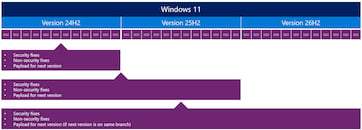
Sources:
Microsoft, VideoCardz
Windows 11 26H2 won't be a major update involving a total replacement of all system files and migration of the user's environment; rather, it will be a minor update since 26H2 is based on the same code base as 25H2. The update would be effortless, take no longer than a typical monthly Patch Tuesday update, and simply roll up security and quality updates released till that time. The update to 26H2 will be recommended because Windows will release security updates to Windows 11 versions going back two years—in this case, 24H2 and 25H2 besides 26H2. Businesses looking to lock in on a particular version would have to look out for Windows 11 Enterprise LTSC versions, which lock on to a particular kernel code base, and gather security updates until a specified date in the future.

36 Comments on Microsoft Confirms Windows 11 26H2 Update for x86-64 PCs
Not 26H1 mind. I know it's out.
Also i got this update yesterday:
2026-06 Preview Update (KB5095093) (26200.8737)
This is change log:
KB5095093 is the June 23, 2026 Preview Cumulative Update for Windows 11, advancing builds to 26200.8737 (Version 24H2) and 26100.8737 (Versions 23H2/22H2). This non-security optional update introduces new features and fixes eight quality issues, serving as a preview for the upcoming July 2026 Security Update.
Key New Features
- Point-in-time Restore: A new recovery capability that captures automatic snapshots of apps, settings, and files for faster system rollback.
- Windows Update Controls: A calendar-based pause system allowing users to defer updates for up to 35 days with a specific end date.
- Redesigned Widgets: A quieter experience with minimized notifications, auto-closing dashboards, and reduced visual distractions.
- Accessibility: New Screen tint options for eye strain reduction and granular zoom controls for the Magnifier.
Major Fixes and Improvements- File Explorer: Improved launch speed, better address bar path handling, and fixes for OneDrive duplication and renaming glitches.
- Bluetooth: Enhanced audio stability, synced microphone mute states, and faster pairing for devices like AirPods.
- System Stability: Fixes for taskbar unresponsiveness, DirectX crashes, and third-party credential provider issues on lock screens.
- Networking: SR-IOV hardware acceleration for Confidential Virtual Machines and improved Wi-Fi power management.
Installation and Known Issues- Prerequisites: Requires the May 2026 cumulative update (KB5093294) and a current Servicing Stack Update.
- Known Errors: Installation may fail with error 0x800F0922 on devices with certain third-party endpoint protection; temporarily disable real-time protection to workaround.
- Visual Glitch: Devices with Intel integrated graphics drivers earlier than 31.0.101.2125 may see a brief black screen on first boot.
- WSL2: Virtual network adapter settings may reset; run wsl --shutdown in PowerShell to restore.
My PC is JET now!Yes, if BitLocker is activated, you will need the key. Auto-enabled for system volumes >200GB in size.
From here: Source
Because unlike File History, I cannot just point it at a random drive, it will just make use of the system volume and *gasp* write whenever.
Microsoft still subtly suggests to use cloud for backup.
But it's great for Mom & Pop's PC from 2018 with a 1TB Green drive that never ever saw a backup setup in its life.