Monday, June 22nd 2026

Microsoft Confirms Windows 11 26H2 Update for x86-64 PCs

Microsoft late last week confirmed this year's update to Windows 11, version 26H2. This update would be exclusive to PCs powered by x86-64 processors (compatible processors from Intel and AMD); as devices based on Qualcomm Snapdragon Elite and NVIDIA RTX Spark are now on a separate update trunk. If you recall, the company earlier this year released Windows 11 26H1, but the update was exclusive to Windows-on-Arm devices, mainly powered by Snapdragon chips. Although announced at Computex, notebooks and mini PCs powered by RTX Spark aren't currently available, and will be released to market this Fall. OEMs will launch them with Windows 11 26H1.

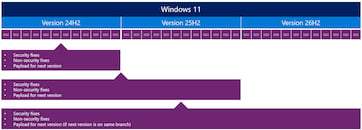
Windows 11 26H2 won't be a major update involving a total replacement of all system files and migration of the user's environment; rather, it will be a minor update since 26H2 is based on the same code base as 25H2. The update would be effortless, take no longer than a typical monthly Patch Tuesday update, and simply roll up security and quality updates released till that time. The update to 26H2 will be recommended because Windows will release security updates to Windows 11 versions going back two years—in this case, 24H2 and 25H2 besides 26H2. Businesses looking to lock in on a particular version would have to look out for Windows 11 Enterprise LTSC versions, which lock on to a particular kernel code base, and gather security updates until a specified date in the future.
Sources: Microsoft, VideoCardz
Add your own comment

36 Comments on Microsoft Confirms Windows 11 26H2 Update for x86-64 PCs

#1
_JP_
Foreshadowing for Windows Home users:
Around August '26, type 'services.msc' and 'Run as Administrator' to find this and set it to 'Disabled' until December. Most issues could be solved by then.

Every other version: Have fun delaying it with other tools!
Posted on Reply
#2
FR3D1
Ninja Cat
I’ve only just discovered 23H2 for myself. And no; as long as the actually "essential" component store remains "broken" in later builds, there won't be any upgrade—at least not for me. After all, if that part is "broken," everything else can't possibly be "intact," right?

What is the Windows component store?
The component store refers to the WinSxS (Windows Side-by-Side) folder located at C:\Windows\WinSxS. It is a crucial directory that houses all the files required for Windows to function correctly and supports various features and updates. Here are some examples of what these files do:

Stores critical system files for feature and security updates
Supports the installation and removal of Windows components via DISM and Windows Update
Enables rolling back to previous versions to fix issues caused by updates
Prevents conflicts when different applications try to use incompatible versions of the same file
Courtesy of Google

With IoT Enterprise, I get cumulative updates until just before the end of the year. Windows Defender updates continue beyond that. Plus, the firewall, AdGuard for Windows, and "Brain.exe" keep working as usual. What more do I need?

Redmond can shove its autumn—aka AI, aka junk—upgrade where the sun doesn't shine.

Regards,
Fred.
_JP_Have fun delaying it with other tools!
Posted on Reply
#3
lexluthermiester
btarunrIf you recall, the company earlier this year released Windows 11 26H1, but the update was exclusive to Windows-on-Arm devices, mainly powered by Snapdragon chips.
Um, this is not correct. 26H1 installs and functions perfectly on X64 based systems. I personally tested this recently.
Posted on Reply
#4
Darmok N Jalad
btarunrThe update would be effortless, take no longer than a typical monthly Patch Tuesday update
These days, not many Patch Tuesdays have been "effortless."
Posted on Reply
#5
R-T-B
FR3D1After all, if that part is "broken," everything else can't possibly be "intact," right?
I've seen no evidence that that is broken. SFC and DISM seem happy, so what makes you think they are "broken?"
Posted on Reply
#6
FR3D1
Ninja Cat
@R-T-B
The component store needs to be repaired after almost every update—and has required this since version 24H2. Not that this is the only issue since 24H2, but it is one that has persisted for over two years. And the following doesn't change that either:

click here!

Regards,
Fred.
Posted on Reply
#7
R-T-B
FR3D1@R-T-B
The component store needs to be repaired after almost every update—and has required this since version 24H2. Not that this is the only issue since 24H2, but it is one that has persisted for over two years. And the following doesn't change that either:

click here!

Regards,
Fred.
Yeah, can't say I have seen that, with all due respect. I think you may have something else going on. I run sfc after every update out of habbit and can count the number of times it has found anything since Win11 launch on one hand, nearly all of them also publically documented by news.
Posted on Reply
#8
Bigshrimp
I bet this is so they force re-install copilot on all PCs.
Posted on Reply
#9
TheinsanegamerN
lexluthermiesterUm, this is not correct. 26H1 installs and functions perfectly on X64 based systems. I personally tested this recently.
www.igorslab.de/en/windows-11-26h1-exclusively-for-arm-microsoft-excludes-amd-and-intel-systems/
You can argue with Microsoft, the company that makes Windows 11:

techcommunity.microsoft.com/blog/windows-itpro-blog/what-to-know-about-windows-11-version-26h1/4491941

"Windows 11, version 26H1 is a scoped release
  • Windows 11, version 26H1 will only be available on new devices with select new silicon as they come to market in early 2026.
  • Windows 11, version 26H1 is not offered as an in-place update from Windows 11, version 24H2 or 25H2 on existing devices.
  • There is no impact to devices already in market today.
  • Devices running Windows 11, version 26H1 will continue receiving monthly updates for security, quality, and new features, the same as devices running Windows 11, versions 24H2 and 25H2.
  • Devices running Windows 11, version 26H1 will not be able to update to the next annual feature update in the second half of 2026. This is because Windows 11, version 26H1 is based on a different Windows core than Windows 11, versions 24H2 and 25H2, and the upcoming feature update. These devices will have a path to update in a future Windows release.
  • Windows 11, version 26H1 does not support hotpatch updates.
  • Windows 11, version 26H1 security updates will be manageable through typical tooling – Windows Autopatch, Microsoft Intune, Microsoft Configuration Manager, etc.
This approach allows Windows to support the development of new hardware capabilities while protecting the stability and predictability that commercial customers rely on in production environments."
Posted on Reply
#11
lexluthermiester
Darmok N JaladThese days, not many Patch Tuesdays have been "effortless."
Sad, but true. Trusting microsoft has become an effort in futility.
TheinsanegamerNYou can argue with Microsoft, the company that makes Windows 11:
I'm not arguing with anyone, just stating a fact as tested personally.
TheinsanegamerN"Windows 11, version 26H1 is a scoped release
  • Windows 11, version 26H1 will only be available on new devices with select new silicon as they come to market in early 2026.
  • Windows 11, version 26H1 is not offered as an in-place update from Windows 11, version 24H2 or 25H2 on existing devices.
  • There is no impact to devices already in market today.
  • Devices running Windows 11, version 26H1 will continue receiving monthly updates for security, quality, and new features, the same as devices running Windows 11, versions 24H2 and 25H2.
  • Devices running Windows 11, version 26H1 will not be able to update to the next annual feature update in the second half of 2026. This is because Windows 11, version 26H1 is based on a different Windows core than Windows 11, versions 24H2 and 25H2, and the upcoming feature update. These devices will have a path to update in a future Windows release.
  • Windows 11, version 26H1 does not support hotpatch updates.
  • Windows 11, version 26H1 security updates will be manageable through typical tooling – Windows Autopatch, Microsoft Intune, Microsoft Configuration Manager, etc.
This approach allows Windows to support the development of new hardware capabilities while protecting the stability and predictability that commercial customers rely on in production environments."
News flash for you there, what microsoft says and what they do are frequently two VERY different things. Once again, I tested it myself. 26H1 works perfectly on Intel/AMD hardware. Full stop. What you want screenshots?
Posted on Reply
#12
rafipc2025
When people realize that most bloat and bugs in windows is the "windows update feature"?
Just get windows ltsc and disable updates forever.
Posted on Reply
#13
lexluthermiester
For giggles, I just fresh installed on a spare system;

And there it is. 26H1 on a 3rd gen i5. No fuss, no muss, installed smooth and easy.
Posted on Reply
#14
R-T-B
Yeah, you can install the arm centric branch on x86_64, but why would you want to? You won't be getting x86 specific improvements.
Posted on Reply
#15
Prima.Vera
(Not) Looking forward to see that other stuff this "update" breaks.
We do know that one way or the other , this will break something.
Really looking forward for that "I told you so" .
Posted on Reply
#16
lexluthermiester
R-T-BYeah, you can install the arm centric branch on x86_64, but why would you want to? You won't be getting x86 specific improvements.
Not having any issues at all. No performance degradation, no glitches or crashes and no irregular operations. It works perfectly. In other words, 26H1 contains the code for all supported platforms and automatically selects the correct kernel and code base during setup.
Posted on Reply
#17
_roman_
lexluthermiesterAnd there it is. 26H1 on a 3rd gen i5. No fuss, no muss, installed smooth and easy.
Cool. Now share which cpu instructions are in use or not. vs what microsoft needs :)

I have to check next time if my laptop also tells everyone in the screeenshot that it is a HP, Small Formfactor PC.

LOL wrong Units for DRAM and graphic card. Nice hardware :)

I assume windows updates work, right?
Posted on Reply
#18
lexluthermiester
_roman_Cool. Now share which cpu instructions are in use or not. vs what microsoft needs
ARM instruction sets are not compatible with X86/X64 and vice-verse. If Windows setup had tried using the ARM compiled code it would have crashed instantly. The install is running X86/X64 code as that is what Windows setup installed.
_roman_I have to check next time if my laptop also tells everyone in the screeenshot that it is a HP, Small Formfactor PC.
Why would it do that?
_roman_LOL wrong Units for DRAM and graphic card. Nice hardware :)
Wait, what?
_roman_I assume windows updates work, right?
I didn't get that far.
Posted on Reply
#19
_roman_
lexluthermiesterWhy would it do that?
Your screenshot shows you installed it on a HP Prodesk ... SFF (small form factor hardware)
Posted on Reply
#20
R-T-B
lexluthermiesterNot having any issues at all. No performance degradation, no glitches or crashes and no irregular operations. It works perfectly. In other words, 26H1 contains the code for all supported platforms and automatically selects the correct kernel and code base during setup.
I mean it may work but my point was that microsoft has stated that branch (The H1 series) will remain arm centric with no upgrade path to 26H2. You'd have to wait for the also arm centric 27H1, at least if MS is to be believed.
Posted on Reply
#21
_JP_
_roman_Your screenshot shows you installed it on a HP Prodesk ... SFF (small form factor hardware)
That is read from the UEFI and set by HP via MPM mode. Manufacturers will fill this information in when boards are freshly built or refurbed (which is always a headache when they insert the wrong model and UUID, for MDM scenarios). IIRC, it is equivalent of the BIOS' "Chassis name", which could also be seen by WMI calls.

Not exactly rocket science.

If you have a Lenovo, or any other big name, odds are you also have that string baked-in.
Posted on Reply
#22
lexluthermiester
R-T-BI mean it may work but my point was that microsoft has stated that branch (The H1 series) will remain arm centric with no upgrade path to 26H2. You'd have to wait for the also arm centric 27H1, at least if MS is to be believed.
This is another example of microsoft saying one thing and doing another. I didn't make the OS, I'm just testing it.
Posted on Reply
#23
R-T-B
lexluthermiesterThis is another example of microsoft saying one thing and doing another. I didn't make the OS, I'm just testing it.
Since 26H2 hasn't gone golden yet isn't your testing unable to test the upgrade path claims?
lexluthermiesterAre you two accusing me of something? I'm going to get very unpleasant if you do..
I think so far they are just reading your screenshot. Since your whole scenario is technically unsupported, I certainly would not read much into that string. I also don't picture lex running a HP anything tbh, but could be wrong. :laugh:
Posted on Reply
#24
_roman_
I apologised to lexluthermiester in personal message. I did not want to cause any harm or misunderstandings
Posted on Reply
#25
lexluthermiester
R-T-BSince 26H2 hasn't gone golden yet isn't your testing unable to test the upgrade path claims?
Yes? I only tested functionality and did a few benchmarks. Updates are not something I usually check personally.
R-T-BI also don't picture lex running a HP anything tbh, but could be wrong. :laugh:
I do. My main systems are custom builds, but I have few Dell's and HP's. I also own a Compaq and have owned Lenovo's.
Posted on Reply
Add your own comment
Nov 14th, 2026 07:41 CST change timezone

New Forum Posts

Popular Reviews

TPU on YouTube

Controversial News Posts