Tuesday, July 21st 2026

NVIDIA Shows DLSS 5 Progress and Technical Details at SIGGRAPH 2026

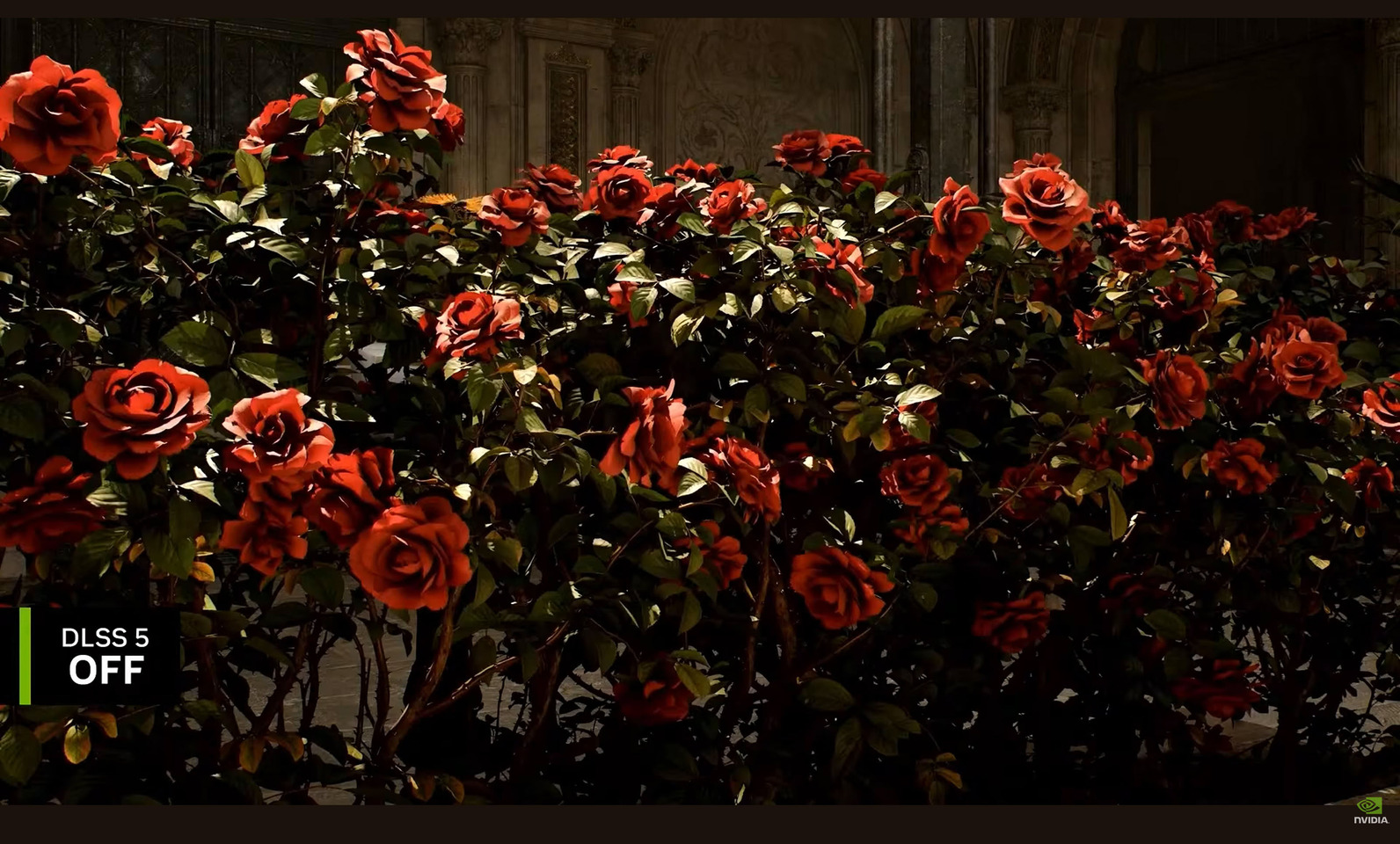
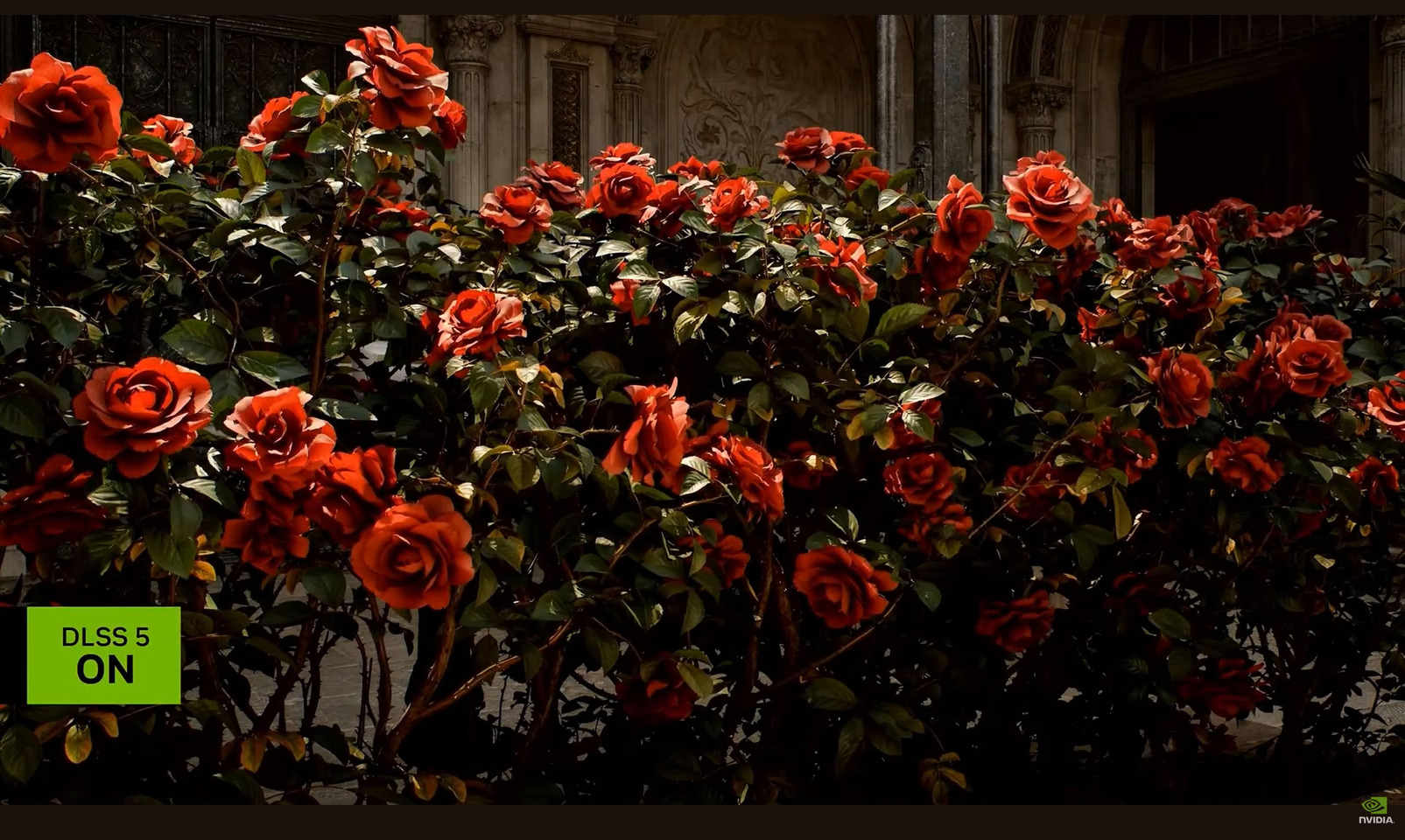
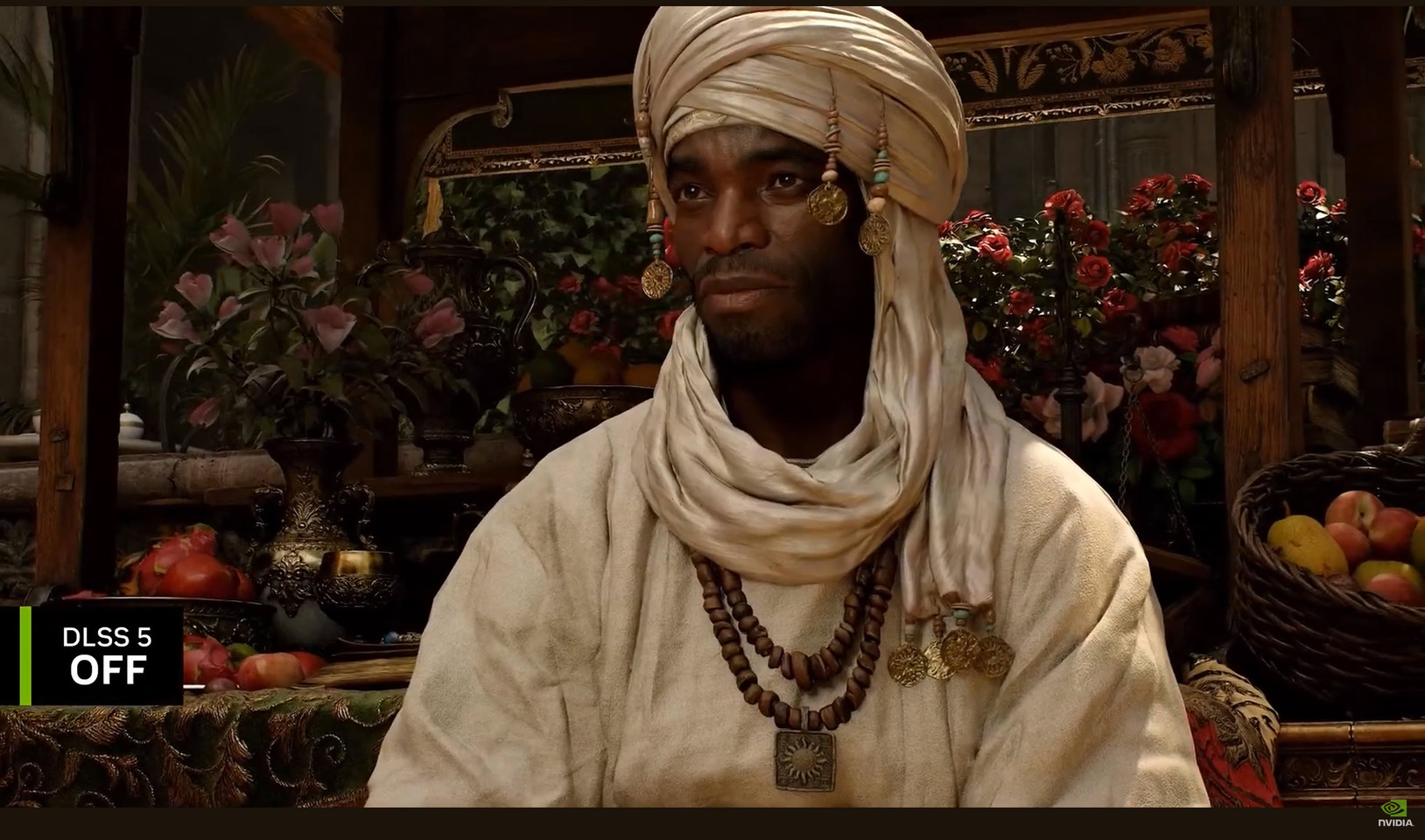
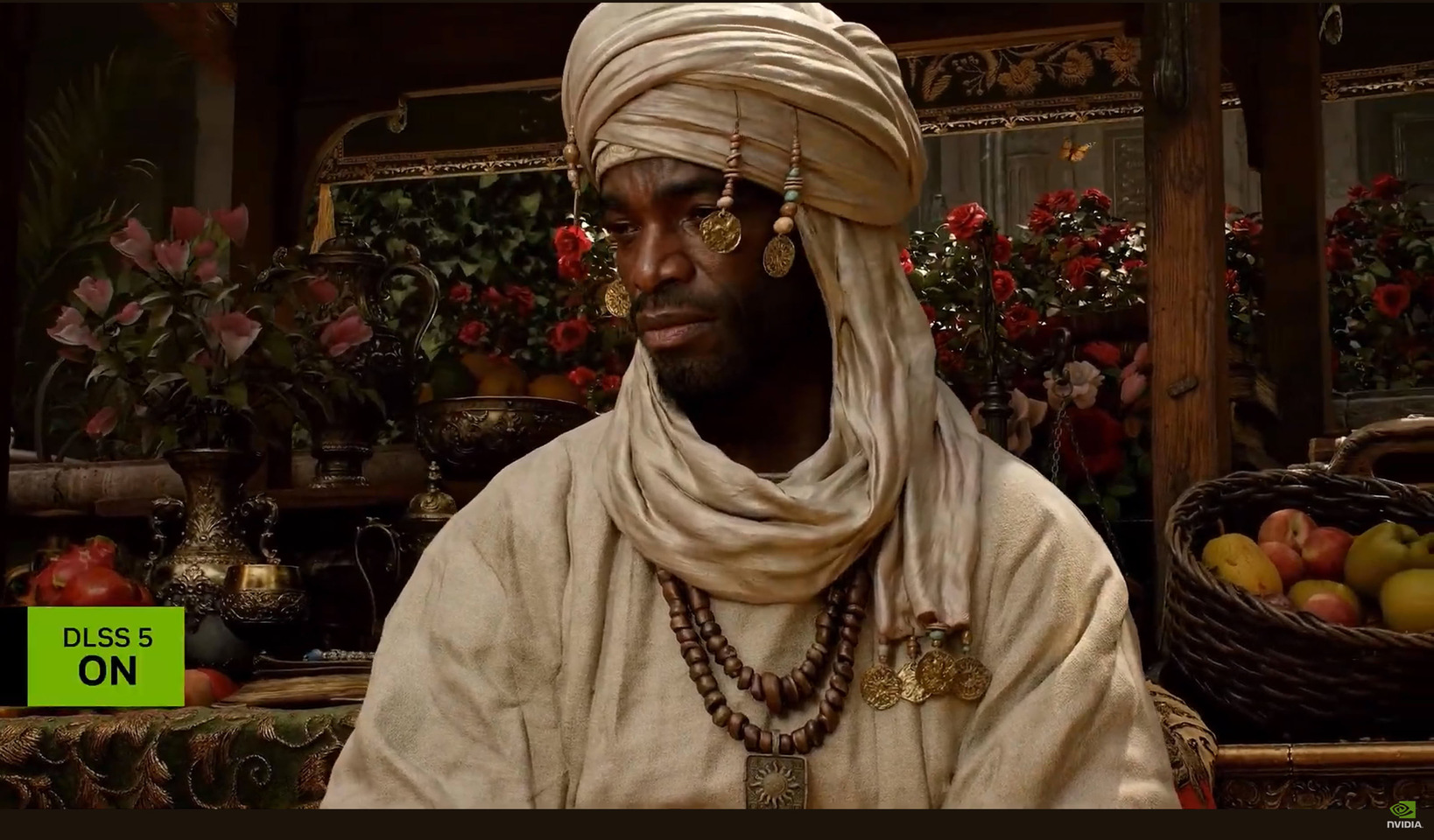
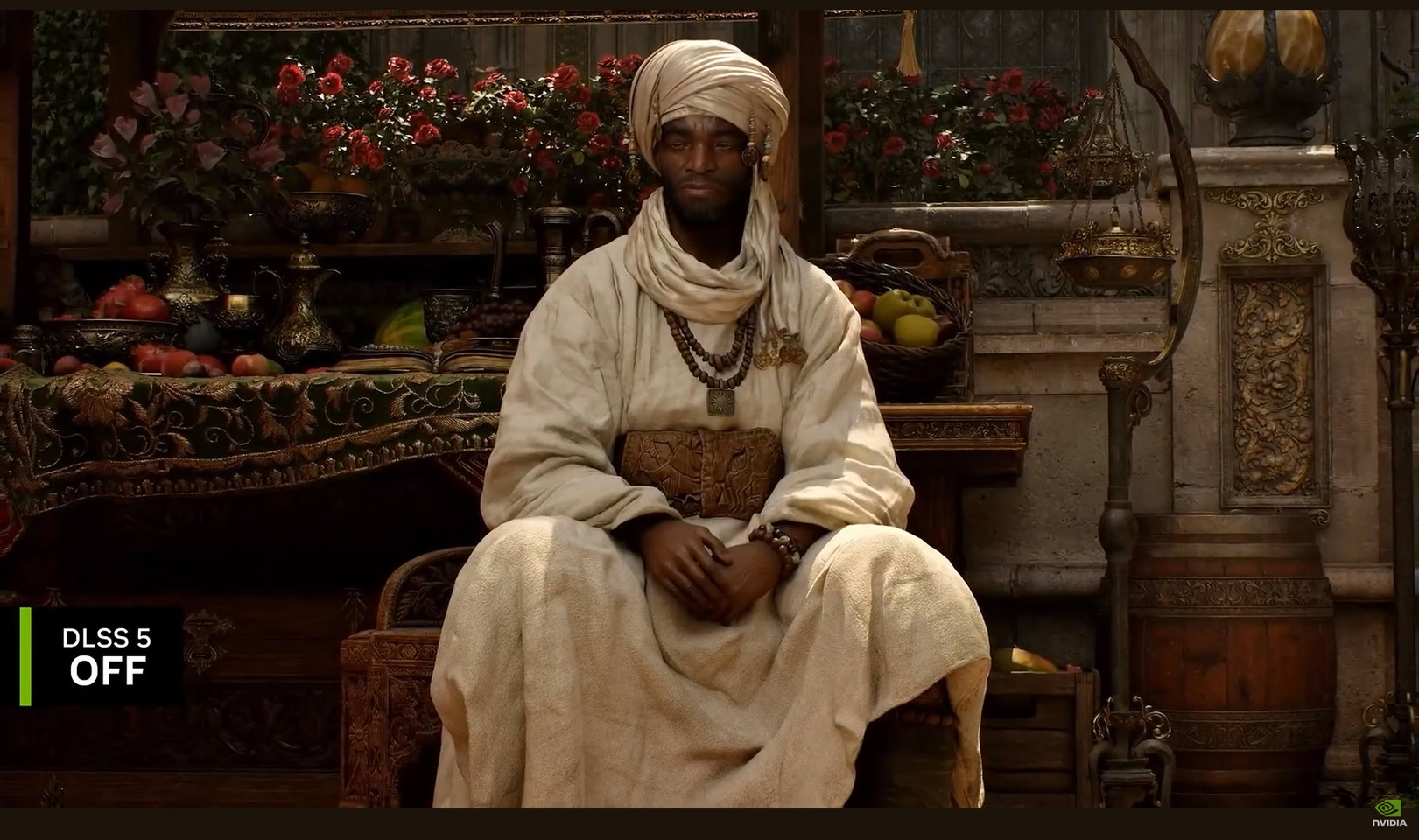
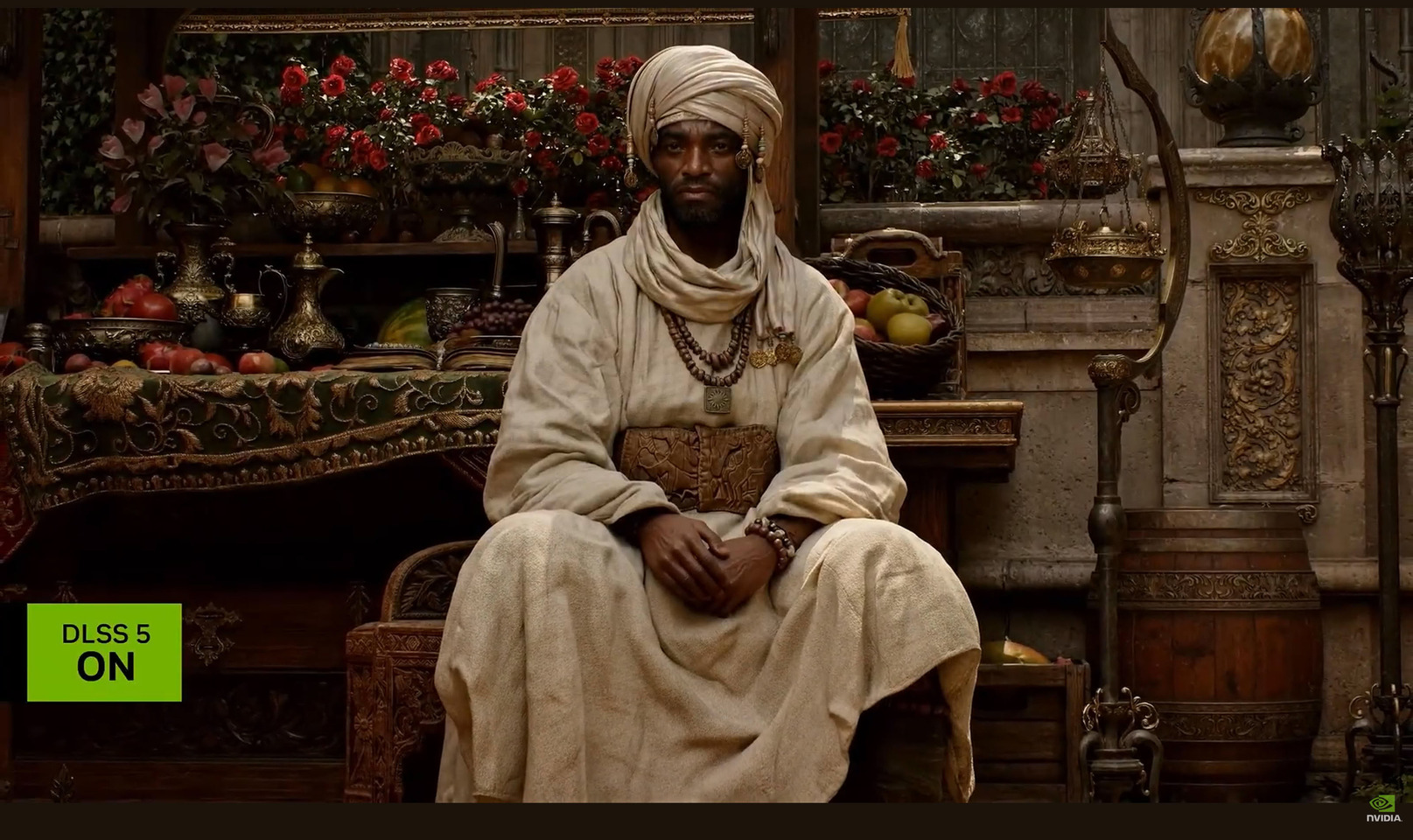
NVIDIA has once again showcased its DLSS 5 neural rendering at the SIGGRAPH 2026 event, currently taking place in Los Angeles. Despite the initial negative reaction from gamers, NVIDIA is continuing to develop the technology, offering improvements and a new demonstration of how DLSS 5 is intended to function. One of the most interesting aspects is that game developers can choose from three DLSS 5 models, each providing a different level of structural intensity, global illumination, texture detail, and more. These models, labeled Model A, Model B, and Model C, can be tailored to specific scenes or character needs, allowing developers to mix and match according to their requirements. Each model carries a different parameter count, meaning that some are more compute and memory-intensive than others. However, they generally fit and run fine on a single GPU without any problems.

Another noteworthy feature is the preservation of artistic intent, which was heavily criticized in the original DLSS 5 demo. Each individual object, scene, and game setting can be customized according to the developer's vision. This is one of the challenges NVIDIA faced with DLSS 5, as maintaining visual identity, object semantics, and character poses, along with output lighting semantics, motion, and art direction, is crucial. Within these strict parameters, DLSS 5 applies material photorealism to enhance visual appeal. Below you can even see the customization of the applied model, where there are adjustable parameters that can be done per scene and per character.
The second challenge that the company faced is temporal streaming. Traditional generative AI video generators process in chunks, reasoning across a frame and generating a batch of frames at once. However, real-time rendering requires immediate generation, frame by frame. Since DLSS 5 uses motion vectors from the game engine, it can generate additional textures instantly, without delay. This results in no shimmer or image corruption, as DLSS 5 know exactly where to attach itself and perform its texture generation instantly.

The final challenge for DLSS 5 is speed. To render a 4K frame with 8.3 million pixels at over 60 FPS, NVIDIA achieves this in less than 16 ms, with most of the processing time consumed by the game engine rather than the DLSS 5 model. The model is so efficient that users will not notice any delay during gameplay, and it operates on a single GPU. While NVIDIA highlights VRAM efficiency, it remains unclear whether 4K gaming will be limited to high VRAM GPUs or something else. As the launch is expected this fall, the company will provide general system requirements and further details, but the improvements compared to the original demo seem promising for now.

Source: NVIDIA at SIGGRAPH 2026
Add your own comment

153 Comments on NVIDIA Shows DLSS 5 Progress and Technical Details at SIGGRAPH 2026

#101
Youseethis
MTS-CThese images show part of the problem, but I have found it's almost impossible to capture the full extent in still images so a lot of it gets a pass in debate vs reality. Ghosting, blurring, noise, flickering, only to try and be covered up further by more tech.
It is still very blurry. Every moving object leaves behind a trail depending on the relative speed. Acceleration actually makes things worse. Dlss 4.5 works well in gta v enhanced. No flickering, noise, bubbling or big trails but when you accelerate, decelerate or turn quickly the image blurs.
JustBenchingIf I post 10 pictures from 10 different games (not just one) that native has ghosting, blurring, dancing backgrounds etc. do I win? It's such a dishonest argument to use, everyone can cherrypick a scenario here or there. On the bigger picture, 4k dlss embarrasses 1440p native while offering similar performance. So if you are not implement DLSS one way or another, you are losing image quality

Mini comparison from TPUs screenshots, fps is similar (35 vs 36). Just look at the billboard, the health warning text. Horrifying


And this is the difference between 4k native and 4k dlss

Native = 18 fps


DLSS = 35 fps


Double the framerate, better image quality. I guess im just blind, ill just check with the doctor
It's not cherry-picking when objects leave trails when moving.

This is the worst case from gta v:


Like I said before, during the car acceleration there is a smear under the bumper, you can;t miss it.

Cyberpunk 2077 is the same withe cars. (red engine)

Oblivion remastered is the same (ue5). When your weapon accelerates and decelerates it leaves after images and they are huge. You can't miss them.

Dlss 5 I suspect will do the same but the whole frame. The colors will shift and move slightly. Changing and leaving trails like an eye trick:
(but actually moving)


Posted on Reply
#102
JustBenching
YouseethisIt is still very blurry. Every moving object leaves behind a trail depending on the relative speed. Acceleration actually makes things worse. Dlss 4.5 works well in gta v enhanced. No flickering, noise, bubbling or big trails but when you accelerate, decelerate or turn quickly the image blurs.


It's not cherry-picking when objects leave trails when moving.

This is the worst case from gta v:


Like I said before, during the car acceleration there is a smear under the bumper, you can;t miss it.

Cyberpunk 2077 is the same withe cars. (red engine)

Oblivion remastered is the same (ue5). When your weapon accelerates and decelerates it leaves after images and they are huge. You can't miss them.

Dlss 5 I suspect will do the same but the whole frame. The colors will shift and move slightly. Changing and leaving trails like an eye trick:
(but actually moving)


And there are games that have that on native resolution (ie crimson desert). So what's your point?

Here is an example of shimmering at native that dlss fixes, the video is from my pc


So as I've said, that's a very dishonest argument cause we are supposed to pretend that only upscaling causes this which is a lie.
Posted on Reply
#103
EsliteMoby
OnasiFirst, unlikely. Default UE TAA and TAAU is, frankly, awful. Secondly, a lot of blurring in modern UE5 titles has less to do with any AA and more with just how undersampled to shit everything is. Try and find a UE5 title that allows fully disabling AA (or do manually through .ini tweaks). The game will, most likely look absolutely fucking atrocious. Resolving this shit via any temporal algorithm will lead to blur.
DLSS is TAA. It is, in fact, the heaviest form of TAA. Even if it's supposedly powered by RTX Tensor cores (which is a waste of die space, IMO), it still runs worse than UE5 TSR and doesn't really look better than TSR.

Also, the introduction of DLSS 2.0 is the problem you described. They keep getting away with undersampling effects that would look broken without TAA and not optimizing stuff. And Nvidia can keep selling their overpriced, underperformed hardware since they intend to use software tricks like DLSS to replace raw performance
Posted on Reply
#104
Doctor Who
wolfIs it? What game forces you to use DLSS or frame gen?
Those that know me here know I am all about technological advancements when it makes sense. DLSS and its AMD equivalent do not. Maybe it's just me. I'm old school, but...
There has to be a balance. DLSS or frame generation is not that balance. Because of the majority market share, tech goes in all sorts of directions for Nvidia. So you're right, no one *has* to use DLSS, but that industry steering impacts game development overall. where poorly optimized games get away with it just because of DLSS making up for it.
OnasiAre we just conveniently memory-holing the fact that console games started abusing checkerboard rendering as a way to improve performance long before DLSS came around? Or that DLSS in its first incarnation was utter trash and has been clowned on with very limited adoption from the industry?

Honestly, I feel like I am taking crazy pills sometimes.
I agree completely. Good point. One of my main criticisms of DLSS 5 or rrr, the AI slop, is that I don't like the fact it changes character appearances and artistic intent, among several other things. DLSS 5 actually re-imagines and generates the final appearance of objects and lighting.

I'll add: "Give me an upscaler that can improve performance "without" ruining a game's artistic intent and without using fake generated frames, which makes games look fake."
BigMack70I do not and will not ever want an AI slop filter over my games.
Couldn't agree more, regardless of company.
Posted on Reply
#105
JustBenching
Doctor WhoBecause of the majority market share, tech goes in all sorts of directions for Nvidia.
No it doesn't. Majority of AAA gaming is on consoles. Upscaling was introduced back in 2013 on the PS4. Nvidia had nothing to do with it.
Posted on Reply
#106
Youseethis
JustBenchingSo what's your point?
The point is simple: temporal solutions have smearing. If the game have issues on it's own and dlss reduces them to lower level while an improvement it still a band-aid. The smearing/blurring that I see is annoying whether is caused by dlss, depth of filed, games bugs etc...

For example, gta v is unplayable for me with dlss (up to 4). I will test 4.5 more to see how it looks, first impressions are good for the first time ever.
Same thing with many other games be it dlss, depth of filed, games bugs etc...

Dlss 5 creates similar concerns about image clarity. That is the point.
Posted on Reply
#107
wolf
Better Than Native
Doctor WhoThose that know me here know I am all about technological advancements when it makes sense. DLSS and its AMD equivalent do not
I suppose that's really your determination of what is an advancement and what isn't.

It's tough because to some degree, they're damned if they do and damned if they don't.

Visual advances? They cost too much performance! AI slop! Nobody asked for RT! Nobody asked for PT! Nobody asked for realism, et cetera and so on. Some people demand more of the same performance, some people want newer better at the same perofmance. I'd argue we're getting both.

DLSS is genuinely a boon imo because it pushed forward what AA and TAA was doing and is giving people more tools (way more by extension of other vendors and companies also competing, ala FSR, XeSS etc) to get ever-better results from sub-native rendering, and of course even native AA through the best algorithms available, which has been happening since well before dlss 1.0

I really don't see the direct link asserted that upscaling is stagnating visuals. It's progression in parallel to, and to the betterment of, increased polygon counts, geometry density, texture quality, lighting enhancement, realism enhancement, increased visual fluidity and so on.
Posted on Reply
#108
Prima.Vera
Let me guess. They will divide some quality modes specifically for RTX 60 gen cards ;)
Posted on Reply
#109
MTS-C
JustBenchingIf I post 10 pictures from 10 different games (not just one) that native has ghosting, blurring, dancing backgrounds etc. do I win? It's such a dishonest argument to use, everyone can cherrypick a scenario here or there. On the bigger picture, 4k dlss embarrasses 1440p native while offering similar performance. So if you are not implement DLSS one way or another, you are losing image quality

Mini comparison from TPUs screenshots, fps is similar (35 vs 36). Just look at the billboard, the health warning text. Horrifying


And this is the difference between 4k native and 4k dlss

Native = 18 fps


DLSS = 35 fps


Double the framerate, better image quality. I guess im just blind, ill just check with the doctor
That's your bias leading to a subjective view. The original image in fact is clearer and the reason the DLSS picture looks better to YOU is because DLSS is further bluring the image to make it seem better in motion while in a still you can see that the text clearly is blurred. It's an illusion, and one that clearly started making people blind to what the tech really is doing. 4K DLSS does not embarrass 1440p native, it gives you the same performance with a soap opera upscaler effect because it is in fact 1440p.
JustBenchingAnd there are games that have that on native resolution (ie crimson desert). So what's your point?

Here is an example of shimmering at native that dlss fixes, the video is from my pc


So as I've said, that's a very dishonest argument cause we are supposed to pretend that only upscaling causes this which is a lie.
That is texture flickering. Do we want to guess how DLSS fixes that? Blurring it.

The other guy said it best, DLSS is TAA. What does TAA do? It blurs aliased edges for the appearance of a smoother object in motion. If everybody is in agreement motion blur is terrible in game why would anybody be in agreement this is ok for a few extra FPS? If you want more FPS turn your settings down or reduce resolution like we've always done. DLSS and in retrospect RT has been one of the biggest brainwashing psyops in tech IMO.
Posted on Reply
#110
Onasi
EsliteMobyDLSS is TAA. It is, in fact, the heaviest form of TAA. Even if it's supposedly powered by RTX Tensor cores (which is a waste of die space, IMO), it still runs worse than UE5 TSR and doesn't really look better than TSR.
Yes, it’s TAA. By definition. All modern AA algorithms have a temporal component. No, it looking worse than base UE5 TSR is not an objective fact. Frankly, I have a feeling that in a blind test people would prefer it. And yes, DLAA, especially with latest model, runs somewhat heavier than base TSR - it literally does more.
Oh, and your opinion on die space “wasted” by Tensor cores is noted and discarded. They are not there for your vidya to run better, that’s just a fortunate byproduct.
EsliteMobyAlso, the introduction of DLSS 2.0 is the problem you described. They keep getting away with undersampling effects that would look broken without TAA and not optimizing stuff. And Nvidia can keep selling their overpriced, underperformed hardware since they intend to use software tricks like DLSS to replace raw performance
Oh, yeah yeah, totally. When I was seething at CDPR when playing The Witcher 2 because they dithered all shadows and alphas on vegetation to absolute shit that totally was NV and their DLSS… more than half a decade before it was actually released, but no matter. Or those undersampled shader and shadow effects in GTA IV. Or terrible undersampled screenspace effects in half of UE3 games. But nah, it’s obviously new and NV is to blame.
Posted on Reply
#111
JustBenching
MTS-CThat's your bias leading to a subjective view. The original image in fact is clearer and the reason the DLSS picture looks better to YOU is because DLSS is further bluring the image to make it seem better in motion while in a still you can see that the text clearly is blurred. It's an illusion, and one that clearly started making people blind to what the tech really is doing. 4K DLSS does not embarrass 1440p native, it gives you the same performance with a soap opera upscaler effect because it is in fact 1440p.
You are suggesting that the bottom (native) looks better than the top (DLSS) but im the biased one :roll:

MTS-CThat is texture flickering. Do we want to guess how DLSS fixes that? Blurring it.
But im biased for preferring my textures not to dance around the scene like they do in native, while also getting roughly a 30% performance boost. Sure bud. Im clearly the problem here :D

Since I'm biased I just asked my gf. It took her less than half a second, she said top looks way better. So I pressured her a bit more


- Can you look at it for 10 seconds and tell me again
- I don't need to, it's obvious
- Are you sure?
- Yes, you can't even read the text on the top one. Why, doesn't it look obvious to you?
- it does but people say I'm nvidia biased and they prefer the bottom
- maybe they are drunk, maybe they are blind, maybe they are into retro gaming.


That was genuinely our dialogue. So yeah, I guess she is also biased, even though she didn't know what she was looking at
Posted on Reply
#112
SnoutBaron
qlumIs it just me or does dlss5 still look worse, less grounded?
Is it giving you a weird uncanny valley look? I can understand that.
Posted on Reply
#113
MTS-C
JustBenchingYou are suggesting that the bottom (native) looks better than the top (DLSS) but im the biased one :roll:


But im biased for preferring my textures not to dance around the scene like they do in native, while also getting roughly a 30% performance boost. Sure bud. Im clearly the problem here :D

Since I'm biased I just asked my gf. It took her less than half a second, she said top looks way better. So I pressured her a bit more


- Can you look at it for 10 seconds and tell me again
- I don't need to, it's obvious
- Are you sure?
- Yes, you can't even read the text on the top one. Why, doesn't it look obvious to you?
- it does but people say I'm nvidia biased and they prefer the bottom
- maybe they are drunk, maybe they are blind, maybe they are into retro gaming.


That was genuinely our dialogue. So yeah, I guess she is also biased, even though she didn't know what she was looking at
Considering you got what I said backwards I'm going to ignore the rest. The original is also zoomed in on purpose to make it intentionally look worse with your repost compression, but I ignored that for that sake of argument. We can then also circle back and say your bias leads your subjective opinion that the blurred image looks better.

Show her in motion, not stills. You've ignored that your entire time trying to convince yourself it looks better between myself and the other user you're arguing with. But I digress, continue licking the boot and being a part of the problem. If you like a blurry mess in motion by all means, the other user can continue arguing with a biased brick wall.
Posted on Reply
#114
JustBenching
MTS-CConsidering you got what I said backwards I'm going to ignore the rest. The original is also zoomed in on purpose to make it intentionally look worse with your repost compression, but I ignored that for that sake of argument. We can then also circle back and say your bias leads your subjective opinion that the blurred image looks better.

Show her in motion, not stills. You've ignored that your entire time trying to convince yourself it looks better between myself and the other user you're arguing with. But I digress, continue licking the boot and being a part of the problem. If you like a blurry mess in motion by all means, the other user can continue arguing with a biased brick wall.
Showing her in motion doesn't change the fact that you are arguing that native looks better on the stills I posted, which is obviously not true and no normal person would suggest such a thing.

Both images are zoomed in btw the exact same amount, you can literally print screen and put it on paint, you can match one atop of another 1:1. So yeap, clearly im the one being biased :D
I beg everyone reading this go show these stills to a random person in your family and ask them which one is better. Don't tell them anything about dlss upscalers or whatever, just show them the images. Let's see whos actually biased here, I bet a 100k everybody will find top clearly, infinitely better.

EG1. Here, I went through the trouble of proving that both are equally zoomed in. I moved the top part of the guy (dlss) to the bottom (native). Exact same size...Accusing me of bias while thinking 2 identical pictures are zoomed differently. Just wow man

Posted on Reply
#115
EsliteMoby
OnasiYes, it’s TAA. By definition. All modern AA algorithms have a temporal component. No, it looking worse than base UE5 TSR is not an objective fact. Frankly, I have a feeling that in a blind test people would prefer it. And yes, DLAA, especially with latest model, runs somewhat heavier than base TSR - it literally does more.
Oh, and your opinion on die space “wasted” by Tensor cores is noted and discarded. They are not there for your vidya to run better, that’s just a fortunate byproduct.


Oh, yeah yeah, totally. When I was seething at CDPR when playing The Witcher 2 because they dithered all shadows and alphas on vegetation to absolute shit that totally was NV and their DLSS… more than half a decade before it was actually released, but no matter. Or those undersampled shader and shadow effects in GTA IV. Or terrible undersampled screenspace effects in half of UE3 games. But nah, it’s obviously new and NV is to blame.
DLSS 4/4.5 has the most aggressive sharpening filter among all temporal methods. It makes certain images look like oil paintings.

Tensor cores are an unfortunate byproduct of Nvidia tailoring its modern GPUs toward data centers instead of graphics rendering. They also take up 1/3 of die space per SM in the latest 5000 series, they should be replaced by all shading cores for pure raw performance instead.
Posted on Reply
#116
AusWolf
So if you buy a GPU for $1,000+, you can maybe get... Slightly different lights? Is that it? :confused:
Posted on Reply
#117
Apocalypsee
AusWolfSo if you buy a GPU for $1,000+, you can maybe get... Slightly different lights? Is that it? :confused:
And still not knowing the performance impact of this.

At this age there's not even a whisper whether a multi-GPU could elevate this, the only thing I heard is Lossless Scaling being able to use secondary GPU to do the fake frames.
Posted on Reply
#118
Vayra86
So lots of sliders to still get every picture slightly oversaturated and too high in contrast to make us believe AI is doing a job that benefits us.

Righto. I'll move on and continue to not give a flying fuck about this

This reminds me strongly of the 'showcase mode' TVs have and use in the showroom. It is just there to grab your attention and make you buy a TV, at home you'll never use it at all. I'm genuinely wondering what's the actual point of this technology at all, as I have done since announcement. Nothing fundamentally changed - DLSS still warps color and balance of the picture no matter how you set it up.
AusWolfSo if you buy a GPU for $1,000+, you can maybe get... Slightly different lights? Is that it? :confused:
Don't forget about the epeen value of being able to afford such a fantastic technology.

Its a bit like driving a Ferrari. Looks nice, but in most situations also completely does not fit the use case, for example the first speed bump you meet, which will take off your skirts if you drive over it; and now your car produces artifacts :D. And then comes the question what kind of gamer are you: do you game to buy that ferrari, or do you game to drive fast. I reckon most do the latter; and that Ferrari only gets in the way of it.

RT > DLSS = lots of wasted capital, time and effort that could have gone into either cheaper GPUs or actual better game art. That's the long and short of it. These technologies never existed to make graphics better, they exist to upsell bottom tier content and GPUs. To get back to the car analogy, every GPU is a car and can drive just fine. RT/DLSS is the nitro button that makes it all go slower and faster at the same time and practically makes no difference in getting from A to B.
Posted on Reply
#119
Doctor Who
JustBenchingNo it doesn't. Majority of AAA gaming is on consoles. Upscaling was introduced back in 2013 on the PS4. Nvidia had nothing to do with it.
How about upscale without altering the artistic intent of the developers? or changing character appearances? Do that and it's a win-win. At the moment DLSS 5 failed at both.
Posted on Reply
#120
Onasi
Doctor WhoHow about upscale without altering the artistic intent of the developers? or changing character appearances? Do that and it's a win-win. At the moment DLSS 5 failed at both.
It’s just the naming that is fucked. DLSS 5 is not an upscaler in any sense of the word. NV kinds messed up by bundling a whole lot of different technologies under DLSS banner.
EsliteMobyDLSS 4/4.5 has the most aggressive sharpening filter among all temporal methods. It makes certain images look like oil paintings.
Depends on the preset. Latest K is about as close to original as can be.
EsliteMobyTensor cores are an unfortunate byproduct of Nvidia tailoring its modern GPUs toward data centers instead of graphics rendering. They also take up 1/3 of die space per SM in the latest 5000 series, they should be replaced by all shading cores for pure raw performance instead.
I see this take on the regular and each time wonder if people just woke up in 2020s. NV has been aiming at the enterprise compute market since CUDA became a thing. They aren’t changing their course just to cater to vidya game players. That’s an insane proposal.
Posted on Reply
#121
Doctor Who
wolfVisual advances? They cost too much performance! AI slop! Nobody asked for RT! Nobody asked for PT! Nobody asked for realism, et cetera and so on. Some people demand more of the same performance, some people want newer better at the same perofmance. I'd argue we're getting both.

DLSS is genuinely a boon imo because it pushed forward what AA and TAA was doing and is giving people more tools (way more by extension of other vendors and companies also competing, ala FSR, XeSS etc) to get ever-better results from sub-native rendering, and of course even native AA through the best algorithms available, which has been happening since well before dlss 1.0
RT & PT are alright. It's a choice you can turn on or off. But DLSS? Sure, it's interesting indeed, but once it alters the appearance of in-game characters, that's where I draw the line. And I am not the only one criticizing it. AMD's approach with FSR does not alter in-game appearances and sticks with the dev's artistic intent. Maybe Nvidia should follow AMD in this regard.
Posted on Reply
#122
JustBenching
Doctor WhoHow about upscale without altering the artistic intent of the developers? or changing character appearances? Do that and it's a win-win. At the moment DLSS 5 failed at both.
If this is the artistic intent of the developers, no thanks, im good.


Posted on Reply
#124
Vayra86
JustBenchingIf this is the artistic intent of the developers, no thanks, im good.


Mass Effect Andromeda is also a nice one.
Or any Fallout / TES title... I mean artists definitely do manage to make us question 'the intent'...

But in the end, maybe that's artistic intent, we still talk about it, best marketing ever made.
Signed - 'The Fan'


I mean... DLSS this, m.f.ker :D
Posted on Reply
#125
wolf
Better Than Native
Doctor WhoRT & PT are alright. It's a choice you can turn on or off. But DLSS?
Believe it or not, DLSS is the same as RT and PT, you can just turn it off too.
Doctor WhoSure, it's interesting indeed, but once it alters the appearance of in-game characters, that's where I draw the line.
DLSS5 shown here? sure, arguably for the better with this showing but I agree nonetheless, and also, it will be able to be turned off.
Doctor WhoAnd I am not the only one criticizing it
More than 1 person criticises every product and feature, this isn't a valuable statement.
Doctor WhoAMD's approach with FSR does not alter in-game appearances and sticks with the dev's artistic intent. Maybe Nvidia should follow AMD in this regard.
Pre DLSS5 versions of DLSS do what FSR does just as well or better, and FSR has trailed DLSS at every step/leap of the way since DLSS 2. The versions of super resolution and FG/MFG and the scaling factors are all completely within user control and make no artistic alterations, certainly not relative to what FSR does.

Am I taking crazy pills? Nvidia should follow AMD in this regard?

Did you read or watch the parts where the game developers are going to have complete control over how or indeed even if DLSS5 is implemented in their game and in exactly what granular quantities? Per scene, per cutscene, per level, per object type(s), per groupable objects/masks, with 0-100 sliders for intensity, with multiple model/presets, and it this is still a pre release showing. When the time comes and games ship with DLSS5 enhancing it, it will by necessity of the way the toolset works, be the artistic vision of the developers.

And even that to some degree is a statement I don't think is some indisputable ideal to hang our hats on. For example if a game ships with and enables by default, as per the developers artistic vision, motion blur, depth of field, chromatic aberration, film grain, lens flare, vingette and so on, do we bemoan people disabling any of those to ensure they are able to enjoy the game without distraction/frustration/nausea?
Posted on Reply
Add your own comment
Nov 19th, 2026 12:23 CST change timezone

New Forum Posts

Popular Reviews

TPU on YouTube

Controversial News Posts