Tuesday, August 18th 2026

Corsair Launches the 2026 RMe Series Platinum PSUs with ThermalProtect 12V-2x6 Cables
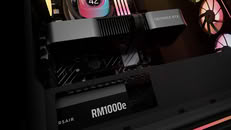
Corsair is excited to announce upgraded RMe Series power supplies are now paired with a Corsair ThermalProtect PCIe 5.1 600 W 12V-2x6 GPU power cable, combining two of Corsair's most popular products and offering PC builders a powerful and resilient hardware bundle for their next build or mid-cycle upgrade. This component combo offers reliable Cybenetics Platinum-certified power delivery with an RM850e or RM1000e power supply that includes a Corsair ThermalProtect PCIe 5.1 600 W 12V-2x6 Cable featuring built-in Over Temperature Protection (OTP) to help protect modern GPUs from excessive cable temperatures. This is a potent package that offers reliable high-wattage power delivery with built-in protection for modern GPUs.
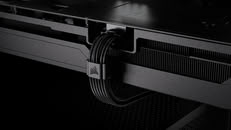
Modern gaming PCs demand steady power output along with a sturdy and reliable connection to the GPU, and this package delivers on both fronts for excellent performance and peace of mind when pushing a GPU to its limits. The RMe Series power supplies are ATX 3.1 certified and PCIe 5.1 compliant, meeting all the latest standards for power delivery and use high-quality 105°C capacitors for enhanced durability. The RMe power supplies include Corsair's new ThermalProtect PCIe 5.1 600 W 12V-2x6 cable, which features hardware embedded in a cable comb 30 mm from the GPU connection to monitor the temperature of the 12V-2x6 cable. If temperatures on the cable exceed 65°C, ThermalProtect technology activates, causing the GPU to shut off to prevent any potential damage.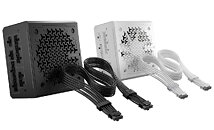
 The 12V-2x6 cable features dual-tone connectors on each end for visual confirmation of a secure connection for an easy setup and even more peace of mind while running demanding workloads.
Platinum Power and Efficiency
RMe Series are the most popular power supplies from Corsair due to their effective blend of wattage, features, and affordability, and the two models offered in this pairing have been upgraded from Cybenetics Gold efficiency to Cybenetics Platinum rating for up to 91% overall efficiency, allowing them to run cool and quiet while providing ample power for high-end gaming PCs.
At only 140 mm in length, RMe Series power supplies can be easily installed in virtually any case and are very quiet with a custom fan curve and ZERO RPM Mode, which stops the fan completely under low and moderate loads for quiet computing. They feature a fully-modular design, so you only connect the cables you need, and the included cables are flexible and debossed for easy cable management with a professional look. The RM850e and RM1000e power supplies come with a seven-year warranty, so you can depend on them through several upgrade cycles.
Two Colors to March Your Build
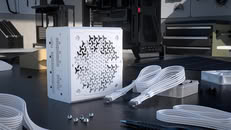
This hardware combo is offered in both black and white to complement your setup. RMe Series power supplies can be easily installed in any ATX enclosure, and the ThermalProtect cable requires a GPU with a native 12V-2x6 connector.
Availability, Warranty, and Pricing
The Corsair RMe Series Platinum Power Supply with a ThermalProtect 12V-2x6 Cable is available immediately from the Corsair worldwide network of authorized retailers and distributors and on the Corsair webstore.
The Corsair RMe Series Platinum Power Supply with a ThermalProtect 12V-2x6 Cable is backed by a seven-year warranty, alongside the Corsair worldwide customer service and technical support network.
Regional launch pricing is listed below and is subject to change.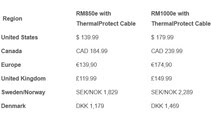 For more information, visit the product page.
Modern gaming PCs demand steady power output along with a sturdy and reliable connection to the GPU, and this package delivers on both fronts for excellent performance and peace of mind when pushing a GPU to its limits. The RMe Series power supplies are ATX 3.1 certified and PCIe 5.1 compliant, meeting all the latest standards for power delivery and use high-quality 105°C capacitors for enhanced durability. The RMe power supplies include Corsair's new ThermalProtect PCIe 5.1 600 W 12V-2x6 cable, which features hardware embedded in a cable comb 30 mm from the GPU connection to monitor the temperature of the 12V-2x6 cable. If temperatures on the cable exceed 65°C, ThermalProtect technology activates, causing the GPU to shut off to prevent any potential damage.


Platinum Power and Efficiency
RMe Series are the most popular power supplies from Corsair due to their effective blend of wattage, features, and affordability, and the two models offered in this pairing have been upgraded from Cybenetics Gold efficiency to Cybenetics Platinum rating for up to 91% overall efficiency, allowing them to run cool and quiet while providing ample power for high-end gaming PCs.
At only 140 mm in length, RMe Series power supplies can be easily installed in virtually any case and are very quiet with a custom fan curve and ZERO RPM Mode, which stops the fan completely under low and moderate loads for quiet computing. They feature a fully-modular design, so you only connect the cables you need, and the included cables are flexible and debossed for easy cable management with a professional look. The RM850e and RM1000e power supplies come with a seven-year warranty, so you can depend on them through several upgrade cycles.
Two Colors to March Your Build
This hardware combo is offered in both black and white to complement your setup. RMe Series power supplies can be easily installed in any ATX enclosure, and the ThermalProtect cable requires a GPU with a native 12V-2x6 connector.
Availability, Warranty, and Pricing
The Corsair RMe Series Platinum Power Supply with a ThermalProtect 12V-2x6 Cable is available immediately from the Corsair worldwide network of authorized retailers and distributors and on the Corsair webstore.
The Corsair RMe Series Platinum Power Supply with a ThermalProtect 12V-2x6 Cable is backed by a seven-year warranty, alongside the Corsair worldwide customer service and technical support network.
Regional launch pricing is listed below and is subject to change.

16 Comments on Corsair Launches the 2026 RMe Series Platinum PSUs with ThermalProtect 12V-2x6 Cables
I just wonder if there is a time delta when it hits that, and the system shuts down, is it like instant, or do they monitor it for very small spikes at 65C
My concern with this implantation is does the GPU still get the single to know how much wattage the PSU can provide, then if the cable comb that contains the temp sensor is 30mm away from the connector is the heat going to travel that far in the wire to help effectively or be detected on time?
sources:
www.corsair.com/us/en/explorer/diy-builder/power-supply-units/corsair-thermalprotect-12v-2x6-cable-power-supply-compatibility/
www.corsair.com/us/en/explorer/diy-builder/power-supply-units/corsair-thermalprotect-600w-12v-2x6-cable-everything-you-need-to-know/
www.corsair.com/us/en/explorer/diy-builder/power-supply-units/corsair-thermalprotect-technical-overview/It's a switch, like a circuit breaker.
60°C environment that's a goddamn sauna, good luck having that in your room.
Intentional 3mm gap -> improper/incomplete insertion.
So the over 115°C at the connector was reached in VERY adverse conditions.
That doesn't mean that in normal conditions the 65°C trigger threshold corresponds to over 115°C at the connector. By having an improper insertion a larger temperature gap was created between the connector and the wires, the connector heats up rapidly and the difference between it and wires behind it is much greater.
In normal conditions I'm expecting the connector to reach about 90°C (just a guess, don't quote me on it) when the 65°C threshold is triggered.